Office 2010; Installation problems and solutions

I installed Office 2010 a couple of weeks ago, and I have just succeeded in getting the help system to work.  After pressing F1, or clicking the Help icon, I was getting a screen saying that the help system was being installed, then eventually (after a couple of minutes maybe) a box saying that the computer needed to be re-booted (yes/no) and a blank help screen in the background.  After re-booting and restarting Office, the whole installation process started again, and if interrupted showed a screen saying there was no help available on this topic.  After much searching, and eventually e-mails to Microsoft support, this is the process that fixed the problem:

  1. Run MS Config, and disable all  start-up programs and all non-Microsoft services.
  2. Re-boot, then find all “Microsoft Help” folders, and rename them “Microsoft Help.Old”
  3. Run a repair installation from the Control Panel “Uninstall a program” tab
  4. Re-boot; – didn’t work.
  5. Disable Microsoft Firewall
  6. Delete new “Microsoft Help” folders (which were all empty this time)
  7. Set up a new user account (as administrator)
  8. Log in under the new account, start Office, and press F1.
  9. Same “installing help” message as before, then the re-start required box.
  10. Rebooted the computer, restarted Office, and the Help works!
  11. Log in to my original account, and that has help as well!

Having gone through all that I find that Microsoft in their wisdom have made on-line help the default, so we get an annoying wait for help (even with a fast cable connection), rather than the instant help we used to get 20 years ago, on machines about 1000 times slower.  Fortunately I remembered a post from Ron de Bruin at Daily Dose of Excel on this very issue.  Click on the box in the bottom right hand corner, showing
“Connected to Office.com” and you can select “Show content only on this computer”, which then becomes the default.  If you really want the on-line help you can click on the same box any time, and select it.

Just what was going on in the mind of whoever decided to make on-line help the default, and why they hid the local option away instead of putting it under the help menu, I can’t imagine, but never mind, it’s easily fixed thanks to Ron de Bruin.

So now I’m back to being as productive as I was 3 weeks ago.

Posted in Excel | Tagged , , , | 3 Comments

Beam on Elastic Foundations Analysis

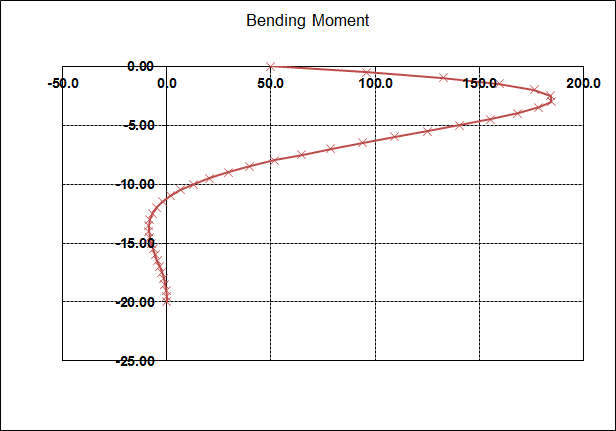
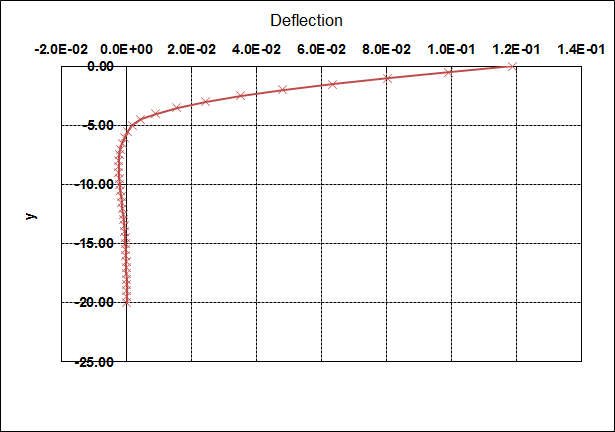
A previous post on laterally loaded piles used a finite difference analysis to analyse the deflections and forces in a vertical pile subject to a lateral load at the top.  An alternative approach to the same problem is presented in “Programming the Finite Element Method” by I.M. Smith and D.V. Griffiths, including Fortran code.  The main advantage of their approach is that the pile and soil stiffness values are treated as varying linearly between each node, rather than being constant over each segment.  Also the code provides for up to 6 integration points in each segment, allowing a smooth transition between elements with different properties.

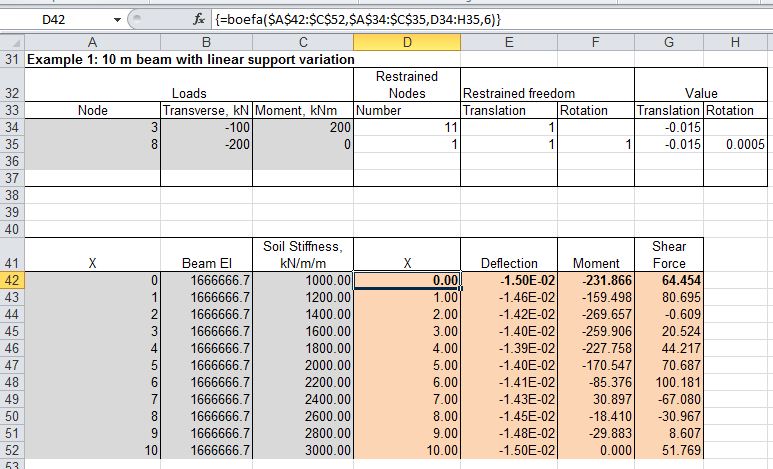
I have converted the Fortran code to VBA, and incorporated it into the LatPile function presented previously.  The spreadsheet also includes a new function, BoEFA, with additional flexibility for specifying node constraints and variable segment lengths, and with sign conventions better suited to horizontal beams.  The spreadsheet, including full open source code, may be downloaded from LatPileB.zip

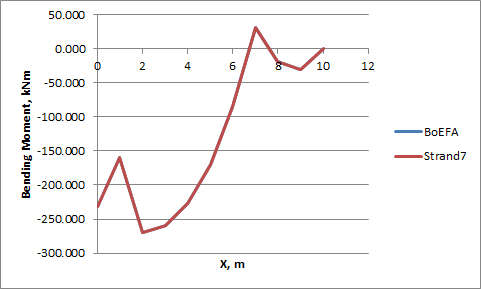
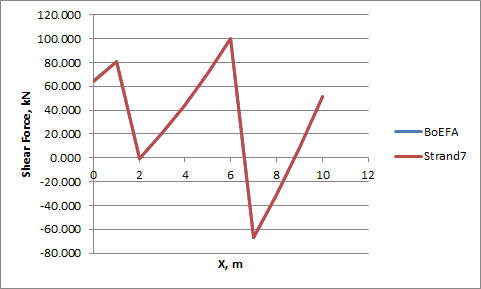
Screenshots below show typical input and output, including comparison of results of the same analysis in Strand7 FEA software.  Click on any image for a full size view.

LatPileB input and output

LatpileB Bending Moments

LatPileB Shear Forces

LatPileB Deflections

BoEFA Input and Output

BoEFA and Strand7 Deflections

BoEFA and Strand7 Bending Moments

BoEFA and Strand7 Shear Forces

Posted in Excel, Finite Element Analysis, Geotechnical Engineering, Newton, UDFs, VBA | Tagged , , , , | 6 Comments

AlgLib Spline function update

Following a question at the AlgLib Forum I have added the Hermite spline fit function to the AL-Spline-Matrix collection.

The revised spreadsheet, with full open source code is available for download in 2007/20010 version and pre-2007 version.

Typical output of the Hermite spline fit function (together with the two previous spline fitting functions) is shown in the screen shot below:

HSplineFit Function; click for full size view

Posted in Excel, Maths, Newton, UDFs, VBA | Tagged , , , | 5 Comments

The hole through the middle of the Earth – acceleration

In my first go at modelling a ball falling through a hole through the middle of the Earth I assumed constant density, and hence the acceleration at any point was proportional to the distance from the centre.  That is of course far from the truth, the Earth has large variations in density through its depth, so the first step in creating a more realistic model will be to estimate the actual variation in gravity with depth.

For the basic data I have used a table from a presentation produced by the Washington Centre:

Earth Density Data

I have used this data (assuming a constant density for each layer) to calculate the mass of the Earth in 50 km steps from the centre out.  The acceleration due to gravity at any radius R from the centre is then given by:

a = Gm/R^2

where G is the gravitational constant and m is the mass of the sphere of radius R:

Calculation of the acceleration due to gravity through the Earth

The spreadsheet shown above can be downloaded from Earth Density.xls.  The result of this calculation is shown in the graph below.  Note that the acceleration is far from linear with depth, and initially increases through the crust layer, then  initially declines through the mantle, but increases again as the outer core is approached, reaching a maximum of 10.3 m/s^2 at the surface of the outer core, then reducing rapidly through the outer core, then faster still through the very dense inner core:

Variation in gravity to the middle of the Earth

Posted in Differential Equations, Newton | Tagged , , , | 2 Comments

More on buckling columns

Coincidentally, at about the same time as I wrote about column buckling for a column with a point load on the end, Autar Kaw at The Numerical Methods Guy was writing about buckling of columns under self weight, using the theory of Stephen Timoshenko

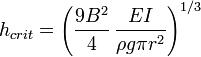
The maximum height of a cylindrical column that will stand under its own self weight is given by: 


Where B2 is a constant equal to 3.483265528 and ρgpr2 is the weight of the column per unit length. 

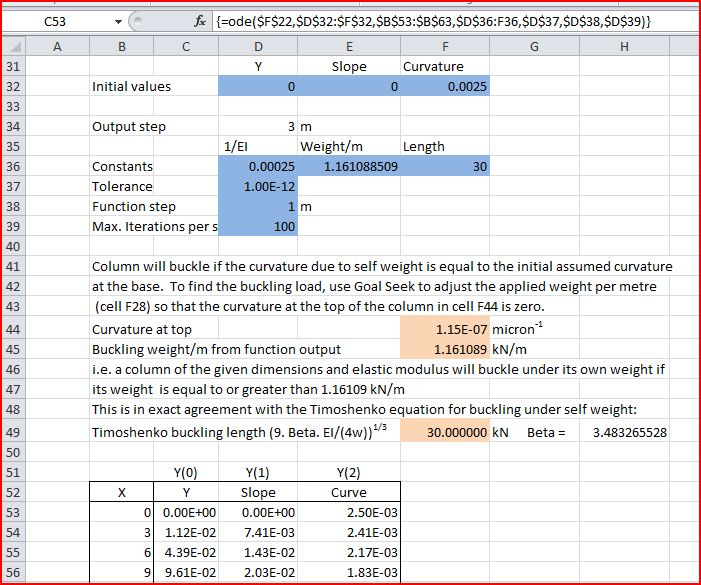
The critical height can also be found numerically by analysing the curvature of the column using the Runge-Kutta method to find the length of the column for which the change of curvature over the total height, due to deflection under self weight, is equal to the curvature at the base.  That is, the curvature at the top of the column reduces to zero.  The VBA function to perform this calculation (in combination with the AlgLib Runge Kutta routines) is shown below: 

Function ODEFunc5(X As Double, Y As Variant, CoeffA As Variant) As Variant
Dim ResA(0 To 2) As Double
 ResA(0) = Y(1) ' slope
 ResA(1) = Y(2) ' curvature
 ResA(2) = -CoeffA(1, 1) * Y(1) * CoeffA(1, 2) * (CoeffA(1, 3) - X) ' weight x slope

 ODEFunc5 = ResA
End Function

This routine has been added to the spreadsheet ODESolver-Buckle.xls, which is available for free download, including full open source code.
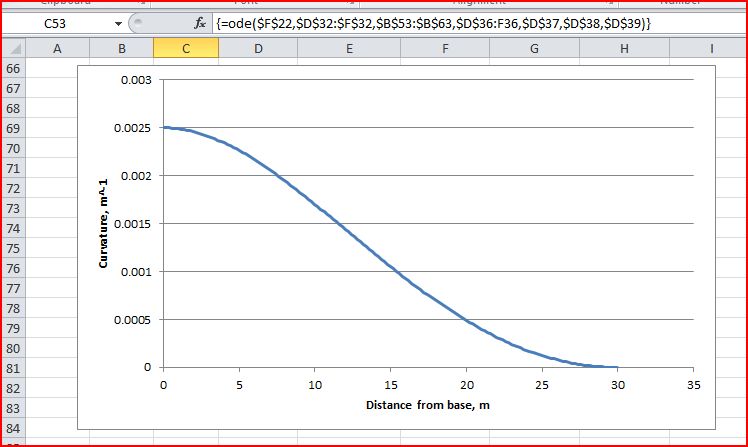
The results of the analysis are shown in the screen shots below.   Note that the Runge-Kutta analysis has given exactly the same critical length as the Timoshenko equation. 

Click on any image for a full size view: 


Self weight curvature for a column at critical length

Strand7 analysis including 2nd order effects, showing increase in deflection as the column approaches critical density

Posted in AlgLib, Beam Bending, Excel, Maths, Newton, UDFs, VBA | Tagged , , , , , , | 1 Comment