Using Goal Seek on Multiple Cells

The Excel “goal seek” function is useful and powerful, but the procedure for using it on multiple cells is painfully slow.

The spreadsheet GSeek.xls provides a simple macro to allow Goal Seek to be automatically applied to a range of cells, arranged in either a column or row.  As usual,  it includes open source code for all sub-routines and functions.

The spreadsheet includes an example finding the first root of 20 quartic equations, compared with the analytic solutions using the User Defined Function Quartic().
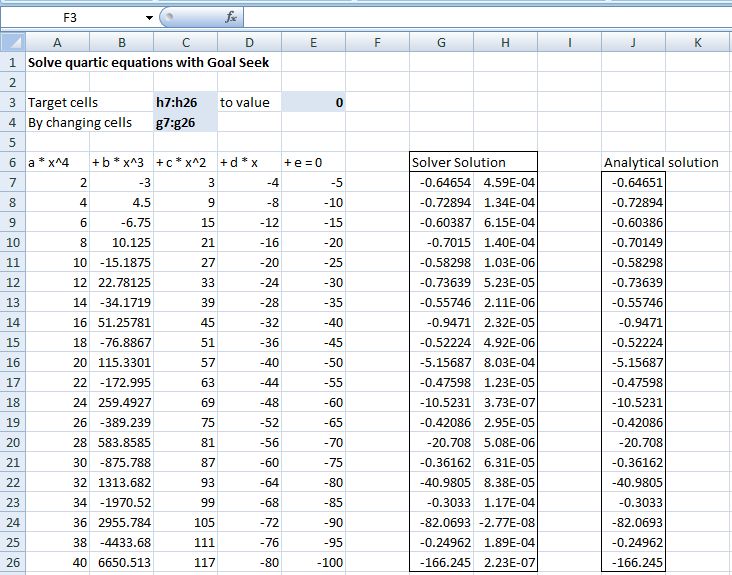
GSeek Output

GSeek Output

Posted in Excel, Maths, VBA | Tagged , , , | 17 Comments

Changing Environment Variables

I’m occasionally using a beta program that requires me to change the search path.  The procedure for doing this in Vista seems to be something that Microsoft do not wish to talk about, and I have to search the web to remind myself how to do it; so I’m going to post the procedure here and maybe I’ll remember it.

Click on the “Start” button and select “Computer”

Right click and select “properties”

Select “Advanced System Settings” from the left

It should display the “Advanced” tab; Click on the “Environment Variables” button

Find the “Path” variable on the “System Variables” list.

Click the “Edit” button

Edit the path, and click OK three times

Re-boot

Posted in Computing - general | Tagged , | 2 Comments

Should undergraduates be taught Fortran? …

… is an interesting question being discused at the Eng-Tips Forum.

I particulary liked this response:

“I can think of about 10 things that undergrad engineers should learn instead of Fortran.

1) How to spell
2) How to make an outline of a report before starting to type
3) How to use Excel the way it’s designed
4) How to turn off MSN while at work
5) How things in their field of interest are manufactured
6) How their employers actually generate income and profit
7) How and where to find which design loads to use
8) What “design requirements” are.
9) How to work with others
10) How to talk to clients

Come to think of it, I have about 15 more, but I need to get to work.”

Needless to say, I heartily endorse Number 3.

Posted in Computing - general | Tagged , , | Leave a comment

Update to Frame4.xls

It was recently pointed out to me that the non-uniform load calculation in Frame4.xls gave incorrect results.

The code for the non-uniform load has now been fixed, and the spreadsheet can be downloaded from Frame4.zip

Posted in Excel, Finite Element Analysis, Frame Analysis, Newton, VBA | Tagged , , | 1 Comment

Two new functions for IP.xls

Edit 8 Feb 2012: The functions described below have been superseded by new versions which are described at https://newtonexcelbach.wordpress.com/2009/08/18/finding-circle-centres-in-3d/.  That link also gives a description (with diagrams!) of how the functions work.  The download file for the new versions is at IP2.zip.


In response to this thread at the Eng-Tips forum I have added two new functions to my IP.xls spreadsheet:

  • ArcCenT2IP finds the centre and radius of an arc specified by 2 tangent points and the intersection point of the tangents.
  • ArcCenP3 finds the centre and radius of an arc specified by any 3 points on the arc.

Full open source code for the two functions is included in the spreadsheet, which can be downloaded here:IP.zip

The procedure used is similar for both functions; for ArcCenP3:

  1. Read the 3D coordinates for three points on the circle
  2. Translate Point 2 and Point 3 for an origin at Point 1
  3. Find polar coordinates of Point 3
  4. Rotate Points 2 and 3 about the Z axis so that Point 3 is on the XZ plane
  5. Rotate Points 2 and 3 about the Y axis so that Point 3 is on the X axis
  6. Find angle of Point 2 from XY plane
  7. Rotate Points 2 about the X axis so that Point 2 is on the XY plane
  8. Find the XY coordinates of the mid-points of lines 1-2 and 3-2.
  9. Find a second point on the perpendiculars through mid-points
  10. Find the XY coordinates of the intersection of the perpendiculars.  This is the centre of the circle.
  11. Find the radius of the circle
  12. Rotate and translate the centre point back to the original axes
  13. Assign the 3D coordinates of the circle centre, and the circle radius, to the function return value as a 1×4 array

ArcCenT2IP is very similar, except:

  1. The first step is to check that the two “tangent” points are equidistant from the intersection point.  If not, adjust the coordinates of the further point to be an equal distance from the intersection point as the closer tangent point.
  2. Find the slope, and then the intersection point, of the perpendiculars through the two tangents.  This is the centre of the circle.
  3. If either of the tangent points has been adjusted, return the adjusted coordinates, and the point number, as a second row of the 2×4 array function return value.

A screen shot of input and output for the two functions is shown below:

Functions to Find Circle Centre and Radius

Functions to Find Circle Centre and Radius

Posted in Excel, Maths, UDFs, VBA | Tagged , , , , , , | 8 Comments