Microsoft Office 2010 Engineering Blog

It seems that Microsoft are ramping up their efforts to get us really really excited about the impending release of the next version of Office.

Read all about it here

For me, the main thing I’d like to see in the next version (well the main thing that has some chance of being realised) is dramatically improved performance of re-draw time of complex graphics.

What, realistically, do you see as being the best thing that might be in Office 2010?

Posted in Computing - general, Excel | Tagged , | 1 Comment

Microsoft Present Lectures on Gravity …

… which seems fairly appropriate material for a blog called Newton Excel Bach.

Link here Feynman Lectures on Physics

Warning – requires Silverlight

Here’s a screen shot:

Feynman

Posted in Computing - general, Newton | Tagged , , | 1 Comment

More on cubic splines

Link to Cubic Spline Update

The previous two posts used cubic splines with the “natural” end condition, that is with an end curvature of zero.  To apply the cubic spline to analysis of continuous beams with different end conditions we need to find the cubic spline formulation for a specified non-zero end curvature, or for a specified slope.

To that end, I have re-written the CSpline function to show more explicitly the parameters of the underlying cubic equations, and how these relate to the chosen end conditions.  The new function and examples can be found at CSpline2.zip.  The procedure is as follows:

Aim: For a list of XY coordinates, X(1 to n) and Y(1 to n), to find a, b, c, d in
Y = a + b(x – X(i)) + c(x – X(i))^2 + d(x- X(i))^3
for each segment, where x lies between X(i) and X(i+1)

It can be shown that:
a = Y(i)
b = m(i) – l(i)/6(2c(i) + c(i+1))
c = c(i)/2
d = (c(i+1) – c(i)) / (6l(i))
where:
l(i) = x(i+1) – x(i)
m(i) = (y(i+1) – y(i)) / l(i)
c(i) = d2y/dx2 at point i

The values of  l and m are defined by the x,y coordinates, so it remains to find the values of c .

Since m and c (the first and second derivative of f(x)) are defined to be equal for the splines meeting at any node
it can be shown that for any point, i:
l(i-1)c(i-1) + 2(l(i-1) + l(i))c(i) + l(i)(c(i+1)) = 6(m(i) – m(i-1))
In matrix form:

cspline2-1A spline with n segments will have n+1 nodes and n-1 internal nodes, so 2 more equations are required to define the c values
Commonly used end conditions include:
Specified second derivative. Where the second derivative = 0 the spline is known as a natural spline.
Specified first derivative. This is known as a clamped spline.

Examples of the equations for different end conditions, and their solution using worksheet functions, are given on the spreadsheet.  On the spreadsheet the matrix equations are solved using the built-in MINVERSE() and MMULT() functions, but for the CSplineA UDF it is much more efficient to use a specific routine for solving “tri-diagonal” matrices, i.e. those where the only non-zero terms are on or immediately adjacent to the leading diagonal.

Examples of the use of the new function, with different end conditions, are shown below:
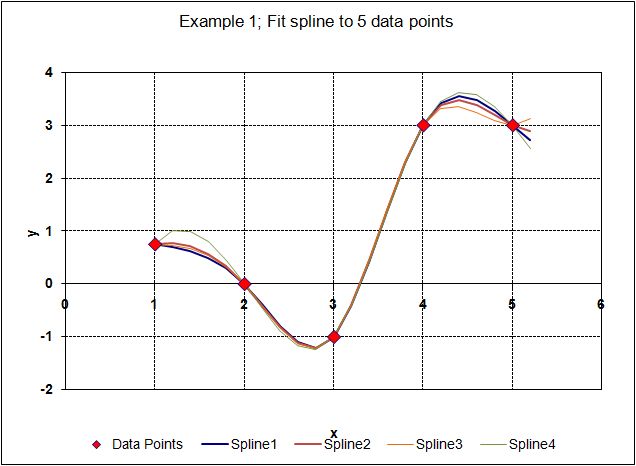
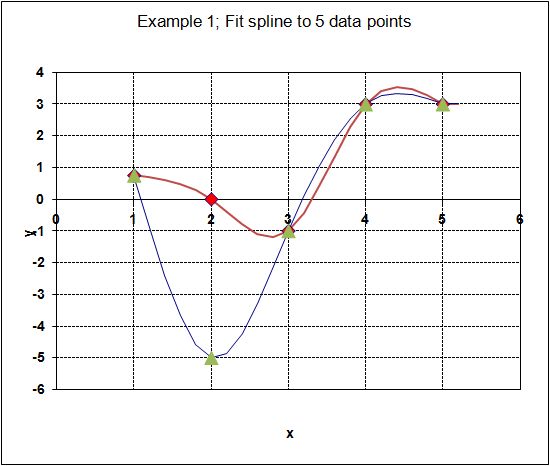
Spline through 5 data points with different end conditions

Spline through 5 data points with different end conditions

Spline through 9 data points with specified end slope
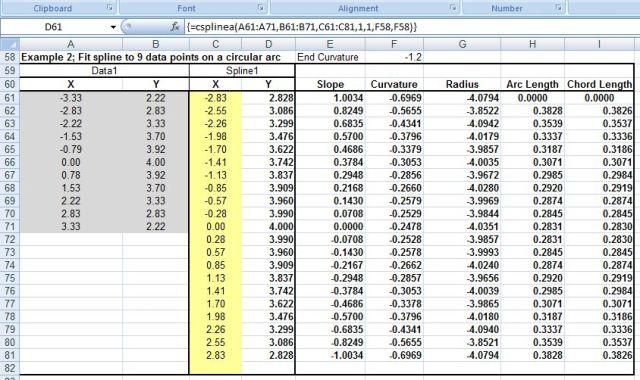
Spline through 9 data points with specified end slope

Spline coordinates for Example 2
Spline coordinates for Example 2

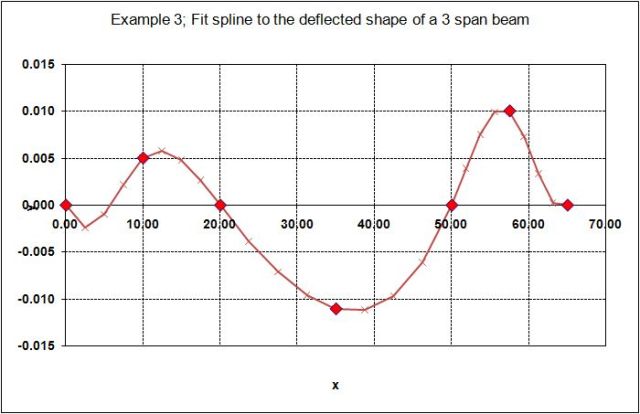
Continuous beam with specified end slope

Continuous beam with specified end slope

Input and output for Example 3

Input and output for Example 3

Posted in Beam Bending, Excel, Frame Analysis, Maths, Newton, UDFs, VBA | Tagged , , , , | 10 Comments

Continuous beam analysis with cubic splines

The last example in the previous post illustrated the use of cubic splines to find the bending moments in a continuous beam subject to prescribed lateral displacements.  A similar technique can be used to find bending moments, shear forces, reactions, and displacements in a continuous beam subject to lateral forces.  The spreadsheet SplineBeam.zip contains a description of this technique and a User Defined Function (UDF) to perform the analysis.

In outline, the procedure is:

For each loaded point:

  1. Apply unit deflection
  2. Fit cubic spline and find the curvature and bending moment in the segments either side of the loaded point
  3. Load = change of bending moment gradient at the point load
  4. Scale bending moments by Applied Load / Load for unit deflection

Sum bending moments for each loaded point

Calculate shear forces and reactions from bending moment diagram

This procedure is illustrated in this example for a single point load on a three span beam (click on any image below for a full size view):

SplineBeam1

Calculation of beam actions and deflections for a single point load on a 3 span beam

The beam support positions are specified with a Y value of zero in column B, and a deflection of -1 is entered for the load at X = 17.5.  The beam slope and curvature at each node and the load location are generated by the UDF CSPLINEA() (see previous post).

The bending moment in column G is simply the curvature multiplied by the beam flexural stiffness, EI; where E is the Young’s Modulus and I is the second moment of area of the beam cross section.

The force in column H is the force required to generate the prescribed unit deflection, and is equal to the change in slope of the bending moment diagram at the load position.   Dividing the specified applied load (100 kN) by the force for unit deflection gives the factor to be applied to the calculated bending moments; in this case -5.67E-04.  The beam actions and deflections in Columns I to K are found by multiplying the corresponding action under unit deflection by this factor.

SplineBeam2

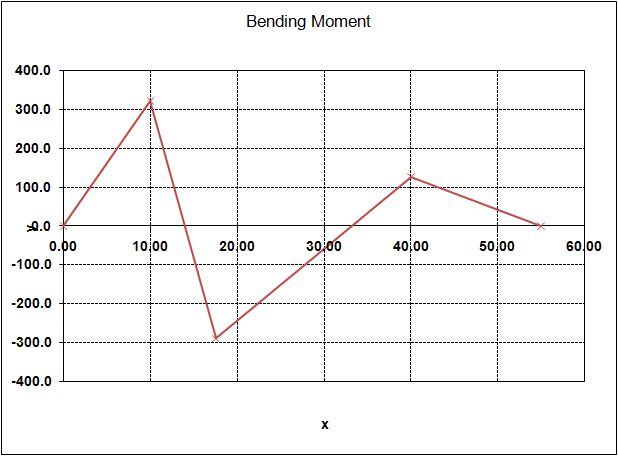
Bending moments for a single point load on a 3 span beam

This procedure has been incorporated in the UDF SPLINEBEAM() which can be used to analyse continuous beams with any numbers of spans and any number of point loads:

SplineBeam3

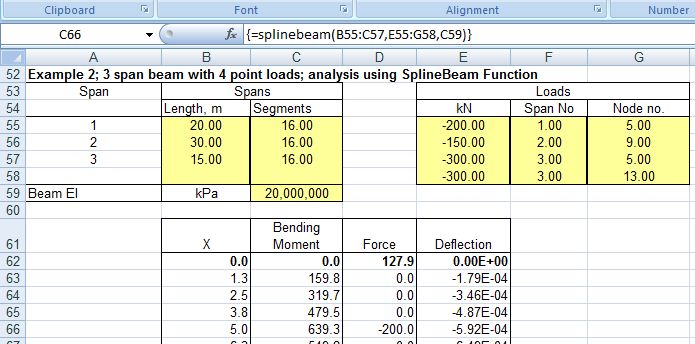
SplineBeam input and top of output for a 3 span beam with 4 point loads

Note that loads can only be applied at node positions, and nodes are generated by dividing each beam into a specified number of equal length segments.  Nodes are numbered from 1 to number of segments + 1 from left to right for each beam.

SplineBeam4

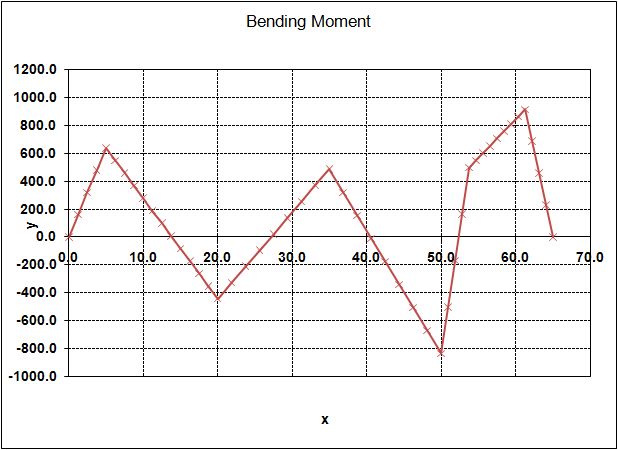
Bending Moments for 3 span beam with 4 point loads

SplineBeam5

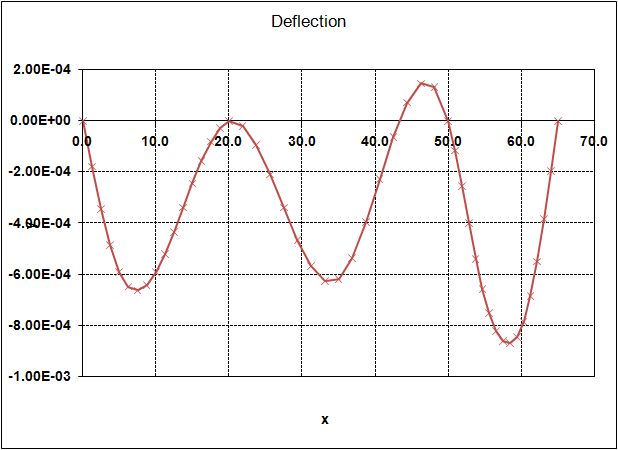
Deflections for 3 span beam with 4 point loads

SplineBeam6

Bending Moment output from the same analysis in Strand7

The same analysis performed in Strand7 gives identical results.

Posted in Arrays, Beam Bending, Excel, Finite Element Analysis, Frame Analysis, Maths, Newton, UDFs, VBA | Tagged , , , , , , , | 9 Comments

Cubic Splines

Cubic splines are used to fit a smooth curve to a series of points with a piecewise series of cubic polynomial curves.  In addition to their use in interpolation, they are of particular interest to engineers because the spline is defined as the shape that a thin flexible beam (of constant flexural stiffness) would take up if it was constrained to pass through the defined points.  This post will present an Excel User Defined Function (UDF) to generate a “natural” cubic spline for any series of 3 or more points.  Later posts will look at alternative spline formulations, and applications of the cubic spline to structural analysis.

A cubic spline is defined as the curve that for any two adjacent internal points:

  1. The curve passes exactly through both points
  2. The slope of the curve at the end points is equal to the slope of the adjacent segments
  3. The curvature of the curve at the end points is equal to the curvature of the adjacent segments

Alternative provisions for the end segments will generate different spline curves over the full extent of the curve.  The most common provision for the ends is that the curvature is zero at both ends.  This is known as a “natural cubic spline”.  In a structural analysis context this corresponds to a beam that is free to rotate at both ends, but is constrained in position at the ends and a number of internal points.

Further details of the theory of cubic splines, and an algorithm for generating natural cubic splines are given in this Wikipedia article.

An excel spreadsheet with a UDF for generating cubic splines, based on the algorithm in the Wikipedia article, can be downloaded from: CSpline2.zip

The download is open source, and full VBA code for the UDF is freely accessible.

Example screen shots from this file are shown below:

Csplinea Function

Csplinea Function

Example 1; Fit spline to 5 data points

Example 1; Fit spline to 5 data points

Example 1; Fit spline to 5 data points

Example 1; Fit spline to 5 data points

Example 2; Fit spline to 9 data points on a circular arc

Example 2; Fit spline to 9 data points on a circular arc

Example 2; Fit spline to 9 data points on a circular arc

Example 2; Fit spline to 9 data points on a circular arc

“Dummy” data points at each end allow the curvature at the start and end points to be adjusted to the required value.

Example 2; Fit spline to 9 data points on a circular arc

Example 2; Fit spline to 9 data points on a circular arc

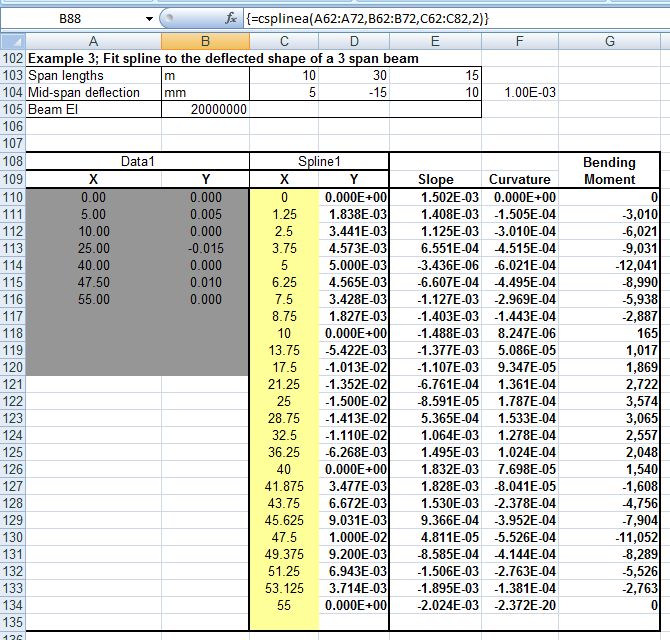
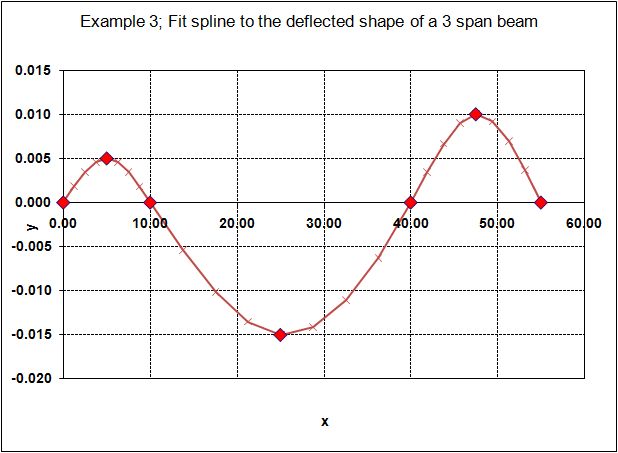
Example 3; Fit spline to the deflected shape of a 3 span beam

Example 3; Fit spline to the deflected shape of a 3 span beam

Example 3; Fit spline to the deflected shape of a 3 span beam

Example 3; Fit spline to the deflected shape of a 3 span beam

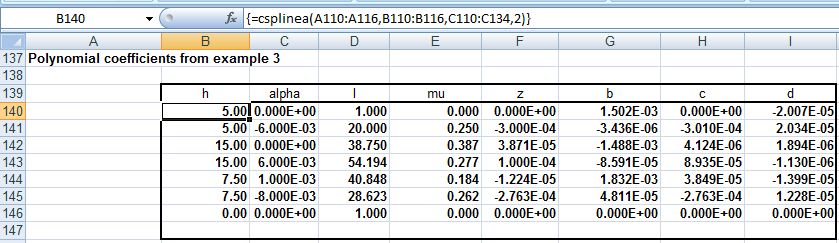
Polynomial coefficients from example 3

Polynomial coefficients from example 3

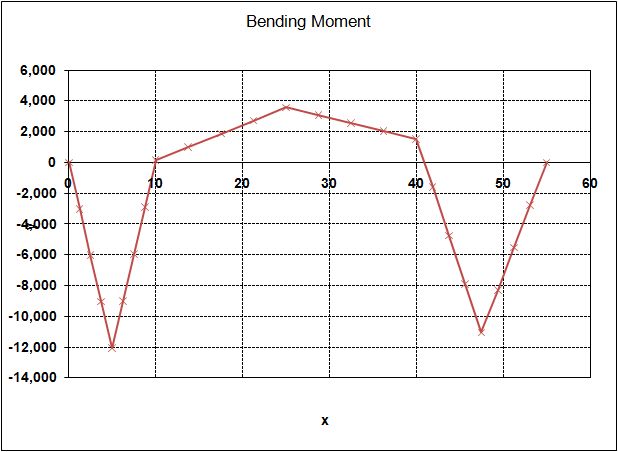
Example 3; Bending Moments

Example 3; Bending Moments

Bending moments are calculated by multiplying the curvature at each point by the beam flexural stiffness, EI.

Posted in Beam Bending, Excel, Newton, UDFs, VBA | Tagged , , , , | 73 Comments