The previous post provided a method for using pyxll to pass optional arguments from Excel to Python whilst preserving the default values of any called Python function for arguments that were omitted in the Excel function.
One condition where this does not work is for Python functions where “None” is a valid argument, but it is not the default. For instance, many Scipy functions working with multi-dimension array input have an “axis” argument that allows “None” as input, but the default is 0. In this case the default value for the Excel function should be set to 0, and the data type set to variant. Before calling the Python function two additional steps are then required:
If the argument is a number, convert it from “float” to “int”.
If the argument is the string “None” convert it to the Python None object.
Typical code is shown below:
@xl_func
@xl_arg('a', 'numpy_array', ndim = 2)
@xl_arg('axis', 'var')
@xl_arg('dtype', 'str')
@xl_return('numpy_array')
def py_hmean(a, axis = 0, dtype = None):
    ...
    if axis != 'None': axis = int(axis)
    kwargs = {'axis': axis, 'dtype': dtype}
    kwargs = {k:v for k,v in kwargs.items() if v is not None}
    if axis == 'None': kwargs['axis'] = None
    res = stats.hmean(a, **kwargs)
Python functions allow optional arguments to be specified by allocating a default value to each optional argument. The pyxll add-in allows Python functions called from Excel to work in the same way, so any argument with a default value may be omitted, in a similar way to using the “optional” key-word in VBA.
This raises the question, if an Excel function is being used to call a Python function with default arguments, and both functions require a default value to be specified, how do we ensure that the default values are consistent?
The obvious solution is to specify all the Excel defaults as “None”, so that the Python function applies its specified defaults; however this does not work. “None” is not the same as “nothing”, so the Python function treats the argument value as being “None”, rather than applying the default. An example is the Numpy “linspace” function, where the boolean “endpoint” argument has as default value of True, but setting all defaults to None will result in a default of False, so the resulting series will have one less value, with an increased space between the numbers.
Solutions that do work include:
Assign all the Python function default values to the Excel function.
Pass the optional arguments to the Excel function as a single dictionary, using the Python argument names. It is then not necessary to specify default values in the Excel function. Any missing arguments will then not be passed to the Python function, and the Python defaults will be used.
Assign a default value of “None” to all the optional arguments in the Excel function, then form a dictionary in the Excel code, of any arguments that have a value other than “None”.
Option 1 provides simple coding, but requires extra work in extracting the correct default value from the documentation (which is not always clearly stated).
Option 2 is also simple to code, but does not allow the creation of help for each argument when using the Excel function wizard.
Option 3 requires some extra coding, but allows the Python help for each argument to be copied to the function docstring, from where it can be accessed in Excel using the function wizard.
Typical code for a Scipy Stats function using Option 3 is shown below:
# pyxll decorators, allowing the function to be called from Excel
@xl_func
@xl_arg('a', 'numpy_array', ndim = 1)
@xl_arg('numbins', 'int')
@xl_arg('defaultreallimits', 'numpy_array', ndim = 1)
@xl_arg('weights', 'numpy_array', ndim = 1)
@xl_return('numpy_array')
# assign the default None to all optional arguments
def py_relfreq(a, numbins = None, defaultreallimits = None, weights = None):

#  Help that will appear in the Excel function wizard
    """
Return a relative frequency histogram, using the histogram function.
    :param a:        Input array.
    :param numbins:        The number of bins to use for the histogram. Default is 10.
    :param defaultreallimits:        The lower and upper values for the range of the histogram. If no value is given, a range slightly larger than the range of the values in a is used. Specifically ``(a.min() - s, a.max() + s)``, where ``s = (1/2)(a.max() - a.min()) / (numbins - 1)``.
    :param weights:        The weights for each value in `a`. Default is None, which gives each value a weight of 1.0
    """

    #  create a dictionary of each optional argument name, with the argument value
    kwargs = {'numbins': numbins, 'defaultreallimits': defaultreallimits, 'weights': weights}

    # extract the arguments that have a value other than None
    kwargs = {k:v for k,v in kwargs.items() if v is not None}

    # call the function, passing the dictionary using **kwargs
    rf = stats.relfreq(a, **kwargs)

    # convert the results to a 2D array that can be passed back to Excel
    ncols = len(rf[0])
    binwidth = rf[2]
    nrf = np.zeros((2,ncols))
    nrf[0,:] = rf[0]
    nrf[1,0] = rf[1]+binwidth
    for i in range(1, ncols):
        nrf[1,i] = nrf[1,i-1] + binwidth
    return nrf
Use of this function from the Excel function wizard is shown in the screen-shot below (click the image for full-size view):
This code will generate the correct function defaults, but creates a problem in the case where “None” is a valid option, but not the default, since entering None as the argument value will result in the default value being used. The next post will look at how to handle that situation.
As discussed here, I have updated the Units4Excel spreadsheet, with the list of non-SI units updated from the latest Wikipedia table. The EvalU user defined function (UDF) has also been modified with three output options, as shown in the screen-shot below:
The revised spreadsheet, including full open-source code, can be downloaded from:
Following the last post on this topic (Reinforced Concrete Design for Circular Sections to Eurocode 2) I have added provision for parabolic-linear concrete stress blocks to the ULS Design Functions spreadsheet. The Circu function in the RC Design Functions spreadsheet has also been modified. The latest versions of the spreadsheets can be downloaded from:
The UMom function in ULS Design Functions can be used to analyse any reinforced concrete section that can be divided into a series of stacked trapezoids. For the purpose of comparing the results of a rectangular or parabolic stress block when analysing a circular section the circle was divided into 24 layers:
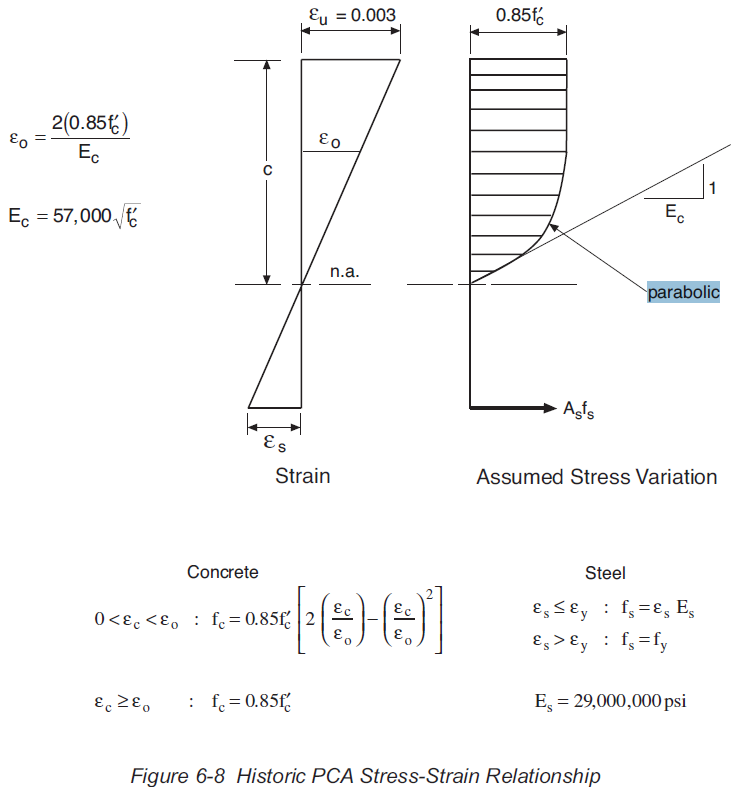
The parabolic-linear stress block option uses the form specified in Eurocode 2 for both the Eurocode and AS 3600 codes, and a modified version for the ACI code, as specified in the PCA document: PCA Notes on ACI 318-11 Building Code (EB712). The main differences in the ACI stress block are:
The maximum concrete stress reduction factor is 0.85 (1.0 for the default Eurocode and 0.9 for AS 3600)
The strain at the compression face is 0.003 (0.0035 in Eurocode)
The strain at the end of the parabolic portion is based on a parabolic curve with an initial slope equal to 1/Ec -see below (tabulated values based on concrete strength in Eurocode)
The exponent of the parabolic curve is 2 for all concrete strengths (reduced values for high strength concrete in Eurocode.
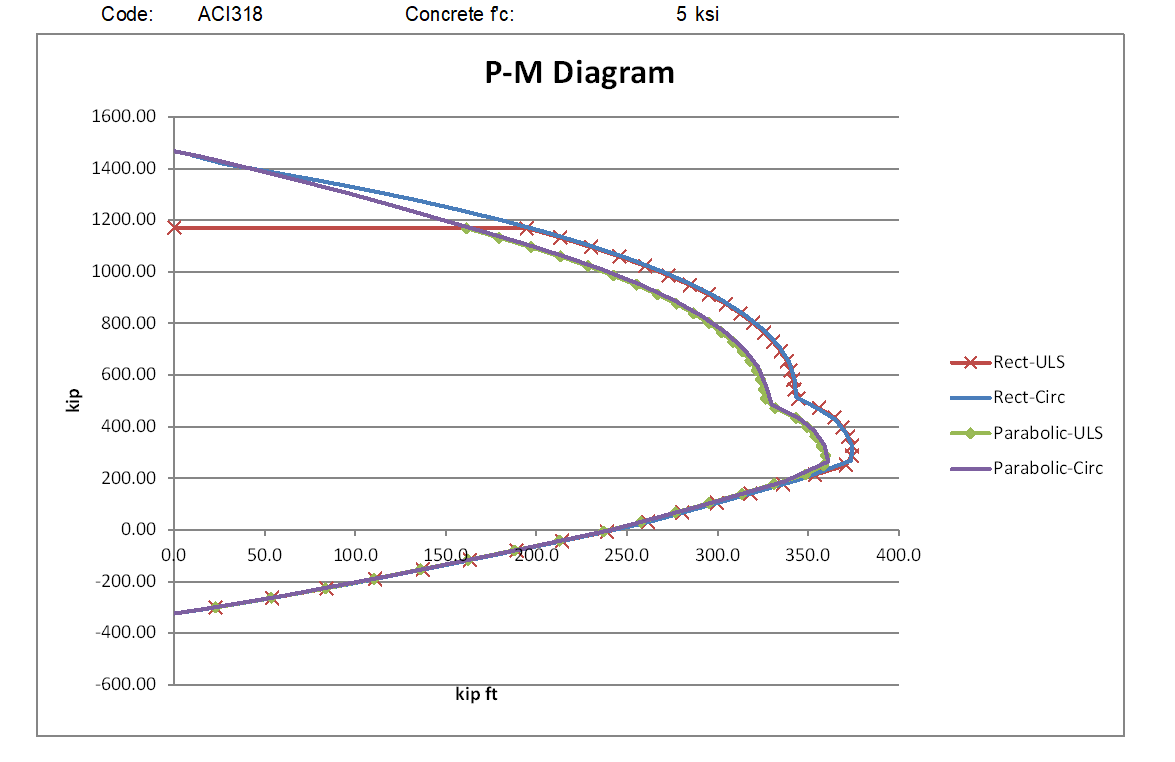
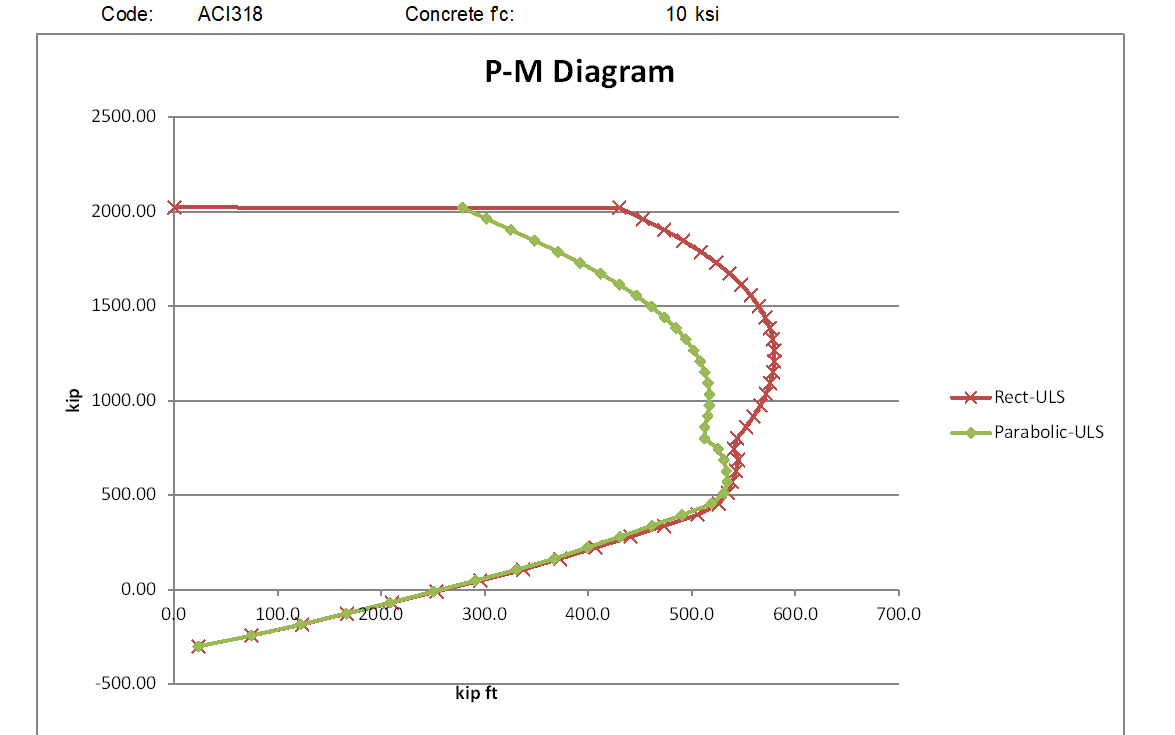
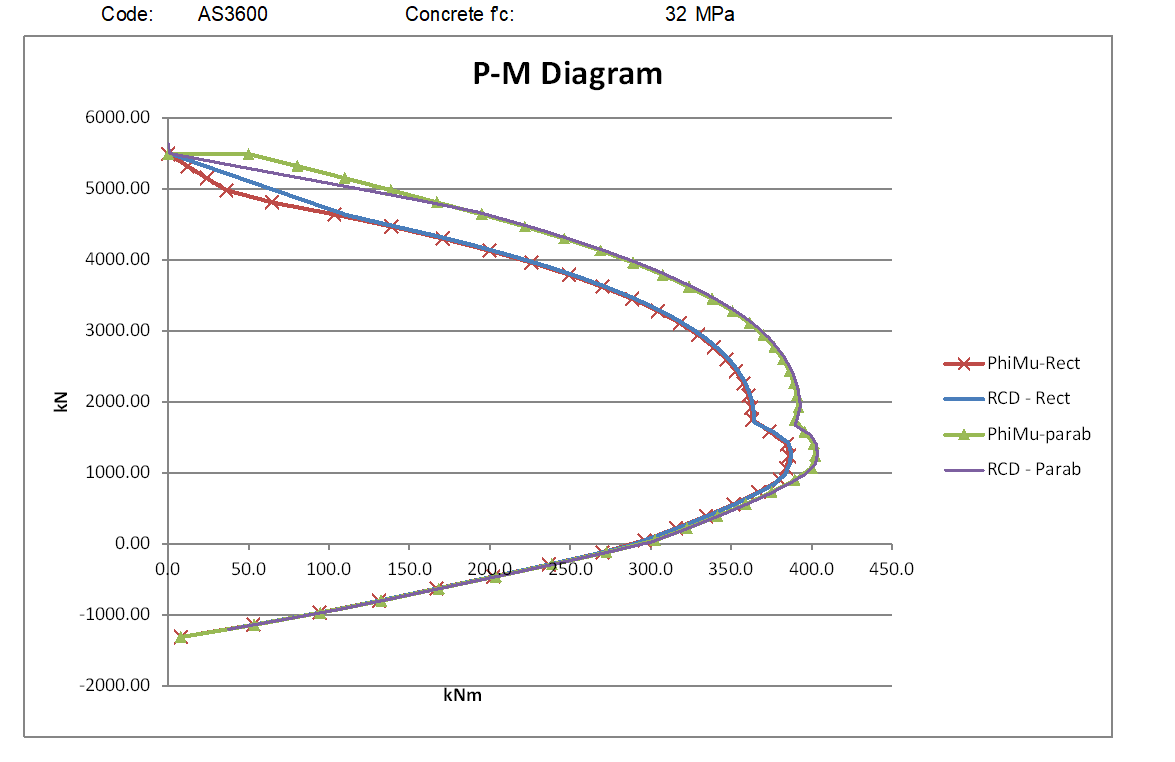
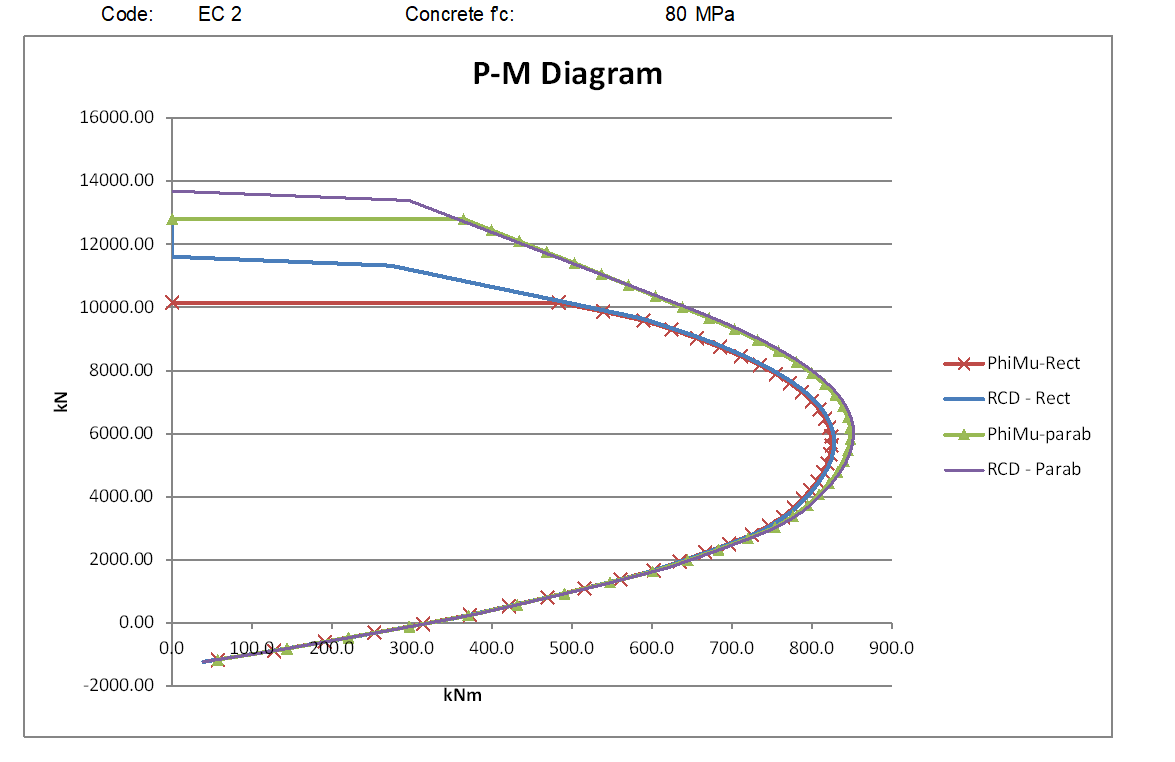
The graphs below compare moment vs axial load results using the rectangular and parabolic-linear stress blocks for circular sections with low and high concrete strengths to the three codes.
The ACI results below used customary US units with concrete strengths of 5 and 10 ksi (approximately 34.5 and 69.0 MPa)
For the lower strength concrete the rectangular stress block moment capacities are significantly higher than the parabolic stress block for all axial load greater than the balance load, and for higher strength concrete the difference increases to almost a 50% increase at loads close to the maximum axial load.
For the AS 3600 code (below) the parabolic stress block gives a greater moment capacity with the lower strength concrete, but with the high strength concrete the rectangular stress block is less conservative for mid-range axial loads, but the parabolic stress block has higher capacity with very high axial loads.
The Eurocode results show a similar relationship between the two stress blocks as AS 3600 for the lower strength concrete, but the parabolic stress block also has higher moment results with the high strength concrete, for all axial loads above the balance load. Note that the Eurocode results for the rectangular stress block have an additional reduction factor of 0.9, in accordance with Eurocode requirements for sections where the concrete width reduces towards the compression face:
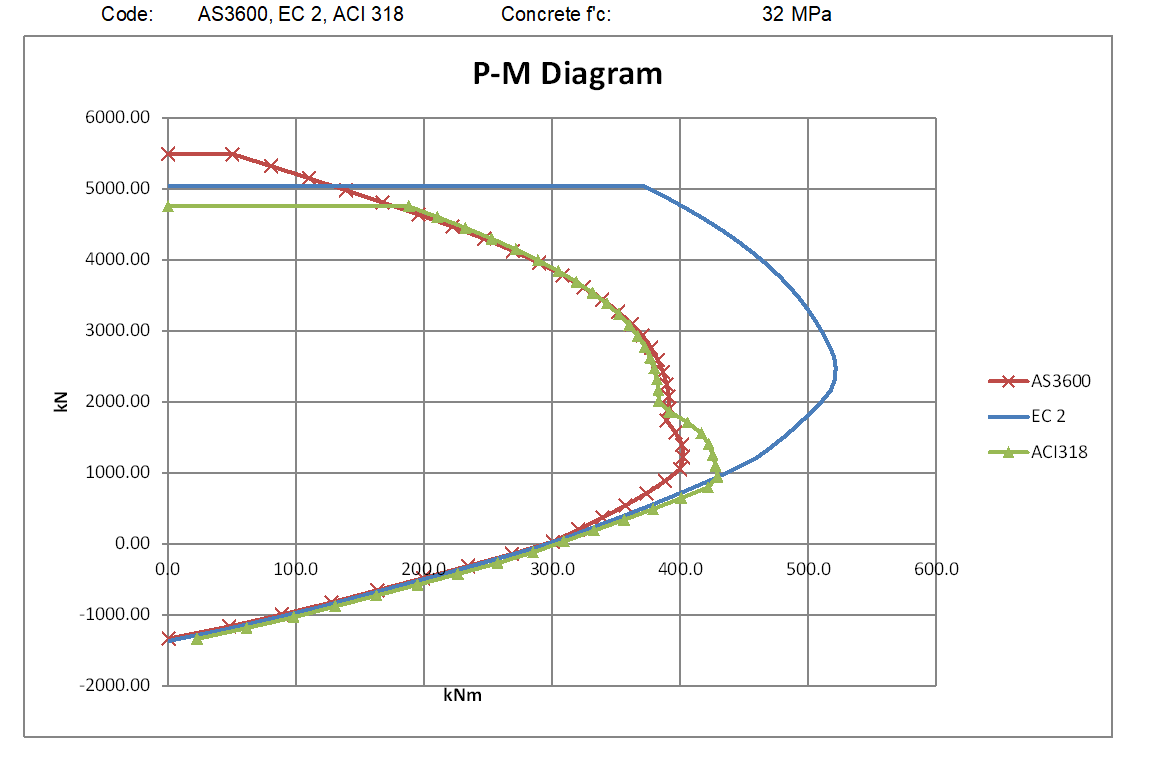
The graphs below compare the parabolic stress block results from the 3 codes:
For the lower strength concrete the AS 3600 and ACI 318 are very close for high axial loads and zero axial load to maximum tension, but for intermediate axial loads the ACI results are significantly higher. This is because of the different procedures for calculating the transition of the capacity reduction factor from 0.85 to 0.65. For the high strength concrete the ACI results are significantly higher than AS 3600 over the full range of compressive axial loads up to the ACI maximum.
The Eurocode results are higher than both ACI 318 and AS 3600 for loads above the balance load for both the low and high strength concrete. The reasons for this difference, when the Eurocode and AS 3600 calculations use the same stress block, are examined below:
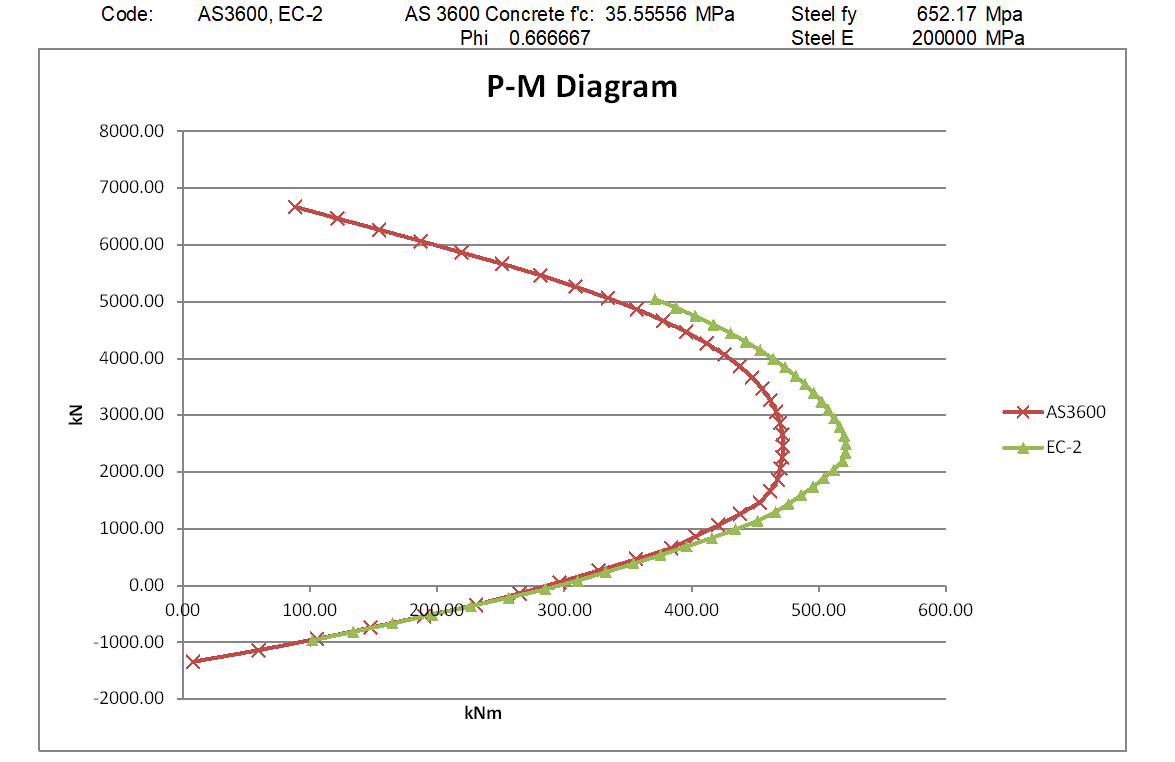
If the global reduction factors are set to 1.0, and the AS 3600 steel yield strength and concrete compressive strength are factored down by 1.15 and 1.5 repectiveley, the AS 3600 results exactly match the Eurocode results:
However if in AS 3600 the global reduction factor is set to 1/1.5, with the steel yield strength factored by 1.5/1.15, and the concrete strength factored by 1/0.9, so the nett material properties after factoring are the same as in the Eurocode analysis, the results are different:
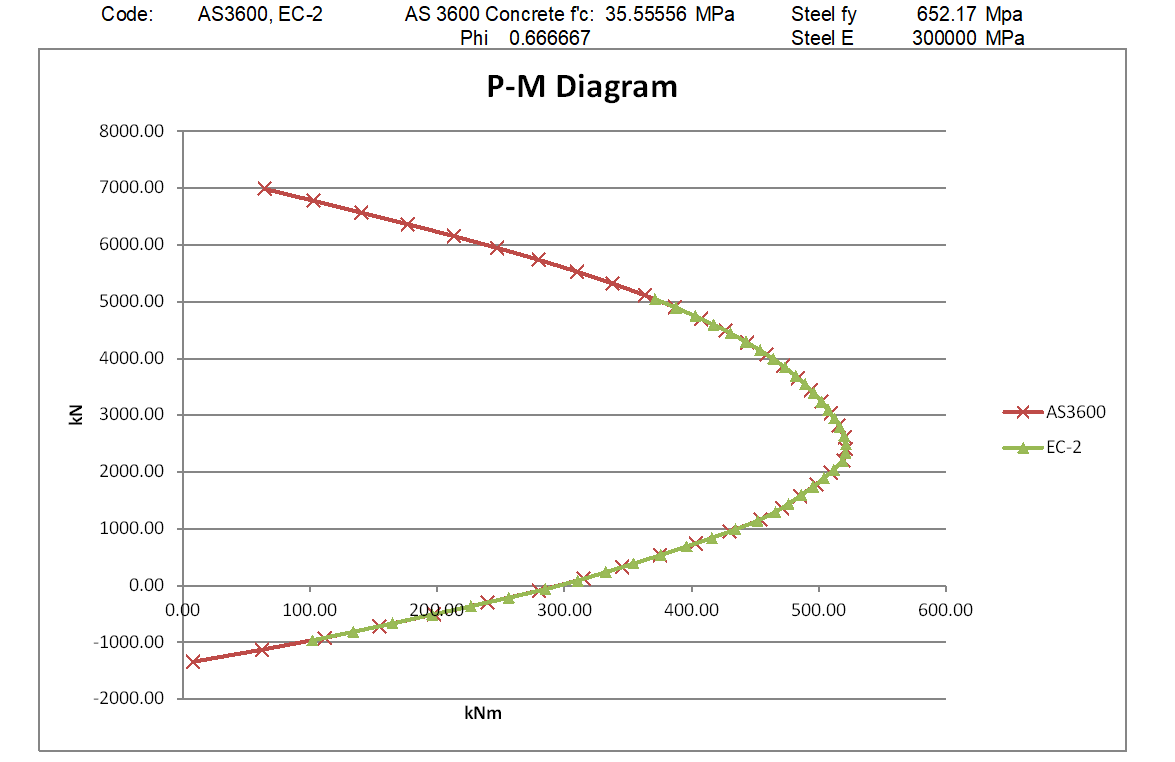
The reason is that in the Eurocode analysis forces in the reinforcing bars within the elastic range are not factored down, whereas in the AS 3600 analysis all the forces in the reinforcement are factored down by 1.5. In effect, the elastic modulus of the steel is reduced by a factor of 1.5 in the AS 3600 analysis, but remains unchanged in the Eurocode analysis. If the previous analysis is repeated with the steel elastic modulus factored up to 30,000 MPa in the AS 3600 run, the results from the two analyses are identical:
Update 27 Jan 2021:
Following the comment dated 25th Jan. below, I have modified the MomA function so that if any of the tabulated input axial loads exceed the section capacity, the function moves on to the next value, rather than exiting. The new file is now in the ULS Design Functions zip file near the top of the post.
PyFEM is a python-based finite element code accompanies the book: ‘Non-Linear Finite Element Analysis of Solids and Structures’ by R. de Borst, M.A. Crisfield, J.J.C. Remmers and C.V. Verhoosel. The code is open source and intended for educational and scientific purposes only. If you use PyFEM in your research, the developers would be grateful if you could cite the book in your work.
Another github site of the same name, but apparently entirely independent is:
The PyFEM library is an open -software project for the conversion of 2D and 3D mesh formats. • Primarily designed for conversion of Finite Element meshes as used in numerical simulations in the geosciences.