More Numpy with Excel and xlwings

The spreadsheet presented in the last post on sorting also includes links to many other Numpy functions.  The spreadsheet and associated Python file can be downloaded from:

xlNumpy.zip

The Numpy functions require xlwings and Numpy to be installed, which are included in the (free) Anaconda Python default installation.

All the Numpy functions in this spreadsheet return an array.  The whole array may be displayed either by entering as an array function, or using xlwings dynamic array formulas.  The spreadsheet also includes two VBA macros to display the entire array function (press Ctrl-Shift-S), or to re-size the display to the selected range (press Ctrl-Shift-R).  The next post on this topic will give more details.

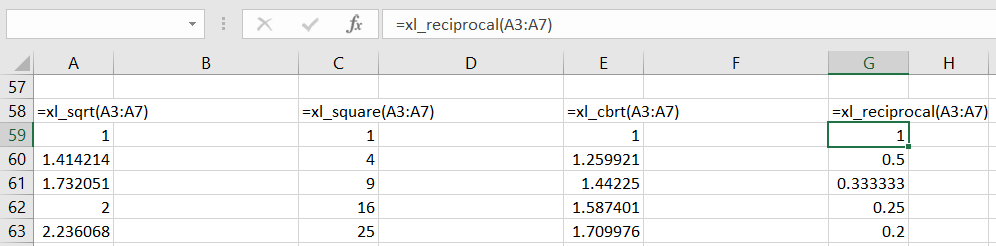
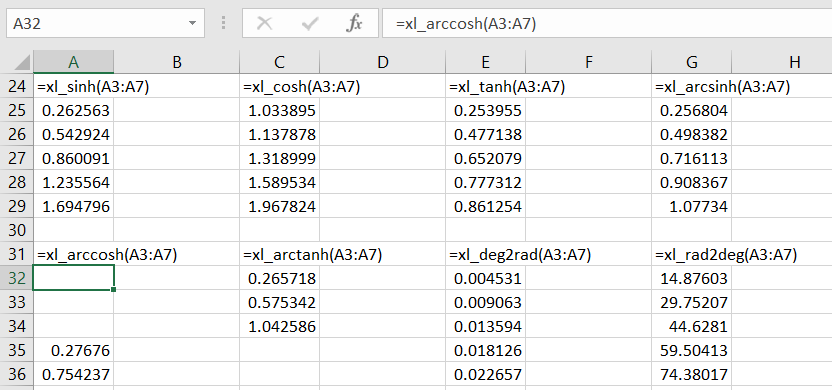
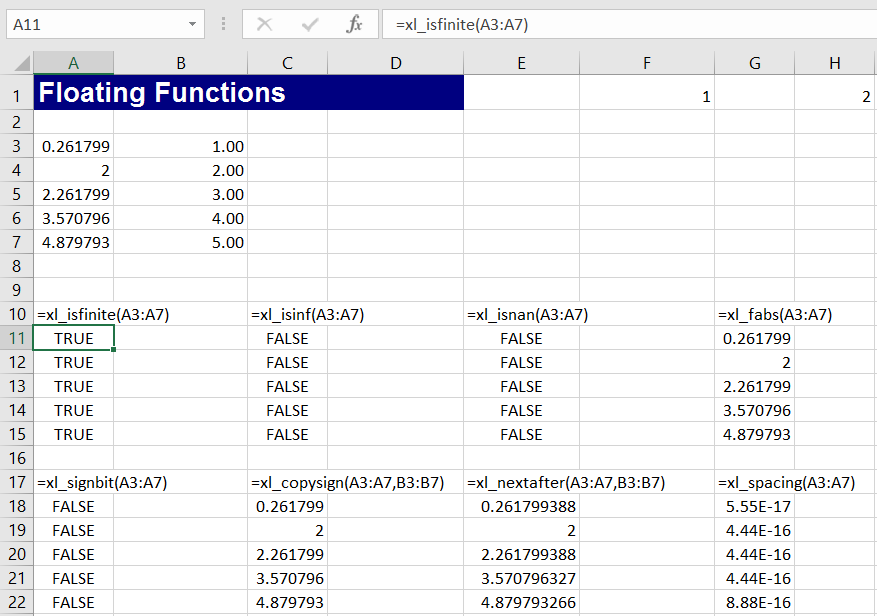
The Numpy functions included are shown in the screenshots below.  See the Numpy Documentation for more details.:

Polynomial functions:

  • xl_PolyRoots
  • xl_PolyFromRoots
  • xl_PolyVal

xl_PolyFit fits a polynomial to scattered data

  • xl_PolyCompanion
  • xl_PolyDer
  • xl_PolyInt
  • xl_PolyAdd
  • xl_PolySub
  • xl_PolyMul
  • xl_PolyDiv
  • xl_PolyPow

Maths functions operating on arrays:

  • xl_add
  • xl_subtract
  • xl_multiply
  • xl_divide
  • xl_logaddexp
  • xl_logaddexp2
  • xl_true_divide
  • xl_floor_divide
  • xl_negative
  • xl_positive
  • xl_power
  • xl_remainder

  • xl_mod
  • xl_fmod
  • xl_divmod
  • xl_absolute
  • xl_fabs
  • xl_rint
  • xl_sign
  • xl_heaviside
  • xl_conj
  • xl_exp
  • xl_exp2
  • xl_log
  • xl_log2
  • xl_log10
  • xl_expm1
  • xl_log1p

  • xl_sqrt
  • xl_square
  • xl_cbrt
  • xl_reciprocal

Trigonometric Functions:

  • xl_sin
  • xl_cos
  • xl_tan
  • xl_arcsin
  • xl_arccos
  • xl_arctan
  • xl_arctan2
  • xl_hypot

  • xl_sinh
  • xl_cosh
  • xl_tanh
  • xl_arcsinh
  • xl_arccosh
  • xl_arctanh
  • xl_deg2rad
  • xl_rad2deg

Floating Point Functions:

  • xl_isfinite
  • xl_isinf
  • xl_isnan
  • xl_fabs
  • xl_signbit
  • xl_copysign
  • xl_nextafter
  • xl_spacing

  • xl_modf
  • xl_ldexp
  • xl_frexp
  • xl_fmod
  • xl_floor
  • xl_ceil
  • xl_trunc

Numerical Ranges:

  • xl_arange
  • xl_linspace

  • xl_logspace
  • xl_geomspace

  • xl_meshgrid


Posted in Arrays, Excel, Link to Python, Maths, Newton, NumPy and SciPy, UDFs, VBA, xlwings | Tagged , , , , , , , , , , | 2 Comments

More Lowlands

Sometimes YouTube suggestions are hopeless, and sometimes they are spot on.  Here is one of the latter:

It seems that Ali Darragh is yet to be deemed Wiki-worthy, but there is a good article about her here.

That link led me to a more traditional version by The Corries:

… and then back to the Anne Briggs unaccompanied version, which has featured here before:

Posted in Bach | Tagged , , , | Leave a comment

Office Insiders and Power Pivot

I recently discovered another benefit of the Office Insiders program through the ExcelUnplugged blog, which has a feature on the new linked data types in Excel.  More on those another day, but in addition to JavaScript UDFs, the added feature that I found to be of most immediate interest was that after signing up for the program Power Pivot becomes available on Office 365 Home and (I presume) the business plans where it was previously excluded.

See more about Power Pivot.


Posted in Computing - general, Excel, Javascript | Tagged , , , | Leave a comment

Sorting with Python and Numpy

Following the previous post, lets look at sorting functions in the Numpy library.

The spreadsheet xlwNumpy links to a variety of Numpy functions, including the sorting functions described below.  The spreadsheet and associated Python code can be downloaded from:

xlNumpy.zip

The Python code requires xlwings and Numpy to be installed, which are included in the (free) Anaconda Python default installation.

The screenshots below  show examples of the sorting functions:

xl_npsort uses the basic Numpy sort function.  The Numpy sort has two significant differences from the standard Python version:

  •  Each column is sorted independently.
  • Numpy arrays convert all elements to the same data type, so if the data contains one or more strings, all the numbers will be converted to strings as well.  This may change the sort results, since in an ascending numerical sort 3 will be sorted before 21, but in an alphabetic sort 21 will come first.

The xl_LexSort function uses Numpy lexsort, which performs an indirect sort, returning a list of index values for the sorted array, using the supplied “keys”.  In the Numpy function the keys are defined as:

keys : (k, N) array or tuple containing k (N,)-shaped sequences.
The k different “columns” to be sorted. The last column (or row if keys is a 2D array) is the primary sort key.

In the Excel version the entire data range is passed as single array, and the columns to be sorted are passed as a row of values.  Note that the primary key is listed first, and the list is base 1, not base 0.  The key list may be any length from 1 up to the number of column.

The xl_Sort_t function sorts a table using the lexsort function, providing similar functionality to the Python sort function, provided that all the data has the same type.

The lexsort results can also be used with the Excel built-in Index function.  This provides the same results as the xl_Sort_t function.  The xl_pysort function calls the standard Python sort, and can therefore handle table with mixed data types.

The xl_Argsort function returns the index values to sort an array in the same way as Numpy sort, i.e. each column is sorted separately.

xl_Msort calls the Numpy msort function, which has similar functionality to sort, except there is no provision for changing the axis of the sort.

xl_Sort_Complex sorts a two column array, treating each row as the real and imaginary parts of a complex number.

xl_Partition and xl_Argpartition split an array into two parts, with values below and above the kth value.


Posted in Arrays, Excel, Link to Python, NumPy and SciPy, UDFs, VBA, xlwings | Tagged , , , , , , , | 1 Comment

Sorting with VBA and Python

This subject was last covered in March 2014.  I have now updated the Python code to work with xlwings, and the new version (including open source VBA and Python code) can be downloaded from:

Sortfunc.zip.

The previous version, linking to Python through Pyxll is still available from:

SortFunc-pyxll.zip.zip.

The Python functions require xlwings and Python.  The Anaconda Python package includes xlwings as well as the Numpy and Scipy libraries.

The screenshot below shows examples of the VBA and Python dynamic sort functions.  See the  previous post for more details.

Posted in Arrays, Excel, Link to Python, UDFs, VBA, xlwings | Tagged , , , , , | 1 Comment