Solvers, parsers and more

Links to some really useful recently discovered sites:

OpenSolver for Excel

OpenSolver is an Excel VBA add-in that extends Excel’s built-in Solver with more powerful solvers. It is developed and maintained by Andrew Mason and students at the Engineering Science department, University of Auckland, NZ. OpenSolver provides the following features:

  • OpenSolver offers a range of solvers for use in Excel, including the excellent, Open Source, COIN-OR CBC optimization engine which can quickly solve large Linear and Integer problems.
  • Compatible with your existing Solver models, so there is no need to change your spreadsheets
  • No artificial limits on the size of problem you can solve
  • OpenSolver is free, open source software.

Excel Formula Parsing:

RubberDuck for VBA:

Your IDE is about to enter the 21st century. Rubberduck is a free, open-source COM add-in under active development that integrates with the VBE to enable the features every programmer wants to have in their IDE.
​From unit testing to source control, from code inspections to refactorings, programming in VBA will never be the same.

FormulaDesk:

Add superpowers to Excel
Amazing tools to improve your spreadsheets

And finally, not a new link, but this looks like a really useful article:

Building an add-in for Excel:

Excel is a very powerful application with thousands of options and functions to help you build your models and reports and analyses. Oftentimes your daily job could do with some additional functionality. Something Excel does not offer “out of the box”.

With VBA, augmenting Excel with new functionality is possible. This article demonstrates how I created a small utility. It outlines all steps I used to create the tool. The principles I used in these steps may help you when set out to build your own add-in.

Posted in Excel | Tagged , , , , | 3 Comments

A mystery curve links to Jupyter

Reviewing some of my less visited links recently, I was intrigued by a post at The Math Less Travelled:

The previous post at the site provides more details of the source of the curve, and some links to an interactive curve generator written in Python, using the Jupyter Notebook. I hadn’t heard of the Jupyter Project, and I will certainly be taking a closer look in the future, but for now I thought I would have a go at creating the curve generator in Excel, which turned out to be surprisingly easy, with no coding required.

The curve is defined by the equation:
f(t) = e^{it} + \frac{1}{2} e^{6it} + \frac{i}{3} e^{-14it}
which looks fairly mysterious to a non-mathematician, but as explained at this Wikipedia article the function consists of three circles in the complex plane, which can be translated into the XY plane with two functions:
x(t) = cos(t) + cos(6t)/2 + cos(-14t)/3
y(t) = sin(t) + sin(6t)/2 + sin(-14t)/3

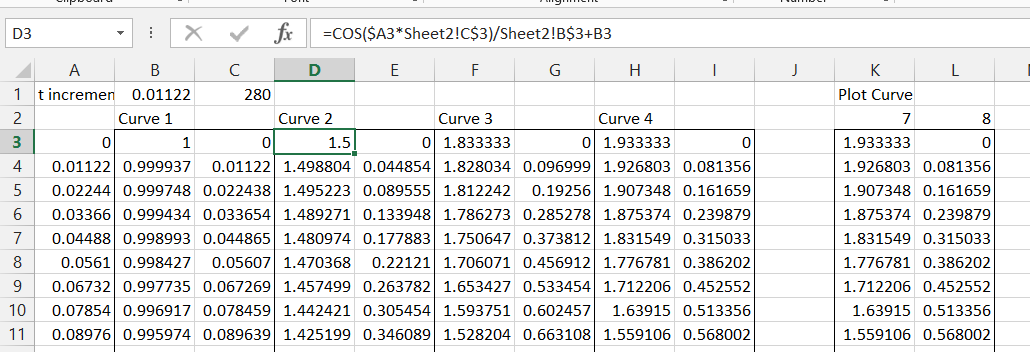
I have generated these values in Excel in three stages so each component of the curve can be plotted separately, and we can also add a fourth level, as shown in the screenshot below:

MCPlot5

The t values in Colum A simply increment by the value in Cell B1 (set to pi/280 in this example).  The x and y values for Curve 1 are Cos(t) and Sin(t), and the values for Curve 2 (as shown in the formula bar for the x value) are:
=COS($A3*Sheet2!C$3)/Sheet2!B$3+B3
=SIN($A3*Sheet2!C$3)/Sheet2!B$3+C3

The links t0 Sheet2 allow the factors for the curve to be easily changed.  The formulas for Curve 2 can then be copied across for Curve 3, and an additional Curve 4 is added.  The formulas in Row 3 are then copied down as far as required.  Finally the actual values to be plotted are extracted in Colums K and L with:
=INDEX($B3:$I3,K$2)
=INDEX($B3:$I3,L$2)
which are also copied down to cover the full range.

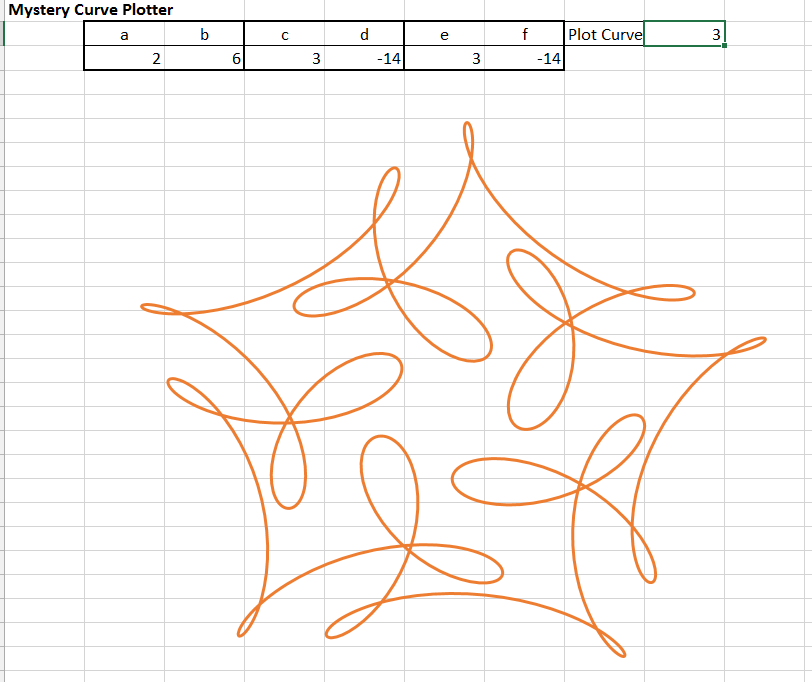
Finally values are entered in the appropriate cells on Sheet 2, and the values in Columns K and L are plotted as an XY (Scatter) chart on Sheet 2, resulting in:

MCPlot1

We can now experiment with different curves simply by entering different values under a to f, and choosing which curve to plot. Entering the same factors as c and d under e and f, and selecting curve 4 generates:
MCPlot2

Changing the sign for factor f:

MCPlot3

And increasing the value of e:

MCPlot4

The spreadsheet can be downloaded from MysteryCurve.xlsx.
No open source code this time, because there is no code.
Feel free to add slider bars and animation!

Update:

If you wondered why my plot looks a bit different to the one in the link, it’s because I didn’t get the function right; the third term is multiplied by i/3, not 1/3.  That makes it a bit more complicated, but it can still be done in code-free in Excel.  I have updated the spreadsheet using the functions Complex(), IMProduct(), IMExp(), IMReal(), and Imaginary().  See the download spreadsheet for details, or just enjoy the corrected image below:

MCPlot6

Posted in Charts, Charts, Excel, Maths, Newton | Tagged , , , , , , | 2 Comments

ConBeamU 4.05 and ConBeampy 1.02

The latest update of the two continuous beam spreadsheets can be downloaded from:

The main changes are:

  • A problem with point loads applied exactly at a support position has been corrected
  • A function has been added to evaluate 3D end actions for a beam with any combination of 3D loading, any number of segments, and any combination of fixed or spring restraints at the ends.

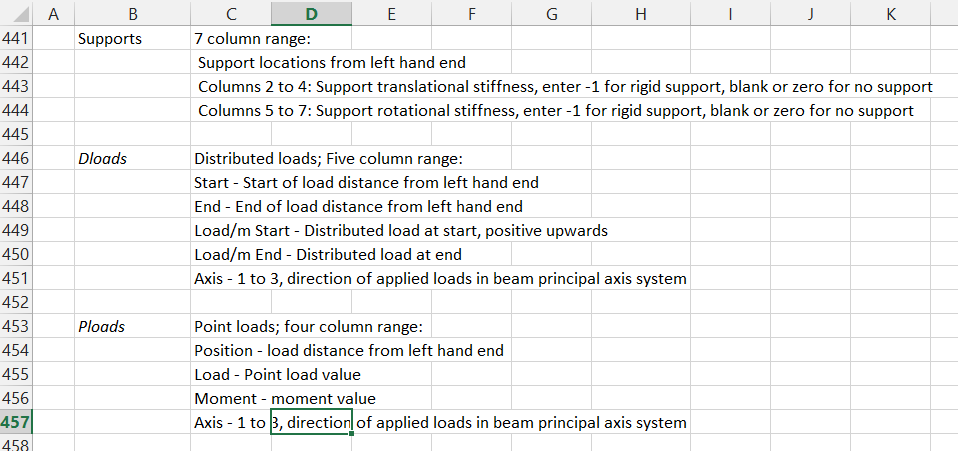
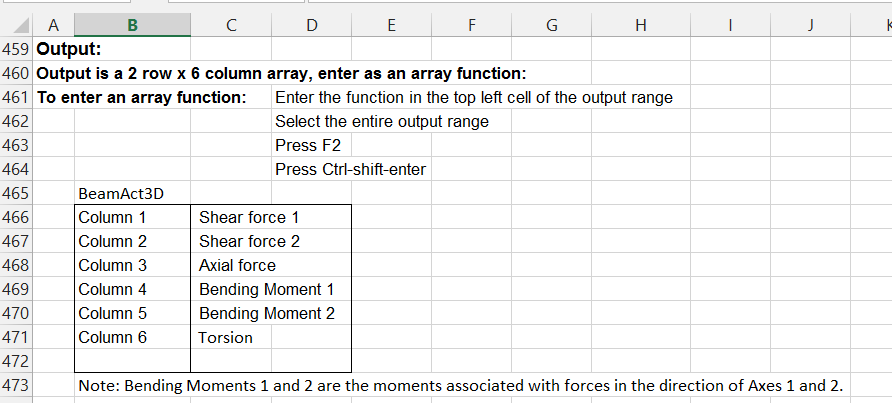
The screen-shots below show the function input and output documentation, and example results:

REAct3D1-1

REAct3D1-2

REAct3D1-3

REAct3D1-4

The Python version requires an installed copy of Python, including Numpy and Scipy. All other required files are included.

Posted in Beam Bending, Excel, Finite Element Analysis, Frame Analysis, Link to Python, Newton, UDFs, VBA | Tagged , , , , , | 1 Comment

New and updated links

I have just updated my Blogroll, with 9 new links, and a couple of updates:

  • Colin Caprani’s site is now back on-line
  • I have updated the link to Jon Peltier’s blog
  • dataprose.org was the source of many of the new links, and also has excellent content on Excel, VBA, Access and dealing with data
  • Option Explicit describes itself as “A blog of Excel, Dashboards, Visual Basic for Applications, Data Analysis, Operations Research, and Visualizations”
  • TheSpreadsheetGuru has a wide range of tutorials on VBA, charts and general Excel topics.
  • Excelgaard not a blog, but an Excel site with a wide range of resources.
  • The Ken Puls (Excelguru) Blog has been going for approaching 10 years, and still has regular updates with excellent content
  • EXCELXOR has provided useful input for several topics discussed here over the past year or so.  Focusses on pushing the limits of what you can do on a spreadsheet without using VBA,
  • Mark Kubiszyn on the other hand focusses on what you can do with VBA
  • Datascopic is dedicated to Data Management and Excel as a tool for helping you get what you need from your data
  • Finally myOnlineTraininghub provides regular tutorials, and (like this site) is based in Australia.
Posted in Excel, UDFs, VBA | Tagged , , | Leave a comment

Google, artificial intelligence and the Daily Mail

The New Scientist tells me that the people at Google Labs are training their bots in natural language processing by feeding them text from the Daily Mail.

This raises two puzzling questions:

  1. How is it that those behind the Internet’s most successful search engine do not know of the Daily Mail Song?
  2. If in fact they do know of this song, how could they even start to think that analysis of this newspaper would be a useful step on the path towards artificial intelligence?

But anyway, re-visiting YouTube I find that views of Dan & Dan’s work have recently passed the 2 million mark, so congratulations to both of them.


Posted in Bach | Tagged , , , | Leave a comment