
One disadvantage of the spreadsheet style interface is that even simple formulae are difficult to check. For instance, the deflection of a cantilever loaded at the end is given by:
F*L^3/(3*E*I)
which is much easier to read than the Excel version:
=B31*B32^3/(3*B33*B34)
It is possible to allocate names to the spreadsheet cells, but this rapidly becomes cumbersome if there are more than a few formulae, or if a formula is repeated with different data.
The spreadsheet Eval2.xlsb overcomes these problems by allowing the evaluation of formulae entered as text:

In the example above, the text formula in Cell A29 is evaluated using the values listed in the range A31:B34. The Eval function also has the option to return a text string with the variable names replaced with values, as seen in Cell D31.
The original version of this function had the disadvantage that short variable names might corrupt longer names, or function names, that included the same characters. For instance a variable “a” would result in “ab” or “tan” having their a characters replaced by the value of a. I have now re-written the function, using the VBA scripting dictionary, so that all variable names only apply to a string of the same length. The new function, including full open source code, may be downloaded from the link below. Links are also provided to other spreadsheets using the Eval function.
The screenshot below shows an example of the use of the new version with a variable name that would previously have caused an error. Note also that the range specifying the variable names and values may now be entered as a single range of two adjacent columns, or two separate ranges.

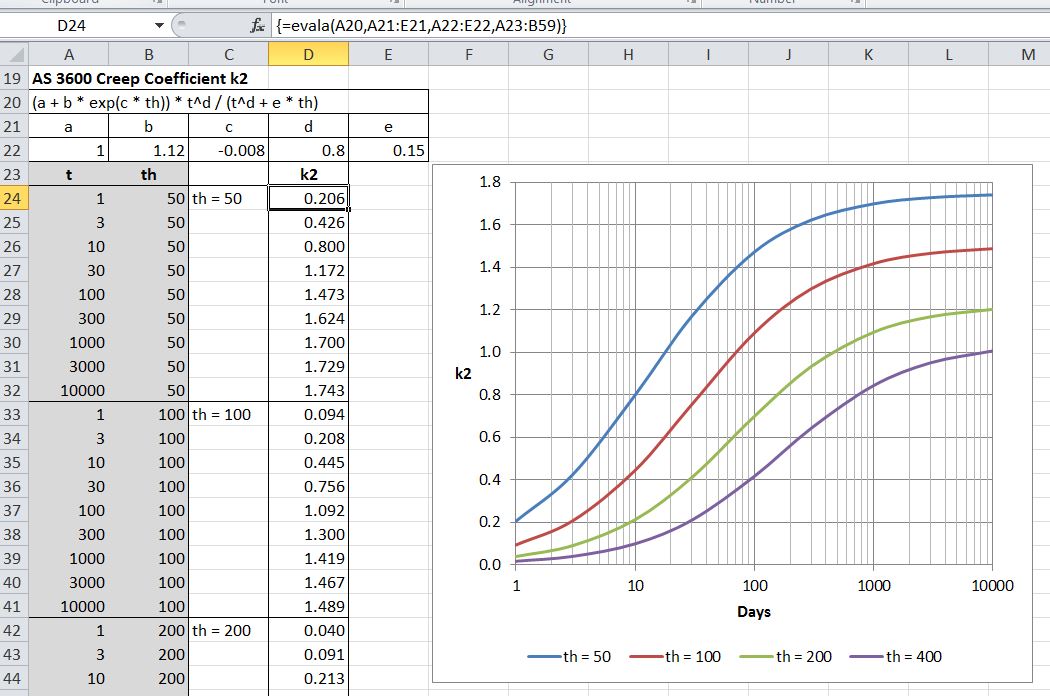
The Evala function returns an array of values with evaluation of a single formula. In the example below the formula for K2 is evaluated for a range of values of t and th:
The Eval-Integration spreadsheet (included in the Eval2.zip download) includes a number of functions for numerical integration of any function of a single variable, including the Tanh-Sinh method (based on a function provided by Graeme Dennes), and Gauss-Kronrod Quadrature, using the Alglib library:

The new version has also been included in the Units4Excel spreadsheet, allowing unit aware evaluation of any formula, using a wide range different units:







 Newton Excel Bach, not (just) an Excel Blog