Feet and inches, and other units

Following a query at Eng-tips I have had a look at options in Excel for converting metres to feet and inches, with the inches displayed as a fraction rather than a decimal.

Converting from metres to feet or inches is straightforward (with a length in metres in C3):

=CONVERT($C$3,”m”,”ft”) or  =CONVERT($C$3,”m”,”in”)

or just:  =C3/0.3048 or  =C3/0.0254

To display the resulting value as a fraction, the cell may be formatted to display fractions, or the same result may be achieved with the text function, which also allows the string to be terminated with the ‘ or ” symbol:

=TEXT($C$3/0.0254, “# #/16”)&CHAR(34)

The number following the ##/ is the denominator for the fraction, which may be entered explicitly, or read from another cell:

=TEXT($C$3/0.0254, “# #/”&D13)&CHAR(34)

To display the result in feet and inches is not so straightforward.  The simplest method I found came from: http://excel-formulas.blogspot.com.au/2009/07/display-feet-and-inches-as-5-8-12.html

To convert from decimal feet to feet and fractional inches:

=INT($C$5)&”‘ “&TEXT(12*($C$5-INT($C$5)),”#/16″)&CHAR(34)

or for metres to feet and fractional inches:

=INT(CONVERT($C$3,”m”,”ft”))&”‘ “&TEXT(12*(CONVERT($C$3,”m”,”ft”)-INT(CONVERT($C$3,”m”,”ft”))),”# #/16″)&CHAR(34)

Alternatively, a short User Defined Function (UDF) will give the same result with:

=M2Ftinf($C$3,16)

These formulas, and 4 UDFs (converting to inches or feet and inches, and in the opposite direction) are included in the download file: M2ft-in.xlsb:

Metres to feet and fractional inches

Metres to feet and fractional inches

On-sheet formulas for conversion in the other direction would be still more complex, but the UDFs provide this functionality.
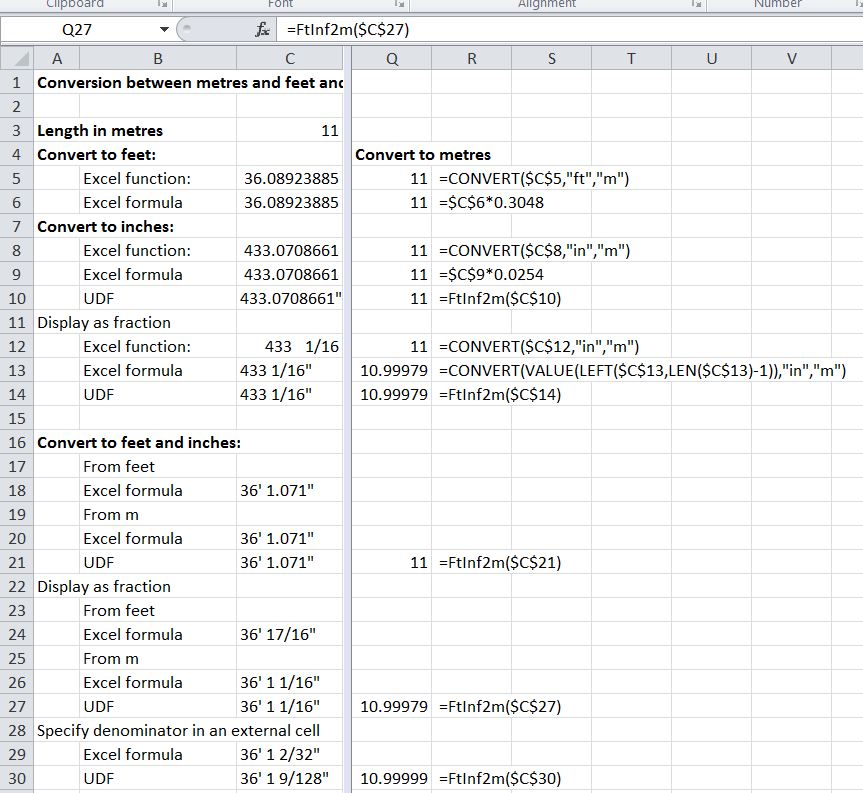
Feet and inches to metres

Feet and inches to metres

The four UDFs have also been added to the Units4Excel spreadsheet, which also provides functions for conversion between a wide range of other units, and units aware evaluation of functions entered as text.  The spreadsheets (including full open-source code) may be downloaded from Units4Excel.zip


Posted in Excel, Maths, Newton, UDFs, VBA | Tagged , , , , , | 1 Comment

Python Matrix Functions with ExcelPython – 2

Following the previous ExcelPython post I have modified the VBA and Python code for improved performance and to simplify the Python coding.  The main change is that where Numpy Arrays are required in the Python code, these are now created in the VBA, as described here (see post number 9 from Eric Reynolds) and here (a more detailed and wide ranging tutorial).

The new spreadsheet and Python Code may be downloaded from MatrixXLpy.zip including full open source code.

I have also updated the performance benchmarks as shown below:

ExcelPython Matrix Solver Functions

ExcelPython Matrix Solver Functions

I have now separated out the data transfer times from the actual solution time. It can be seen that when operating on a full dense matrix the xl_Solve function is very much faster than any of the sparse functions, but on the 1000×1000 sparse matrix all of the functions performed in much the same time. With the large (10945×10945) sparse matrix (which is too large for the dense functions to handle) the xl_SpSolveCOO function (using the Scipy Library) was significantly faster than the PySparse based xl_SpSolveLU, but the iterative xl_SpSolveit function (also using the PySparse Library) was 5 times faster again. The PySparse based functions operate on the non-zero elements of the lower triangle of symmetrical matrices, allowing substantially larger problems to be solved than could be handled by the xl_SpSolveCOO function.

Coding for the xl_SpSolveCOO function is shown below:

Function xl_SpSolveCOO(SMatrix As Range, SVect As Range) As Variant
Dim Rtn As Variant
    Rtn = xl_Run2A("xl_spsolvecooL", SMatrix, SVect, modname2, 1)
    If TypeName(Rtn) = "String" Then
        xl_SpSolveCOO = Rtn
    Else
        xl_SpSolveCOO = WorksheetFunction.Transpose(Rtn)
    End If
    End Function

The Python code is called by the xl_Run2A function:

Function xl_Run2A(FuncName As String, VA_1 As Range, VA_2 As Range, Optional Modname As String = modname1, Optional RtnDims As Long = 2) As Variant
Dim methods As Variant, result As Variant, VA_1py As Variant, VA_2py As Variant, NumpyArray As Variant, Result_List As Variant
    On Error GoTo rtnerr

    Set NumpyArray = PyGet(PyModule("numpy"), "array")
    Set VA_1py = PyCall(NumpyArray, , PyTuple(VA_1.Value2))
    Set VA_2py = PyCall(NumpyArray, , PyTuple(VA_2.Value2))

    Set methods = PyModule(Modname, AddPath:=Path1)
    Set result = PyCall(methods, FuncName, PyTuple(VA_1py, VA_2py))
    Set Result_List = PyCall(result, "tolist")
    xl_Run2A = PyVar(Result_List, RtnDims)
    Exit Function
rtnerr:
    xl_Run2A = Err.Description

End Function

The associated Python code is:

import numpy as np
import scipy.sparse as ssp
import scipy.sparse.linalg as sspla
from pysparse import spmatrix, superlu, precon, itsolvers
import linalgfuncs as laf
import time

def xl_spsolvecooL(m, x):
    """
    Solve a matrix equation Mx = y in sparse COO format, input from array.
	m: three column array of: row indeces, column indeces, values.
	x: column x vector
    """
    i, j, v, x = list2ijvx(m, x)
    n = x.size
    A = ssp.coo_matrix((v,(i,j)),shape=(n,n))
    return xl_spsolvecoo(A, x)

def list2ijvx(m, x):
    """
    Convert 3 column array, m, to 3 vectors, and single column array, x, to vector
    """
    v = m[:,2]
    i = m[:,0]
    j = m[:,1]
    x = np.array(x)
    x = x[:,0]
    return i, j, v, x

def xl_spsolvecoo(A, x):
    """
    Solve a matrix equation Ax = y in sparse COO format.
    A: Sparse array in COO format.
    x: column x vector
    """
    A = A.tocsr()
    A = sspla.spsolve(A, x)
    return A


Posted in Arrays, Excel, Link to Python, Maths, NumPy and SciPy, UDFs, VBA | Tagged , , , , , , | 14 Comments

Planxty and Little Musgrave


Planxty are one of my favourite groups form the early 70’s, consisting of  Christy Moore (vocals, acoustic guitar, bodhrán), Andy Irvine (vocals, mandolin, mandola, bouzouki, hurdy-gurdy, harmonica), Dónal Lunny (bouzouki, guitars), and Liam O’Flynn (uilleann pipes, tin whistle), all of whom had notable subsequent careers, both as solo musicians and members of other groups.  They were active from 1972 – 83 (with a short break), and from 2003 to 2005, from which period the concert below is taken.

Little Musgrave (otherwise known as Matty Groves)

This piece led me to another version from Martin Simpson (who we have heard from before):

And here is the Nic Jones version from 1970, mentioned by Christy Moore:

Posted in Bach | Tagged , , , | Leave a comment

Linking to Python with Excel-Python, and Python matrix functions

I have been experimenting for a few weeks with a new package linking Excel to Python, by the name of ExcelPython.  Here is what the author says about it:

“ExcelPython is a lightweight, easily distributable library for interfacing Excel and Python. It enables easy access to Python scripts from Excel VBA, allowing you to substitute VBA with Python for complex automation tasks which would be facilitated by Python’s extensive standard library.”

The main points of differentiation from PyXll are:

  • It is open source and free for all applications (GNU Lesser General Public License)
  • All routines must be called via VBA (examples will be given in a later code, and may also be viewed in the download file)
  • The number of data-types supported is much more restricted; excel variant arrays being transferred as Python lists of lists.
  • Documentation is also lightweight
  • Being a non-commercial package, support will be limited, although to be fair, the author does seem to respond promptly to all queries on the discussion forum.
  • Data is transferred to Python via COM, which allows data to be passed by reference.
  • There are no facilities for setting up Excel Menus from Python code (so far as I know), and the Python docstrings are not transferred to the Excel function wizard.

I found installation to be straightforward with my Anaconda Python setup.  The only problem I had was that if PyXll is installed, the add-in must be disabled before opening any file with ExcelPython code, otherwise an immediate crash results.  To disable PyXll, go to File-Options-Addins, click the Manage button, and unselect PyXll from the list of add-ins.  It may easily be re-enabled from the same menu, when required.

As an example of the use of Excel-Python, I have adapted the Matrixpyxll spreadsheet. The new file may be downloaded from MatrixXLpy.zip, including full open source code.

The functions included in the new file are:

XLpyMatrix1-1
The matrix functions are used in a similar way to the built-in Excel matrix functions, and provide identical results, but performance is very much better for large matrices. XLpyMatrix1-2

Eigenvalue and Eigenvector functions are provided, which have no equivalent in Excel.
XLpyMatrix1-3

A variety of functions are provided to solve systems of  simultaneous equations.  The examples shown here on small data-sets provide identical results to use of the built-in MInverse and MMult functions, but provide much better performance, especially with large data sets.
XLpyMatrix1-4

Functions linking to the PySparse library provide much better performance with large sparse systems, and also allow the solution of systems far larger than can be accommodated by systems operating on the full matrix.
XLpyMatrix1-5

Run times for 8 different functions are shown below with 4 different systems of equations:

  • A small 10 x 10 system, solved 1000 times.
  • A 1000 x 1000 system, solved once
  • A sparse 1000 x 1000 system
  • A sparse 10945 x 10945 system (sparse solvers only, this system would be much too large for the solvers operating on the full matrix)

XLpyMatrix1-6

For the small and medium sized dense systems the standard solvers were found to be significantly faster than the sparse solvers, although it should be said that the code I used for setting up the sparse matrices was probably far from optimum.  With the medium sized sparse matrix the sparse solvers were significantly faster than the others, which had almost identical run times to the dense matrices of the same size.  The iterative solver was marginally faster than the others with the medium sized sparse matrix, but with the large sparse matrix it was 5-10 times faster than the other sparse solvers.

The data transfer time reported on the bottom row is the difference between the total run time in VBA and the run time of the Python code.  Note that this is a significant part of the total, especially for the larger dense matrix which required the transfer of a matrix of 1 million doubles.  To minimise this overhead the data transferred from Excel to Python should be minimised, with the matrices being created in Python, using the functions provided in the PySparse library where possible.

The next post in this series will look at the VBA code required to call the Python code, and also differences required in the Python coding, compared with that required when Pyxll is used.

Posted in Arrays, Excel, Finite Element Analysis, Frame Analysis, Link to Python, Maths, Newton, NumPy and SciPy, UDFs, VBA | Tagged , , , , , , , , | 5 Comments

Dividing shapes into layers

For reasons that will become apparent in a later post, I need to rotate irregular polygons, defined by the coordinates of each corner, by a specified angle, and then split the resulting shape into horizontal trapezoidal layers. I have written an Excel User Defined Function (UDF) to perform this task, and incorporated it with some section properties functions. The spreadsheet (including full open source code) can be downloaded from Section Properties-Layers.

A summary of the functions provided in the spreadsheet is shown in the screenshot below:

Functions included in Section Properties-Layers

Functions included in Section Properties-Layers

The screenshot below shows coordinates defining the cross section of a precast bridge girder (Columns B,C), section properties calculated from coordinates (Column F), coordinates for the section rotated about the centroid by 30 degrees (Columns H, F), and section properties for the rotated shape calculated from the trapezoidal layers (Column K) and directly from coordinates (Column L):

SecProp-Layers2

Output from the function splitting the section into layers is shown below:
SecProp-Layers3

The chart below shows the rotated section plotted directly from coordinates, overlain with the trapezoidal layers generated by the HIP_2 function:

SecProp-Layers4

The second sheet (Func Index) provides details of the included UDFs, listing input and output for each.
SecProp-Layers5

All of the included functions return results as an array. See Using Array Functions and UDFs for details of how to display the full function output, if you wish to use them elsewhere.


Posted in Coordinate Geometry, Excel, Maths, UDFs, VBA | Tagged , , , , , | 8 Comments