The statement below is false

FalseIf you think I’m wrong, try looking at it from a different perspective.

The picture above came from an optical illusion blog at:

http://www.anopticalillusion.com/

and I was led there from:

http://www.josleys.com/index.php

which is an amazing collection of mathematical imagery by Jos Leys, of which I have posted a very small sample below (visit the link for higher resolution images, and much more).

3D Mandelbrot 1

3D Mandelbrot 1

Mandelbrot2

3D Mandelbrot 2

NewtonFract

Newton Fractal

EngineersNightmare

Escher inspired “Engineer’s Nightmare”

Posted in Bach, Maths, Newton, Ray Tracing | Tagged , , , , | Leave a comment

Extending Frame4 with on sheet formulas

Still on Frame4, Julien asked if provision could be made for application of local loads, i.e. loads perpendicular to sloping members, rather than just horizontal or vertical.  This will actually be incorporated in the spreadsheet “real soon now”, but it makes a good example of how the program can be made more versatile with the use of formulas on the spreadsheet, so that’s what I have done in this example.  The example is a simple twin portal frame structure, with perpendicular downward loads of 10 kN/m applied to the beams facing left, and perpendicular upward loads of 5 kN/m applied to those facing right.

Twin Portal Frame Structure

Twin Portal Frame Structure

The formulas entered to calculate the equivalent global loads are shown below:
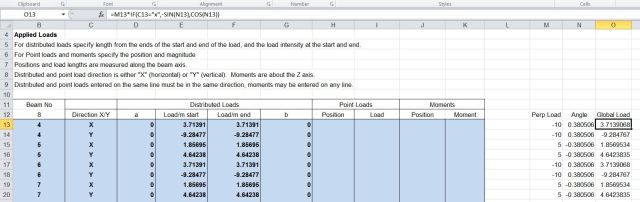
Calculation of global loads

Calculation of global loads, click for full size view

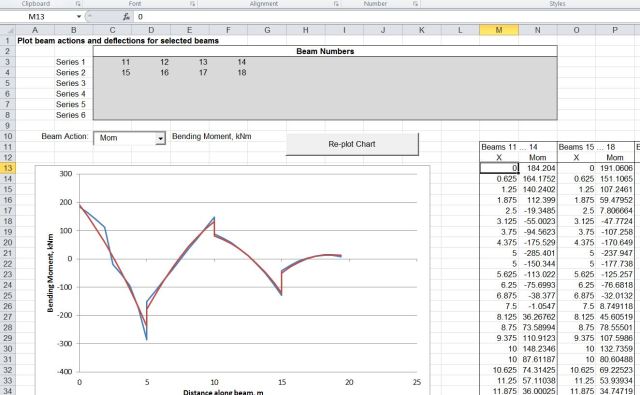
For each roof member two load lines are required, to calculate the X and Y loads, from the input perpendicular loads, and the beam slope.  The calculated global load can then be transferred to the input area.  The resulting output results and deflected shape are shown below:

Output Results

Output Results

Deflected shape

Deflected shape

This technique can be extended to allow quite sophisticated analyses; for instance it would be possible to include geometric non-linearity by adjusting the node coordinates after each run, or material non-linearity by adjusting the section properties. The only word of warning is that the rows below the designated data entry areas must not be used for other purposes.


Posted in Beam Bending, Excel, Finite Element Analysis, Frame Analysis, Newton, VBA | Tagged , , , , | 3 Comments

Frame4 Version 3.05; with support displacements

Hot on the heels of Version 3.04 comes Version 3.05.

A few days ago Julien asked if the Frame4 allowed for specified support deflections, to which I replied it would be added in the future.  Searching Google on the topic I found:
https://newtonexcelbach.wordpress.com/2009/05/11/frame-analysis-with-excel-%E2%80%93-7-shear-deflections-and-support-displacements/
from which I discovered that it had been done already!

Download from: http://www.interactiveds.com.au/software/Frame4.zip

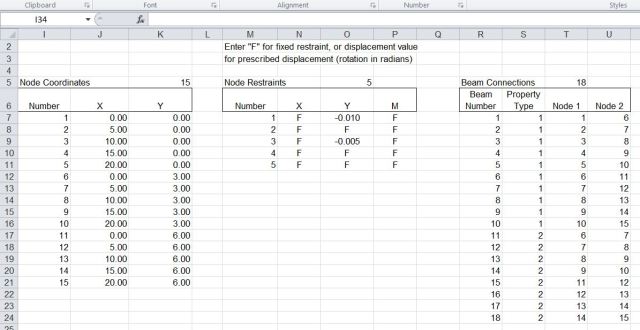
The new version has some small amendments to make it compatible with the Alglib solver, and adds some brief documentation.  The screen shots below show example input and output, and results from Strand7 for the same problem, which are in near exact agreement.

Support displacement input

Support displacement input

Frame4-6-2

Support displacement and reaction output

Frame4-6-3

Deflected shape x 200

Frame4-6-4

Horizontal beam moments

Frame4-6-5

Strand7 output, reactions for Node 1

Posted in Beam Bending, Excel, Finite Element Analysis, Frame Analysis, Newton, Strand7, VBA | Tagged , , , , | 7 Comments

Frame4 Version 3.04

In preparation for adding 3D functionality to the Frame4 spreadsheet I have rearranged the load input sheet, and in doing so I noticed that the fixed end reaction calculation was incorrect for cases where loads were applied to one member over two or more lines, and the fixed end moments were not equal.  That has now been fixed, along with some other minor amendments, and the new files (in xls and xlsb versions) may be downloaded from: Frame4.zip.

For details of installing the link to the compiled Alglib solvers see: https://newtonexcelbach.wordpress.com/2012/11/16/frame4-now-with-added-alglib ,
and in the event of problems registering the dll files see the comment from Tom dated December 5 2012.

New load input sheet

New load input sheet

Posted in Excel, Finite Element Analysis, Frame Analysis, Link to dll, Newton, VBA | Tagged , , , , | 1 Comment

Automating chart scale limits – update

I wrote about this function 2 1/2 years ago, and promptly forgot about it, but a few days ago brian provided an answer to a question that was raised shortly after it was first posted, concerning how to apply the function to secondary chart axes.

I have updated the spreadsheet to incorporate brian’s code (slightly modified), and the new version (including full open source code) can be downloaded from: SetScale2.zip

I have also added an example of the technique for plotting a function entered as text on the spreadsheet.  The procedure is:

  • Name cells containing the lower and upper limits for the X range: “xstart” and “xend” respectively.
  • Create a range “nsteps” with the value 1000 (or however many steps you would like in your graph)
  • Create a name “x” that will contain a rnge of x values, between the specified limits by entering: =xstart+xrange/(nsteps-1)*(ROW(OFFSET(Sheet1!$A$1,0,0,nsteps,1))-1) in the name “refers to” box (see picture below).
  • Create names “Y1vals” and “Y2vals” with the formulas: =EVALUATE(Sheet1!$B$17&”+x*0″) and =EVALUATE(Sheet1!$B$18&”+x*0″) (adjusting the cell references to the location of your function(s).
  • Create an XY (scatter) graph and set the data ranges to =SetScale.xls!x for the X range for both series and =SetScale.xls!Y1vals and =SetScale.xls!Y2vals for the two Y series

Posted in Charts, Excel, UDFs, VBA | Tagged , , , , | 13 Comments