The Hawkesbury River Bridge at North Richmond, NSW

Hawkesbury River Bridge from the North-West

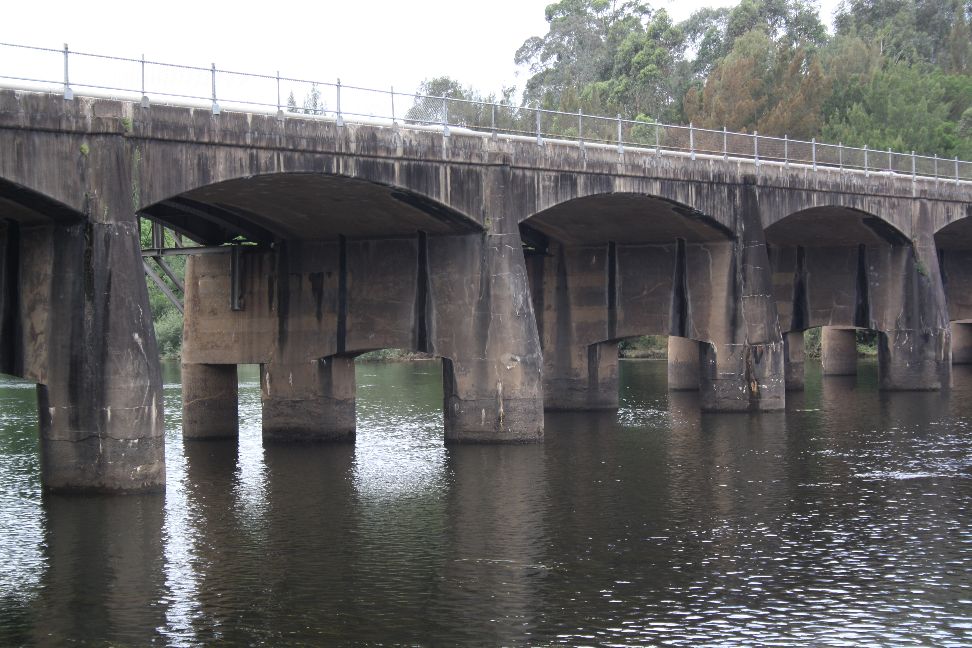
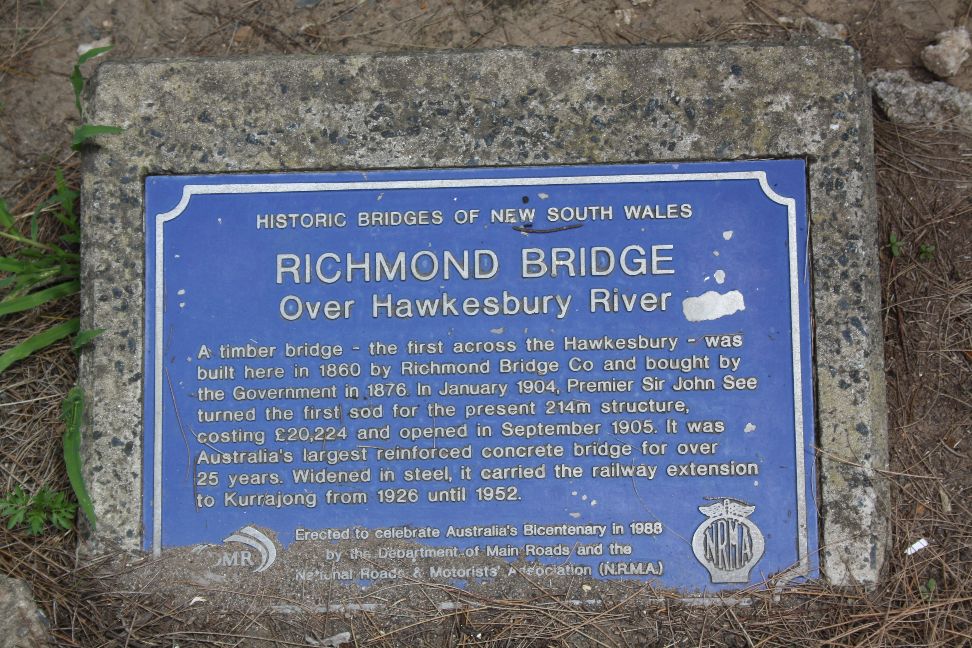
The bridge over the Hawkesbury River near North Richmond, North-West of Sydney, is one of the first reinforced concrete structures in Australia.  At the time of its construction it was the largest reinforced concrete bridge in the country, and it remained so for 25 years.

Hawkesbury River Bridge location

The bridge is one of a few examples of the Monier arch system in New South Wales.  The system was developed by Joseph Monier and licenced in Australia to the firm Carter Gummow and Co. and later to the firm Monash and Anderson.  Most of the structures built in Australia are in Victoria, including the Anderson Street Bridge in Melbourne.  The history of the structures in Victoria has been well documented, and can be found at Monash & Anderson’s Monier Arch Bridges.

The North Richmond Bridge is documented by the NSW Government Office of Environment and Heritage.

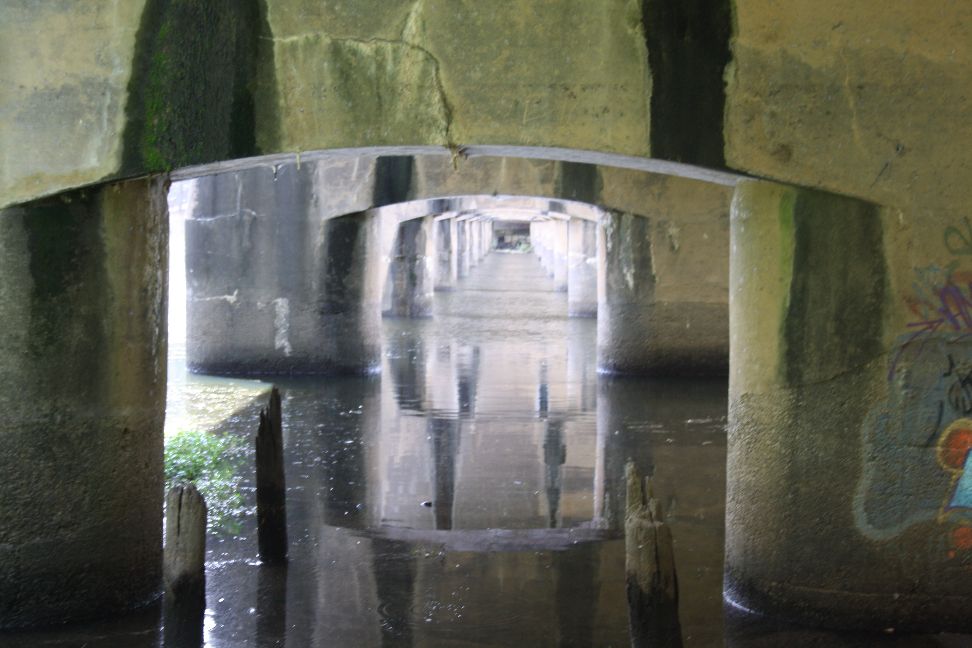
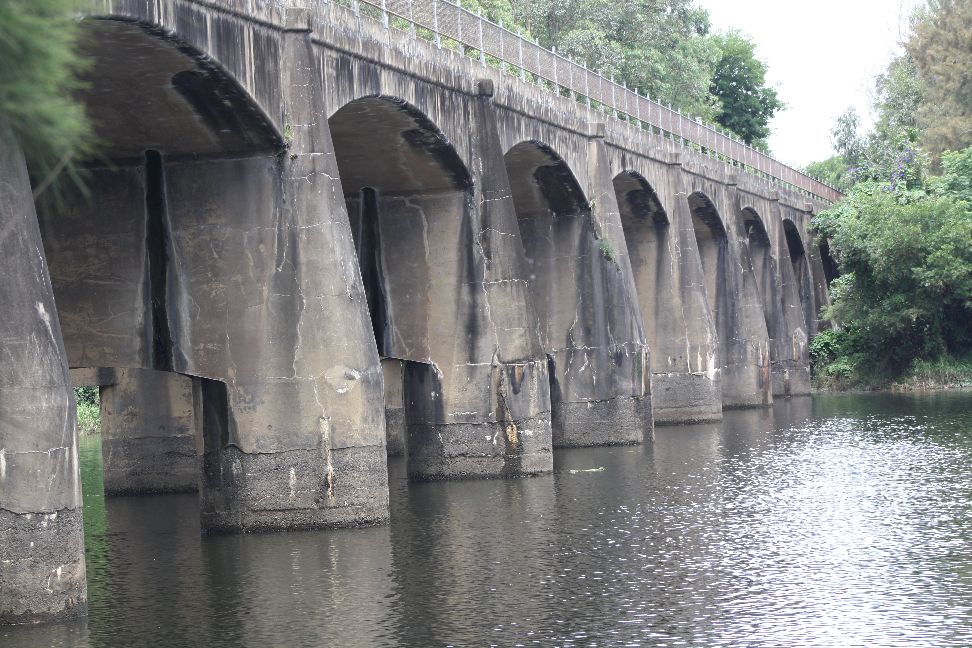
The original structure consists of 13 arch spans, monolithic with heavy concrete piers, consisting of twin concrete caissons founded on rock, joined by a deep headstock with curved soffit.

Arch spans monolithic with concrete piers

Caissons with curved soffit headstock

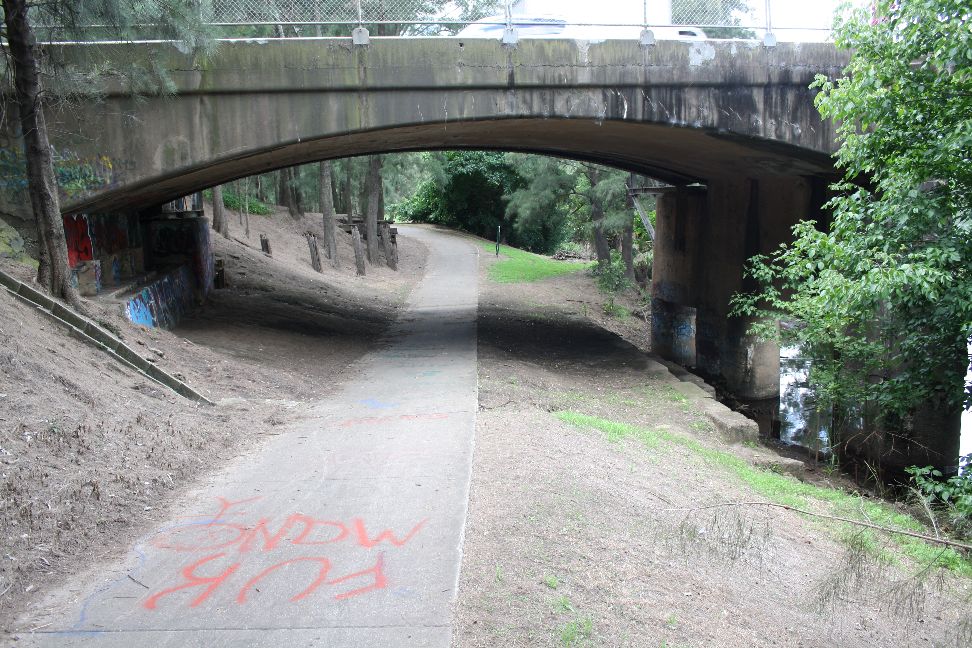
The northern end of the bridge can be accessed from Hanna Park, immediately to the north, which has an access path under the bridge, the path providing excellent views of the bridge and along the Hawkesbury River in both directions.

Access track under the northern span.

Hawkesbury River, looking West towards Blue Mountains

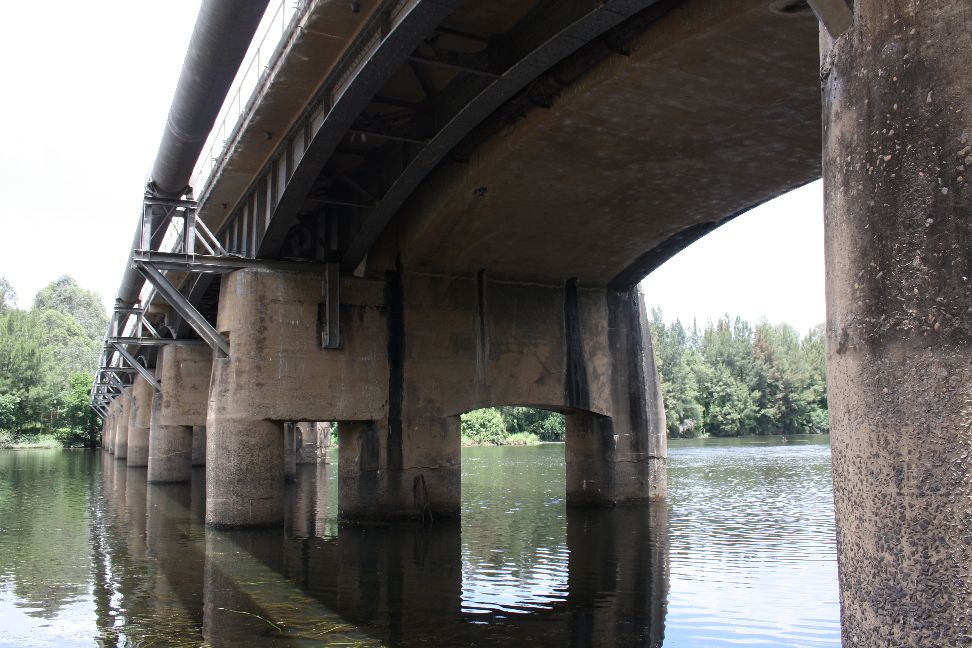
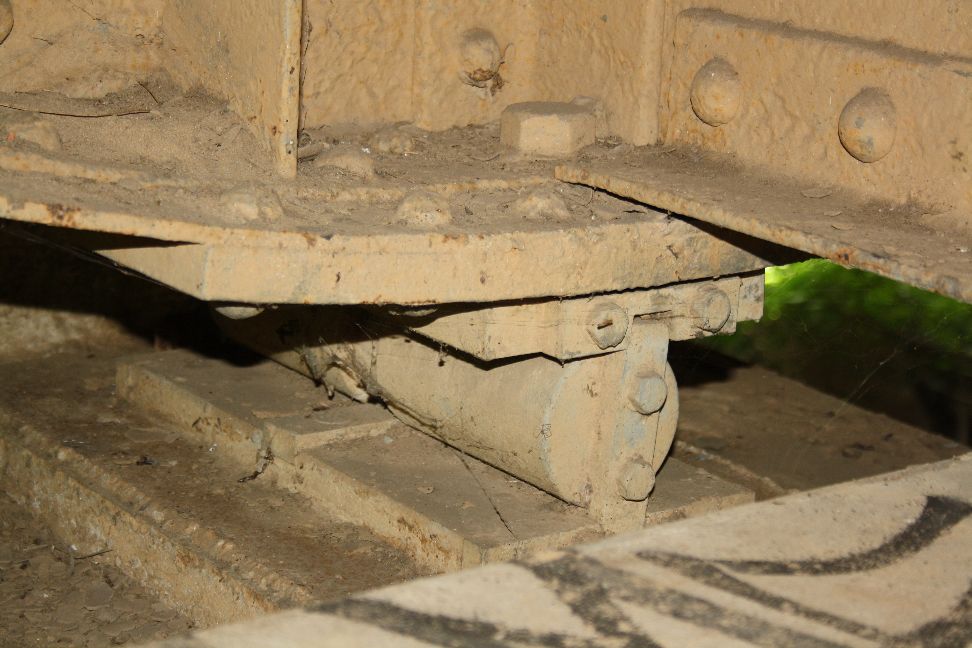
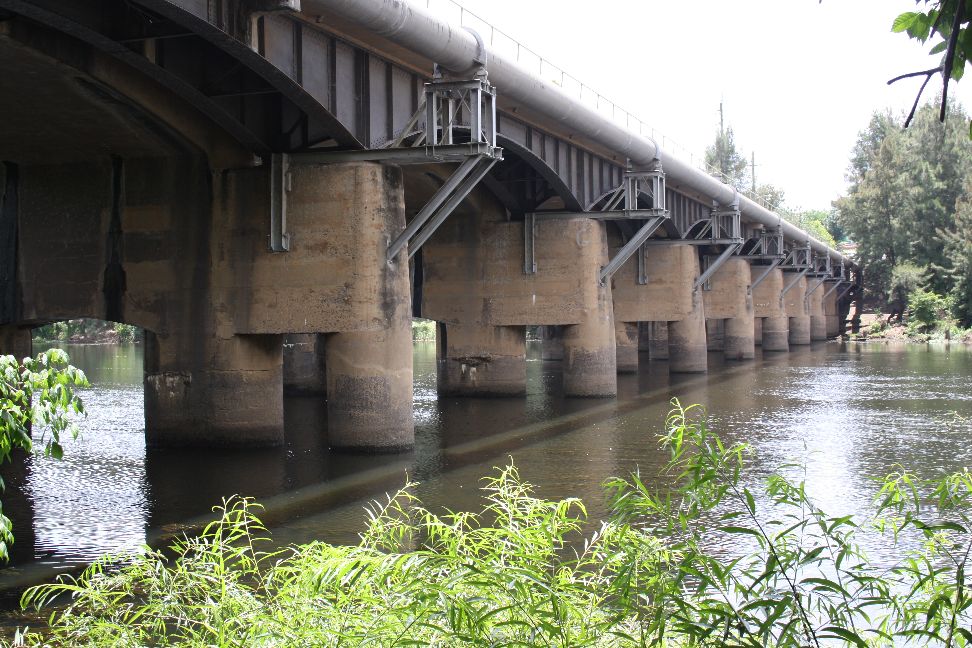
In 1926 the bridge was widened with the addittion of an additional pier and two steel girders, supported on steel rocker bearings, to provide a rail line, which has since been removed and replaced with an additional road lane.

Additional steel girder supports for rail line

Steel girder bearings

Steel girder addition viewed from the South-East

The south end of the bridge is not so easily accessible, the banks being heavily overgrown with weeds.

View from South West bank

Historic Bridges plaque

View from North-West

Posted in Arch structures, Historic Bridges, Newton | Tagged , , , | 2 Comments

LatPilePY 1.02

Following some discussion at Eng-Tips and elsewhere I have updated the LatPilePY spreadsheet, previously presented at Lateral pile analysis with PY curves …  This spreadsheet provides User Defined Functions (UDFs) to carry out the analysis of vertical piles under lateral loading, following the method described in the manual for the program COM624.  See the earlier posts for more details.  The new spreadsheet, including full open source code, can be downloaded from LatPilePY.zip .

The main change, as discussed in the Eng-Tips thread, is to the way in which the initial soil stiffness is calculated.  The soil stiffness is defined by a factor Ki which has units of Force/Length^3.  The previous version of the spreadsheet converted this factor to units of Force/unit deflection/unit length of pile by multiplying the Ki factor by the pile diameter (resulting in a factor independent of depth), whereas in COM624 the Ki factor is multiplied by the depth of the soil layer (resulting in a factor independent of pile diameter).  Both approaches clearly involve gross approximations, but to allow users to get a reasonable comparison with COM624 results I have now introduced an option to allow either method to be applied, with the COM624 method being the default (see screenshot below):

LatPile input; click for full sized view

Other significant changes are:
The calculation of the effective depth of layered soils has been amended to follow the COM624 method more closely.  Soil layers with varying strength and density affect the stiffness of lower layers in 3 ways:

  1. Where the ultimate soil resistance is controlled by wedge failure the failure load is affected by all the layers through which the wedge passes.
  2. Where the initial stiffness of a soil is related to the vertical pressure, this is affected by the density of the overlying soils.
  3. For deeper layers, where the ultimate resistance is controlled by soil flow around the pile, the failure stress of granular soils is related to the vertical pressure.

For this reason two separate effective depths are calculated at the top of each layer:

  1. The depth of soil, with the same properties as the layer, that would have the same ultimate resistance to wedge failure as the actual upper layers.
  2. The depth of soil, with the same density as the layer, that would have the same vertical pressure as the actual upper layers.

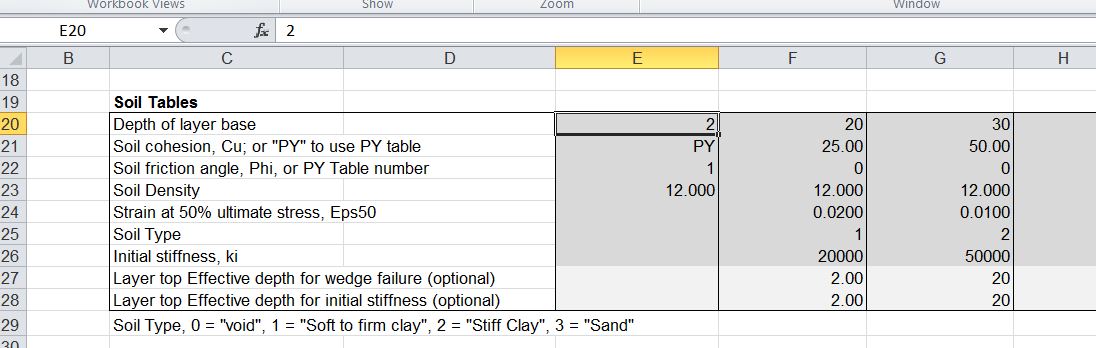
These two effective depths are calculated by the program, but provision has also been made to specify override values in the Soil Properties Tables; see screenshot below:
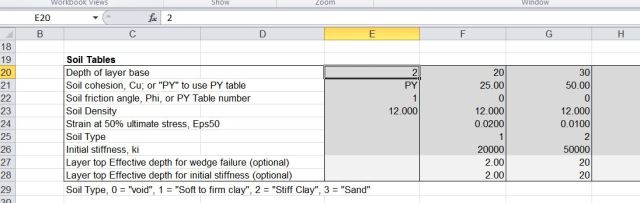
Soil property input, including new optional effective depth rows

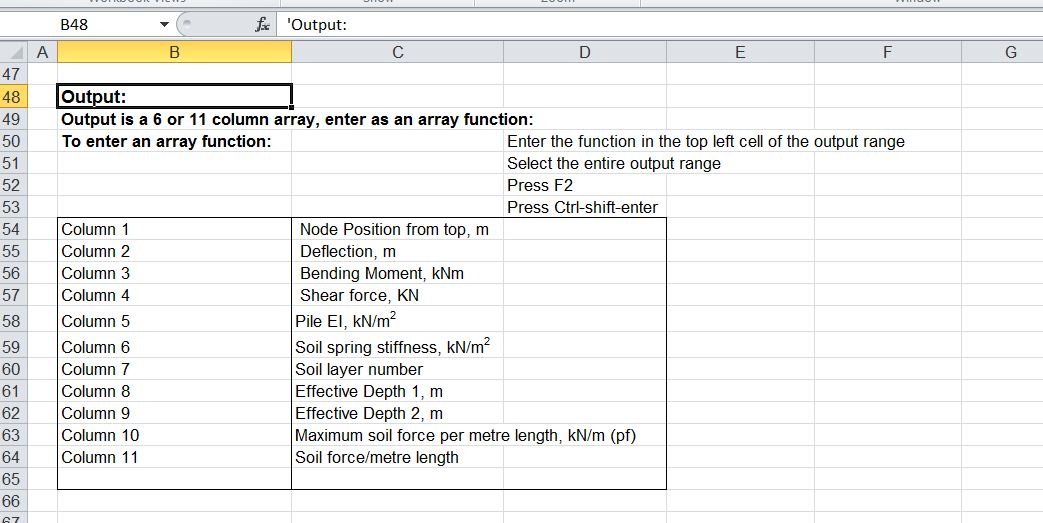
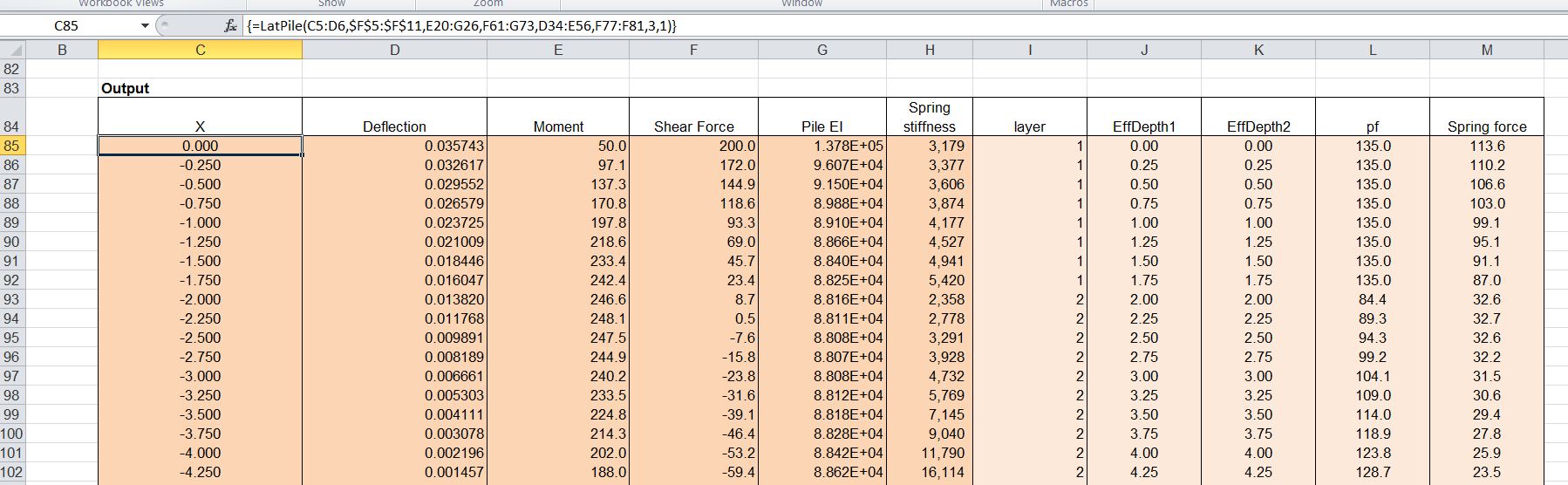
The other major change is that additional columns may (optionally) be added to the output array, providing details of the calculated effective depths, ultimate soil resistance, and calculated soil force/unit length of pile.

LatPile output options

LatPile output with Output Option 3 (11 columns)

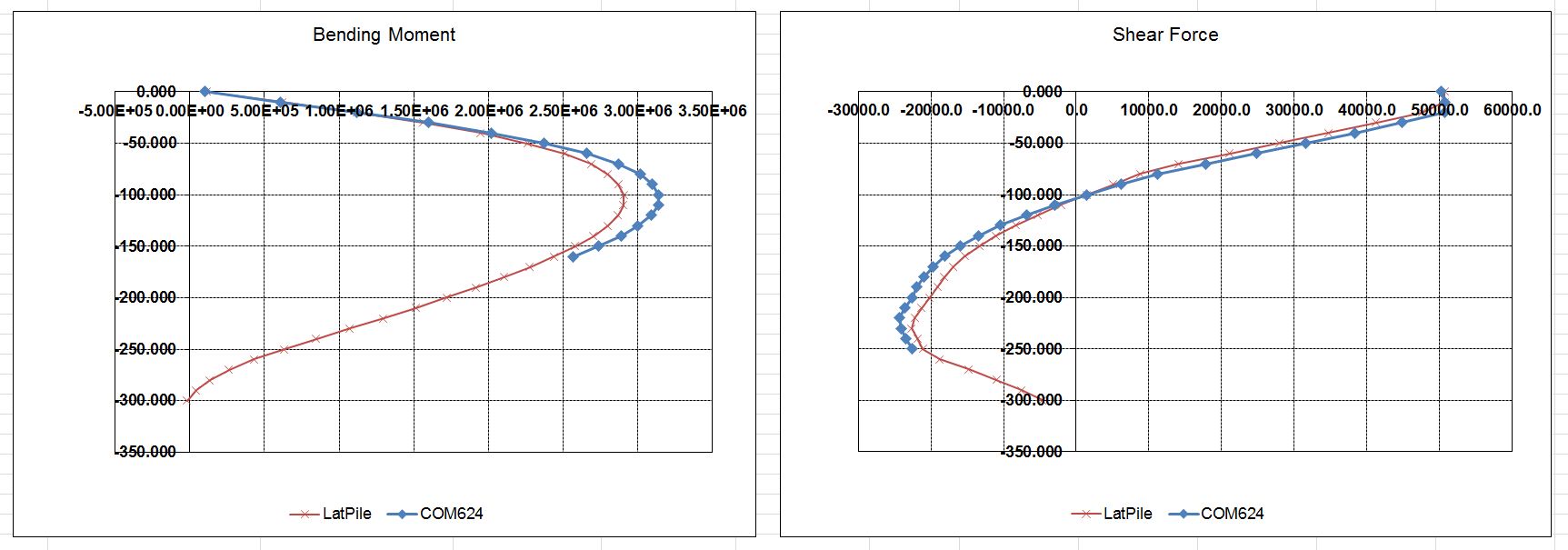
The spreadsheet results have been compared with 3 examples from the COM624 manual (full details are included in the download file). The first example is for a single layer soil, and shows very good agreement in all respects:

COM624 Example 1
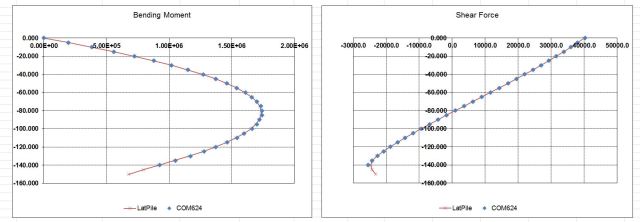
COM624 Example 1

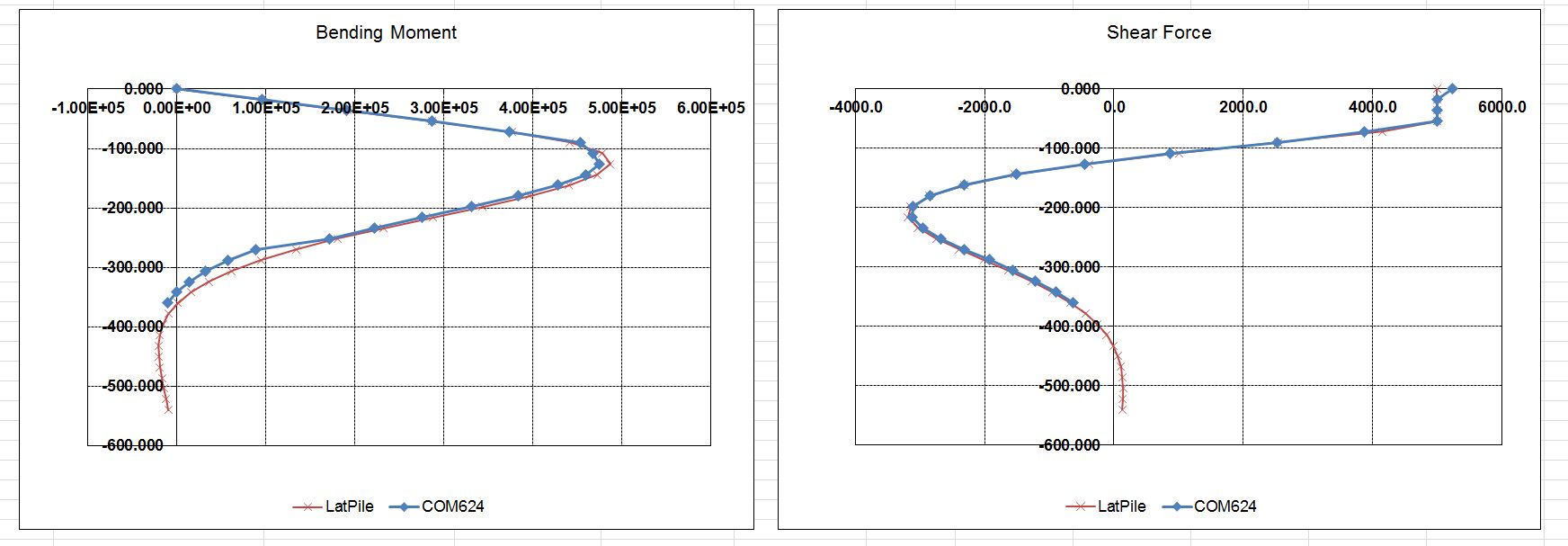
The second example is for a layered soil with varying soil types and densities.  When user defined effective depths have been used reasonably good agreement was found:

COM624 Example 2; User defined effective depths

COM624 Example 2; User defined effective depths

Where the effective depth has been calculated by the spreadsheet the agreement was less good, but maximum bending moments and shear forces are within about 10%.  The reason for the difference seems to be that the spreadsheet calculates an effective depth based on density, whereas COM 624 uses the actual depth in these cases.

COM624 Example 2; spreadsheet calculated effective depths
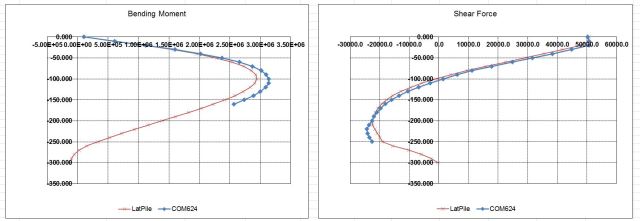
COM624 Example 2; spreadsheet calculated effective depths

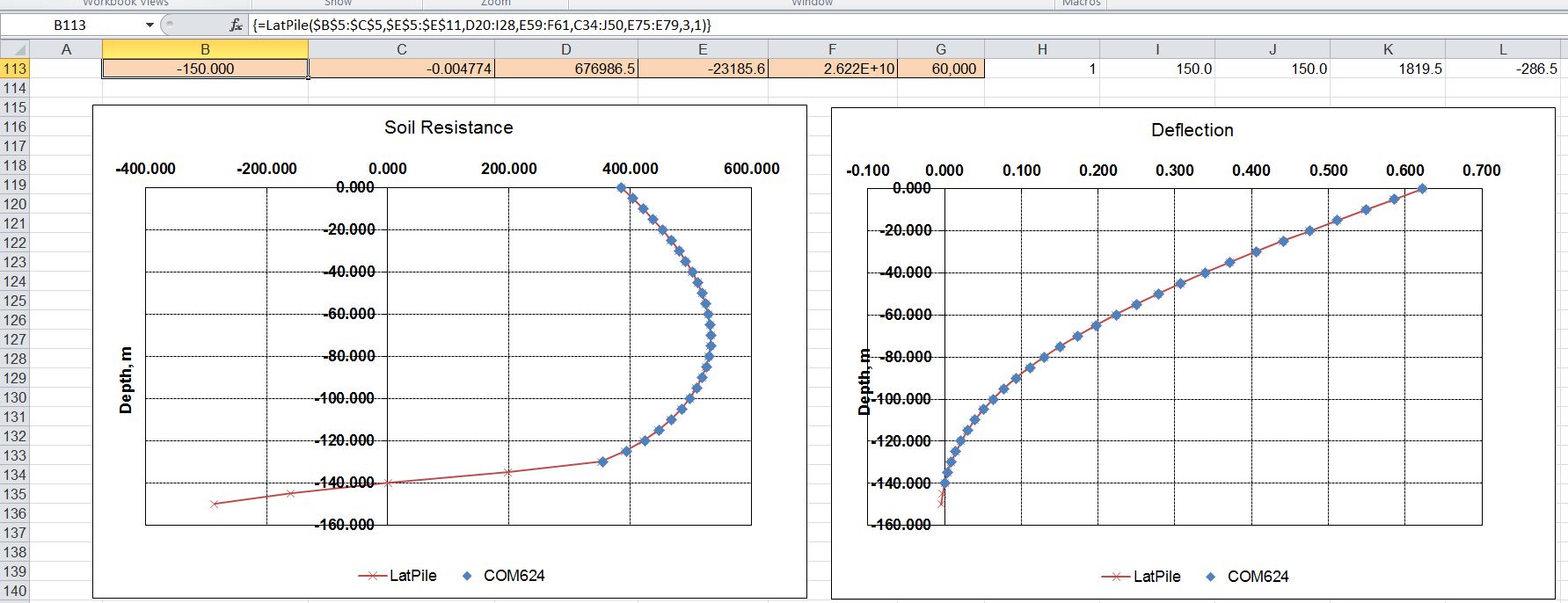
The Example 2 file  also compares the PY Curves generated by the spreadsheet with those given in the COM624 manual, finding excellent agreement:

PY curves for COM624 Manual Example 2

The final example is Example 4 from the COM624 manual, which uses 7 user input PY curves. In this case the COM624 program interpolates stiffness values between the curves above and below for each point down the pile, whereas the spreadsheet uses the values from the specified curve to apply to each layer. The spreadsheet input for this example is shown below:

Input for COM624 Example 4

In spite of the different method of application of the stiffness from the PY curves, the spreadsheet shows good agreement with the COM624 results:
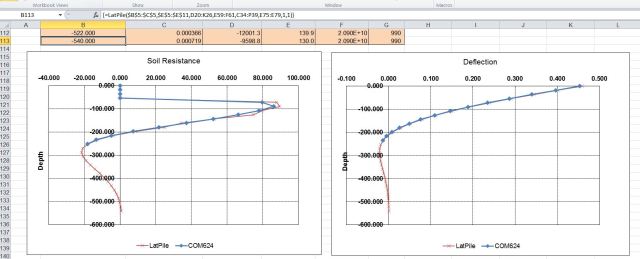
Results for COM624 Manual Example 4

Results for COM624 Manual Example 4

Posted in Concrete, Excel, Geotechnical Engineering, Newton, UDFs, VBA | Tagged , , , , , , | 3 Comments

The Family Tree

A great song with an excellent video from Sydney based band The Former Love (formerly The former Love Pirates):

(Click on Vimeo to visit site, or click play, then full screen button:

Family Tree by The Former Love from Kerinne Jenkins on Vimeo.

Posted in Bach, Films | Tagged , , | Leave a comment

Comparing floating point numbers

Some of the issues raised in this post:
https://newtonexcelbach.wordpress.com/2011/12/20/when-does-35-not-equal-35/
arose when writing the functions for the previous post on combining arrays.  In particular, when values from the two arrays are “equal” the function should create one entry in the combined array, not two, and I wanted the user to have some control over the tolerance that would be regarded as equal.

The result was three new User Defined Functions (UDFs), EqualT(), LTEqualT(), and GTEqualT().  The input and criteria for the new functions are shown in the screenshot below:

Floating Point comparison UDFs, click for full size view

The basis of the function is to find the value abs(a/b -1), where b is the lesser of the two values, and a is the greater.  Is this value is less than the specified tolerance then the two values are treted as being equal.  If the tolerance is not specified it defaults to 1E-14.

The use of a relative tolerance raises a problem if both numbers are very close to the minimum values allowed by the floating point number system.  For this reason the numbers are treated as being equal if the absolute value of the difference is less than a constant, MinReal, currently set to 1E-300.  The code for the EqualT function is shown below, anad all code is available in the download file: https://www.interactiveds.com.au/software/CombineArray.zip

Private Const MinReal As Double = 1E-300
Private Const DefaultTol As Double = 0.00000000000001
Function EqualT(Value1 As Variant, Value2 As Variant, Optional Tol As Double = DefaultTol) As Boolean
' Test if Value1 is equal to Value2 within Tol
    If Abs(Value1 - Value2)         EqualT = True
        Exit Function
    End If

    If DiffRatio(Value1, Value2) < Tol Then         EqualT = True     Else         EqualT = False     End If End Function Function DiffRatio(Value1 As Variant, Value2 As Variant) As Double Dim BVal As Double, TVal As Double     If Abs(Value1) > Abs(Value2) Then
        BVal = Value1
        TVal = Value2
    Else
        BVal = Value2
        TVal = Value1
    End If
    DiffRatio = Abs((TVal / BVal) - 1)

End Function

Finally, in a comment on the previous post Lori Miller provided an on-sheet solution that will combine multi-column arrays in the same way as the UDF, other than that the precision of the comparison is fixed. The formulas are included in the spreadsheet, and the output is shown, compared with the CombineArray function in the screenshot below:

CombineArray UDF and on-sheet functions

Note that the on sheet formulas return values a 5 from the first array, and just over 5 from the second, whereas for the UDF results the tolerance has been set high enough for these two values to be treated as equal.

Posted in Arrays, Excel, UDFs, VBA | Tagged , , , , , | 4 Comments

Two dystopian futures, in short

Two of my daughter’s short films are now available on the Web:

Precious

In a dystopian future, two men meet in an underground tunnel for an exchange of stolen goods.

Liam lives in the stacks, making small black market deals and dreaming of getting out of the city walls. The natural world is a distant memory for those who live in the slums of the city and the passes out are restricted to those with money. Conrad is young, rich and brash and thinks he can buy anything he wants. To him the world is there for his taking and those who aren’t as well off as him are just lazy.

Conrad has promised Liam a way out of the city and a better status in life, middle class status. The upgrade will give him a clean room, a small pension and a cremation service. For this and the transport pass Liam manages to steal an item for Conrad that he has been coveting.

The exchange seems set to give both parties what they want until Liam realises that Conrad has only come through on part of his deal. Ignoring Liam’s desperation and actual needs leads to a heated situation and neither party will leave with what they came for.

Culling is at the AFTRS site.  You need to register (click on the AFTRS link to the left, then on the Register Now link at the AFTRS site), but this is free and gives you access to over 30 films.

Culling

Culling

*This film can only be viewed within Australia

In an irradiated subterranean future where the unproductive are marked for death, a young man faces a terrifying choice between his duty to his father and his feelings for the girl he is supposed to terminate.

Posted in Bach, Films | Tagged , , | 1 Comment