More on the Excel Evaluate function

Previous posts have presented the Eval() User Defined Function, using the Evaluate function in VBA to evaluate mathematical functions displayed as text (Evaluate Function, Evaluate Function – Update).  It was recently pointed out by Jeff Weir that the Evaluate function has its origins as an Excel 4.0 macro command, which can be used in conjunction with defined names to evaluate text functions without any coding at all.  A couple of examples are included in the new version of the Eval2.xls spreadsheet, and more details are given here: The EVALUATE Function in Excel.

Unlike the Eval function, where parameter values are read from ranges on the worksheet, when the Evaluate function is used in a name definition the parameters must either be converted to numerical values, or must be defined as named ranges.  Playing with this it occurred to me that it would be useful for my Eval UDF to have the option to return a text string with the function parameters converted to values, rather than the evaluated function value, so I have added this capability.  I have also added a new function, SubstituteA, that works the same as the built in Substitute function, but on a range of values, rather than just 1.  This in effect does the same as the Eval UDF when set to return a text string.  Finally I have added a simple UDF, EvalText(), to evaluate a text string where no substitution is required.

The updated spreadsheet can be downloaded from Eval2.xls for the Eval function with some simple integration examples, or Eval-Integration.xlsb for a version including some heavy duty integration functions (including the Tanh-Sinh Integration function).

The screenshots below show the documentation for the new functions, and two examples:

Eval, SubstituteA, and EvalText functions

Eval Function examples


Perhaps the most useful application of the Evaluate Function in conjunction with defined names is in plotting xy charts of functions entered as text, without the need to generate values on the spreadsheet.  The next post will describe this in more detail.

Posted in Excel, Newton, Numerical integration, UDFs, VBA | Tagged , , , , , , , | 4 Comments

Interpolation Update

The interpolation functions in IP2.xls have been given an overhaul:

  • The linear and quadratic interpolations routines have been modified to accept negative values.
  • All the routines have been modified to convert the table range to an array, rather than using a range object.
  • Notes and an example of the InterpA function have been added.

Interpolation Function Examples

The new file can be downloaded from the link above, and as usual includes full open source code.

Also note that a variety of other interpolation and curve fitting functions are available in:

Posted in Excel, Maths, Newton, UDFs, VBA | Tagged , , , , , | 4 Comments

ULS design of reinforced concrete to AS 3600 and ACI 318

Following on from the previous post I have modified my RC Design Functions spreadsheet to incorporate the US ACI 318 design code requirements, as well as the recent revision to the Australian code, AS 3600.  The revised spreadsheet will be uploaded in a few days after further testing.

The ACI and Australian codes are very similar in basic approach, but in the current documents there are a number of significant differences:

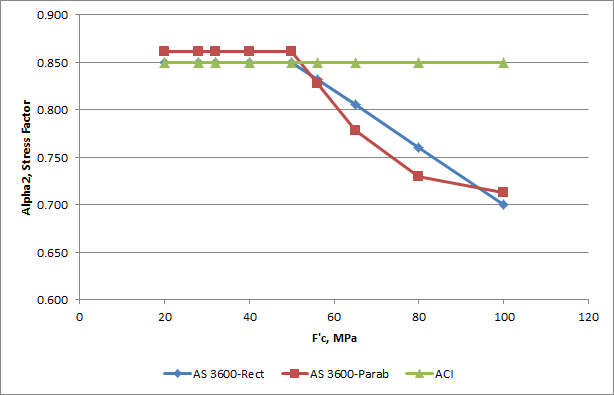
  • The concrete stress factor applicable to the rectangular stress block is the same (0.85) in both codes for concrete up to 50 MPA, but  in ACI 318 the factor remains constant for all concrete grades, whereas it reduces to 0.7 for 100 MPa concrete in AS 3600.
  • The strength reduction factors are slightly higher (i.e. less reduction) in ACI 318 than AS 3600, and ACI 318 has different strength reduction factors for helical and rectangular ties, in compression controlled sections.
  • The transition from the tension controlled stress reduction factor to the lower compression controlled values is controlled by the axial load in AS 3600, and by the tension steel strain in ACI 318.  The result is that the factor starts to reduce at a much lower axial load in AS 3600 than in ACI 318.
  • ACI 318 applies an additional reduction factor to concrete stresses for sections under uniform compression, as an allowance for unspecified load eccentricity, whereas AS 3600 specifies a minimum eccentricity.

The graphs below compare the stress block depth factor (Gamma) and the concrete stress factor (Alpha2) for AS 3600 and ACI 318.  Also compared is the equivalent rectangular stress block parameters derived from the Eurocode 2 parabolic-rectangular stress block. This stress block was converted to a rectangular block with the same total force and centroid location, for a rectangular section.  Since AS 3600 allows the use of any stress block “defined by recognized simplified equations”, the parabolic-rectangular block is described as “AS 3600-Parab”.   Note that ACI 318 also permits the use of “any other shape that results in prediction of strength in substantial agreement with results of comprehensive tests.”
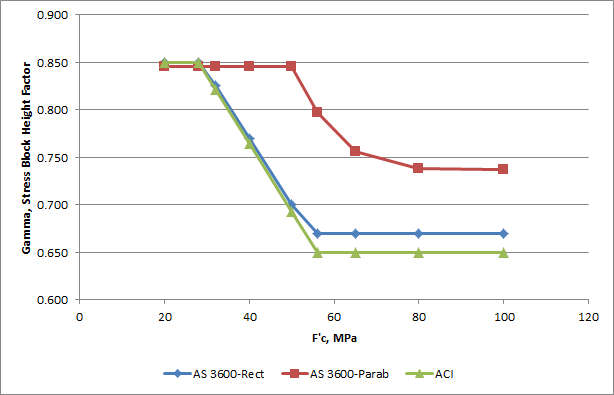
Stress Block Depth Factor (Gamma) vs Concrete Grade, MPa

Concrete Stress Factoer (Alpha2) vs Concrete Grade

The combined effect of variation in the two factors is shown in the graphs below.  The product of Gamma and Alpha2 is proportional to the force per unit width, and is referred to below as the Force Factor.  The product of the Force Factor and (1 – Gamma/2) is proportional to the moment per unit width, and is referred to the Moment Factor.

Force Factor vs Concrete Grade

Moment Factor vs Concrete Grade

It can be seen that both factors are in close agreement for the two codes up to 50 MPa, but diverge significantly for higher strength grades.  The curves for the parabolic-rectangular stress block are significantly different for the lower strength grades, but closer to AS 3600 for higher strengths.

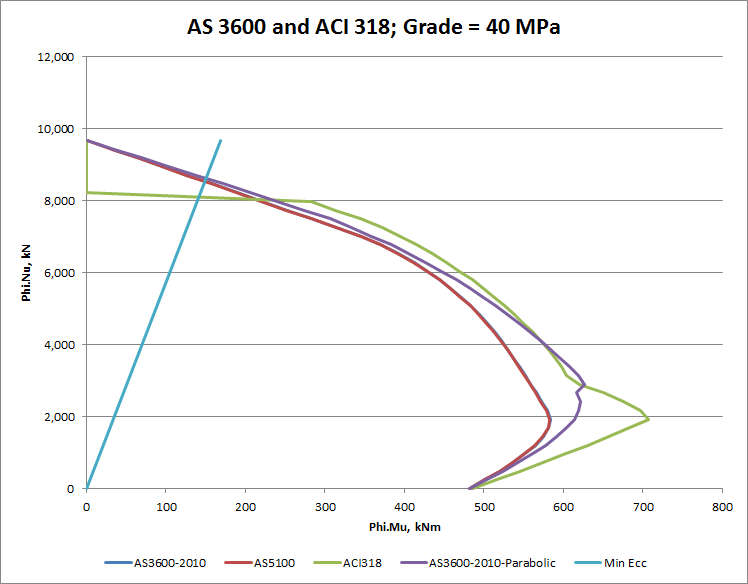
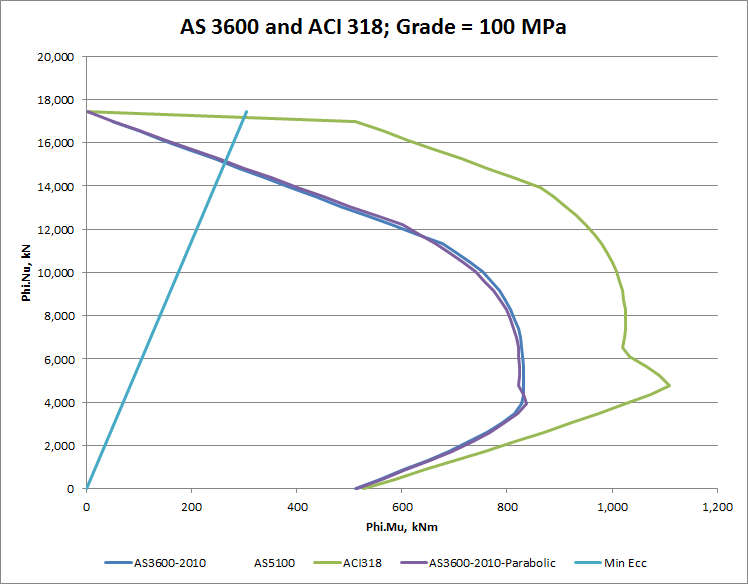
The combined effect of these variations for a 350 mm deep section is shown in the interaction diagrams below:

F'c = 32 MPa
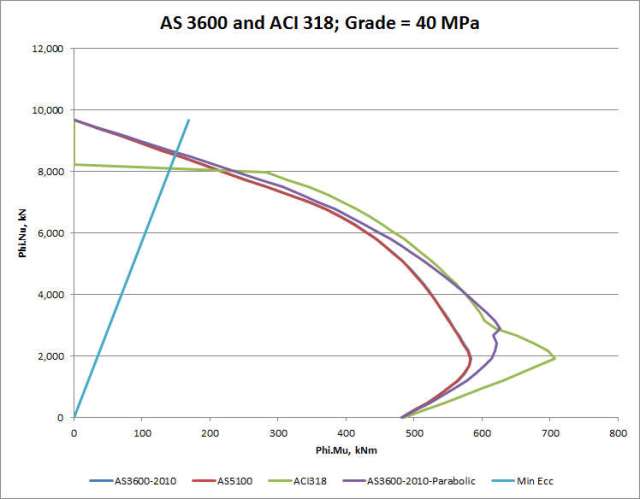
F'c = 40 MPa
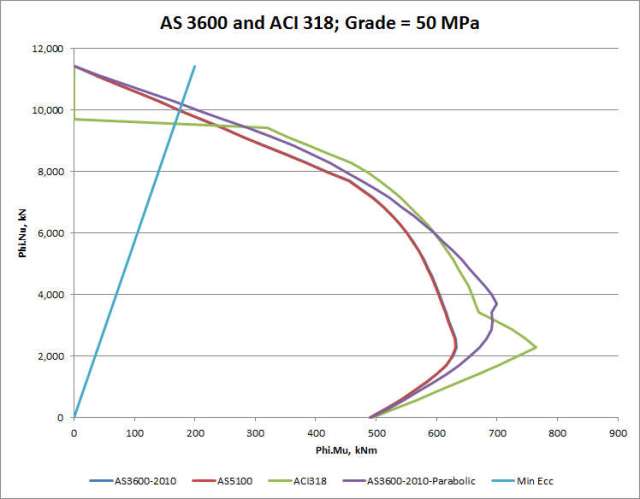
F'c = 50 MPa
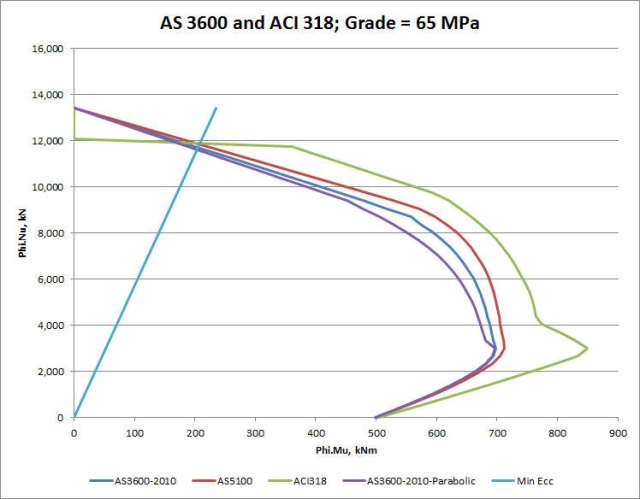
F'c = 65 MPa
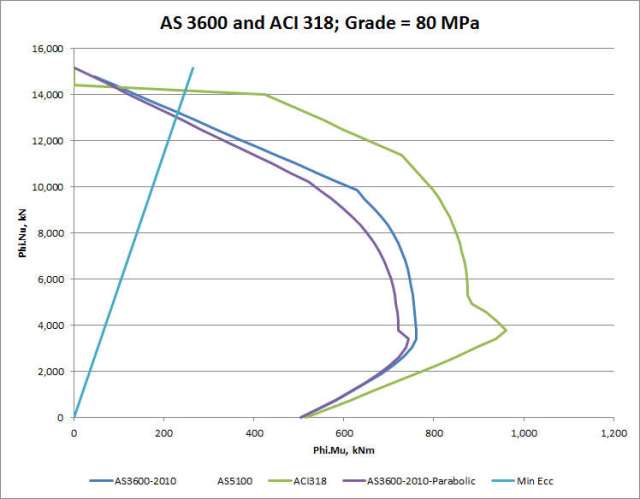
F'c = 80 MPa

F'c = 100 MPa

These graphs show that:

  • The different concrete stress block factors have little effect at zero or low axial load.
  • The differences in the method of calculation of the strength reduction factor (phi) in the transition from “tension controlled” to “compression controlled” sections results in AS 3600 being significantly more conservative for axial loads approaching the balance load.
  • For higher axial loads the results of the two codes are similar for strength grades up to 50 MPa.  The ACI code gives slightly higher values than the AS 3600 rectangular stress block (because the strength reduction factor is higher), but the results from the parabolic stress block with AS 3600 factors are very close to the ACI values.
  • The maximum axial load in AS 3600 (controlled by minimum load eccentricity) is a little higher than the AVI 318 value (controlled by additional reduction factor) for strength grades up to 50 MPa.
  • For strength grades above 50 MPa the compression controlled strength from ACI 318 becomes progressively greater than that found in AS 3600, with either the rectangular or parabolic stress blocks.  This difference is due to the constant concrete stress factor used in ACI 318, compared with a reducing factor for the rectangular stress block in AS 3600, and the reduced ductility in the parabolic-rectangular stress block data in Eurocode 2.  The ACI code therefore appears to be unconservative in this respect.
  • The rectangular and parabolic stress blocks used for AS 3600 give almost identical results at 100 MPa, but the parabolic stress block gives slightly lower results for concrete grades of 65 MPa and 80 MPa.  The rectangular stress block may therefore be slightly unconservative for high axial loads with these strength grades.

The next post in this series will compare AS 3600 with the Eurocode 2 results, and the two UK codes for concrete in buildings (BS 8110) and bridges (BS 5400).

Posted in Beam Bending, Concrete, Newton | Tagged , , , , , | 3 Comments

AS 3600 (Concrete Structures Code) Amendment 1

The first amendment to the current (2009) version of the Australian Standard for Concrete Structures (AS 3600) was recently released for free download.  SAI Global have not seen fit to notify purchasers of the standard of this amendment, but it does contain very significant corrections to mis-prints that appeared in the original release after approval of the final draft by the Code Committee.

The revisions can be downloaded from AS 3600-2010 Amendment 1

I will be posting revisions to my concrete design spreadsheets over the next few days. These will take account of the new amendments, and also include discussion of the best way to handle alternative concrete stress blocks, particularly for high strength concrete.

Posted in Beam Bending, Concrete, Newton | Tagged , | Leave a comment

Maximum distance between two points

I have just written a short User Defined Function (UDF) to find the maximum distance between any two points from a list of coordinates, and since it may be useful to others, I will post it here.  Here is the code:


Function MaxDist(XRange As Variant, YRange As Variant) As Variant
    Dim i As Long, j As Long, MDRes(1 To 1, 1 To 4) As Double, Dsq As Double, MaxD As Double
    Dim Maxi As Long, Maxj As Long, NumRows As Long, STime As Single

    If TypeName(XRange) = "Range" Then XRange = XRange.Value2
    If TypeName(YRange) = "Range" Then YRange = YRange.Value2

    STime = Timer
    NumRows = UBound(XRange)

    If UBound(YRange) <> NumRows Then
        MaxDist = "X and Y ranges must be the same length"
    End If

    If NumRows < 2 Then
        MaxDist = "Must be at least 2 pairs of coordinates!"
    End If

    For i = 1 To NumRows - 1
        For j = i + 1 To NumRows
            Dsq = (XRange(i, 1) - XRange(j, 1)) ^ 2 + (YRange(i, 1) - YRange(j, 1)) ^ 2
            If Dsq > MaxD Then
                MaxD = Dsq
                Maxi = i
                Maxj = j
            End If
        Next j
    Next i
    MDRes(1, 1) = MaxD ^ 0.5
    MDRes(1, 2) = Maxi
    MDRes(1, 3) = Maxj
    MDRes(1, 4) = Timer - STime

    MaxDist = MDRes
End Function

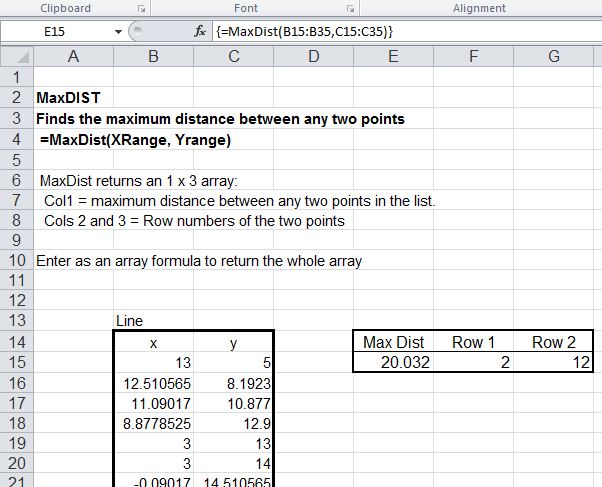
The function returns the maximum distance between any two points and the row numbers of the two points.  To return all three values enter as an array function:

  • Enter the function as a normal function.
  • Select the cell with the function and the adjacent two cells
  • Press F2 (Edit)
  • Press Ctrl-Shift-Enter

This function and a variety of other coordinate geometry related functions are included on the spreadsheet IP2.xls, with full open source code.  More details of IP2 here.

MaxDist in action

Posted in Coordinate Geometry, Excel, Maths, Newton, UDFs, VBA | Tagged , , , , | 1 Comment