In 2007 I wrote a paper on buckling of confined steel tunnel liners for the ANZ Geomechanics Conference in Brisbane, and in the course of that I noticed that the calculated buckling load of an unconstrained pipe subject to uniform radial load was significantly different for different methods of analysis. The most widely quoted theoretical solution (for instance, Roark’s Formulas for Stress and Strain, Edition 7, Table 15.1.8) gives a buckling load (radial load per unit length) of 3EI/R³, and this was supported by an incremental non-linear analysis, including geometric non-linear effects. On the other hand a linear buckling analysis, based on an eigenvalue analysis, gave a buckling load very close to 4EI/R³. I did not find the reason for this difference at the time, but I was reminded of the problem by a recent thread at the Eng-Tips forum, and decided to investigate it further using the buckling analysis spreadsheet presented here earlier this year.
I have modified the spreadsheet to allow the input of a quarter circular arch (which with appropriate end conditions is equivalent to symmetrical effects in a full ring), or for a smaller portion of an arc. The spreadsheet also allows different options for the change in direction of the applied load after deformation of the ring (for reasons that will become apparent), and the ring may be either specified with a constant cross section or a series of stepped sections. The modified spreadsheet, including full open source code, is available for free download.
For the purposes of this investigation the end conditions were set as follows:
- Base: restrained against rotation and vertical translation
- Top: restrained against rotation and horizontal translation
These end conditions make the quarter circle equivalent to a full circle for actions that are symmetrical about the X and Y axes.
The options for the application of the load after displacement of the point of application are:
- The load remains normal to the point of application, appropriate for loading by a fluid pressure.
- The load direction remains unchanged.
- The load remains directed towards the original centre point.
Option 1 may be modelled with either uniform loads applied to each element of the ring, or with point loads applied to the mid point of each element. Options 2 and 3 require the use of point loads.
The model may be subdivided into any number of straight elements, but there is little increase in accuracy with more than about 40 elements, and the analysis becomes very slow if 100 or more elements are used.
The procedure for the analysis is:
- Calculate node coordinates for the specified radius and number of elements
- Apply linearly increasing deflections to each node.
- Apply radial unit load/unit length, either to each element as a distributed load, or to the mid-point of each element.
- Analyse the structure for this loading, to find the X and Y deflections at each node.
- Scale the deflections so that the maximum resultant deflection is 1 unit, and add these normalised deflections to the original circular arc node positions.
- If the loads are being applied as node loads, adjust the load direction according to the chosen option (distributed beam loads are automatically applied as perpendicular to the member direction).
- Repeat until the change in maximum resultant deflection is less than the specified tolerance.
- The buckling load is then 1/maximum resultant deflection
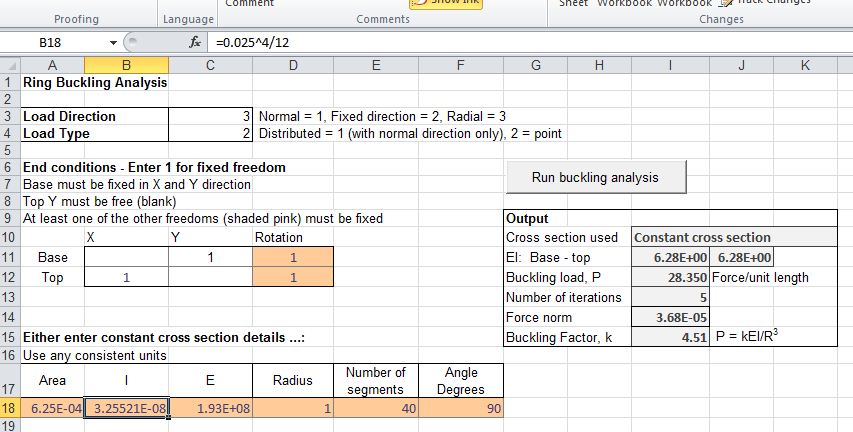
Input and results for the example given in the Eng-tips discussion are shown in the screen shot below. This is a steel ring of 25 mm square cross section and 1000 mm radius to the centroidal axis. The output shown is for the case where the applied load remains radial.

Ring Buckling Input and Output
The spreadsheet gives the following results for the three load direction cases (k = PR³/EI):
- Load remains perpendicular to elements; k = 3.01
- Load direction remains unchanged; k = 4.01
- Load direction remains radial; k = 4.51
These values compare well with the theoretical values quoted in Reference (1), which gives:
- k= 3.0
- k = 4.0, most common value (but see below)
- k = 4.5
It should be emphasised that these values are for symmetrical buckling shapes. If the ring is free to deform asymmetrically the buckling load may be greatly reduced, and Reference (1) quotes a k value of only 0.701 for a ring subject to constant direction loading and free to buckle in an asymmetric manner.
References: (1) “Critical Constant-“Directional Pressure on Circular Rings and Hingeless Arches”; Robert Schmidt; Journal of Applied Mathematics and Physics (ZAMP), Vol. 31, 1980









 Newton Excel Bach, not (just) an Excel Blog