Importing tab delimited files and clearing large ranges

Wray Sisk commented on Importing text files with VBA – 3, asking if it could be modified to read tab delimited files.

It could be, and has been; download here: Text-in2.ZIP

It turned out to be a simple task; just the addition of one line to the splittext() function:

 If LCase(Separator) = “tab” Then Separator = Chr(9)

To allow the use of other non displaying characters, and also so the code for tab (9) could be used instead of “tab” I also added:

If Val(Separator) > 0 Then Separator = Chr(CLng(Separator))

and changed the data type of separator from string to variant.

Whilst changing the spreadsheet I noticed that I had commented in the post about the very slow performance of Excel 2007 in clearing large ranges.  There is a solution to this one, the slow down is associated with the Google Desktop COM add-in,  and if you de-activate this the problem goes away.  More details from Charles Williams here: Google Toolbar Slows Excel

Posted in Excel, UDFs, VBA | Tagged , , , , , | 2 Comments

You can’t count on money

An interesting bug is reported at Daily Dose of Excel:
Code snipit to test

If you use a variable of data type currency as a counter in VBA you get some very strange behaviour.  The function below returns the result of counting between the specified limits:
Function CheckCurrency(startval, endval)
Dim c As Currency

For c = startval To endval
Next c

CheckCurrency = c

End Function

The function should return a value one greater than “endval”, but the screen shot below shows the results of using currency as a counter:

currency

Just to prove it is the currency data type causing the problem, here are the results of the same function, with the counter changed to a long:

currency1

The message is, don’t count on currency.

Posted in Excel, VBA | Leave a comment

Happy Birthday Newton Excel Bach

Newton Excel Bach is one year old today.   To mark the occasion I have downloaded the statistics for number of hits on each post, and pasted them into an Excel worksheet.  The link to each post is preserved in the spreadsheet, so it makes a convenient index to what has been posted over the year, which can be downloaded here.

The top end of the list is shown in the screen shot below:

First Year Statistics

Firts Year Statistics


It’s interesting that the posts covering importing of text files are by far the most popular, and a good proportion of the people reading these posts were directed here from a comment on a Daily Dose of Excel post which is about 4 years old.  Clearly many people have an issue with the built in methods of importing text files in Excel.

At the other end of the table, the least popular post was alice through the looking-glass, or how to shake hands with an alien , which I think was a bit of a shame, so you can all click on the link and read it now 🙂

Posted in Bach, Computing - general, Excel, Newton | 3 Comments

IP.xls updated

The spreadsheet IP.xls has been updated (previous post) with the addition of a function to find the minimum perpendicular distance from a point (or series of points) to a polyline: Pdist

=PDist(Line,Points)

Line is a range with at least two rows containing XY coordinatesof the polyline.  Points is a range with XY coordinates of one or more points.

Pdist returns an array of 3 values for each point:

The distance from the point to the nearest segment, and the X and Y components of this distance.

Open source code is included in the download file.

The screen shot below shows output from this function.

PDist output

PDist output

Posted in Coordinate Geometry, Excel, Maths, Newton, UDFs, VBA | 1 Comment

Frame Analysis with Excel – 4, 2D frame analysis

Continuing from: Frame Analysis with Excel – 3, Continuous beam or frame

Download Frame1.zip – the download file includes complete open source code.

The continuous beam spreadsheet presented in the previous post has been modified to deal with 2D frames where any nodes may be connected, and to deal with much bigger structures.  The changes that have been made are:

  1. The input has been rearranged to allow (in principle) data to be limited only by the number of rows in the spreadsheet.  I say “in principle” because the size of the problem that can be handled is still limited by Excel’s matrix handling capabilities, and for Excel 2003 and earlier this is a restrictive limitation, but this will be fixed in future versions.
  2. The routine for forming the global stiffness matrix no longer assumes that beams are connected end to end in a single line, any 2D arrangement of beams is now possible.
  3. The matrix arithmatic operations are now carried out in VBA, rather than on the spreadsheet.

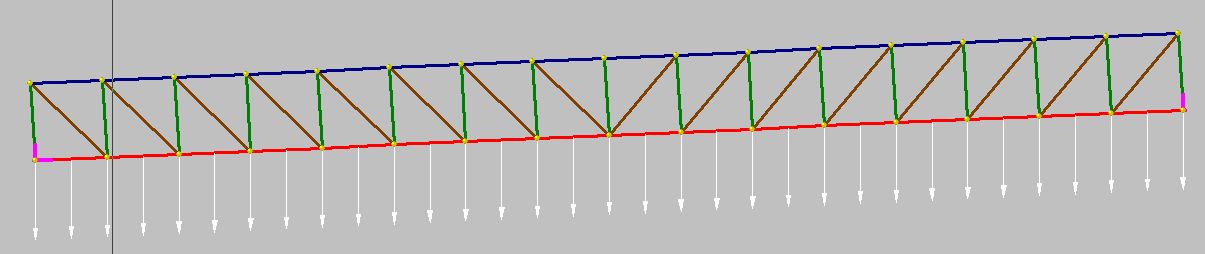
Screenshots below show the new input screens, and the results of the analysis of a 16 bay truss structure, compared with the analysis of the same structure in Strand7.  Note that in the current version this structure is too large for Excel 2003 and earlier, but in the next version a VBA routine for the solution of the stiffness matrix equations will be incorporated, which will allow the analysis of much larger structures.

Input of beam properties, node coordinates, node restraints, and beam connections and property types

Input of beam properties, node coordinates, node restraints, and beam connections and property types


Input of member loads

Input of member loads

Inclined truss

Inclined truss

Results of truss analysis compared with Strand7 results for the same structure

Results of truss analysis compared with Strand7 results for the same structure

Posted in Beam Bending, Excel, Frame Analysis, Newton, Uncategorized, VBA | Tagged , , , | 20 Comments