The Old Bridge at Heidelberg

The “Old Bridge” at the German university city of Heidelberg was constructed in 1788,replacing a wooden bridge that had occupied the same site since 1284, and which was regularly destroyed by ice and floods.

Heidelberg Old Bridge from the castle

Heidelberg Old Bridge from the castle

Heidelberg Old Bridge

Heidelberg Old Bridge

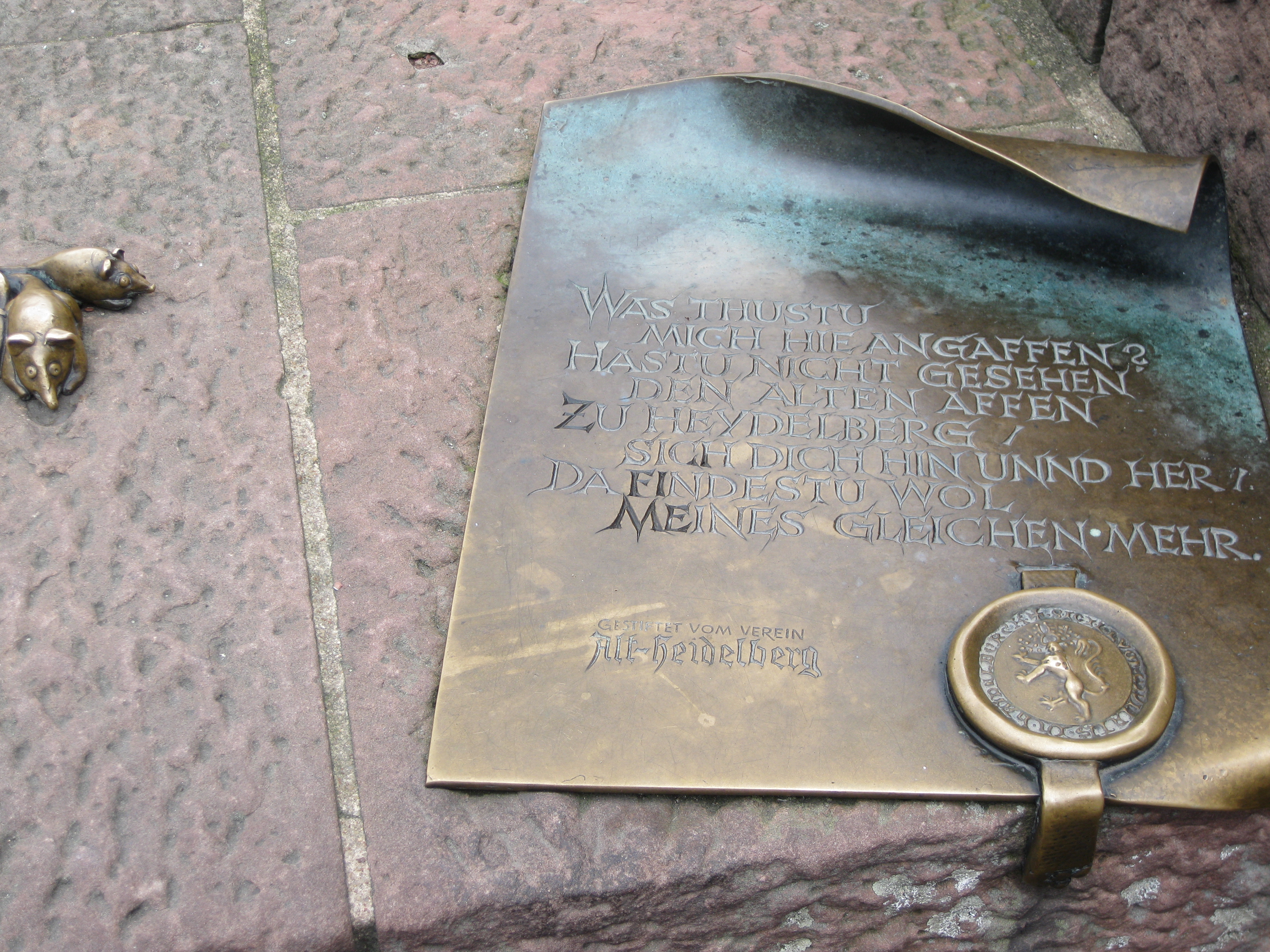
On the south bank can be found the Bruckenaffe, or Bridge Monkey,made by sculptor Gernot Rumpf, based on a carved monkey from medeival times. The monkey carries a mirror, and the adjoining
inscripion roughly translates as:

Why are you looking at me?
Look in the mirror
and you will see more of the same

The Bridge Monkey

The Bridge Monkey

The monkeys inscription

The monkey

Posted in Arch structures, Bach, Historic Bridges, Newton | Tagged , | Leave a comment

Drawing in Excel 6 – getting shape properties

Previous post

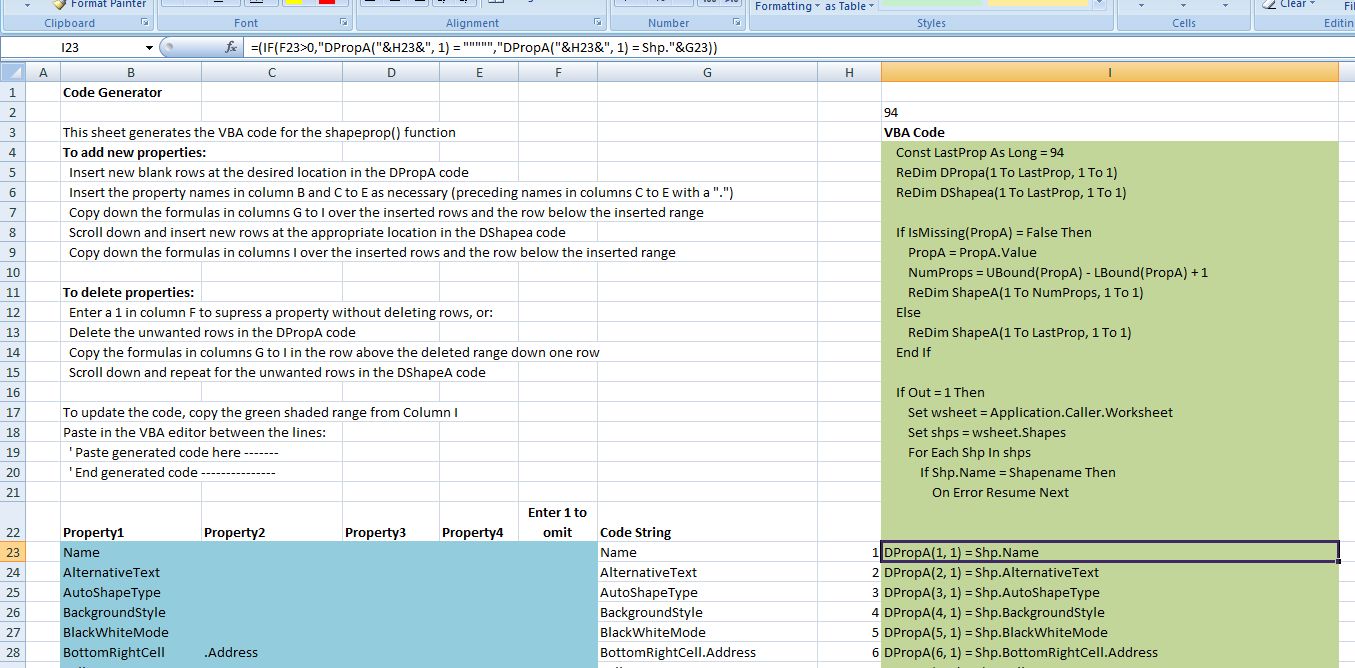
One of the less than useful new “features” of Excel 2007 is that its macro recorder no longer records operations on shapes, which removes the easiest way to discover the exact names of shape properties, and how to manipulate them.  The file ShapeProps.zip contains a spreadheet with a User Defined Function (UDF) that will return a list of property names, and the values for each property, for any named shape.  In addition it will generate VBA code to read aditional properties if the correct property names are inserted in a list on the spreadsheet.


The UDF currently reads 94 different properties, which can either be returned as a column array of all 94 values, or if a list of property numbers is entered only the listed property values will be returned.  See the screen shot below for examples.

ShapeProp() Output

ShapeProp() Output


ShapeProp() code generation sheet

ShapeProp() code generation sheet

Posted in Drawing, Excel, UDFs, VBA | Tagged , , , , | 5 Comments

Linking Excel to C – 3; Avoiding bottlenecks

The previous post in this series included a C dll to solve cubic polynomial equations that could be called from VBA.  The performance of this routine is compared with a VBA routine using a similar algorithm in the sceenshot below (rows 6 and 8):

Benchmark of cubic solution routines

Benchmark of cubic solution routines

Both of these routines spend most of their time passing data from the spreadsheet to VBA and back again, as can be seen by comparing with row 7, where the routine VBAcubica is over 2 times faster than the original VBA routine. In VBAcubica all 1000 lines of data are passed to VBA as an array in one operation; the equations are then solved and the results passed back in one operation. This spreadsheet and the VBA and C code can be downloaded here:

This process has been replicated using the C dll in three different ways:

  • In Cubica the data is passed to VBA as an array, then passed to the dll one row at a time as three doubles, passed by value.
  • In Cubica2 the 1000×3 array of variants is converted to a single dimension, base 0, array of doubles, which is passed to the dll by reference.
  • in Cubica3 the VBA array of variants is converted to a 3×1000, base 1, array of doubles which is again passed to the dll by reference.

It can be seen that the the three dll routines that use an array to pass the data from the spreadsheet to VBA are much faster than the other routines, and that there is no significant difference between them.

The VBA declare statements, and the VBA statements calling the dll functions are shown below:

' Amend paths in the declare statements below as necessary
Declare Function gsl_poly_solve_cubic Lib "D:\Users\Doug\Documents\Visual Studio Projects\Cubic\Release\Cubic" (ByVal a As Double, ByVal b As Double, ByVal c As Double, ByRef xa As Double) As Long
Declare Function gsl_cubica Lib "D:\Users\Doug\Documents\Visual Studio Projects\Cubic\Release\Cubic" (ByVal numrows As Long, ByRef abc As Double, ByRef xa2 As Double) As Long

Function Cubica(CubicData As Variant) As Variant
..
For i = 1 To numrows
a = CubicData(i, 1)
b = CubicData(i, 2)
c = CubicData(i, 3)

Retn = gsl_poly_solve_cubic(a, b, c, xa(0))
..

Function Cubica2(CubicData As Variant) As Variant
.. For i = 0 To numrows - 1
For j = 0 To 2
abc(i * 3 + j) = CubicData(i + 1, j + 1)
Next j
Next i
Retn = gsl_cubica(numrows, abc(0), xa_2(0))
..

Function Cubica3(CubicData As Variant) As Variant
..
For i = 0 To numrows - 1
For j = 0 To 2
abc(j, i) = CubicData(i + 1, j + 1)
Next j
Next i
Retn = gsl_cubica(numrows, abc(1, 1), xa_2(0))
..

Note that cubica2 and cubica3 call the same function in cubic.dll, even though they are passing arrays of different dimensions, with a different base.

Full VBA and C code for all the functions is included in the download file.

Posted in Arrays, Excel, Link to dll, UDFs, VBA | Tagged , , , | 2 Comments

LHC Rap

The Large Hadron Collider explained:

Posted in Bach, Newton | Tagged , , | 1 Comment

Linking Excel to C – 2

In the previous post I decribed how to create four simple functions in Visual C++, and how to link them to an Excel spreadsheet or a VBA User Defined Function (UDF).

This post will cover:

  • Accessing arrays created in C++ functions from VBA.
  • Write and compile a simple C function to solve quadratic equations, and link to it from Excel.
  • Compile a GNU Scientific Library (GSL) function to solve cubic equations, and link from Excel. 

To pass an array from a C function back to a VBA routine:

Declare the array in the function and header file as shown below:
int Quad(double a, double b, double c, double* resa)
extern __declspec(dllexport) int Quad(double a, double b, double c, double* resa); 

Add data to the array:
resa[0] = (-b-disc )/(2*a);
resa[1] = (-b+disc )/(2*a);

Modify the VBA declare statement to pass the array by reference:

Declare Function Quad Lib “D:\Users\Doug\Documents\Visual Studio Projects\MSDN-wt2\Debug\MSDN-wt2” (ByVal a As Double, ByVal b As Double, ByVal c As Double, ByRef Res As Double) As Long

In the VBA function caling the C function, dimension the array, and pass the first item in the array in the function call:

Dim Res(0 To 1) As Double
..
Retn = Quad(a, b, c, Res(0))

The contents of the array Res() will now be available to the VBA function.  The full code is shown below, and has been added to WalkThrough2.zip

Header file:
// MSDN-wt2.h
// Function returns number of real roots
// resa contains roots
extern __declspec(dllexport) int Quad(double a, double b, double c, double* resa);

.cpp file
// MSDN-wt2.cpp
#include "MSDN-wt2.h"
#include
#include
using namespace std;
double disc, discsq;
int Quad(double a, double b, double c, double* resa)
{
discsq = ( b*b - 4*a*c);
if (discsq < 0)
{
return 0;
}
disc = sqrt(discsq);
if (discsq = 0)
{
resa[0] = (-b )/(2*a);
resa[1] = resa[0];
return 1;
}
resa[0] = (-b-disc )/(2*a);
resa[1] = (-b+disc )/(2*a);
return 2;
}

VBA code:
Declare Function Quad Lib "D:\Users\Doug\Documents\Visual Studio Projects\MSDN-wt2\Debug\MSDN-wt2" (ByVal a As Double, ByVal b As Double, ByVal c As Double, ByRef Res As Double) As Long
'
Function XLQuad(a As Double, b As Double, c As Double) As Variant
Dim Res(0 To 1) As Double
Dim Retn As Long
Retn = Quad(a, b, c, Res(0))
XLQuad = Res
End Function

The next example illustrates use of code from The GNU Scientific Library:

In order to use the GSL code:

Set up a new project as before.

Create .h and .def files

Create a blank .cpp file, paste in the GSL code from poly/solve_cubic.c, and modify it as follows:
Replace the line:
#include
with
#include "Cubic.h"

modify the function declaration to:
int gsl_poly_solve_cubic (double a, double b, double c, double* xa)

Replace all instances of x0, x1, and x2 with xa[0], xa[1] and xa[2]

Create a folder named gsl under your Visual Studio include folder, and copy over all the applicable .h files from the GSL download. These are scattered over several folders, but if you miss any the compiler will raise an error with the missing file name(s), so you can copy and try again.

The dll file can now be created, and declared in a VBA module as before:
Declare Function gsl_poly_solve_cubic Lib "D:\Users\Doug\Documents\Visual Studio Projects\Cubic\release\Cubic" (ByVal a As Double, ByVal b As Double, ByVal c As Double, ByRef xa As Double) As Long

All the C and VBA code for the functions described above has been added to WalkThrough2.zip . Download and use the code from the zip file, rather than copying and pasting from this post, as the html tends to mangle the computer code.


Posted in Excel, Link to dll, UDFs, VBA | Tagged , , , | 22 Comments