Drawing in Excel – 2

Before getting down to basics, the attached file:

Animation demo

Illustrates how Excel shapes can be simply animated.

Screen shot:
Animation demo

The code for the animation (having previously drawn a circle and a rectangle with no fill, and noted their names):

Sub Animate()
Dim Start As Single, xInc As Single, yInc As Single, OvlWidth As Single, OvlHeight As Single
Dim OvlX As Single, OvlY As Single
Dim TopBox As Single, BottBox As Single, LeftBox As Single, RightBox As Single
Dim Pi As Double, TimeStep As Double, XV As Double, YV As Double
Pi = Atn(1) * 4

XV = Range(“hspeed”).Value
YV = Range(“vspeed”).Value

TimeStep = 0.01

With ActiveSheet.Shapes(“oval 2”)
OvlWidth = .Width
OvlHeight = .Height
End With

With ActiveSheet.Shapes(“rectangle 14”)
TopBox = .Top + OvlHeight / 2
BottBox = TopBox + .Height – OvlHeight
LeftBox = .Left + OvlWidth / 2
RightBox = LeftBox + .Width – OvlWidth
End With

xInc = XV * (RightBox – LeftBox) / 1000
yInc = YV * (BottBox – TopBox) / 1000


With ActiveSheet.Shapes("oval 2")
Do
.IncrementLeft xInc
.IncrementTop yInc
Start = Timer
Do While Timer < Start + TimeStep
DoEvents
Loop
OvlX = .Left + OvlWidth / 2
OvlY = .Top + OvlHeight / 2
If OvlX &LT LeftBox Or OvlX &GT RightBox Then xInc = -xInc
If OvlY &LT TopBox Or OvlY &GT BottBox Then yInc = -yInc
Loop
End With
End Sub

Where &LT and &GT indicate the “Less Than” and “Greater Than” symbols respectively.
Posted in Drawing, Excel, Newton | Tagged , , , , | 19 Comments

Reinforced Concrete Section Analysis – 4

Previous post

The spreadsheet presented in the previous post in this series uses the basic equation given below to find the location of the neutral axis:

For a cross section with any applied axial load at eccentricity e, measured from the compression face, and depth of the neutral axis X below the compression face:

INA = QNA(X + e)

Where QNA and INA are the first and second moments of area about the neutral axis.

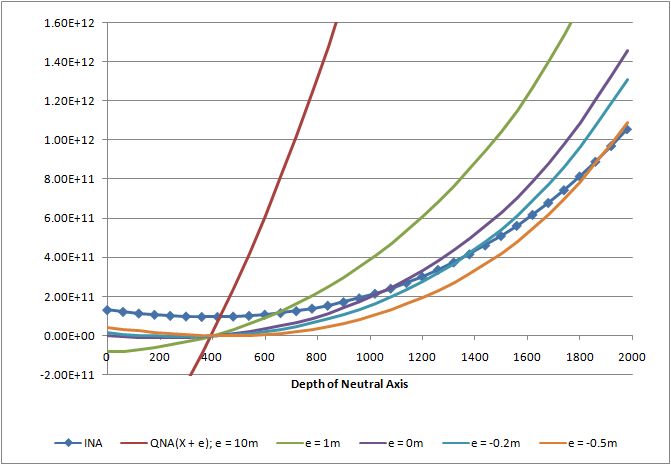
To illustrate this relationship the value of INA has been plotted for a range of neutral axis positions for a typical precast bridge beam, shown below, and compared with the value QNA(X + e) for 5 different values of e.

Super-T
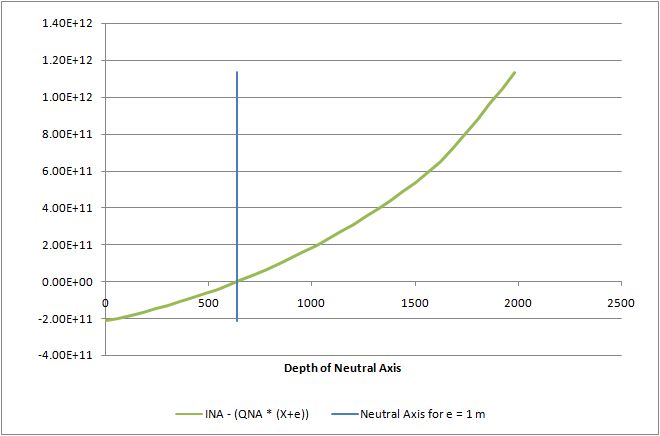
The intersection of the INA and QNA(X + e) lines gives the depth of the neutral axis for the corresponding value of load eccentricity, e.  This is illustrated in the second graph, where the value of (INA – QNA(X + e)) is plotted against the depth of the neutral axis, X, for a load eccentricity of 1 metre above the compression face.  The intersection of this line with the X axis gives the depth of the neutral axis for the specified load eccentricity.

Ina and Qna(x+e) v Depth NA

Ina - Qna(X+e) v Depth NA

Posted in Beam Bending, Excel, Newton, UDFs, Uncategorized | Tagged , , , , | 1 Comment

Importing text files with VBA – 2

Previous post

The text file import routines and functions presented in the previous post have been modified with the following additions:

Lines of text can be split into separate cells, at any designated character (e.g. a coma or a space)

The SplitText function can also be used as a UDF, to split lines of text previously imported.  In this case the most efficent way is to enter the UDF as an array function, operating on the complete range of text.  In this way the UDF is only called once, returning a 2D array, and the whole operation is much quicker.

Download Textin2.zip

Screen shot:

 Text-in2<


Posted in Excel, UDFs | Tagged , , , , | 7 Comments

The roof of the Taq-i-Kisra; Analysis

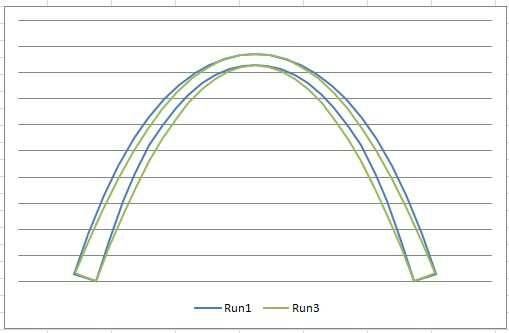
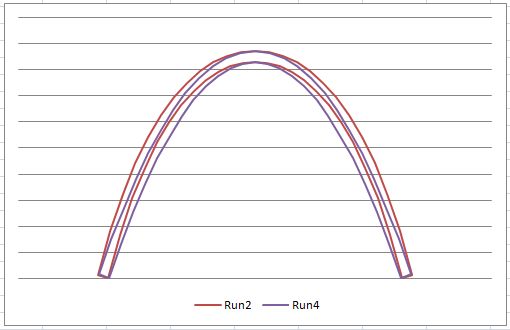
Following the previous post, I have compared the stresses in the Taq-i-Kisra assuming either a catenary or parabolic profile. I have also compared constant depth sections with sections increasing in depth towards the supports. The arch span was taken as 24 metres, with an arch height of 16.6 metres, supported on vertical faced buttress walls with a height of 11.1 metres. The section depth was taken as 0.85 metres, increasing to 1.7 metres at the supports for the variable depth profiles. The span was taken from the Wikipedia article, and all other dimensions were estimated by scaling from photographs. Four analyses were carried out:

Run 1: Catenary with varying section depth
Run 2: Catenary with constant section depth
Run 3: Parabola with varying section depth
Run 4: Parabola with constant section depth

Profiles with variable section depth

Profiles with constant section depth

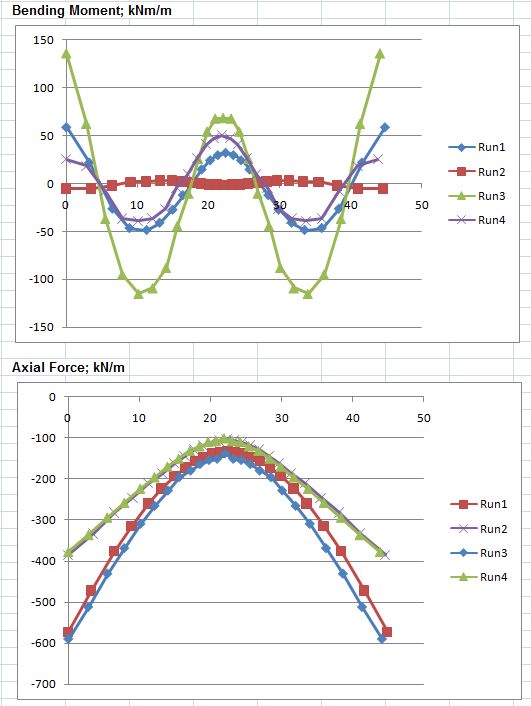
Bending moments and axial forces from these four runs are shown below:

Bending moments and axial forces

It can be seen that axial forces are similar, with the constant depth sections having a significantly smaller force, as would be expected.

Bending moments for the constant depth catenary (Run 2) are close to zero throughout. Bending moments for the constant depth parabola (Run 4) and the variable depth catenary (Run 1) are similar, with a maximum of 50 kNm/m. The variable depth parabola (Run 3) had bending moments more than twice as high.

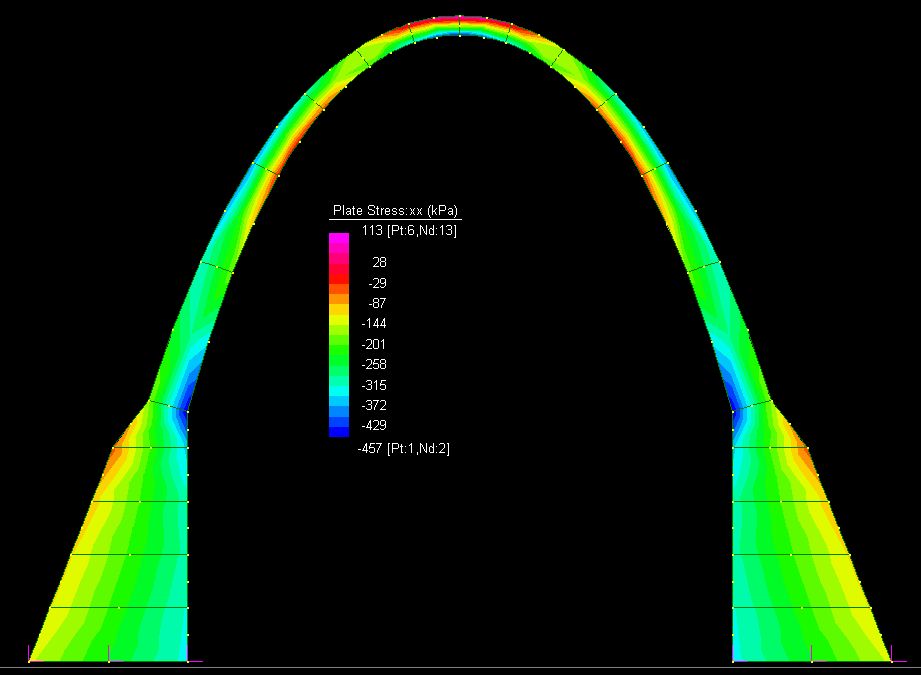
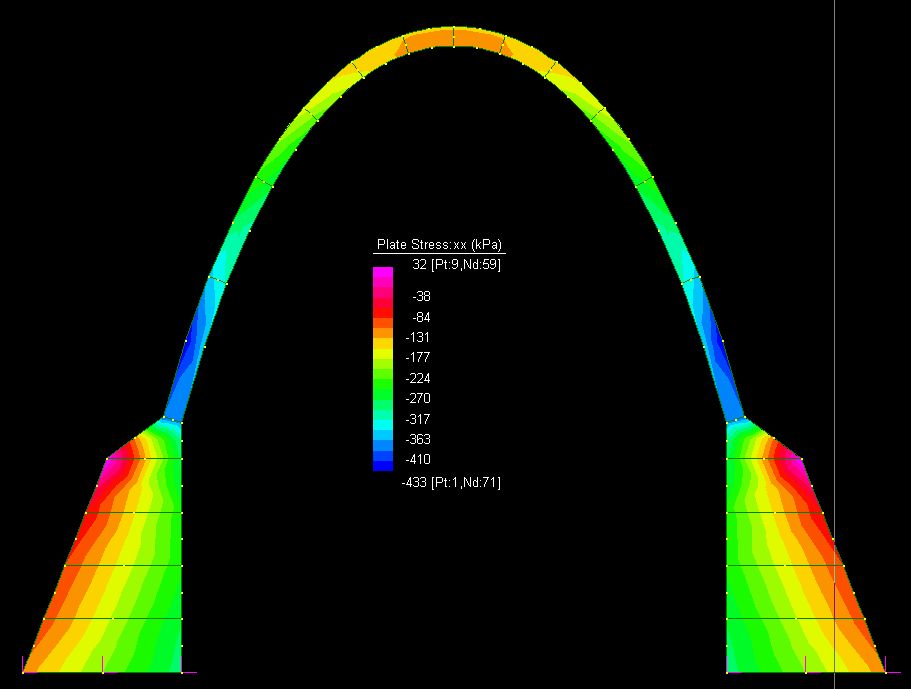
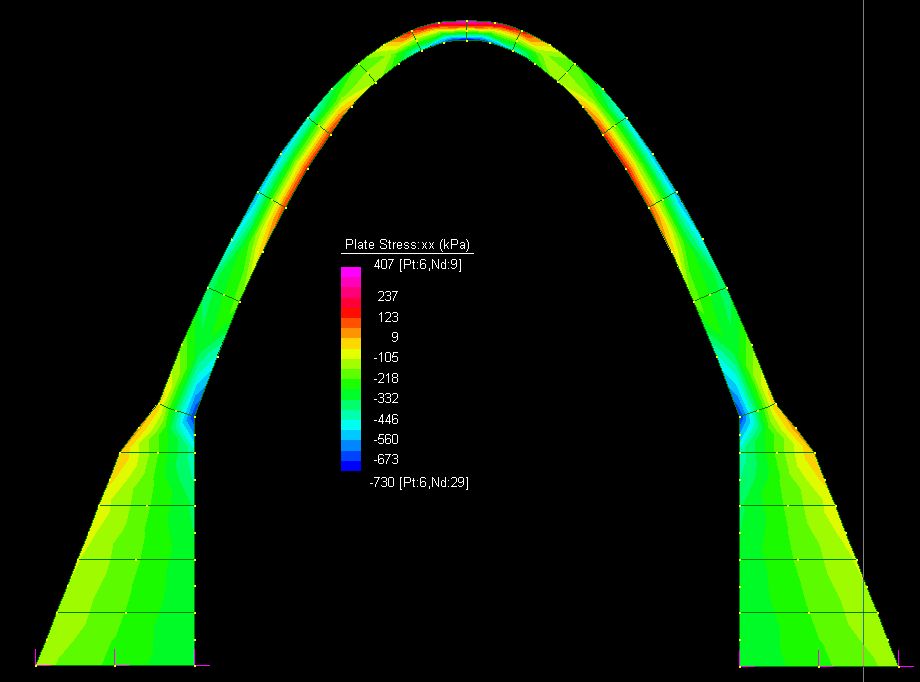
Axial stresses for these four runs are shown below:

Axial stresses - Run1

Axial stresses - run 2

Axial stresses - Run3

Axial stresses - run 4

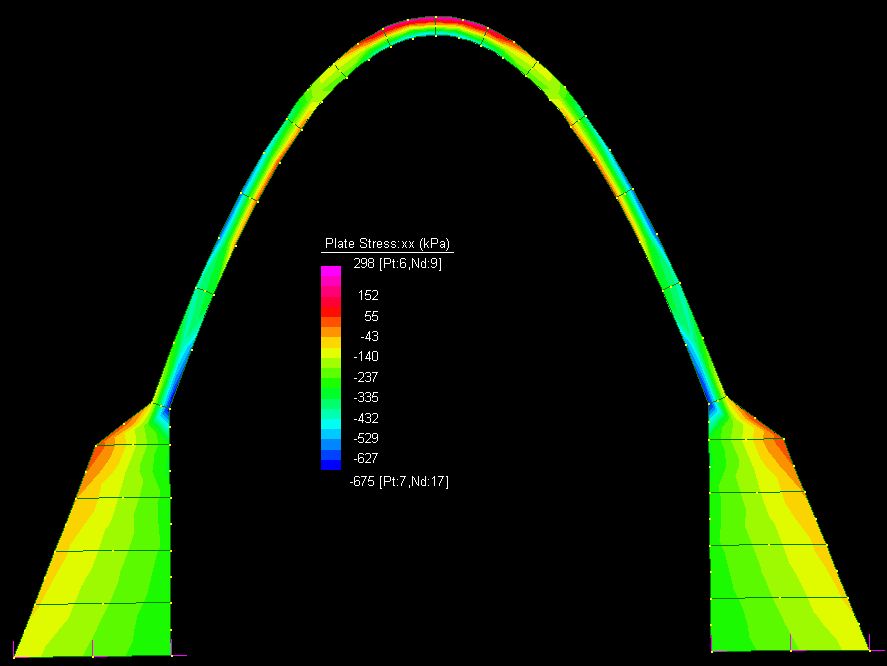
It can be seen that stresses were compressive throughout for Run 2, and tensile stresses increased progressively through Runs 1, 4 and 3 respectively. The maximum tensile stress from Run 3 was 400 kPa, which would leave little reserve capacity for wind or earthquake loads.

Since Runs 1 and 3 were intended to be the closest models to the actual structure the analyses show that the maximum tensile stress was about four times higher for the parabolic profile than the catenary profile.

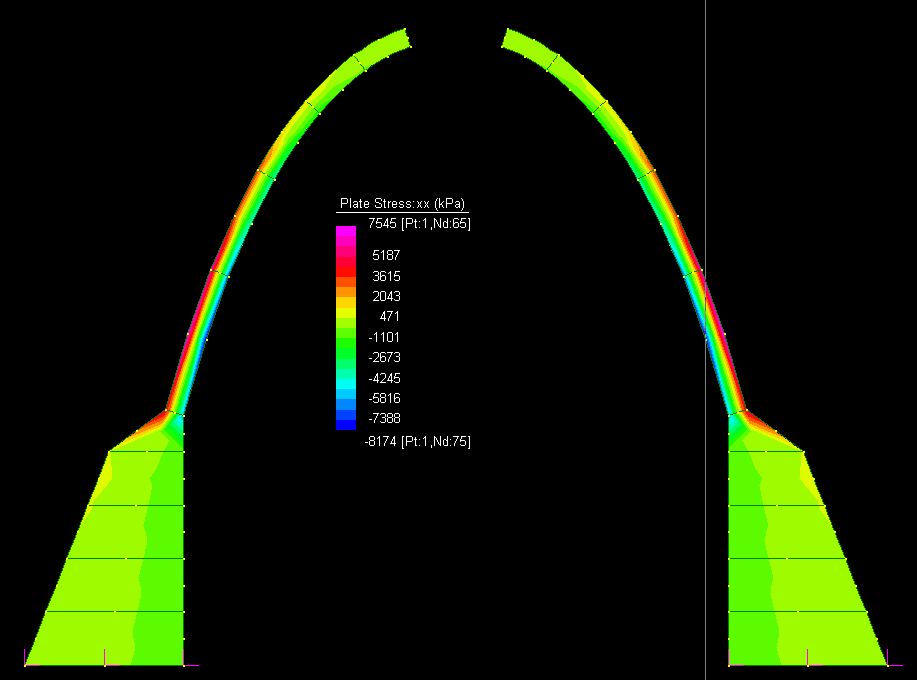
Finally, many sources on the ‘net suggest that the arch was constructed without centering, that is with no temporary supports before the closure of the arch. The analysis below shows that this results in tensile stresses of up to 7.5 MPa, which would be far in excess of the strength of the material, and construction of the arch without some form of temporary support would not be possible.

Axial stresses - run 5

Posted in Arch structures, Finite Element Analysis, Maths, Newton | Tagged , , , , , | 2 Comments

The Roof of the Taq-i-Kisra

Roof ot the Taq-i-Kisra

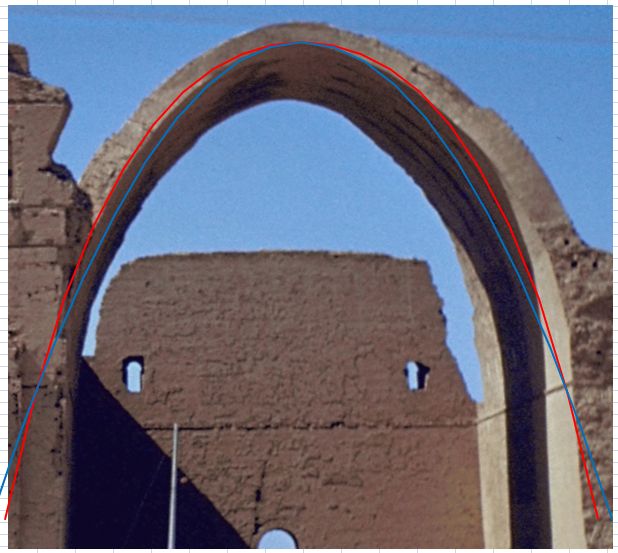
A higher resolution image, from a slightly different viewpoint

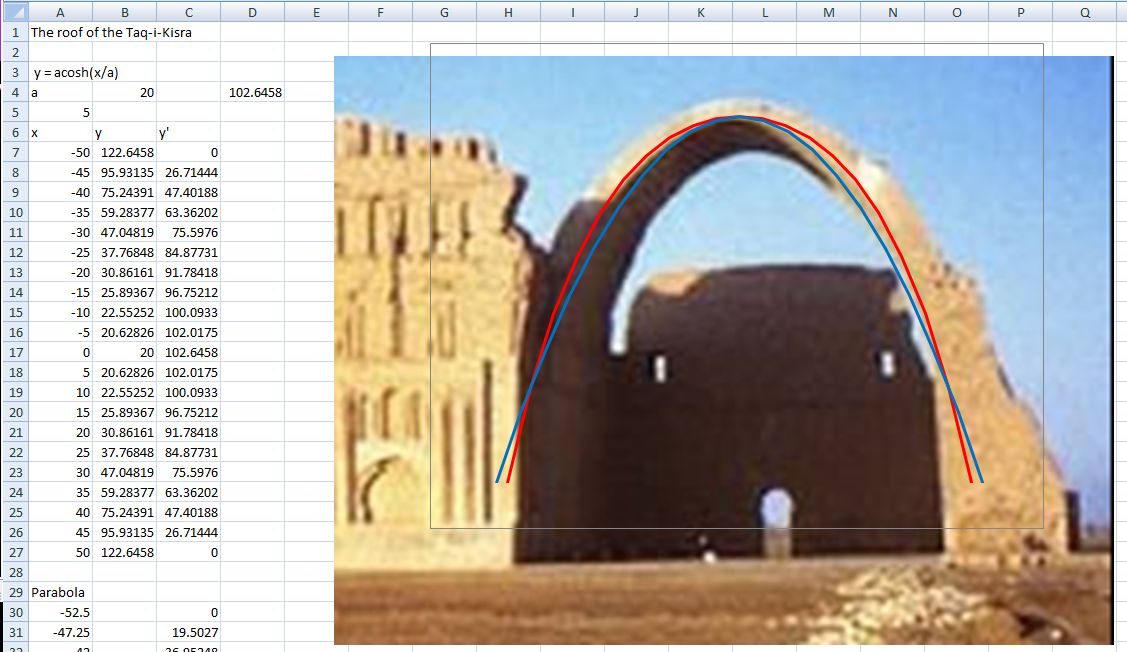
The roof of the Persian Throne Room of the Taq-i-Kisra, now in Iraq, is the best surviving example of an ancient large span structure built to a catenary profile, the shape that will minimise bending moments in a structure of uniform thickness, standing under its own weight.

The red line added to the photograph is a catenary, and the blue line a parabola with the same span at first floor level. The plot suggests that the roof shape from first floor level does indeed approximate a catenary, although the low resolution photograph and irregular outline of the end face of the structure make it difficult to be certain.

Posted in Newton | Tagged , | 7 Comments