More on RC design of circular sections

Following the last post on this topic (Reinforced Concrete Design for Circular Sections to Eurocode 2) I have added provision for parabolic-linear concrete stress blocks to the ULS Design Functions spreadsheet. The Circu function in the RC Design Functions spreadsheet has also been modified. The latest versions of the spreadsheets can be downloaded from:

ULS Design Functions

RC Design Functions

The UMom function in ULS Design Functions can be used to analyse any reinforced concrete section that can be divided into a series of stacked trapezoids. For the purpose of comparing the results of a rectangular or parabolic stress block when analysing a circular section the circle was divided into 24 layers:

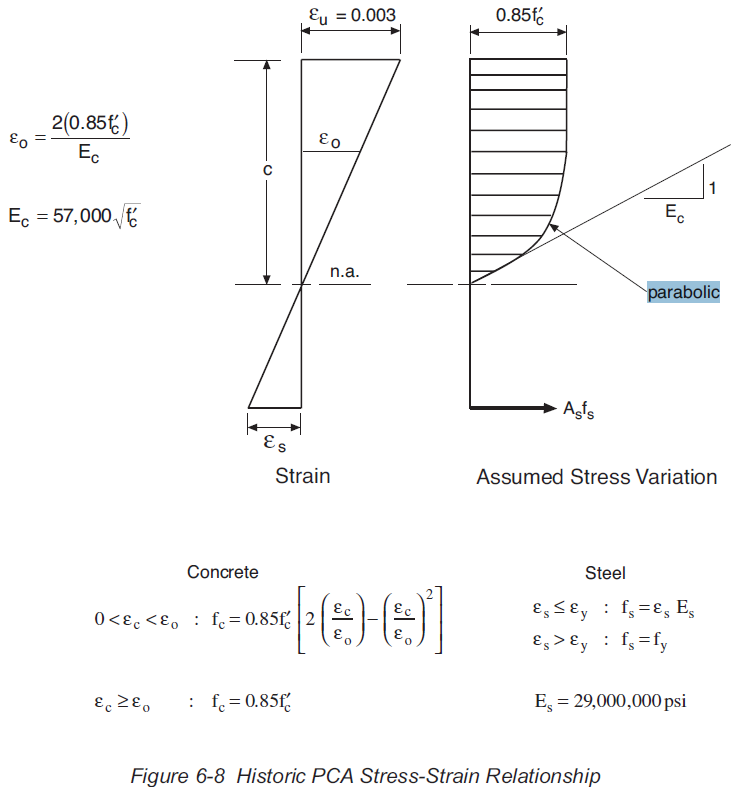
The parabolic-linear stress block option uses the form specified in Eurocode 2 for both the Eurocode and AS 3600 codes, and a modified version for the ACI code, as specified in the PCA document: PCA Notes on ACI 318-11 Building Code (EB712). The main differences in the ACI stress block are:

  • The maximum concrete stress reduction factor is 0.85 (1.0 for the default Eurocode and 0.9 for AS 3600)
  • The strain at the compression face is 0.003 (0.0035 in Eurocode)
  • The strain at the end of the parabolic portion is based on a parabolic curve with an initial slope equal to 1/Ec -see below (tabulated values based on concrete strength in Eurocode)
  • The exponent of the parabolic curve is 2 for all concrete strengths (reduced values for high strength concrete in Eurocode.
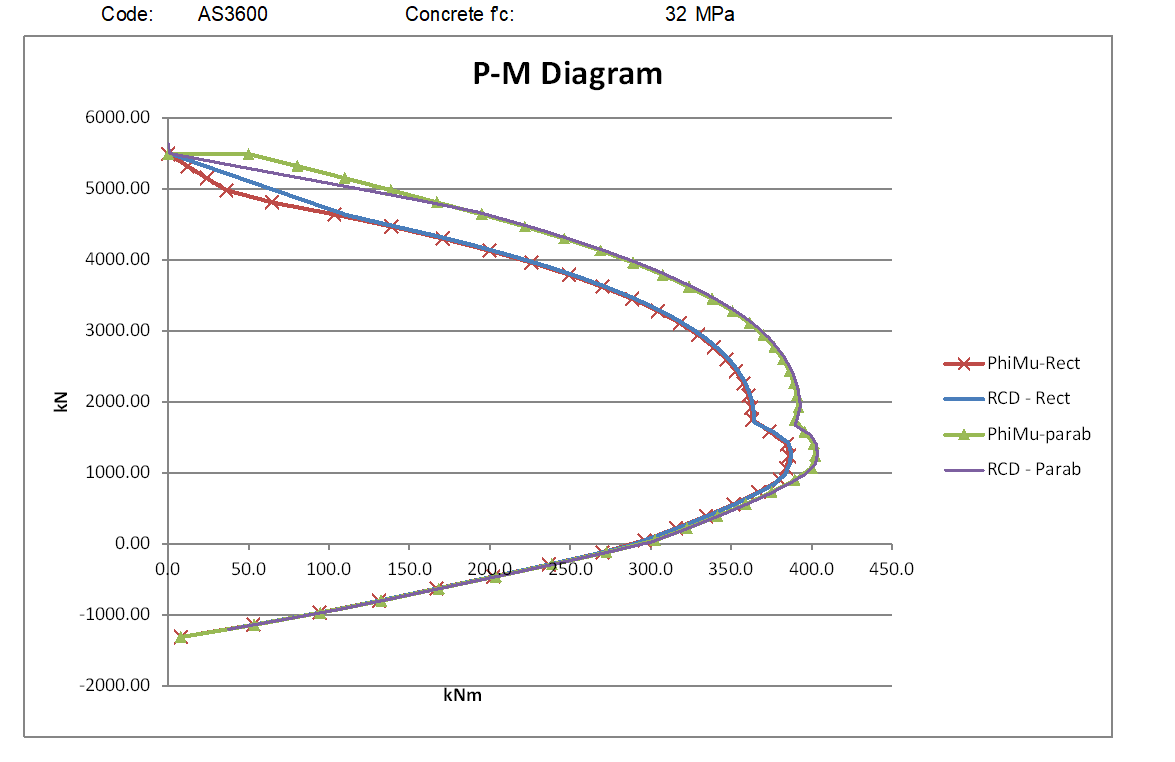
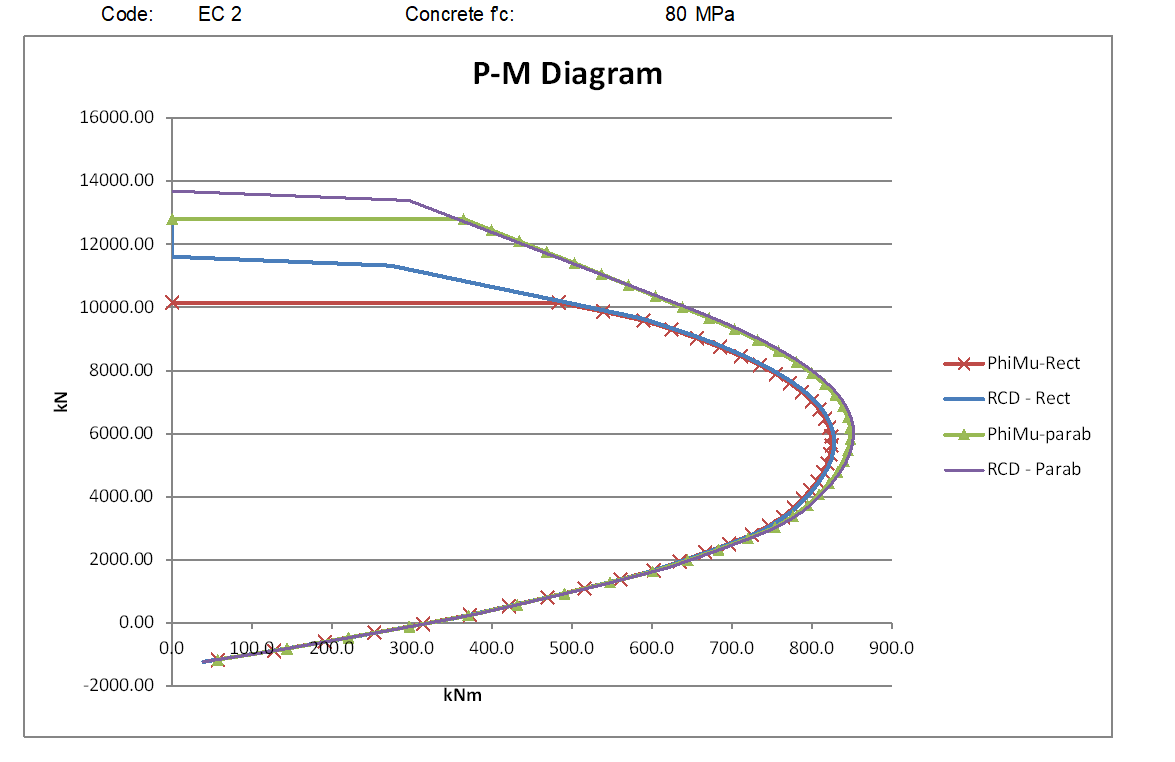
The graphs below compare moment vs axial load results using the rectangular and parabolic-linear stress blocks for circular sections with low and high concrete strengths to the three codes.

The ACI results below used customary US units with concrete strengths of 5 and 10 ksi (approximately 34.5 and 69.0 MPa)
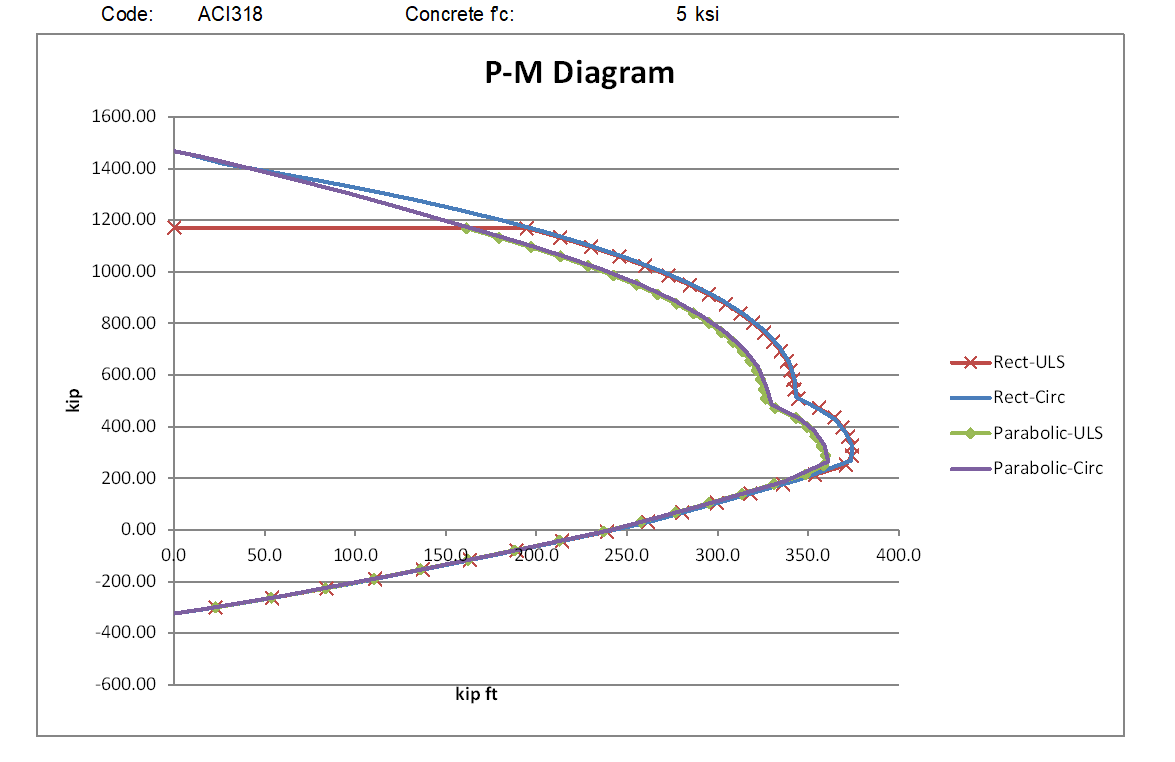
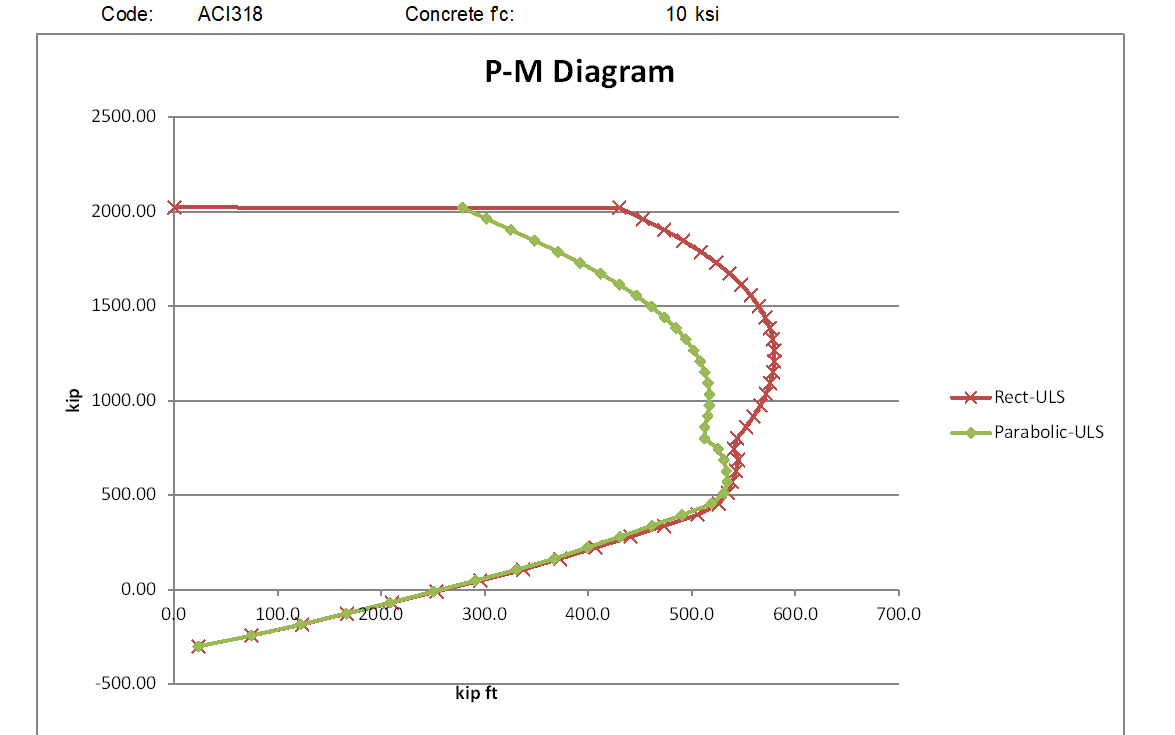
For the lower strength concrete the rectangular stress block moment capacities are significantly higher than the parabolic stress block for all axial load greater than the balance load, and for higher strength concrete the difference increases to almost a 50% increase at loads close to the maximum axial load.

For the AS 3600 code (below) the parabolic stress block gives a greater moment capacity with the lower strength concrete, but with the high strength concrete the rectangular stress block is less conservative for mid-range axial loads, but the parabolic stress block has higher capacity with very high axial loads.
The Eurocode results show a similar relationship between the two stress blocks as AS 3600 for the lower strength concrete, but the parabolic stress block also has higher moment results with the high strength concrete, for all axial loads above the balance load. Note that the Eurocode results for the rectangular stress block have an additional reduction factor of 0.9, in accordance with Eurocode requirements for sections where the concrete width reduces towards the compression face:

The graphs below compare the parabolic stress block results from the 3 codes:
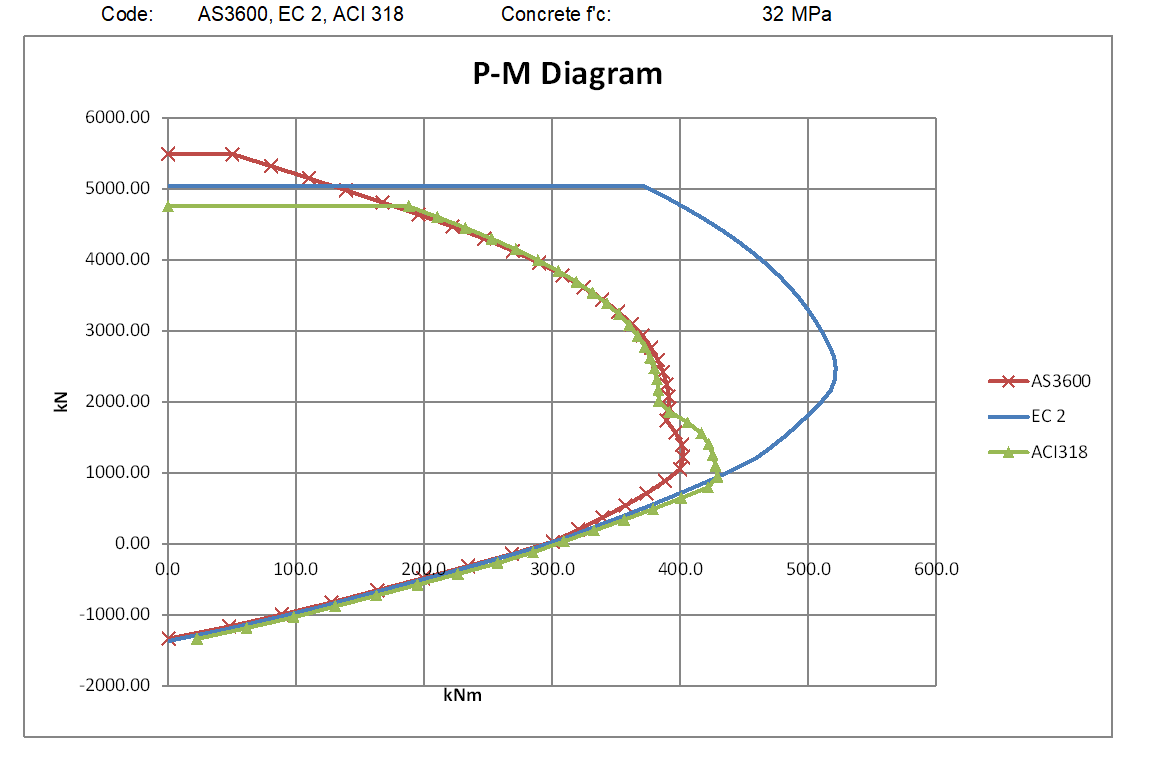
For the lower strength concrete the AS 3600 and ACI 318 are very close for high axial loads and zero axial load to maximum tension, but for intermediate axial loads the ACI results are significantly higher. This is because of the different procedures for calculating the transition of the capacity reduction factor from 0.85 to 0.65. For the high strength concrete the ACI results are significantly higher than AS 3600 over the full range of compressive axial loads up to the ACI maximum.

The Eurocode results are higher than both ACI 318 and AS 3600 for loads above the balance load for both the low and high strength concrete. The reasons for this difference, when the Eurocode and AS 3600 calculations use the same stress block, are examined below:

If the global reduction factors are set to 1.0, and the AS 3600 steel yield strength and concrete compressive strength are factored down by 1.15 and 1.5 repectiveley, the AS 3600 results exactly match the Eurocode results:

However if in AS 3600 the global reduction factor is set to 1/1.5, with the steel yield strength factored by 1.5/1.15, and the concrete strength factored by 1/0.9, so the nett material properties after factoring are the same as in the Eurocode analysis, the results are different:
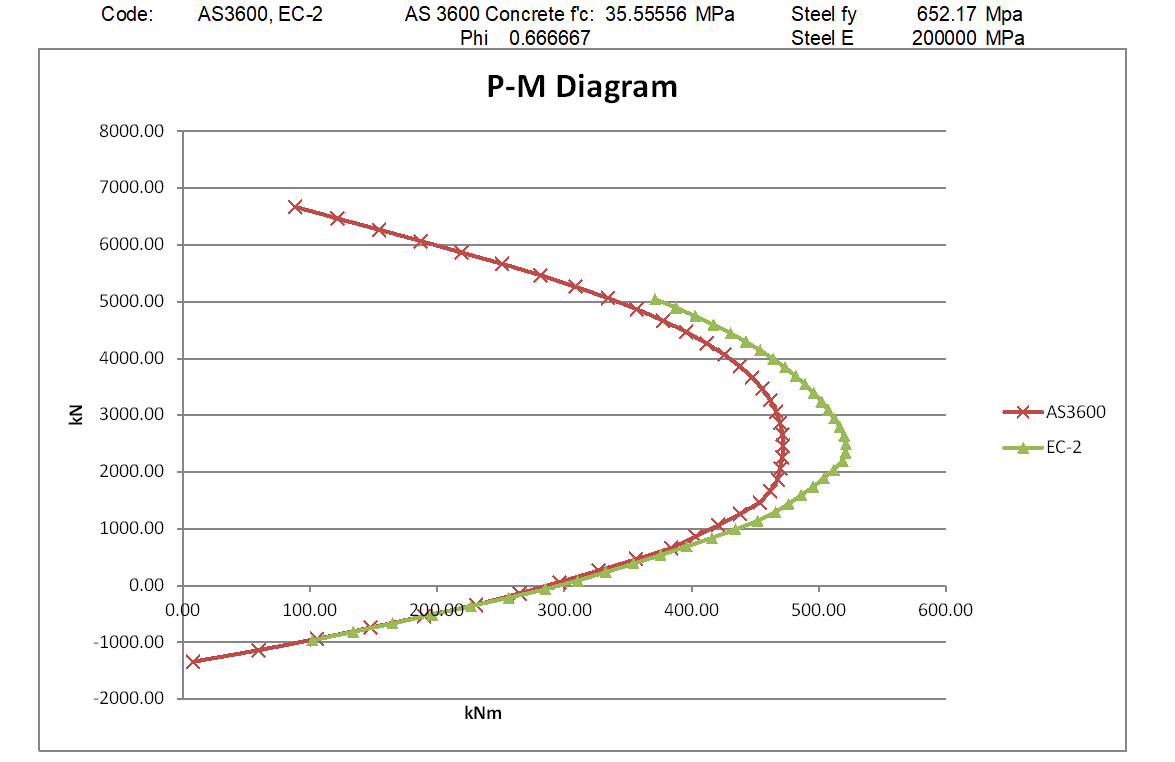
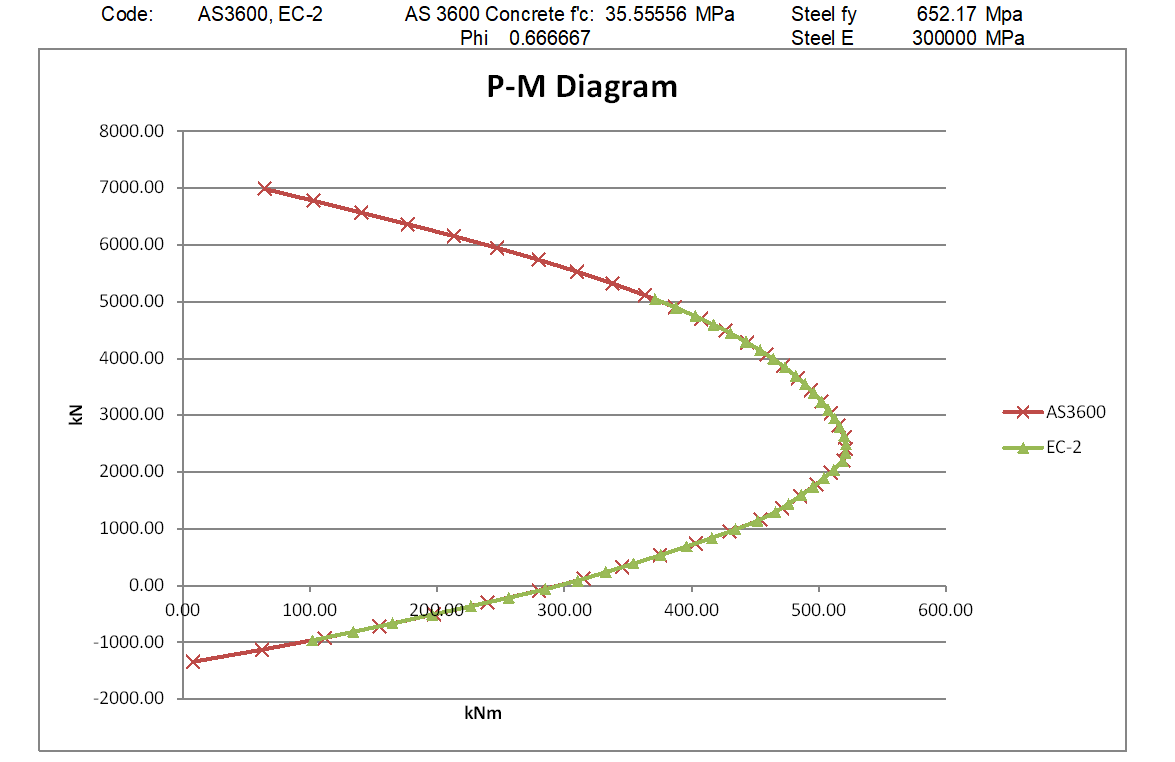
The reason is that in the Eurocode analysis forces in the reinforcing bars within the elastic range are not factored down, whereas in the AS 3600 analysis all the forces in the reinforcement are factored down by 1.5. In effect, the elastic modulus of the steel is reduced by a factor of 1.5 in the AS 3600 analysis, but remains unchanged in the Eurocode analysis. If the previous analysis is repeated with the steel elastic modulus factored up to 30,000 MPa in the AS 3600 run, the results from the two analyses are identical:
Update 27 Jan 2021:

Following the comment dated 25th Jan. below, I have modified the MomA function so that if any of the tabulated input axial loads exceed the section capacity, the function moves on to the next value, rather than exiting. The new file is now in the ULS Design Functions zip file near the top of the post.

Posted in Beam Bending, Concrete, Excel, Newton, UDFs, VBA | Tagged , , , , , , , , | 6 Comments

More Open Source FEA Code Links

The book Nonlinear Finite Element Analysis of Solids and Structures 2nd Edition has an associated python code package called pyFEM, but a search for this code finds several others with the same or similar names:

The pyFEM sites associated with the book are:

jjcremmers/PyFEM: A Python finite element code (github.com)

and an associated pypi site:

PyFEM-TUE · PyPI

PyFEM is a python-based finite element code accompanies the book: ‘Non-Linear Finite Element Analysis of Solids and Structures’ by R. de Borst, M.A. Crisfield, J.J.C. Remmers and C.V. Verhoosel. The code is open source and intended for educational and scientific purposes only. If you use PyFEM in your research, the developers would be grateful if you could cite the book in your work.

Another github site of the same name, but apparently entirely independent is:

rvcristiand/pyFEM: Finite Elements Analysis with python (github.com)

A third package of the same name, but with the specific purpose of finite element mesh conversion is:

The PyFEM Mesh Conversion Software Library

The PyFEM library is an open -software project for the conversion of 2D and 3D mesh formats. • Primarily designed for conversion of Finite Element meshes as used in numerical simulations in the geosciences.

Posted in Finite Element Analysis, Frame Analysis, Link to Python, Newton | Tagged , , , | Leave a comment

Lost Sydney

Click image for full size view.

Lost Sydney is a Facebook site with 100’s of photographs of Sydney, some dating back well over 100 years.

This is Sydney’s story. Lost Sydney is not just about demolished buildings, it’s also about photos of Sydney’s past.

Lost Sydney

Posted in Arch structures, Bach, Historic Bridges, Newton | Tagged , , | Leave a comment

Extracting text from an Internet table

For use in my Units spreadsheet (Units4Excel) I want to extract the unit conversion values from the comprehensive Wikipedia unit conversion table.

On Wikipedia the table looks like this:

and when copied and pasted as Unicode text into Excel, like this:

To convert the text in the final column to values the following changes are required:

  • Skip the leading non-numeric characters,
  • Remove spaces between numbers.
  • Remove the final numbers enclosed in brackets, indicating the uncertainty in the final digits.
  • Convert the exponent (e.g. x10-27) to Excel format (E-27). Note that a positive exponent displays as a 4 digit number, e.g. x1027.
  • Convert the resulting text string to a number with double data type.
  • Extract the units
  • Skip references to notes.

The following code does the job:

Function ExtractVal(Txt As String, Optional ExtractUnits As Boolean = True)
' Extract number and optionally units from Wikipedia unit conversion factor table
' Remove preceding text and trailing notes, and variance value enclosed in ()
' Convert x10nn to Enn or x10-nn to E-nn
Dim n As Long, m As Long, char As String, ValStr As String, RtnA() As Variant, i As Long, strcode As Long

' Skip over any non-numeric text before the first number
    If ExtractUnits Then
        ReDim RtnA(1 To 2)
    Else
        ReDim RtnA(1 To 1)
    End If
    n = Len(Txt)
    
    For i = 1 To n
        char = Mid(Txt, i, 1)
        If IsNumeric(char) Then Exit For
    Next i
    ValStr = char
    m = i + 1
    
 ' Extract all numbers until the first non-numeric text
 ' Skip over single spaces followed by a number
    For i = m To n
        char = Mid(Txt, i, 1)
        If IsNumeric(char) = False And char <> "." Then
            If IsNumeric(Mid(Txt, i + 1, 1)) = False Or char <> " " Then Exit For
        Else
            ValStr = ValStr & char
        End If
    Next i
    m = i + 1
    
' Skip over numbers enclosed in ()
    char = Mid(Txt, i, 1)
    If char = "(" Then
        For i = m To n
            char = Mid(Txt, i, 1)
            If char = ")" Then
                i = i + 1
                Exit For
            End If
        Next i
    End If

' Extract numbers following 'x10' and add to value string as Enn
' The 'x' in the Wikipedia table is Ascii code 215
    char = Mid(Txt, i, 1)
    strcode = Asc(char)
    If strcode = 215 Then
        m = i + 3
        ValStr = ValStr & "E"
        For i = m To n
            char = Mid(Txt, i, 1)
            strcode = Asc(char)
            If strcode = 45 Then char = "-"
            If IsNumeric(char) = False And char <> "-" Then Exit For
            ValStr = ValStr & char
        Next i
    End If
 ' Convert value string to double and copy to RtnA
    RtnA(1) = CDbl(ValStr)
    
 ' Extract unit text, skip over final note reference
    If ExtractUnits Then
        m = i + 1
        ValStr = ""
        For i = m To n
            char = Mid(Txt, i, 1)
            If char = "[" Then Exit For
            ValStr = ValStr & char
        Next i
        ' Copy unit to RtnA
        RtnA(2) = ValStr
    End If
    
    ExtractVal = RtnA
End Function

This function can be applied to the text at the top of the final column, and copied down, resulting in:

Columns AB and AC are the function output. Column AD uses the built in IsNumber function to confirm that the values in Column AB are indeed valid numbers.

Posted in Excel, Newton, UDFs, VBA | Tagged , , , , , , , | 3 Comments

Tanh-Sinh Quadrature update

Following some comments here Graeme Dennes and I have modified the start-up code for the Tanh-Sinh Quadrature spreadsheet to avoid problems opening the file when first downloaded, or copied to a new computer.

The new file is located (as before) at:

Tanh-Sinh Quadrature

Any problems, please leave a comment below, with details of error messages and Excel version, including 32 bit or 64 bit.

Posted in Excel, Maths, Newton, Numerical integration, UDFs, VBA | Tagged , , , | Leave a comment