The answer to Life the Universe and Everything …

is 42, as is well-known:

The actual question, to which the answer is 42, is not known, but a lesser known long standing question involving this number has recently been solved:

The original problem, set in 1954 at the University of Cambridge, looked for Solutions of the Diophantine Equation x^3+y^3+z^3=k, with k being all the numbers from one to 100.  42 was the last remaining number (for which a solution is possible), but recently a solution was found by a team led by the University of Bristol and Massachusetts Institute of Technology.  The answer is:

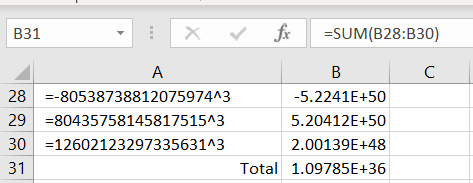
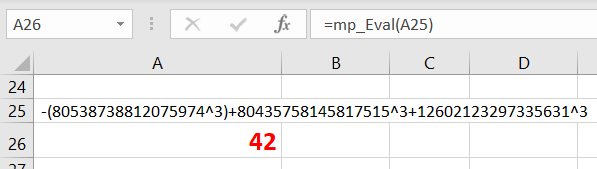
(-80538738812075974)^3 + 80435758145817515^3 + 12602123297335631^3

If we try to check this result in Excel we find that the available 15 significant figure accuracy is not quite up to the job:
But calling the mpmath package, via pyxll, finds that the solution is indeed correct:
Posted in Computing - general, Excel, Maths, Newton, PyXLL | Tagged , , , , | 5 Comments

Plotting Mandelbrot

There are many sites discussing the Mandelbrot Set, but not many examples using VBA to plot the set in Excel, so here is my effort:

The spreadsheet (including open source VBA code) may be downloaded from:

Mandelbrot chart.zip

Note that to keep the download file a reasonable size the file has been saved with a low resolution image.  350 x 350 resolution gives a good compromise between image quality and speed of processing and plotting.

Required input is:

  • Centre point coordinates
  • Plot width (= height)
  • Plot resolution
  • Number of iterations

The results are plotted as a scatter chart  with 7 data ranges, plotting markers only.

The plot below was generated with 28 iterations, and a resolution of 350×350.  Calculation time was 0.33 seconds:

The second example was taken from:

How To Quickly Compute The Mandelbrot Set In Python

Higher resolution (1000×1000) with 2048 iterations resulted in much longer calculation time, but times are 2-3 times faster than the plain Python code given in the link:

For faster plotting compiled code is required.  A good site providing fast high resolution plots for user selected location, scale and number of iterations is:

Mandelbrot Set

The site text says the plots will not work in Microsoft browsers, but they worked with no problem for me in Internet Explorer.  The image below was generated in the spreadsheet using parameters from the link above.

Posted in Charts, Charts, Coordinate Geometry, Drawing, Excel, Maths, Newton, VBA | Tagged , , , | 3 Comments

Using conditional formatting with array formulas

A recent Quora question asked “How do I highlight the number closest to an initial number in a row in Excel?“.  The answer by Bill Jelen provides a good example of using conditional formatting with an array formula:

In my data, I have the Goal or Initial Number in column A. Then, there are 12 results in B:M of each row. Select B3:M16. Home, Conditional Formatting, New Rule, Use a Formula To Determine Which Cells To Format. The formula will be =ABS($A3-B3)=MIN(ABS($A3-$B3:$M3)). Click the Format button and choose your desired fill color or font color.

Note the single dollar sign before the $A, $A, $B, and $M are crucial to make this work. As Conditional Formatting evaluates each cell, those dollar signs make sure that the logic is always pointing at A for the Initial cell and the range of B:M for the other values which may or may not be closer.

Note: This was created using Office 365 Insider which has access to Dynamic Arrays.

When used for conditional formatting, this formula also works with non-Insider versions of Office 365, as can be seen in my example below:

Posted in Arrays, Excel | Tagged , , , | Leave a comment

64 bit Excel and the Strand7 API

Back in May 2017 I posted a sample spreadsheet using the Strand7 API to allow Excel to read and write Strand7 node data and results.  A comment noted at the time that the spreadsheet was not working with 64 bit Excel.  Having now installed 64 bit Excel myself I can confirm that:

  • The API for the current Strand7 version (R2.4.6) does not work with 64 bit Excel.
  • The beta version of the next release (R3) is available for users with a current licence, and this has a full version of the API that supports 64 bit Excel.
  • The R3 beta version is currently updated on a monthly basis, and has to be reinstalled each month.
  • The API sample spreadsheet currently only supports the 32 bit API.  A 64 bit version will be uploaded in the near future.


Posted in Excel, Finite Element Analysis, Frame Analysis, Link to dll, Newton, Strand7 | Tagged , | Leave a comment

64 bit Excel and PtrSafe

Installing my Office 365 subscription on a new computer I discovered it had decided (without asking) to upgrade itself to the 64 bit version, which resulted in some of my spreadsheets not working on the new system.  The main problem is that where VBA code calls an external dll or xll file with a Declare statement, the Declare must be followed by PtrSafe for 64 bit Excel.

A comprehensive article dealing with this problem can be found at: Declaring API functions in 64 bit Office.

The following article deals with one simple example, how to deal with calls to the microtimer function, which is the main offender amongst my spreadsheets.

Revised code from the RC Design Functions spreadsheet is shown below:

#If VBA7 Then
  Private Declare PtrSafe Function getFrequency Lib "kernel32" _
  Alias "QueryPerformanceFrequency" (cyFrequency As Currency) As Long
  Private Declare PtrSafe Function getTickCount Lib "kernel32" _
  Alias "QueryPerformanceCounter" (cyTickCount As Currency) As Long
#Else
  Private Declare Function getFrequency Lib "kernel32" _
  Alias "QueryPerformanceFrequency" (cyFrequency As Currency) As Long
  Private Declare Function getTickCount Lib "kernel32" _
  Alias "QueryPerformanceCounter" (cyTickCount As Currency) As Long
#End If

Note that:

  • “PtrSafe” must be inserted for 64 bit Excel, and will work with recent 32 bit versions (those using VBA7), but will raise an error with earlier versions of VBA.
  • With 64 bit Excel the VBA editor will show the lines without PtrSafe in red, and may raise an error during editing, but the code will run without problems with all VBA versions.

The updated version of the spreadsheet can be downloaded from: RC Design Functions8.zip

I will be progressively updating my spreadsheets as I use them, but please let me know if you are using 64 bit Excel and find a spreadsheet that has problems.


Posted in Excel, VBA | Tagged , , , , | 1 Comment