This post was prompted by a recent question at Fitting high order polynomials, asking for Excel methods to solve the equations for the radius of the Moon’s Lagrangian Point 1. All the methods described in this post have been added to the ItSolve Functions2 spreadsheet, which can be downloaded from:
The question asked for a solution to two equations:
- Simplified: r = R*(Mm/(3*Me))^(1/3)
- Detailed: Find r so that (Me/(R+r)^2)+(Mm/r^2)=(Me/R^2)+r*(Me+Mm)/R^3
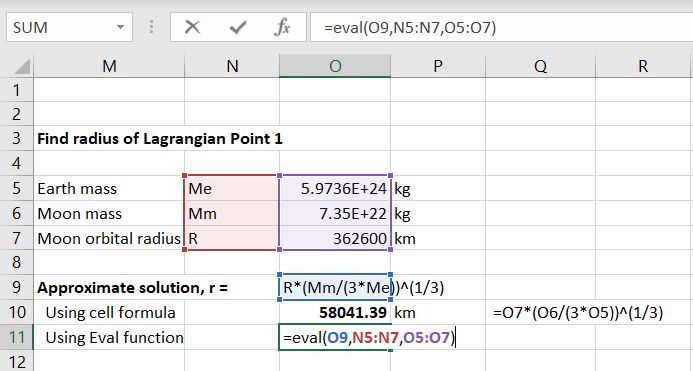
The simplified equation may be easily solved by entering as a spreadsheet formula:
=O7*(O6/(3*O5))^(1/3)
The spreadsheet also includes a User Defined Function (UDF) called Eval, that will evaluate a formula entered as a text string, as shown below:

The Eval UDF returns the same result as the spreadsheet formula:

The simplest way to solve the more complex formula is to use the built in Goal Seek function (on the Data Tab), under What-if Analysis. To use Goal Seek first enter a guessed value for the radius, r, then enter a cell formula to evaluate the function:
(Me/(R+r)^2)+(Mm/r^2)-((Me/R^2)+r*(Me+Mm)/R^3)
as shown below:

Then call the Goal Seek function (Data – What-if analysis – Goal Seek):

Goal Seek will adjust the value in the selected changing cell (O15) so that the “set cell” (O18) evaluates to the selected value (0):

The Goal Seek function is built-in, and is the most convenient for a one-off solution, but it is slow and cumbersome to use for a large range of data. The UDFs QuadBrent and QuadBrentT are much quicker and more convenient to use on tabular data. The input for the QuadbrentT function is shown below:

Entering the function returns exactly the same result:

Finally the function may be rearranged as a quintic polynomial, that can be solved with the RPolyJT function:
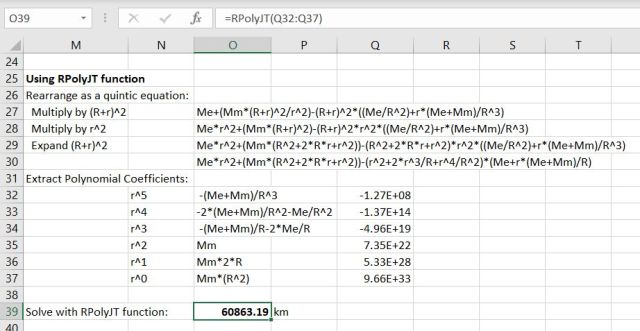
RPolyJT returns all 5 solutions of the quintic polynomial as an array function, but in this case there is only one real solution, which is the first value in the results array.
More details of the UDFs described above can be found at:




 Newton Excel Bach, not (just) an Excel Blog