Continuing posts on new Python features, this one looks at the new walrus operator, which was introduced in Python 3.8. For a detailed description see Python Walrus Operator in Python 3.8.
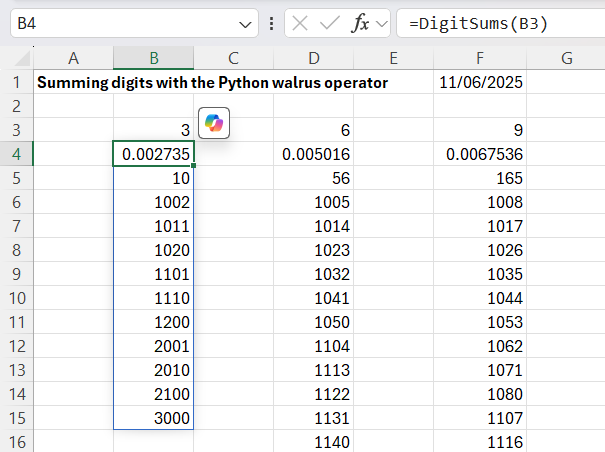
In addition to linking to an Excel UDF, my code allows the sum value to be set to any integer, and also returns the number of values generated and the execution time:
# Quora link - https://qr.ae/pAVa31
@xl_func()
@xl_arg('n', 'int')
def DigitSums(n):
    stime = time.perf_counter()
    sum_n_nums = []
    minval = 1000 + n -1
    maxval = n * 1000 +1
    for num in range(minval, maxval):
        # use the "walrus operator" to both assign a value to
        # digit_sum and compare the value we assigned
        if (digit_sum := sum(int(digit) for digit in str(num))) == n:
            sum_n_nums.append(num)
    sum_n_nums.insert(0, len(sum_n_nums))
    sum_n_nums.insert(0, time.perf_counter() - stime)
    return sum_n_nums
As noted in the code, the walrus operator, :=, calculates the sum of the digits in each number, assigns that value to the digit_sum variable, then compares the value to the required sum, n. If the values are equal the number is appended to the list of results.
The code and an example have been added to the Pandigitals file at: Pandigitals.zip
The py_SciPy download contains full open-source Python code and example spreadsheets for a wide range of Scipy functions, as well as the Numpy functions covered in this post. For more details, see the series of posts starting at: Scipy functions with Excel and pyxll. Also see Python and pyxll for details of the pyxll add-in, required to link my Python code to Excel.
The code below calls functions from the Python random or secret modules:
Function results are shown in the screenshot below, together with three Numpy functions and the Excel built-in Randbetween and Randarray functions:
py_RandBetween and Excel Randbetween operate in the same way, returning a single integer, between the specified inclusive limits.
py_RandRange and py_RandIntA operate in a similar way, returning integers between the lower limit and below the upper limit. py_RandRange also has a step input (default = 1), and returns only integers with the specified step interval above the minimum value. py_RandIntA is a Numpy function, and returns an array with the specified number of rows and (optionally) columns.
py_RandArray and py_RandUniform are Numpy functions and also return arrays with multiple rows and 1 or more columns. py_RandArray returns a normal distribution with zero mean and 1.0 variance. py_RandUniformA operates in a similar way to the Excel Randarray function, returning an array of floats of the specified size with uniform distribution over the specified range.
py_RandBelow returns an integer between zero and 1 less than the upper limit. It is part of the Python random.secrets module and provides greater security in the generation of random integers.
All the Python and Numpy functions provide direct access to the on-line Python help by clicking the “help on this function” link in the function dialogue:
The help is also available as text within Excel for the Numpy functions, using the py_Numpy spreadsheet:
The code below generates arrays of numerical “palindromes”, i.e. integers with the same value when read from right to left:
@xl_func()
@xl_arg('start', 'int')
@xl_arg('stop', 'int')
def PalindromeNum(start, stop):
    stime = time.perf_counter()
    palindromes = []
    for num in range(start, stop):
        if str(num) == str(num)[::-1]:
            palindromes.append(num)
    palindromes.insert(0, len(palindromes))
    palindromes.insert(0, time.perf_counter() - stime)
    return palindromes

@xl_func()
def PalindromeNum8():
    stime = time.perf_counter()
    palindromes = []
    for one in range(1, 10):
        for two in range(0, 10):
            for three in range(0, 10):
                for four in range(0, 10):
                    palindromes.append(int(f'{one}{two}{three}{four}{four}{three}{two}{one}'))
    palindromes.insert(0, len(palindromes))
    palindromes.insert(0, time.perf_counter() - stime)
    return palindromes
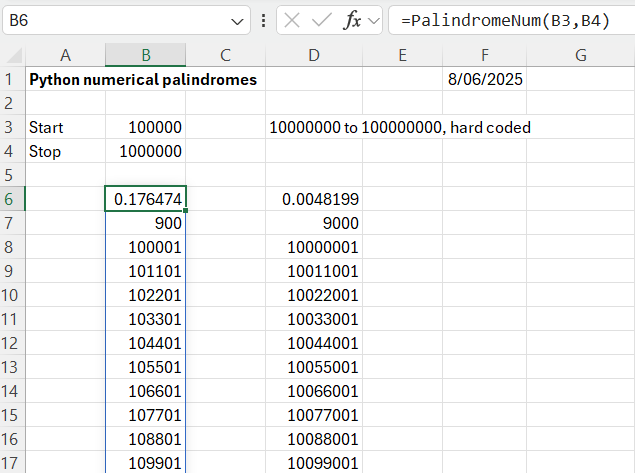
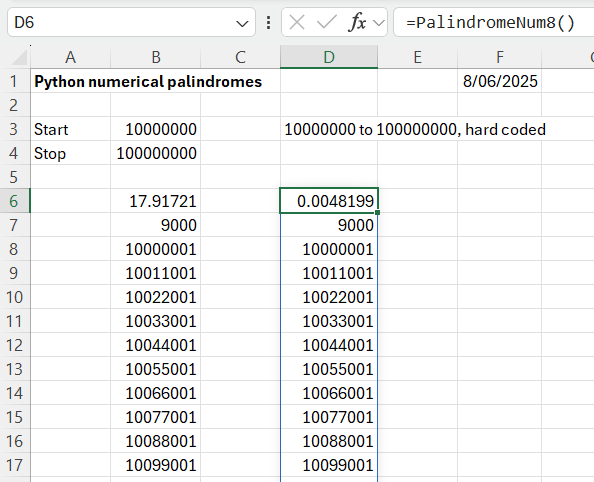
The functions return an array of all the palindromes between the specified limits (for the PalindromeNum function, or between 10,000,000 and 100,000,000 for PalindromeNum8. The functions also return the execution time and the number of palindromes found.
The PalindromeNum function works by generating all the integers in the specified range, then checking if they are palindromes, by comparing a string of each value with the reversed string. This works reasonably quickly for up to 1 million values, but rapidly slows down for bigger ranges:
The PalindromeNum8 function works by generating all the possible integers of half the required size, then appending the reversed value as a string, and converting the result back to an integer. For the example shown this is about 3500 times faster than the original code! The problem with the faster code is that it needs a variable number of nested loops, depending on the magnitude of the integers, so the code would need reworking to allow ranges of different magnitude. Since the purpose of the exercise is to display Python techniques for manipulating lists and strings, I will leave that as an exercise for the reader!
The Python match case statement was introduced in Python 3.10. It provides similar functionality to the VBA Select Case statement, but also has additional features. For detailed background with examples see:
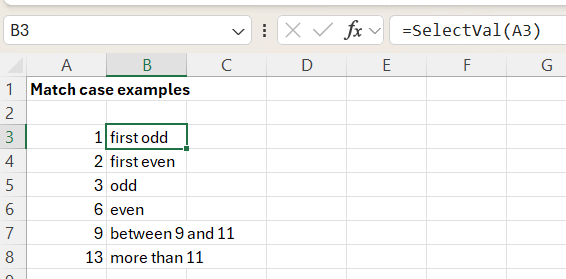
The example below illustrates the basic functionality using code called from Excel with pyxll.
@xl_func()
def SelectVal(n):
    match n:
        case 1:
            return 'first odd'
        case 2:
            return 'first even'
        case 3 | 5 | 7:
            return 'odd'
        case 4 | 6 | 8:
            return 'even'
        case _ if 8 < n < 12:
            return 'between 9 and 11'
        case _ :
            return 'more than 11'
The code shows options for:
Matching a single value (1 or 2)
Matching 2 or more values with the or operator, e.g. 3 | 5 | 7:
Matching any other value in a specified range using _ if condition :
I have recently been catching up with new Python features, starting with Data Classes which were introduced in Python version 3.7. For information and code examples I have referred to:
The link provides detailed information on the basics of data classes, leading on to more advanced features and examples, including:
I have adapted this code to create Excel UDFs that will find the distance between two locations either defined by latitude and longitude, or by city names linked to a table with latitude and longitude. A spreadsheet with examples and location data for Australian cities can be downloaded from:
Note that the position data is defined in the order of Latitude, Longitude, which is the standard order, rather than Longitude, Latitude as used in the Real Python code.
The Sphere_dist function has input of the latitude and longitude of two points and returns the spherical distance between them.
The City_dist function has input of a table of cities with position and other data (which must be in the same format as in the spreadsheet), and two city names. It returns the names of the two cities with their latitude and longitude, and the distance between them.
The results of the two functions are approximate, because the Earth is not an exact sphere. A more accurate approximation can be found with the Vincenty method; see Spherical Geometry and Vincenty’s Formulae.
Ashley Hutchings 80th Birthday Bash – Who Knows Where The Time Goes? Encore #2. Kellie While – lead vocal. Richard Thompson – lead guitar. Plus the ensemble. Birmingham Town Hall – 18.04.2025.
The lead singer, Kellie While, has appeared here before accompanying Martin Simpson, but without mention either in my post or on You Tube:





 Newton Excel Bach, not (just) an Excel Blog