From Highgate Cemetery:

… now you can’t.
I recently updated to the latest version of NumPy (1.12.1), and today I discovered that some of my spreadsheets using NumPy arrays (via xlwings) were returning errors like:
IndexError: only integers, slices (`:`), ellipsis (`…`), numpy.newaxis (`None`) and integer or boolean arrays are valid indices
The problem was that using floats to index NumPy arrays previously generated a warning, but now generates an error:
DeprecationWarning to error
•Indexing with floats raises IndexError, e.g., a[0, 0.0].
•Indexing with non-integer array_like raises IndexError, e.g., a[‘1’, ‘2’]
•Indexing with multiple ellipsis raises IndexError, e.g., a[…, …].
•Non-integers used as index values raise TypeError, e.g., in reshape, take, and specifying reduce axis
You might ask, why use floats to index an array in the first place? The reason is that if a range is copied from Excel to Python then by default all the values are passed as float64. The array could be converted to all integers, but if the values are mixed integers and floats (such as an array of node numbers and coordinates) that won’t work. In previous versions the values to be used as array indices could just be left as floats, but now it is necessary to convert them to integers before using them as index values.
I will be working through my Python code posted here and update as required, but if you come across an IndexError anywhere, please let me know.
In a recent Eng-Tips thread someone wanted a VBA routine to combine a value with different + and – tolerance values, formatted as superscript and subscript. Eng-Tips (and Tek-Tips) regular, Skip Vought, came up with a macro to do the job, which I have modified to allow it to work on any selected range:
Download VBAFormat.xlsb
Sub AddTolerance()
'SkipVought 2017 3.14
'Ammended to use selected range as input: Doug Jenkins 2017 3.15

'Output to the column to the right of the input range, or to the last column of selected range if NumCols > 4
    Dim sVal As String, sMax As String, sMin As String
    Dim p1 As Long, p2 As Long, NumRows As Long, NumCols As Long, i As Long
    Dim RowVals As Range

    With Selection
        NumRows = .Rows.Count
        NumCols = .Columns.Count
        If NumCols < 4 Then NumCols = 4
        For i = 1 To NumRows
            Set RowVals = .Cells.Offset(i - 1, 0).Resize(1, NumCols)

            sVal = RowVals(1, 1).Value           'The value

            sMax = "+" & RowVals(1, 2).Value     'The max tolerance

            sMin = RowVals(1, 3).Value           'The min tolerance

            With RowVals(1, NumCols)
                .Value = sVal & sMax & sMin

                p1 = InStr(.Value, "+")
                p2 = InStr(.Value, "-")

                With .Characters(Start:=p1, Length:=p2 - p1).Font
                    .Superscript = True
                    .Subscript = False
                End With

                With .Characters(Start:=p2, Length:=Len(.Value) - p2 + 1).Font
                    .Superscript = False
                    .Subscript = True
                End With
            End With
        Next i
    End With
End Sub
Results are shown in the screenshot below:
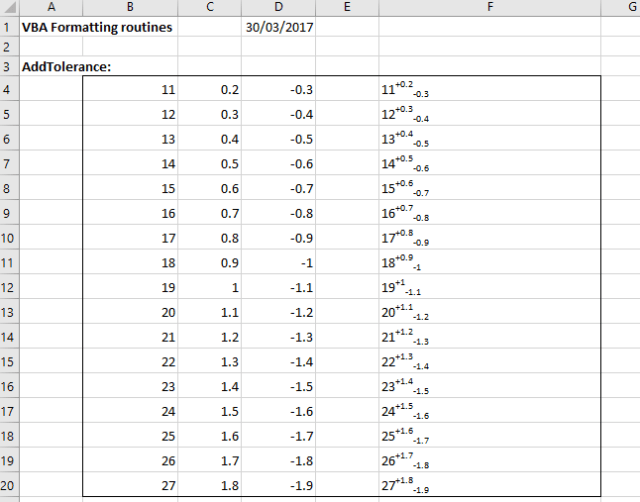 The data consists of three adjacent columns: values and upper and lower tolerances. To run the macro either select just the input data range, or extend the range to the right, then press Alt-F8 and select AddTolerance. The output results will either be written to the column to the right of the input data, or if a wider range was selected, in the last column of the selected range, as shown above.
As another example, I have written a macro to convert text strings with exponents in “^x” format to superscript format, as shown below:

Sub FormatExp()
' Convert ^x to superscript format
'Output to the column to the right of the input range, or to the last column of selected range if NumCols > 2
    Dim sVal As String, sMax As String, sMin As String
    Dim p1 As Long, p2 As Long, NumRows As Long, NumCols As Long, i As Long, NewString As String
    Dim RowVals As Range, j As Long, k As Long, k2 As Long, m As Long, Sup As Boolean, str As String, NumE As Long, EPosA() As Long, StrLen As Long

    With Selection
        NumRows = .Rows.Count
        NumCols = .Columns.Count
        If NumCols = 1 Then NumCols = 2

        For i = 1 To NumRows
            Set RowVals = .Cells.Offset(i - 1, 0).Resize(1, NumCols)

            sVal = RowVals(1, 1).Value           'The value
            StrLen = Len(sVal)
            ' Count number of ^ characters
            NumE = 0
            For j = 1 To StrLen
                If Mid(sVal, j, 1) = "^" Then NumE = NumE + 1
            Next j
            If NumE = 0 Then
                RowVals(1, NumCols).Value = sVal
            Else
            ' find positions of ^ characters and length of exponent value
                ReDim EPosA(1 To NumE, 1 To 2)
                m = 0
                For j = 1 To StrLen
                    If Mid(sVal, j, 1) = "^" Then
                        m = m + 1
                        EPosA(m, 1) = j
                        k = InStr(j, sVal, " ") - 1
                        k2 = InStr(j, sVal, ")") - 1
                        If k2 > 0 Then
                            If k < 1 Or k2 < k Then k = k2
                        End If
                        If k < 1 Then k = Len(sVal)
                        EPosA(m, 2) = k - j
                    End If
                Next j
            ' Remove ^ characters
                NewString = ""
                For j = 1 To NumE
                    If j = 1 Then m = 1 Else m = EPosA(j - 1, 1) + 1
                    NewString = NewString & Mid(sVal, m, EPosA(j, 1) - m)
                Next j
                NewString = NewString & Right(sVal, EPosA(NumE, 2))
            ' Convert exponents to superscript format
                With RowVals(1, NumCols)
                    .Value = NewString
                    For j = 1 To NumE
                        m = EPosA(j, 1) + 1 - j
                        .Characters(Start:=m, Length:=EPosA(j, 2)).Font.Superscript = True
                    Next j
           End With

            End If
        Next i

      End With
    End Sub
Birdland Films
Birdland Films was created by Kerinne Jenkins in 2017, as a home for her own work across a number of platforms, but more importantly as a starting point. To establish a place where other like minded filmmakers, creatives and artists could come to collaborate and create.
Inspired by the feel, the tone and the emotion in the Patti Smith song ‘Birdland’;
I am helium raven and this movie is mine.
And we are free to create anything we could possibly imagine.
Whether it’s a film, a podcast, a music video, an installation, a play or a poem. Whether it’s for long or short, for big screens or small, there is no one format that we will limit ourselves to. Birdland Films hopes to grow and change with every person who comes into the fold.
But there is one rule of Birdland.
That at the heart of any project is a focus on character and story. It might seem like we’re stating the obvious, but we want to make sure that this comes through in anything we make, whether it’s a traditional narrative, a case study, a commercial or an installation.
Let’s never get too distracted by all the other parts of the process that we forget why we wanted to make these things in the first place.
Horses is the debut album by American musician Patti Smith, released in 1975 on Arista Records. The record was a key factor and major influence on the New York punk rock scene.
At the time she recorded Horses, Patti Smith and her band were favorites in the New York club scene along with Blondie and The Ramones. The former’s influence can be best heard in the track “Gloria”, a radical retake on the Them song. “Birdland”, in particular, owed more to the jazz which Smith’s mother enjoyed than to the influence of punk. When recording this song, which was improvised by the band in Electric Lady Studios, Smith has said she imagined the spirit of Jimi Hendrix watching her. The lyrics of “Birdland” are based upon A Book of Dreams, a 1973 memoir of Wilhelm Reich by his son Peter. Several of the album’s songs — “Redondo Beach”, “Free Money”, “Kimberly” — were inspired by moments with members of Smith’s family, while others — “Break It Up”, “Elegie” — were written about her idols. “Land” was already a live favorite and featured the first verse of Chris Kenner’s “Land of a Thousand Dances” and contains a tribute to her long-time idol Arthur Rimbaud. Guest musicians included Tom Verlaine of Television and Allen Lanier of Blue Öyster Cult.
“Horses” is often cited as one of the greatest albums in music history. In 2003, the album was ranked number 44 on Rolling Stone magazine’s list of the 500 greatest albums of all time. NME named the album number 1 in its list “20 Near-as-Damn-It Perfect Initial Efforts”. According to a list released by Time magazine in 2006, Horses is one of the All-Time 100 Greatest Albums.
His father died and left him a little farm in New England.
All the long black funeral cars left the scene
And the boy was just standing there alone
Looking at the shiny red tractor
Him and his daddy used to sit inside
And circle the blue fields and grease the night.
It was if someone had spread butter on all the fine points of the stars
‘Cause when he looked up they started to slip.
Then he put his head in the crux of his arm
And he started to drift, drift to the belly of a ship,
Let the ship slide open, and he went inside of it
And saw his daddy ‘hind the control board streamin’ beads of light,
He saw his daddy ‘hind the control board,
And he was very different tonight
‘Cause he was not human, he was not human.
And then the little boy’s face lit up with such naked joy
That the sun burned around his lids and his eyes were like two suns,
White lids, white opals, seeing everything just a little bit too clearly
And he looked around and there was no black ship in sight,
No black funeral cars, nothing except for him the raven
And fell on his knees and looked up and cried out,
“No, daddy, don’t leave me here alone,
Take me up, daddy, to the belly of your ship,
Let the ship slide open and I’ll go inside of it
Where you’re not human, you are not human.”
But nobody heard the boy’s cry of alarm.
Nobody there ‘cept for the birds around the New England farm
And they gathered in all directions, like roses they scattered
And they were like compass grass coming together into the head of a shaman bouquet
Slit in his nose and all the others went shooting
And he saw the lights of traffic beckoning like the hands of Blake
Grabbing at his cheeks, taking out his neck,
All his limbs, everything was twisted and he said,
“I won’t give up, won’t give up, don’t let me give up,
I won’t give up, come here, let me go up fast,
Take me up quick, take me up, up to the belly of a ship
And the ship slides open and I go inside of it where I am not human.”
I am helium raven and this movie is mine,
So he cried out as he stretched the sky,
Pushing it all out like latex cartoon, am I all alone in this generation?
We’ll just be dreaming of animation night and day
And won’t let up, won’t let up and I see them coming in,
Oh, I couldn’t hear them before, but I hear ’em now,
It’s a radar scope in all silver and all platinum lights
Moving in like black ships, they were moving in, streams of them,
And he put up his hands and he said, “It’s me, it’s me,
I’ll give you my eyes, take me up, oh now please take me up,
I’m helium raven waitin’ for you, please take me up,
Don’t let me here,” the son, the sign, the cross,
Like the shape of a tortured woman, the true shape of a tortured woman,
The mother standing in the doorway letting her sons
No longer presidents but prophets
They’re all dreaming they’re gonna bear the prophet,
He’s gonna run through the fields dreaming in animation
It’s all gonna split his skull
It’s gonna come out like a black bouquet shining
Like a fist that’s gonna shoot them up
Like light, like Mohammed Boxer
Take them up up up up up up
Oh, let’s go up, up, take me up, I’ll go up,
I’m going up, I’m going up
Take me up, I’m going up, I’ll go up there
Go up go up go up go up up up up up up up
Up, up to the belly of a ship.
Let the ship slide open and we’ll go inside of it
Where we are not human, we’re not human.
Well, there was sand, there were tiles,
The sun had melted the sand and it coagulated
Like a river of glass
When it hardened he looked at the surface
He saw his face
And where there were eyes were just two white opals, two white opals,
Where there were eyes there were just two white opals
And he looked up and the rays shot
And he saw raven comin’ in
And he crawled on his back and he went up
Up up up up up up
Sha da do wop, da shaman do way, sha da do wop, da shaman do way,
Sha da do wop, da shaman do way, sha da do wop, da shaman do way,
Sha da do wop, da shaman do way,
We like birdland.


