“Making the simple complicated is commonplace; making the complicated simple, awesomely simple, that’s creativity”
Charles Mingus

“Making the simple complicated is commonplace; making the complicated simple, awesomely simple, that’s creativity”
Charles Mingus
Following a new release of xlwings, I have updated the xlScipy spreadsheet to work with it, and added a few new features:
The new version can be downloaded from:
including full open source code (VBA and Python). Note that there are still one or two issues with the xl_SolveF function, and the previous version is still available (xlScipy.zip).
Unzip the download file to any folder, and install Python with Scipy, Numpy, and xlwings, and it should work.
The new features are shown in the screen shots below:
The Akima1dSpline function has been added to the interpolation sheet. I will be posting more details on this function, and comparing Python splines with VBA and Alglib alternatives, in the near future.

The Matplotlib function works as in the xlMatPlot.zip spreadsheet. In addition, the Interp sheet (shown above) uses a Matplotlib graph with a function that can be called from any sheet (but currently only one graph per sheet).

The Python Delaunay, ConvexHull, Voronoi, functions have been implemented on the Space sheet.

Code for the plotdat routine is shown below. More details to follow in a later post.

Following the blog theme of using Excel for working with numbers without a $ on the front, I have added to my links:
EngineerExcel.com was founded by Charlie Young.
He is a licensed professional engineer with a degree in Mechanical Engineering. His engineering simulations have been featured at multiple international technical conferences.
In his decade plus experience as a practicing engineer he has learned to harness the capabilities of Excel to gain insights into engineering challenges and increase productivity.
Why Excel for Educators?
I started blogging nearly a decade ago. My other blog, What It’s Like on the Inside, is a mishmash of both personal and education-related topics. In recent years, I found myself more and more interested in ideas related to Excel, classroom data, and data visualization—enough to move those ideas to this new space. I believe that educators should be able to ask their own questions and interact with data however they choose. There are many new tools available to assist teachers in analyzing and visualizing data. This blog is my attempt to empower educators to collect and use data.
In response to a recent comment, I have modified the CSpline2 spreadsheet so that the CSplineA and CHSplineA functions will accept x values list in descending order, as well as ascending. For more details of the background to the functions, and how to use them see: Daily Download 22: Splines and Curves. The new version can be downloaded from:
The code for the checking and reversing the x data is quite short:
Function CheckAscX(Xa As Variant, Ya As Variant, n as Long) As Boolean
Dim Temp As Variant, i As Long
' If last x < first x, reverse Xa and Ya and return True, else return False
    If Xa(n, 1) < Xa(1, 1) Then
        Temp = Xa
        For i = 1 To n
            Xa(i, 1) = Temp(n - i + 1, 1)
        Next i
        Temp = Ya
        For i = 1 To n
            Ya(i, 1) = Temp(n - i + 1, 1)
        Next i
        CheckAscX = True
        Exit Function
    End If
    CheckAscX = False
End Function
Then the CheckAscX function just needs to be called from the spline function:
...
    Xa = GetArray(Xa)
    Ya = GetArray(Ya)

    n = UBound(Xa)
    RevX = CheckAscX(Xa, Ya, n)
...
The spline functions will now work with the X values sorted in either direction:

Last years’ statistics for this blog are now uploaded to Onedrive. The link to each post is preserved in the spreadsheet, so it makes a convenient index to what has been posted over the year, and what people are looking at from previous years. You should be able to access the links in the window below, or open the file in your browser or Excel, or download it.
Of the 2015 posts, the most popular overall was Smart Indenter and Excel 2013
The most popular in the Newton category was Continuous Beams with Specified Deflections
and the most popular in the Bach category was Avoid si Aibohphobia is di ova …
From the “deserving but sadly neglected category” I have chosen (and they are all worth a look/listen):
Newton: Solving non-linear equations with two or more unknowns – 1
Excel: xlSciPy 1.01
Bach: Sheila Chandra; This
Most frequent referrers to this site came from:
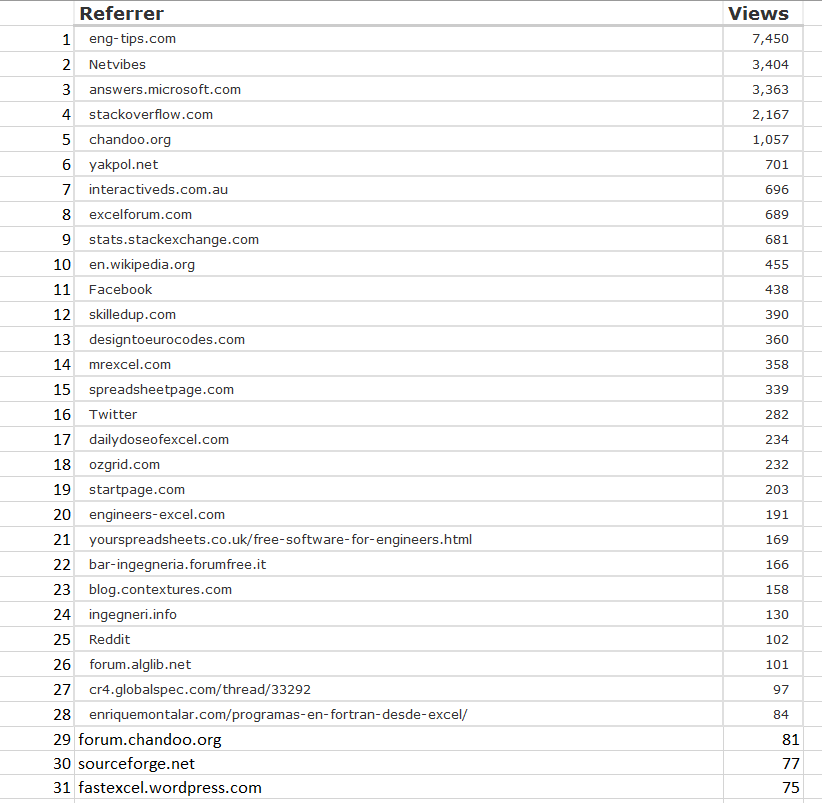
And views by country:


 Newton Excel Bach, not (just) an Excel Blog