The file PdfLink.zip (free download with open source code) contains two short but useful macros for opening and searching pdf files from Excel.
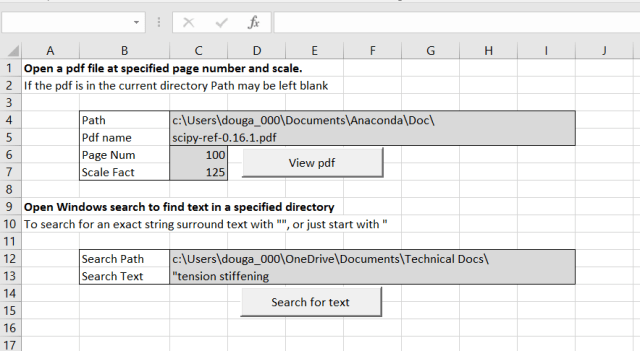
The first is based on code from My Engineering World. I have just added a simple interface to allow the file path and name, page number and scale factor to be entered on the spreadsheet. The code may be copied to any other file; just create the range names: Path_name, Pdf_name, Page_num, and Scale_fact, at any convenient location in the new file.
The My Engineering World blog also has a wide range of other software available for free download, including engineering applications, as well as other routines for working with pdf files, using both Acrobat Reader, and the full Acrobat Professional package.
The second opens the Windows File Explorer search, using the search path and text entered on the spreadsheet. Typical results are shown below:

The search results can be set up to show the files in list format (together with selected details), and a file preview on the right. The preview is very small by default, but can be dragged to be of readable size, and the selected size (plus the other selected settings) are stored for the next use. The Windows search is now greatly improved from earlier versions. Search indexing takes place in the background, without noticeable effect on other operations, search is now very fast (on indexed folders), and the preview also works near instantly.
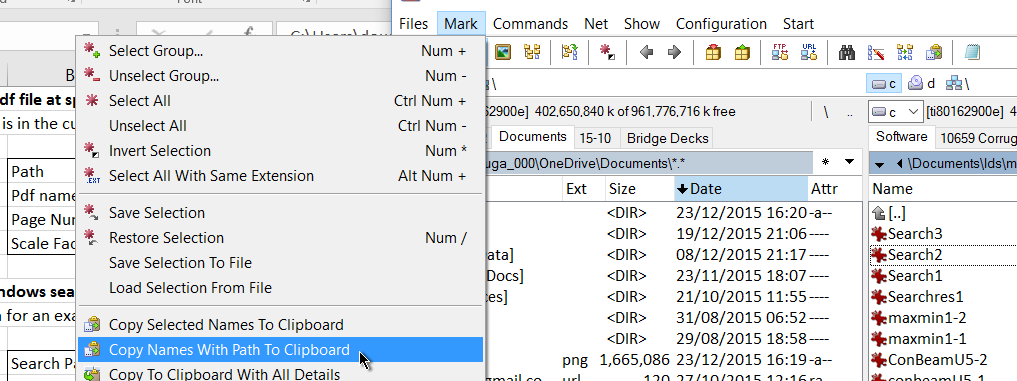
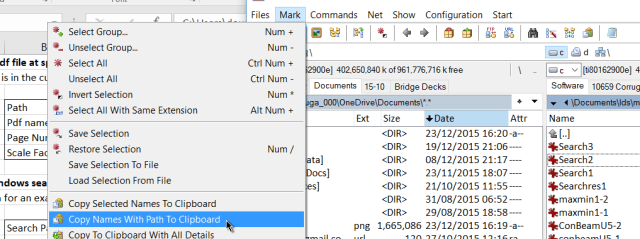
Both the View pdf and Search macros require the full path to be entered, or will work on the current path if the path entry is left blank. My favoured method to copy the full directory path is using the Total Commander file management package. Select the directory you want to copy, then Mark – Copy Name With Path to Clipboard:
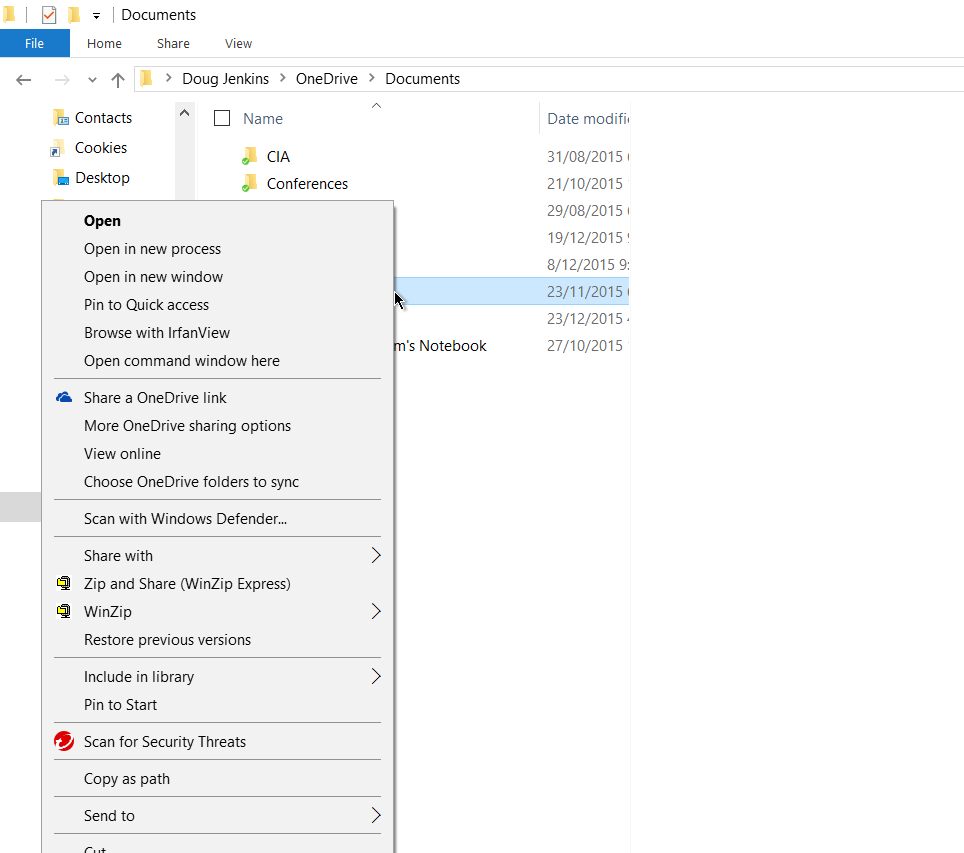
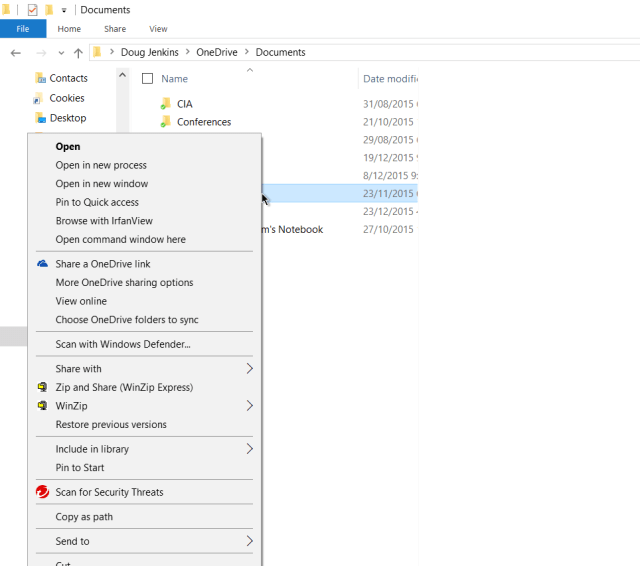
For those who prefer to stick with File Explorer, a similar facility is available, but as usual it is well-buried: Open File Explorer, select the directory you want, then shift-Right Click and select Copy as path:
Update 7 Jan 2016:
Bob Phillips commented with code for 64 bit Excel which I have copied in a code box below. I have also updated the download file, so it should work in both 32 bit and 64 bit Excel. Please let me know if not:
Replace the API definitions with this code
'API declaration for the windows "Search" dialog
#If VBA7 Then
    Private Declare PtrSafe Function ShellSearch Lib "shell32.dll" Alias "ShellExecuteA" ( _
        ByVal hwnd As LongPtr, _
        ByVal lpOperation As String, _
        ByVal lpFile As String, _
        ByVal lpParameters As String, _
        ByVal lpDirectory As String, _
        ByVal nShowCmd As Long) As String

#Else
    Private Declare Function ShellSearch Lib "shell32.dll" Alias "ShellExecuteA" ( _
        ByVal hwnd As Long, _
        ByVal lpOperation As String, _
        ByVal lpFile As String, _
        ByVal lpParameters As String, _
        ByVal lpDirectory As String, _
        ByVal nShowCmd As Long) As String
#End If
Private Const SW_SHOWNORMAL = 1
'Retrieves a handle to the top-level window whose class name and window name match the specified strings.
'This function does not search child windows. This function does not perform a case-sensitive search.
#If VBA7 Then
    Public Declare PtrSafe Function FindWindow Lib "user32" Alias "FindWindowA" ( _
        ByVal lpClassName As String, _
        ByVal lpWindowName As String) As LongPtr
#Else
    Public Declare Function FindWindow Lib "user32" Alias "FindWindowA" ( _
        ByVal lpClassName As String, _
        ByVal lpWindowName As String) As Long
#End If

'Retrieves a handle to a window whose class name and window name match the specified strings.
'The function searches child windows, beginning with the one following the specified child window.
'This function does not perform a case-sensitive search.
#If VBA7 Then
    Public Declare PtrSafe Function FindWindowEx Lib "user32" Alias "FindWindowExA" ( _
        ByVal hWnd1 As LongPtr, _
        ByVal hWnd2 As LongPtr, _
        ByVal lpsz1 As String, _
        ByVal lpsz2 As String) As LongPtr
#Else
    public Declare Function FindWindowEx Lib "user32" Alias "FindWindowExA" ( _
        ByVal hWnd1 As Long, _
        ByVal hWnd2 As Long, _
        ByVal lpsz1 As String, _
        ByVal lpsz2 As String) As Long
#End If

'Brings the thread that created the specified window into the foreground and activates the window.
'Keyboard input is directed to the window, and various visual cues are changed for the user.
'The system assigns a slightly higher priority to the thread that created the foreground
'window than it does to other threads.
#If VBA7 Then
    Public Declare PtrSafe Function SetForegroundWindow Lib "user32" (ByVal hwnd As LongPtr) As LongPtr
#Else
    Public Declare Function SetForegroundWindow Lib "user32" (ByVal hwnd As Long) As Long
#End If

'Sends the specified message to a window or windows. The SendMessage function calls the window procedure
'for the specified window and does not lParenturn until the window procedure has processed the message.
#If VBA7 Then
    Public Declare PtrSafe Function SendMessage Lib "user32" Alias "SendMessageA" ( _
        ByVal hwnd As LongPtr, _
        ByVal wMsg As Long, _
        ByVal wParam As LongPtr, _
        lParam As Any) As LongPtr
#Else
    Public Declare Function SendMessage Lib "user32" Alias "SendMessageA" ( _
        ByVal hwnd As Long, _
        ByVal wMsg As Long, _
        ByVal wParam As Long, _
        lParam As Any) As Long
#End If

'Places (posts) a message in the message queue associated with the thread that created the specified
'window and lParenturns without waiting for the thread to process the message.
#If VBA7 Then
    Public Declare PtrSafe Function PostMessage Lib "user32.dll" Alias "PostMessageA" ( _
        ByVal hwnd As LongPtr, _
        ByVal wMsg As Long, _
        ByVal wParam As LongPtr, _
        ByVal lParam As Long) As LongPtr

#Else
    Public Declare Function PostMessage Lib "user32.dll" Alias "PostMessageA" ( _
        ByVal hwnd As Long, _
        ByVal wMsg As Long, _
        ByVal wParam As Long, _
        ByVal lParam As Long) As Long
#End If

'Constants used in API functions.
Public Const WM_SETTEXT = &HC
Public Const VK_RETURN = &HD
Public Const WM_KEYDOWN = &H100

and also change some variables in the OpenPDF procedure:


#If VBA7 Then
Dim lParent                     As LongPtr
Dim lFirstChildWindow           As LongPtr
Dim lSecondChildFirstWindow     As LongPtr
Dim lSecondChildSecondWindow    As LongPtr
#Else
Dim lParent                     As Long
Dim lFirstChildWindow           As Long
Dim lSecondChildFirstWindow     As Long
Dim lSecondChildSecondWindow    As Long
#End If