Tanh-Sinh Quadrature V4.0

Since last September Graeme Dennes has continued work on his Tanh-Sinh Quadrature spreadsheet, and has recently released Version 4.0, which can be downloaded from: Tanh-Sinh. As usual, the download includes full open-source code and extensive documentation.

The new version includes routines to conveniently evaluate the integrals of functions coded in VBA, as well as those entered on the worksheet.  This approach provides much better performance, as described by Graeme below:

Much, Much Faster Tanh-Sinh Quadrature v4.0 by Graeme Dennes

To the best of the author’s knowledge, this V4.0 package remains the fastest, most powerful, most accurate and most comprehensive general-purpose quadrature package available today at no cost. It includes full open source code and extensive documentation.

Yes, this V4.0 release is much, much faster than the V3.0 release due to a fundamental change in the method used to evaluate the functions being integrated. This is the main, exciting, change for this version of the workbook.

For previous releases, and which is the default option in this release, the functions to be integrated are stored in worksheet cells, and evaluated by the quadrature programs as required. The cell-stored method may continue to be used in the identical manner as in previous releases.

Doug Jenkins (privately) raised the concept of the functions being stored internally as VBA program statements, being called by the quadrature programs when required. Based on initial code provided by Doug, the author has implemented the VBA-stored method as an option for all 13 quadrature programs. Each program worksheet has been provided with a control button to demonstrate either the VBA-based results or cell-based results, allowing for an immediate comparison of the execution times between these two function storage methods.

Why go to all this trouble? Consider the improvement afforded to the Tanh-Sinh program. With all 200+ test functions held as VBA-stored code, the total worksheet calculation time shows a dramatic speed increase of twenty-seven times over the cell-stored method!!! This is an unprecedented out-of-the-real-world improvement to the performance of the Tanh-Sinh program. (The other programs also show performance improvements of varying degrees.) Refer to the VBA TESTS worksheet for the indicative speed comparisons between the two storage methods for the 13 quadrature programs. All several hundred test functions used in the 13 program worksheets are also included as VBA-stored functions, allowing for easy speed comparisons between the two storage methods. If you thought the Tanh-Sinh program’s performance was excellent in the past, wait until you experience the performance when using VBA-stored functions. Hang on to your hat!!

Caveat: Implementing the functions internally as VBA program statements requires VBA programming skills. The top of the module m_EvalFunc contains the basic instructions for entering the functions as VBA code statements.

Doug also provided an example of a custom function which in turn calls a quadrature program to integrate a VBA-stored function. This greatly increases the speed of the custom function. It also improves the overall utility of this workbook, in that it provides the basis for having a library of regularly used custom functions which are also able to make use of the new storage method, while at the same time perform other associated calculations (if required) in conjunction with calls to integration programs, etc. Iterative programs, such as these 13 quadrature programs, maximise the benefits of the VBA storage method because the functions being integrated may need to be evaluated many times for each solution, maximising the time-saving provided by this method. Refer to the last two examples on the T-S EXAMPLES worksheet for two custom functions demonstrating the method. The code for the included custom functions is located at the end of the module m_EvalFunc.

In summary, the huge speed improvement achieved through using VBA-stored functions is immediately obvious and worthwhile. We do live in exciting times! Thank you Doug.

Also in this release, the speed of the Gauss-Kronrod program has been significantly improved through the inclusion of the Epsilon algorithm of Wynn to extrapolate the limit of the series, speeding up convergence. This has allowed the order of the Gauss-Kronrod program to be changed from 20/41 to 10/21. These two changes have improved the performance by a very nice 40 percent.

Graeme Dennes

Posted in Excel, Maths, Newton, Numerical integration, UDFs, VBA | Tagged , , , , | 6 Comments

Using Excel’s shortest functions

Happy New Year to everyone.

I’ve been busy working on a 3D version of my frame analysis program (which will be published in the not too distant future), but as things have been a bit quiet here recently, here are some things you can do with Excel’s shortest functions (N() and T()), inspired by a post at Bacon Bits.

Mike Alexander’s post (linked above) shows how to add comments to the end of a function by surrounding the text with the N() function, which will evaluate to zero, but I was more intrigued by one of the comments, pointing out that these functions can be used within array formulas to evaluate an embedded array.  See the link for more details, but playing with this I found an interesting difference in behaviour compared with using — (double minus), which is often recommended for this purpose.

If we have a list of numbers, starting in cell A1, then the formula:

=COUNTA((OFFSET(A1,{1,5,6},0)))

will return 1, but:

=COUNTA(N(OFFSET(A1,{1,5,6},0)))

will return 3, because the N() function evaluates the Offset function, before the Counta function.  In this case:

=COUNTA(–(OFFSET(A1,{1,5,6},0)))

will give the same result, but:

=SUM(–(OFFSET(A1,{1,5,6},0)))

returns #VALUE!, whereas:

=SUM(N(OFFSET(A1,{1,5,6},0)))

returns 15, which is the correct result.

Posted in Arrays, Excel | Tagged , , , , | 26 Comments

The statement below is false

FalseIf you think I’m wrong, try looking at it from a different perspective.

The picture above came from an optical illusion blog at:

http://www.anopticalillusion.com/

and I was led there from:

http://www.josleys.com/index.php

which is an amazing collection of mathematical imagery by Jos Leys, of which I have posted a very small sample below (visit the link for higher resolution images, and much more).

3D Mandelbrot 1

3D Mandelbrot 1

Mandelbrot2

3D Mandelbrot 2

NewtonFract

Newton Fractal

EngineersNightmare

Escher inspired “Engineer’s Nightmare”

Posted in Bach, Maths, Newton, Ray Tracing | Tagged , , , , | Leave a comment

Extending Frame4 with on sheet formulas

Still on Frame4, Julien asked if provision could be made for application of local loads, i.e. loads perpendicular to sloping members, rather than just horizontal or vertical.  This will actually be incorporated in the spreadsheet “real soon now”, but it makes a good example of how the program can be made more versatile with the use of formulas on the spreadsheet, so that’s what I have done in this example.  The example is a simple twin portal frame structure, with perpendicular downward loads of 10 kN/m applied to the beams facing left, and perpendicular upward loads of 5 kN/m applied to those facing right.

Twin Portal Frame Structure

Twin Portal Frame Structure

The formulas entered to calculate the equivalent global loads are shown below:

Calculation of global loads

Calculation of global loads, click for full size view

For each roof member two load lines are required, to calculate the X and Y loads, from the input perpendicular loads, and the beam slope.  The calculated global load can then be transferred to the input area.  The resulting output results and deflected shape are shown below:

Output Results

Output Results

Deflected shape

Deflected shape

This technique can be extended to allow quite sophisticated analyses; for instance it would be possible to include geometric non-linearity by adjusting the node coordinates after each run, or material non-linearity by adjusting the section properties. The only word of warning is that the rows below the designated data entry areas must not be used for other purposes.

Posted in Beam Bending, Excel, Finite Element Analysis, Frame Analysis, Newton, VBA | Tagged , , , , | 3 Comments

Frame4 Version 3.05; with support displacements

Hot on the heels of Version 3.04 comes Version 3.05.

A few days ago Julien asked if the Frame4 allowed for specified support deflections, to which I replied it would be added in the future.  Searching Google on the topic I found:
https://newtonexcelbach.wordpress.com/2009/05/11/frame-analysis-with-excel-%E2%80%93-7-shear-deflections-and-support-displacements/
from which I discovered that it had been done already!

Download from: http://www.interactiveds.com.au/software/Frame4.zip

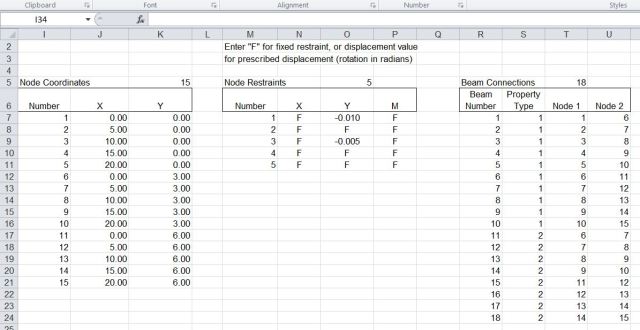
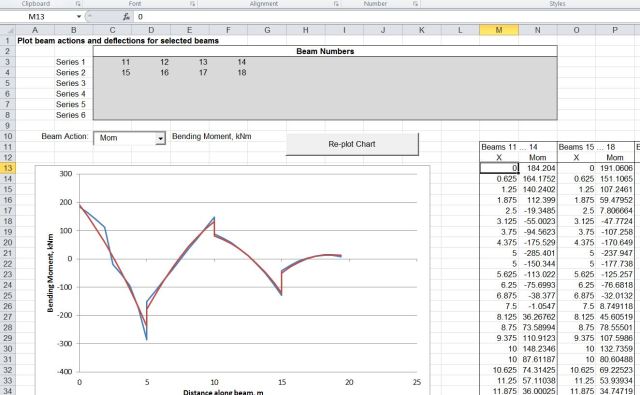
The new version has some small amendments to make it compatible with the Alglib solver, and adds some brief documentation.  The screen shots below show example input and output, and results from Strand7 for the same problem, which are in near exact agreement.

Support displacement input

Support displacement input

Frame4-6-2

Support displacement and reaction output

Frame4-6-3

Deflected shape x 200

Frame4-6-4

Horizontal beam moments

Frame4-6-5

Strand7 output, reactions for Node 1

Posted in Beam Bending, Excel, Finite Element Analysis, Frame Analysis, Newton, Strand7, VBA | Tagged , , , , | 7 Comments