Compiled Matrix Functions for Excel

This is a follow on from the previous post, showing how the C# version of the ALGLIB maths library can be accessed from Excel, with very little additional coding.  The download file, Matrixdll-c#.zip includes compiled .dll and .tlb files which can be used immediately with the spreadsheet (Matrixdll-c#.xlsb) in conjunction with the Alglib compiled dll, alglibnet2.dll, but this post first describes how to set up the necessary linking code in VBA and Visual Studio Express C#.

The first step is to set up a new project in C# with the necessary COM links enabled, exactly as described in the previous post.  For this example I have set up a project called ALMatrixLib, with a single class called AlgLibMatrix, which will contain all the code linking to the matrix functions.

To test the system was working I first entered a short function not requiring the Alglib library:
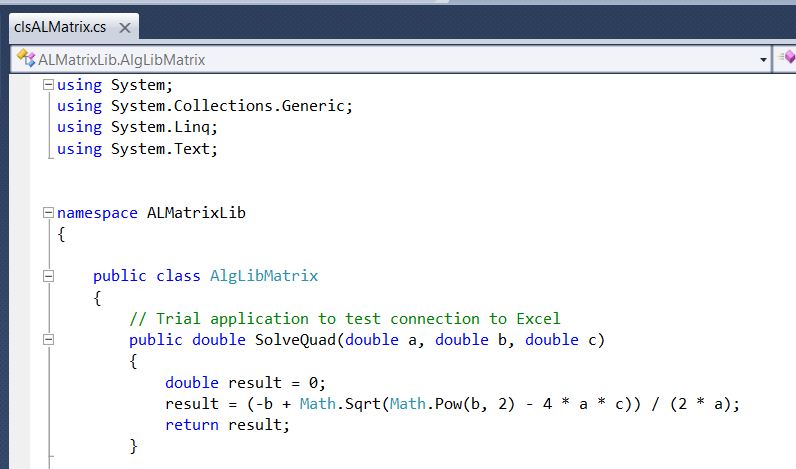
Code for simple quadratic equation solver

Having successfully compiled that code it is necessary to add a few lines of VBA code in Excel to pass the data to the C# code:

Function ALSolveQuad(a As Double, b As Double, c As Double) As Double
Dim ALSolve As New AlgLibMatrix

ALSolveQuad = ALSolve.solvequad(a, b, c)

End Function

Note that the Alglib function is declared as a new instance of the Class AlgLibMatrix, and is called with the line: ALSolveQuad = ALSolve.solvequad(a, b, c).  The same procedure is used for all the other functions included in the AlgLibMatrix class.

The other essential step is to provide a reference to the compiled AlgLib code in the ALMatrixLib project.  The simplest way to do this is to open the solution Explorer window, then simply drag the alglibnet2.dll file from Windows Explorer (or your file manager of choice) onto the References heading:
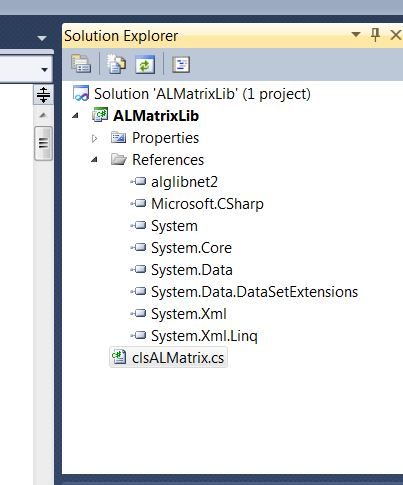
Reference to alglibnet2.dll

Then all that remains is to enter the code to call the AlgLib functions. The first two examples are shown below and full open source code for the interface functions is included in the download file. The AlgLib library is also open source and may be downloaded from their site.

 // Inverse of real matrix
public double [,]    alrminverse(double[,] ddata, out int info)
        {
            alglib.matinvreport rep;
alglib.rmatrixinverse(ref ddata, out info, out rep);
return ddata ;
        }

        // Inverse of real matrix using LU decomposition
public double[,] alrmluinverse(double[,] ddata, int m, out int info)
        {
            int[] pivots;
alglib.rmatrixlu(ref ddata, m, m, out pivots);
            alglib.matinvreport rep;
alglib.rmatrixluinverse(ref ddata, pivots, out info, out rep);
return ddata;
        }

The VBA code for the same two functions is:

Function ALRMatInv(MatrixA As Variant) As Variant
'  Inverse of real matrix
Dim n As Long, M As Long, Info As Long
Dim a2() As Double, iErr As Long, ResA As Variant
Dim MatInv As New AlgLibMatrix

iErr = VarAtoDouble2D_0(MatrixA, a2, M, n)

If iErr = 0 Then
ResA = MatInv.alrminverse(a2, Info)

If Info = 1 Then ALRMatInv = ResA
    Else
ALRMatInv = "Invalid data"
    End If
End Function

Function ALRMatLUInv(MatrixA As Variant) As Variant
' Inverse of real matrix using LU decomposition
Dim n As Long, M As Long, n2 As Long, Info As Long
Dim a2() As Double, iErr As Long, ResA As Variant
Dim MatInv As New AlgLibMatrix

iErr = VarAtoDouble2D_0(MatrixA, a2, M, n)
If iErr = 0 Then
ResA = MatInv.alrmluinverse(a2, M, Info)

If Info = 1 Then ALRMatLUInv = ResA
    Else
ALRMatLUInv = "Invalid data"
    End If
End Function

Having compiled the C# routines, and entered the VBA code, the C# routines should be linked to Excel using the VBE Tools-References menu, as described in the previous post.  The AlgLib functions should now be available in Excel under the User Defined category.  The screen-shot below shows a list of the available functions:

List of Matrix Functions in Matrixdll-c#.xlsb

Of particular interest is the sparse linear equation solver which provides an efficient solution to the systems of equations set up in structural analysis. A typical example is shown below; note the speed increase from the all VBA solution to the C# sparse matrix solver function (752 times speed increase!):

Sparse matrix solver example.

For those not wanting to delve into VBA and C# code the download file contains compiled versions of the routines described above, which together with the included spreadsheet and the AlgLib dll file (from the AlgLib site) will allow all the functions to be accessed without any coding.  It is however necessary to register the dll files with the .Net Framework, and the procedure for doing that will be described in the next post.

Posted in AlgLib, Arrays, Excel, Finite Element Analysis, Frame Analysis, Link to dll, Maths, Newton, UDFs, VBA | Tagged , , , , , , , , , , , | 4 Comments

Links to link VBA to C#

If you search the Internet for information on how to link Excel VBA to C# you will find thousands, if not millions, of links with details of how to connect to Excel from C#, but very few about going the other way, which is what I want to do.  The link below gives detailed, step by step, instructions for doing that, allowing functions in a C# library to be called from a VBA routine with the minimum of hassle.  The link gives a very simple “hello world” example, and I will be giving some more useful examples, linking to the ALGLIB library, in future posts.

A Beginner’s Guide to calling a .NET Library from Excel

Introduction

It’s actually very easy to call a .NET library directly from Excel, particularly if you are using Visual Studio 2005. You don’t need Visual Studio Tools for Office. However there doesn’t seem to be an easy guide on the internet anywhere. MSDN help is quite good on the subject, but can be a little confusing. This article is an attempt to redress the situation.

This article was updated 24th August 2007 to cover Excel 2007 and to clarify the issues with intellisense.

…    More at link

Reading the comments at the link, it seems there is a problem linking with the 64 bit version of Office 2010, so those wanting to do that have a look at the latest comments first.  There is no problem with 64 bit Windows 7, which is what I am using (with 32 bit Office 2010).

The second link is to the MSDN Library, giving details of how to link different data types to objects in C#.  I needed this for one of the ALGLIB routines I will be looking at.  It’s probably very basic stuff, but for those not familiar with C#, it’s not that easy to find.

Boxing and Unboxing (C# Programming Guide)

Boxing and unboxing enable value types to be treated as objects. Boxing a value type packages it inside an instance of the Object reference type. This allows the value type to be stored on the garbage collected heap. Unboxing extracts the value type from the object. In this example, the integer variable i is boxed and assigned to object o.

… see link for example code.

Posted in Excel, Link to dll, VBA | Tagged , , , , , | 11 Comments

More moves through the fair

Following the last Bach instalment, here are three more versions of She Moves Through the Fair.

The first is the “official” Fairport Convention release, with Sandy Denny on vocals.  Much more polished than the demo version posted last time, but it doesn’t capture the same ghostly feel, to my mind.

The second is a live performance from Richard Thompson in 1990 (who would also have been playing lead guitar on the Fairport version), and finally an instrumental version from a very Young Jimmy Page (probably recorded around 1969), with a dash of Blackwater Side, thrown in for good measure.

If you catch a glimpse of the ghosts of Davy Graham or Bert Jansch flitting through the background in the last one, it wouldn’t be at all surprising.

Posted in Bach | Tagged , , , , , , | 3 Comments

Polynomial Update

Following a comment here: Solving cubic and quartic equations with Excel the Quartic and CubicC User Defined Functions (UDFs) have been amended to fix a problem occurring with some combinations of coefficients.

The updated spreadsheet (including full open source code) can be downloaded from: Polynomial.zip

As well as functions to solve Quartic, Cubic and Quadratic equations analytically the spreadsheet includes an iterative method that will solve polynomial functions of any order, using the Jenkins-Traub method, and a function to evaluate polynomial functions of any order.

Posted in Excel, Maths, Newton, UDFs, VBA | Tagged , , , , , , , | 12 Comments

Mohr’s Circle and Plate Stresses and Actions

The functions described in this post can be found in the download file PlateStress.zip, including examples and full open source code.

PlateStress Functions, click for full size view

The function MCircle returns the plane stress components (XX, YY and XY stress) for any specified stress field, when rotated through a specified angle.  If no angle is specified the function returns the principal stresses, and the principal stress angle to the X axis of the original stresses.

MCircle is used in the function PlateStress4, which returns the in-plane forces and moments on a finite element analysis plate element, given the stresses at 4 Gauss Points.  The stresses may either be specified in the element local axis system, or the global XY system, in which case the angle between the X axis and the element longitudinal axis at each section must be specified.  Examples are included in the spreadsheet and illustrated below.

The first example looks at an inclined simply supported beam, modelled with 8 noded plate elements in the finite element package Strand7:

Strand7 results for inclined beam

The spreadsheet analysis of the stresses extracted from Strand7 is shown below, including:

  • Global stresses from the FE analysis
  • Stresses converted to the element local axes with the MCircle function
  • Beam actions found using the global stresses with a rotation angle
  • Beam actions from the local stresses with no rotation angle (identical results).

Plate stresses and beam actions in an inclined beam

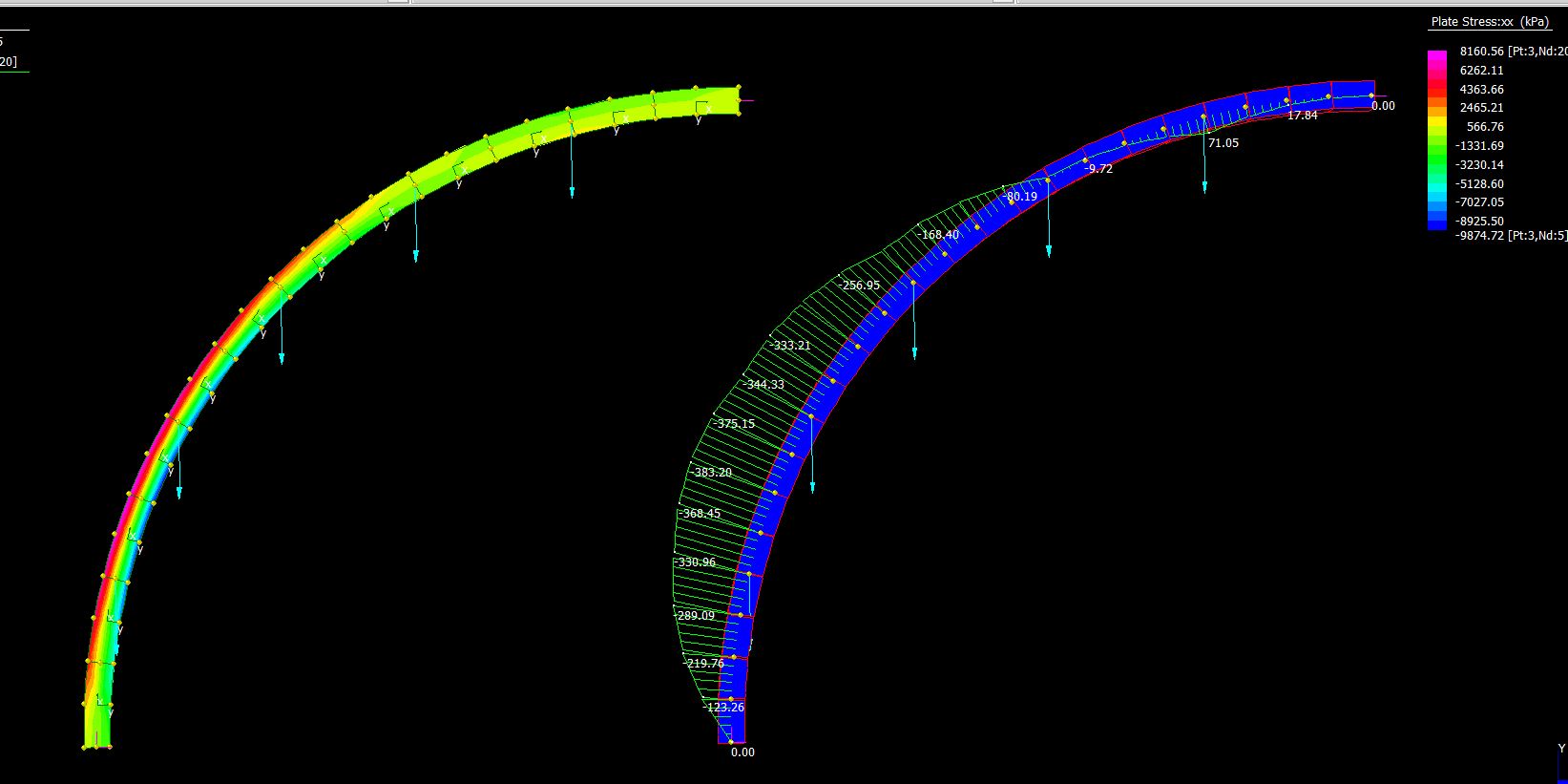
The second example is a circular arc subject to vertical point loads, and modelled using 8-noded plate elements and with short straight beam elements:

Strand7 analysis of a circular arc modelled with plate elements and beam elements

The analysis results are shown below, with Strand7 global plate stresses, plate actions found with the PlateStress function, and for comparison beam actions from the analysis using short beam elements:

PlateStress results from Strand7 analysis of a circular arc

Plate results compared with Strand7 beam results for bending and shear force

Posted in Arrays, Beam Bending, Excel, Finite Element Analysis, Frame Analysis, Newton, Strand7, UDFs, VBA | Tagged , , , , , , | 1 Comment