Ghost Stories

The first video was directed by my daughter whilst at the Australian Film Television and Radio School last year, and weaves together stories of hard times in the early days of Sydney’s Newtown district:

Plug in the headphones, switch off the lights, start the video, and click on full-screen

The second combines a poor quality demo recording of Sandy Denny singing “She Moves Through the Fair” with blurred and grainy video of “The Fall of the House of Usher”.  The result is simply perfect:

Posted in Bach, Excel, Films, Newton | Tagged , , , | 1 Comment

Daily Download 33: Miscellaneous

This is the last of the month and a bit of Daily Downloads, and consists of a bumper bundle of 20 spreadsheets with miscellaneous functions that didn’t fit in elsewhere:

Repeating a set of data: for instance making three copies of every row of a range of data, and also extract specified rows or columns, or rows or columns at a specified spacing.
Download file: http://interactiveds.com.au/software/IndexA.zip

Multiple Match Function: A function to find the first row in a table that contains two or more different matching numbers.
Download file: http://interactiveds.com.au/software/Mmatch.zip

A Sort Function: Sort VBA arrays, or use as an array function on the spreadsheet for dynamic sorting.
Download file: http://interactiveds.com.au/software/SortFunc.zip

Adding Function Categories and Descriptions A simple method of adding categories and descriptions to VBA functions (with a link to a more complicated method with greater functionality).
Download file: http://interactiveds.com.au/software/StringFunctions.zip

Using Goal Seek on Multiple Cells:  A simple macro to allow Goal Seek to be automatically applied to a range of cells, arranged in either a column or row.
Download file: http://interactiveds.com.au/software/GSeek.zip

Randomising a list: A VBA subroutine to randomise a list.
Download file: http://interactiveds.com.au/software/randomise%20list.zip

Three UDFs: Three simple UDFs to add every other cell; sum the digits of a number and transpose data from columns.
Download file: http://interactiveds.com.au/software/SumTab.zip

Hello World (again): A bit of fun with text and numbers.
Download file: http://interactiveds.com.au/software/HWorld-JW.xls

The speed of loops:  Looks at the speed of alternative ways of looping through a set of data, with examples in:
Download file: http://interactiveds.com.au/software/CheckLoopSpeed.xls

Code Generator: VBA code to automatically generate VBA code.
Download file: http://interactiveds.com.au/software/Code%20Generator.xls

Comparing floating point numbers : Functions to check if two numbers are equal, to any specified tolerance.
Download file: http://www.interactiveds.com.au/software/CombineArray.xls

The Switch Function (VBA and UDF): Examples of the VBA Switch function, and a UDF providing similar functionality.
Download file: http://www.interactiveds.com.au/software/SwitchPY.xls

Retrieving unique values from a range or array … using the Scripting Dictionary object.
Download file: http://www.interactiveds.com.au/software/GetUnique.xlsb

Update Dec. 2013:

SelectAv Function:  find the average for a number of the most recent values from a range, ignoring the highest (and/or lowest) values from the selected set.
Download file: http://interactiveds.com.au/software/SelectAv.xlsb

Function to make a list of functions …:Make a list of all the VBA procedures in a workbook.
Download file: http://interactiveds.com.au/software/GetProcedures.xlsb

Selecting Ranges from a UDF:

  • Extend or reduce the range size to the length of continuous data in the first column.
  • Return the number of rows and columns in this range.
  • Convert the range object to a variant array
  • Download file: http://interactiveds.com.au/software/GetRange.xlsb

Showing numerical values of formulae cell references:
Download file: http://interactiveds.com.au/software/Getrefs.xls

Copy non-blank rows to another sheet:
Download file: http://interactiveds.com.au/software/NonBlank.xlsb

Select and sum data using the scripting dictionary:
Download file: http://interactiveds.com.au/software/SelectSum.xlsb

Using Index() as an array function: Using the Excel built in Index() function to operate on arrays; it also provides a VBA user defined function (UDF), VBIndex, which simplifies working with arrays within VBA, and also provides improved functionality when called from the spreadsheet.
Download file: http://interactiveds.com.au/software/VBIndex.xlsb

All the download files listed over the past 33 days (plus later updates) are free and include full open-source code.  Questions, comments and suggestions are welcomed.

Posted in Arrays, Computing - general, Excel, UDFs, VBA | Tagged , , , , , , , , , | Leave a comment

Daily Download 32: Text functions

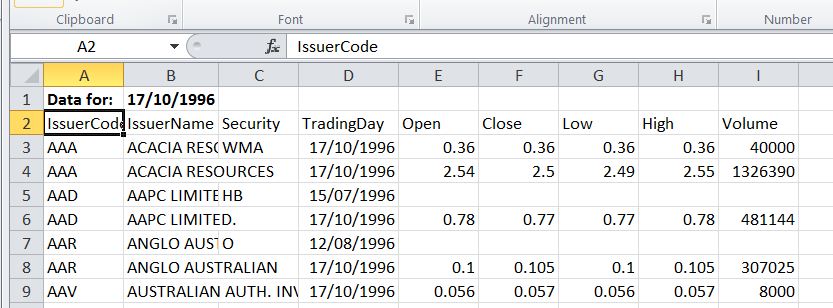
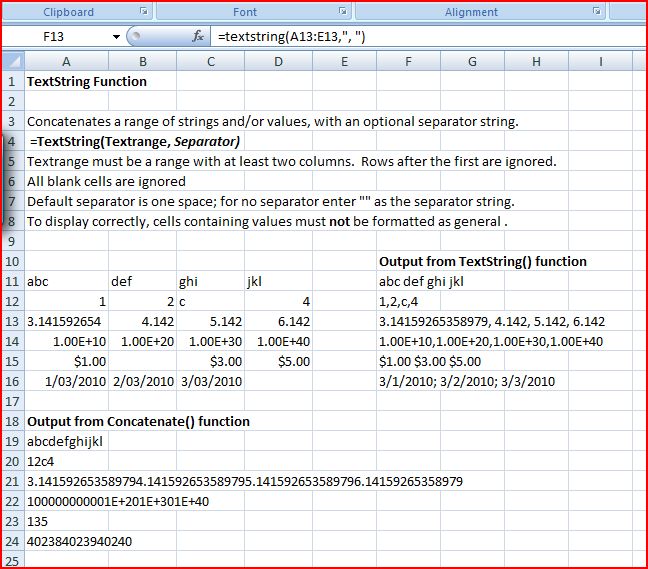
Today’s daily download covers functions to import data from text files into Excel quickly and efficiently, a function to combine text strings, with improved functionality over the built-in Concatenate function, and functions to extract numbers from the beginning or end of text strings.

The text import spreadsheet is described in the following posts:
Importing text files with VBA
Importing text files with VBA – 2
Importing text files with VBA – 3
Importing tab delimited files and clearing large ranges
Importing selected rows from a text file

Download file: http://www.interactiveds.com.au/software/Text-in2.ZIP

A separate spreadsheet allows automatic download of csv files from the web:

Automatic download of csv files
Download file: http://www.interactiveds.com.au/software/web-download1.xlsb

The Textstring Function is described in:
Stringing more than two words together
Download file: http://interactiveds.com.au/software/TextString.xls

The functions NumLeft and NumRight will extract numbers from the start or end of a text string, and are described in:
Extracting Numbers From Text Strings
Download file: GetNum.xlsb

1.4 million row text file imported into Excel 2007

Text import with criteria ranges

CSV data imported from the Internet

TextString Function examples compared with Concatenate

Posted in Excel, UDFs, VBA | Tagged , , , , , , | 1 Comment

Daily Download 31: Linking to Fortran

Several routines linking to Fortran dll files, produced with the Silverfrost Fortran compiler, have been provided in previous daily downloads.  Today’s files are example routines, provided with posts covering the procedures to link Excel to Fortran code.  Note that these files are not working on my current Windows 7 64 bit OS.  I am not sure if this is a problem with the compilation, or with the installation on my machine.

Linking Excel to Fortran
http://www.interactiveds.com.au/software/MathFunc.zip

Linking Excel to Fortran – 2
http://www.interactiveds.com.au/software/Cubic.zip

Distributing Silverfrost Fortran Applications
http://interactiveds.com.au/software/Salflibc.zip

Posted in Computing - general, Excel, Fortran, Link to dll, UDFs, VBA | Tagged , , , , , | Leave a comment

Daily Download 30: Data Transfer, to and from VBA

Today’s downloads cover procedures and functions for the transfer of data between VBA and the spreadsheet, and within VBA.

Array resources provides a variety of resources and web links covering the transfer of data on the spreadsheet to VBA arrays.
Download: http://www.interactiveds.com.au/software/getarray.zip

Transferring data within VBA discusses alternatives for transferring data between VBA routines.
Download: http://interactiveds.com.au/software/ByRefByVal1.xls

Calling a function as a variable describes how to call another function in VBA as a variable, rather than having the function name hard coded.
Download: http://interactiveds.com.au/software/PassFunc.xls

Getting the address of a selected range does what it says.
Download: http://www.interactiveds.com.au/software/RngAddress.xlsb

Finally Writing Arrays to the worksheet – VBA function provides an efficient VBA function to write data from VBA arrays to the worksheet, with several useful options.
Download: http://www.interactiveds.com.au/software/CopyToRange.xlsb

Posted in Arrays, Computing - general, Excel, UDFs, VBA | Tagged , , , , , , | Leave a comment