Solving simultaneous equations

Solving a series of simultaneous equations is a task frequently required in engineering and scientific analysis.  Excel provides the tools to perform this task quickly and easily, but the procedure is not documented in the on-line help (so far as I can see).

The procedure is:

  • Enter the coefficients of the equations as a square matrix, that is an nxn array, where n is the number of equations, and enter the values of the equations in an n rowed column.
  • invert the matrix, using the MINVERSE() function
  • Multiply the inverted matrix by the result values column, using the MMULT() function.  The result is an array formula containing the n solutions to the equations.  The MMULT function can operate directly on the output from the MINVERSE function, as shown in the screenshot below.  Note that the results are an array formula, and which must be entered with ctrl-shift-enter.

The screenshot also shows two User Defined Functions that perform the same task:

SSOLVE() simply calls MINVERSE and MMULT.

GESOLVE() solves the equations by Gaussian Elimination, thus allowing much bigger systems of equations to be solved than can be handled by the built in functions.  I could not find a clear statement of the maximum capacity of the Excel buit-in matrix functions, but testing shows that it is something less than 160 equations in Excel 2000, and something greater than 160 in Excel 2007.

Right click to download the spreadsheet Simultaneous.zip

Simultaneous.xls screenshot

Simultaneous.xls screenshot

Posted in Arrays, Excel, Maths, UDFs, VBA | Tagged , , , , | 5 Comments

Blackwaterside x 4 and Anne Briggs

By Anne Briggs

and Bert Jansch

and the Jimmy Page version of the Bert Jansch version

and the Carla Luft version of the Jimmy page version of the Bert Jansch version

There is much discussion of whether Page stole his version from Jansch, which is made entirely academic by the Anne Briggs version, which in my opion is simply perfect.

More about Anne Briggs here: a recent Anne Briggs interview

Posted in Bach | Tagged , , , | 4 Comments

Reinforced Concrete Section Analysis – 5; Ultimate Limit State

Previous posts in this series have looked at the analysis of beams where the steel stress is within the elastic range, and the concrete stress is sufficiently low that the assumption of linear elastic behaviour in compression is a reasonable approximation.  I now move on to analysis for the ultimate limit state, where some or all of the steel is past its yield stress, and the concrete compression zone may be analysed as having a constant stress, close to its failure stress.

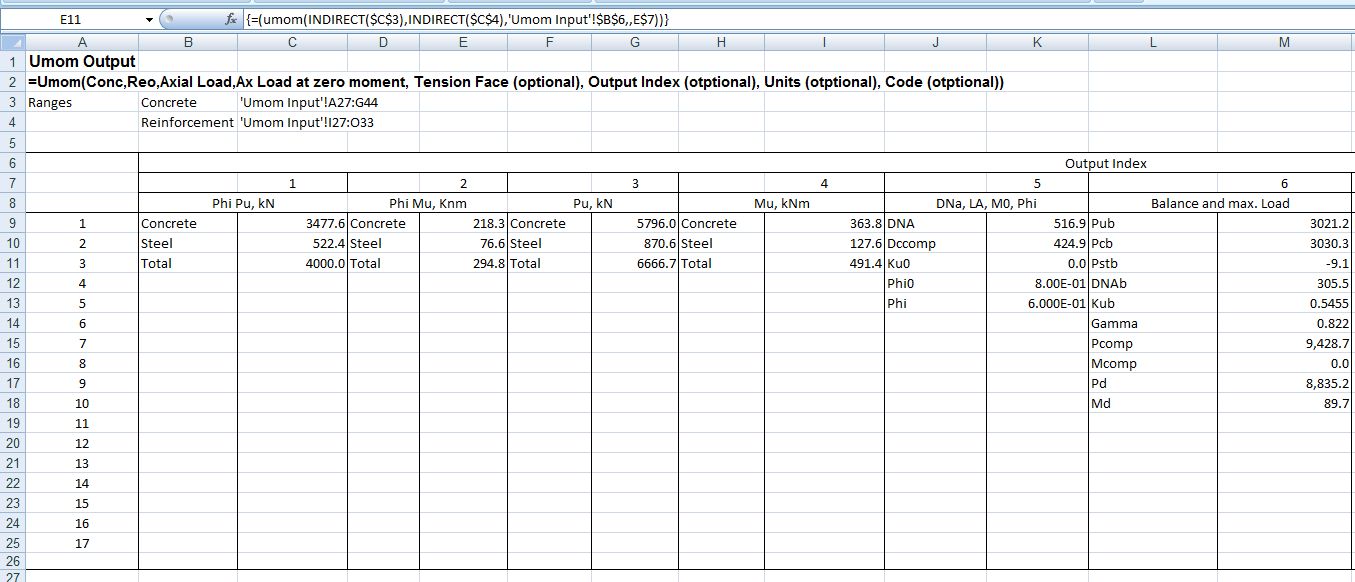
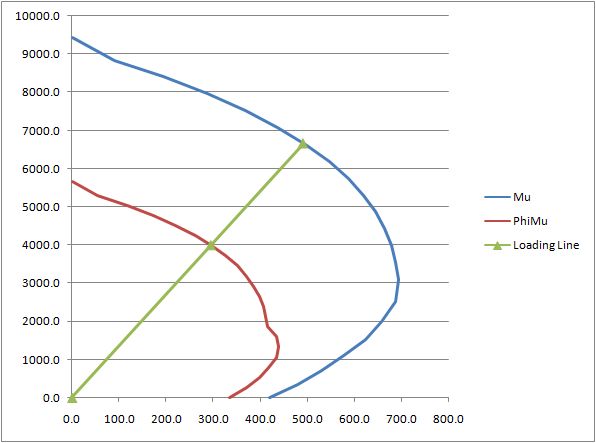
The file ULS Design Functions.zip contains User Defined Functions (UDF’s) that will find the ultimate bending capacity of any reinforced or prestressed concrete section (defined by rectangular or trapezoidal layers) with any number of layers of reinforcement, when subject to a specified axial load.  As for the elastic design functions, the analysis uses a closed form solution, rather than an iterative procedure.  The current version follows the Australian Standards AS 3600 or AS 5100.  Other codes will be added to future versions. Details of the procedure will be given in later posts.

Screen shots:

Input, circular section

Input, circular section

Output, circular section

Output, circular section

Interaction diagram

Interaction diagram

Posted in Beam Bending, Excel, UDFs | Tagged , , , , , , , | 5 Comments

Back to Bassics

Browsing John Walkenbach’s non-Excel blog : The J-Walk Blog  reminded me that Bach hasn’t had a look in here recently, so here is a clip of one of my all time favourite musicians, Danny Thompson (playing here with John Martyn).  Plug in headphones or some decent external speakers to do it justice.

The Official Danny Thompson Web Site

Posted in Bach | Tagged , , | Leave a comment

Intersections, interpolations, and rotations

Amongst the many and varied functions provided by Excel (or as far as I know any other spreadsheet) there are none that provide a one step process for linear interpolation, finding the intersection points of lines, or conversion between polar and rectangular coordinates, and related operations.

These functions and more can be found in the spreadsheet:  IP.zip which includes open source code for the following functions:

Update 29th March 2011:  For the latest version of this spreadsheet, including many additional functions download IP2.zip.  See also the latest related blog post.

Intersection Functions
IP
Finds the intersection points of two 2D lines or polylines
=ip(Line1,LINE2,Optional Coordinate, Optional Point no)
“Line1” and “Line 2” are ranges listing the XY coordinates for the two lines
“Coordinate” specifies the ordinate required, 1 = X, 2 = Y
“Point No” specifies which intersection point is required
If “Point No” is not provided IP returns an n x 2 array, where n is the number of intersection points.
If “Coordinate” is not provided IP returns a 1 x 2 array if “Point no” is provided, or an n x 2 array if not.
If “Line2” is a single point IP returns intersection points for a line through this point and parallel to the X axis if XY = 1, or the Y axis if XY = 2

Intersection points of two polylines

Intersection points of two polylines

INSIDE
Finds if a specified point is inside a closed polyline
=INSIDE(Polyline, Point)

IPLC
Finds the intersection points of a 2D line and a circle
=IPLC(Line, CircleXY ,Radius)

IPCC
Finds the intersection points of two circles
=IPCC(Circle1XY, Radius1, Circle2XY, Radius2)

IPSSS, IPSS
IPSSS finds the 3D intersection points of three spheres
IPSS finds the location and radius of the intersection circle of two spheres,
and the polar coordinate angles of the line connecting the two cenrtres
=IPSSS(Sphere1XYZR, Sphere2XYZR, Sphere3XYZR)

=IPSS(Sphere1XYZR, Sphere2XYZR)
Distance from centre sphere1 to centre intersection circle, radius intersection circle,
and angle of line connecting sphere centres in XY plane and perpendicular plane (radians)

Rectangular to Polar Functions
RtoP, PtoR
Converts rectangular to polar coordinates and polar to rectangular
=RtoP(Rectangular Coordinate range, Origin, Coordinate number)
=PtoR(Polar Coordinate range, Origin, Coordinate number)
Coordinate number 1 2 3
Rectangular X Y Z
Polar R Theta1 Theta2
Theta1 = angle in XY plane
Theta2 = angle in perpendicular plane

Where an origin is given the origin is moved to the coordinates specified

Rotate
Rotates 2D or 3D rectangular axes about any axis
Rotate(Rectangular Coordinate range, Rotation in radians, Axis, Optional Coordinate Number)

Interploation Functions
interp =interp(tablerange, value, column no) Linear interpolation
interp2 =interp2(tablerange, row value, column val) 2 way linear interpolation
loginterp =loginterp(tablerange, value, column no) Log interpolation
loginterp2 =loginterp2(tablerange, row value, column val) 2 way log interpolation
quadinterp =quadinterp(tablerange, value, column no) Quadratic interpolation
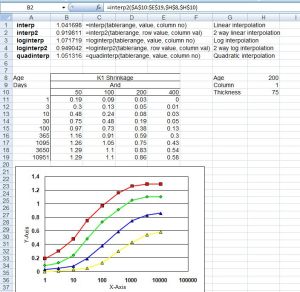
Interpolation functions

Interpolation functions

Posted in Coordinate Geometry, Excel, UDFs, VBA | Tagged , , , , , , | 37 Comments