Two recent additions to You Tube with live performances from the early days of Steeleye Span:
This has been a fun little restoration project. My friend and music journalist Simon Jones handed me an old VHS tape recently. On it he tells me, “is the holy grail for Steeleye Span fans. A very rare recording of a TV appearance they made in 1970.” His request was simple, “could you copy the programme from the tape?” The transfer process was simple enough, if a little convoluted. I still have a couple of fully functioning JVC S-VHS decks, so that helped a whole lot! The one I plumped for is a HR-S8700EK. A S-VHS deck with a built in digital time base corrector, which I would use to stabilise the video image. The audio and video outputs from this were hooked up to a Pioneer DVR-720H DVD/Hard Disk recorder and the programme was recorded digitally. Normally I would capture the tape directly to my PC with a Terratec Firewire capture card but in this case there was some tape deterioration and the resultant picture disturbance upset the capture card and interrupted the capture. The Pioneer unit was far more tolerant to the signal and recorded it cleanly. The disk recording was burned to a DVD which was transferred to my editing PC. Here it was upscaled to 1080p, pillar-boxed and set in a 16:9 frame to look better on modern widescreen monitors and colour corrected, just a tad. The Music Room programme has the ATV ident and countdown clock at the beginning so its likely the recording came from ATV themselves, perhaps as someone’s archive copy. If anyone has details on that please let me know.
Live At My Father’s Place, Roslyn, New York, 20th April 1973
00:00 One Misty Moisty Morning 04:59 The Ups And Downs 09:54 Oak Tree, Pigeon At The Gate 13:58 Sheep-Crook And Black Dog 20:18 Spotted Cow 24:41 Lady Isabelle Barnet’s Jigs 28:11 Rogues In A Nation 33:26 Cam Ye Oer Frae France 38:18 Alison Gross 43:31 Robbery With Violins 47:40 Gaudete 51:36 Royal Forester 57:05 Mason’s Apron
I recently discovered that the continuous beam function from the ConbeamU spreadsheet was giving incorrect results for cantilevers at the left hand end, if the cantilever had more than one segment and no point loads. The corrected version (Rel 4.16) can be downloaded from:
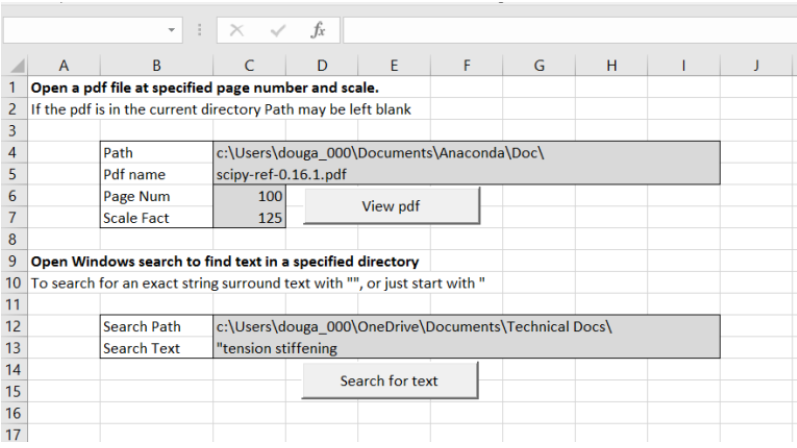
A recent comment at Opening and searching pdf files from Excel reminded of the linked spreadsheet, which allows pdf files to be opened at a specified page from Excel, and also fast searches of the local hard drive:
See the link above for more details of the spreadsheet, including the link to pdf function. Below is some more information on using the search function.
Entering text in the Search Text cell, a list of words separated by spaces will find all the files that contain all the listed words. A list of phrases enclosed in quotes and separated by spaces will find all the files that contain all the listed exact phrases. On my computer the list below shows the search terms and the number of files found:
Following my recent post Making Finite Element Analysis go faster … I have been having a closer look at the options in the Numba just-in-time compiler for improving the performance of Python code.
The Numba docs include a series of short code examples illustrating the main options. I have re-run these with pyxll based interface functions, so the routines can be called from Excel as a user defined function (UDF), and return the execution time for any specified number of iterations.
Typical code for timing a function is:
@xl_func
def time_ident_npj(n):
    x = np.arange(n)
    stime = time.perf_counter()
    y = ident_npj(x)
    return time.perf_counter()-stime
Note that the calls to the time function must be outside the function being timed, since Numba does not support the time function.
The fist example from the Numpy docs compared evaluation of an array function using Numpy arrays and Python loops, with or without Numba:
@njitdef ident_np(x):
return np.cos(x) ** 2 + np.sin(x) ** 2
@njitdef ident_loops(x):
r = np.empty_like(x)
n = len(x)
for i in range(n):
r[i] = np.cos(x[i]) ** 2 + np.sin(x[i]) ** 2
return r
Results from these functions are shown below, with times as reported in the Numba article, and as found with my code:
Using Numpy arrays, the Numba function was only slightly faster for me, and was slightly slower as shown in the Numba article. This is not surprising since the Python code had only a single call to the Numpy function, which is already C compiled code, so there is little scope for improving performance.
The function using Python loops was very much slower, and my results were slightly slower than the time in the Numba article. Presumably this is related to using different versions of Python. Adding the Numba decorator reduced the execution time for my code by a factor of 170, and the result was slightly faster than the Numpy function with Numba decorator.
The next examples looks at the effect of the Numba “fastmath = True” and “parallel – True” options:
@njit(fastmath=False)
def do_sum(A):
acc = 0.
# without fastmath, this loop must accumulate in strict orderfor x in A:
acc += np.sqrt(x)
return acc
@njit(fastmath=True)
def do_sum_fast(A):
acc = 0.
# with fastmath, the reduction can be vectorized as floating point# reassociation is permitted.for x in A:
acc += np.sqrt(x)
return acc
@njit(parallel=True)
def do_sum_parallel(A):
# each thread can accumulate its own partial sum, and then a cross# thread reduction is performed to obtain the result to return
n = len(A)
acc = 0.
for i in prange(n):
acc += np.sqrt(A[i])
return acc
@njit(parallel=True, fastmath=True)
def do_sum_parallel_fast(A):
n = len(A)
acc = 0.
for i in prange(n):
acc += np.sqrt(A[i])
return acc
Results for these functions were:
For this case the Numba compiled code was over 300 times faster than plain Python. The “fastmath = True” option was only of limited benefit in my case, although the Numba article results show a speed up of more than two times. Setting “parallel = True” increased performance by more than 10 times, with “fastmath = True ” again only providing a small further gain. With both options applied, the Numba compiled code was almost 4000 times faster than the plain Python for this case.
This raises the question as to why with more complex code the speed gain from using Numba is often much smaller. This will be examined in more detail in a later post, but the main reason is that if Numba is set to revert to Python mode if there is code it cannot compile (nopython = False), then the resulting code can easily be almost all Python based. The same effect is found using the alternative @jit or @njit decorators. The @njit decorator result in all the Python code being compiled, and will raise an error if any of the code cannot be compiled by Numba. The alternative @jit decorator will switch to Python mode if any code cannot be compiled, but with much reduced (if any) speed improvement. Examples from my own code that will raise an error with @njit, or will not be fully compiled with @jit include:
Use of the time function
Checking the data type of a variable, such as: if type(x) == tuple: …
Statements such as “StartSlope = EndSlope”, where EndSlope has not yet been defined at compile time.
The virtual conference format not only provides greatly reduced travel and accommodation costs, but also all presentations will be downloadable on demand for 30days after the conference. Early-bird registrations are available to midnight Saturday 31st July, East-Australia time (2:00 pm GMT), so click the link above for more information and to secure low-cost tickets for the four day conference.






 Newton Excel Bach, not (just) an Excel Blog