
Following the last post on this topic (Reinforced Concrete Design for Circular Sections to Eurocode 2) I have added provision for parabolic-linear concrete stress blocks to the ULS Design Functions spreadsheet. The Circu function in the RC Design Functions spreadsheet has also been modified. The latest versions of the spreadsheets can be downloaded from:
The UMom function in ULS Design Functions can be used to analyse any reinforced concrete section that can be divided into a series of stacked trapezoids. For the purpose of comparing the results of a rectangular or parabolic stress block when analysing a circular section the circle was divided into 24 layers:

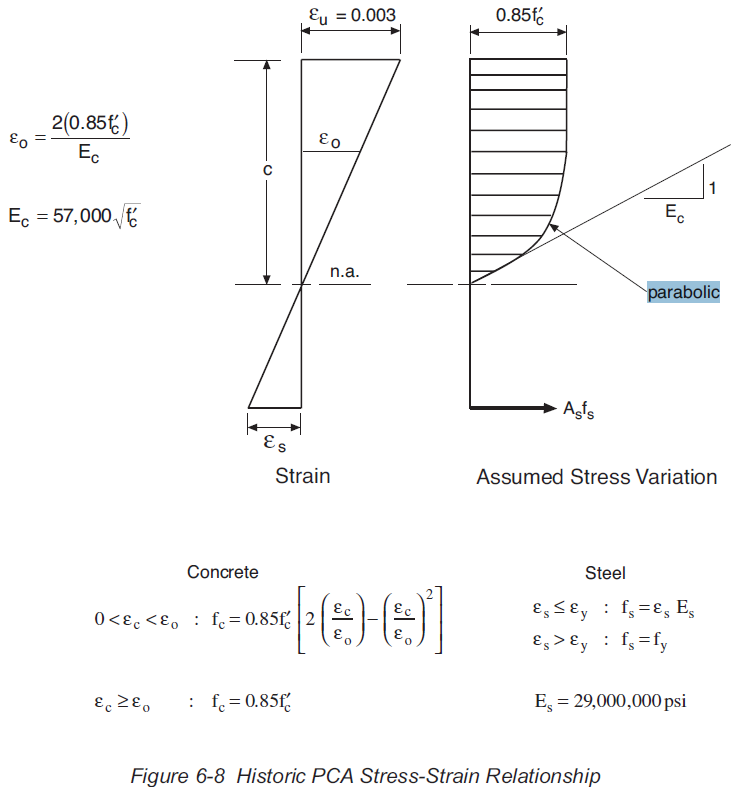
The parabolic-linear stress block option uses the form specified in Eurocode 2 for both the Eurocode and AS 3600 codes, and a modified version for the ACI code, as specified in the PCA document: PCA Notes on ACI 318-11 Building Code (EB712). The main differences in the ACI stress block are:
- The maximum concrete stress reduction factor is 0.85 (1.0 for the default Eurocode and 0.9 for AS 3600)
- The strain at the compression face is 0.003 (0.0035 in Eurocode)
- The strain at the end of the parabolic portion is based on a parabolic curve with an initial slope equal to 1/Ec -see below (tabulated values based on concrete strength in Eurocode)
- The exponent of the parabolic curve is 2 for all concrete strengths (reduced values for high strength concrete in Eurocode.
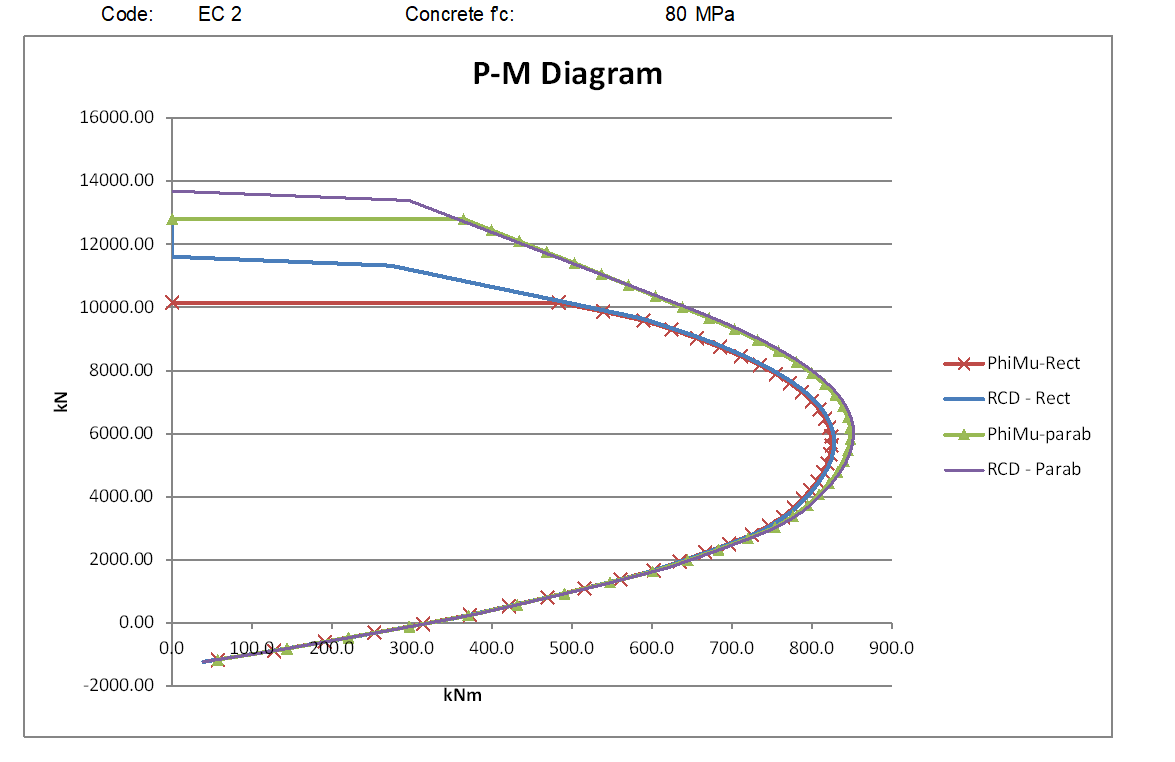
The graphs below compare moment vs axial load results using the rectangular and parabolic-linear stress blocks for circular sections with low and high concrete strengths to the three codes.
The ACI results below used customary US units with concrete strengths of 5 and 10 ksi (approximately 34.5 and 69.0 MPa)
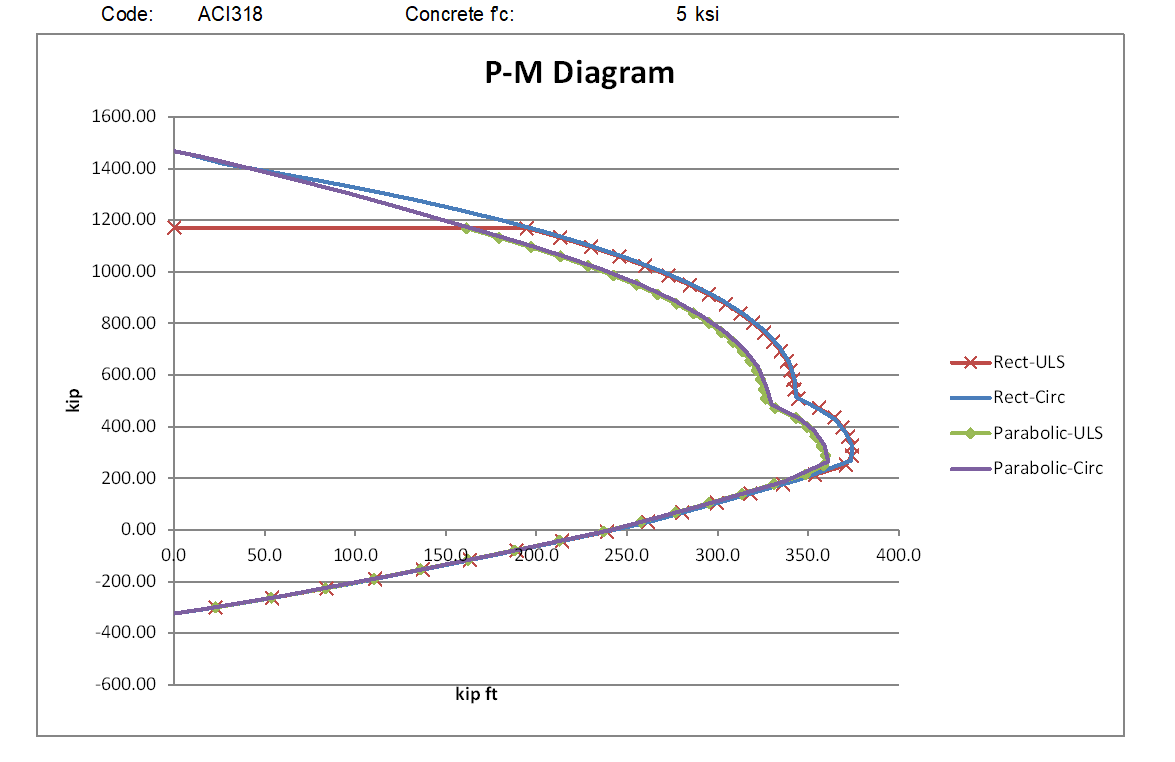
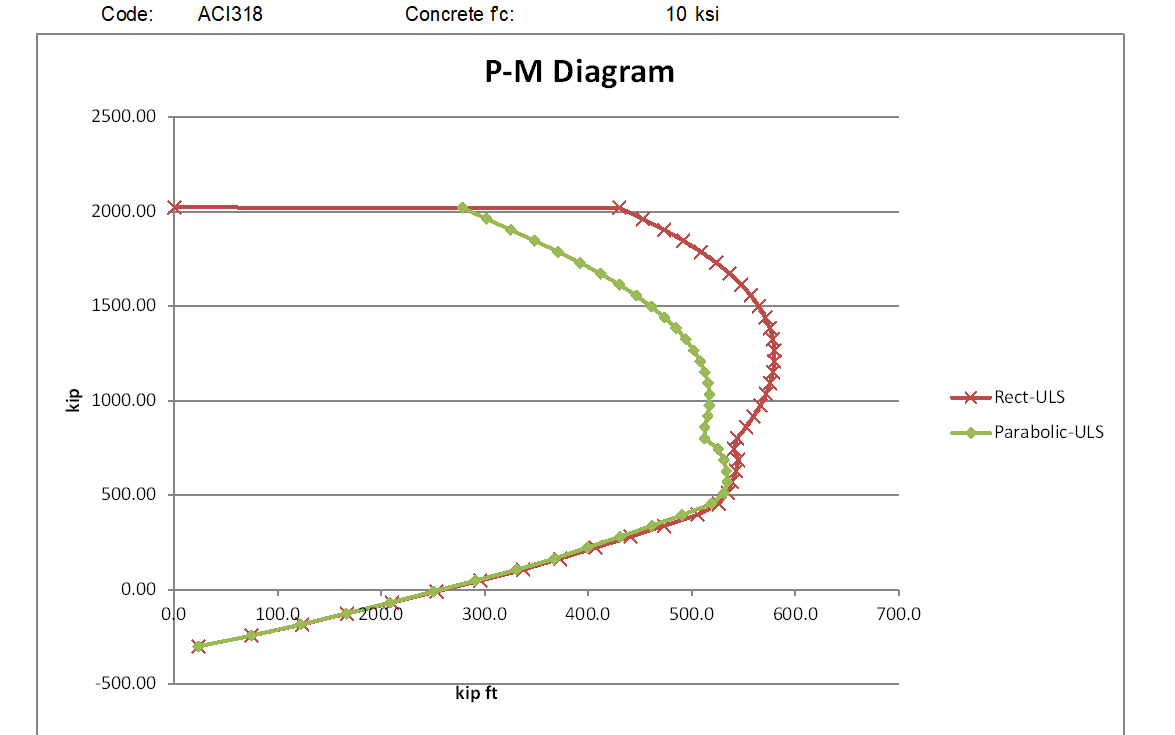
For the lower strength concrete the rectangular stress block moment capacities are significantly higher than the parabolic stress block for all axial load greater than the balance load, and for higher strength concrete the difference increases to almost a 50% increase at loads close to the maximum axial load.
For the AS 3600 code (below) the parabolic stress block gives a greater moment capacity with the lower strength concrete, but with the high strength concrete the rectangular stress block is less conservative for mid-range axial loads, but the parabolic stress block has higher capacity with very high axial loads.
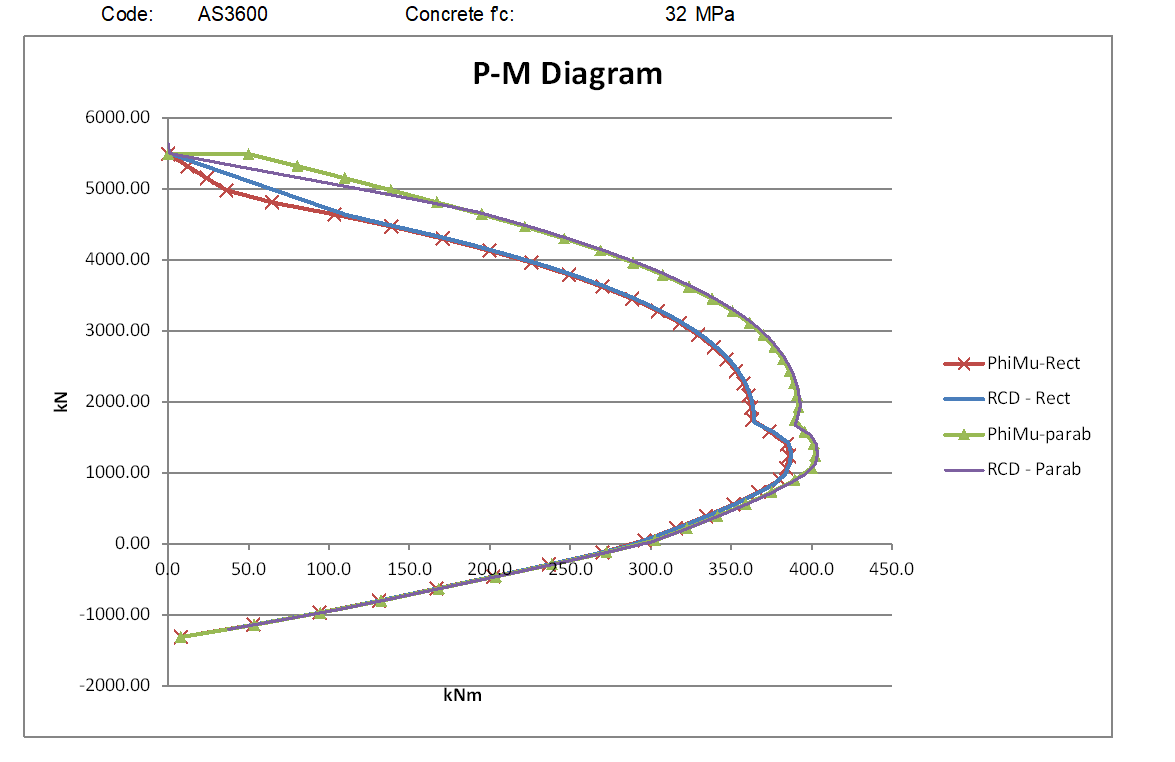

The Eurocode results show a similar relationship between the two stress blocks as AS 3600 for the lower strength concrete, but the parabolic stress block also has higher moment results with the high strength concrete, for all axial loads above the balance load. Note that the Eurocode results for the rectangular stress block have an additional reduction factor of 0.9, in accordance with Eurocode requirements for sections where the concrete width reduces towards the compression face:

The graphs below compare the parabolic stress block results from the 3 codes:
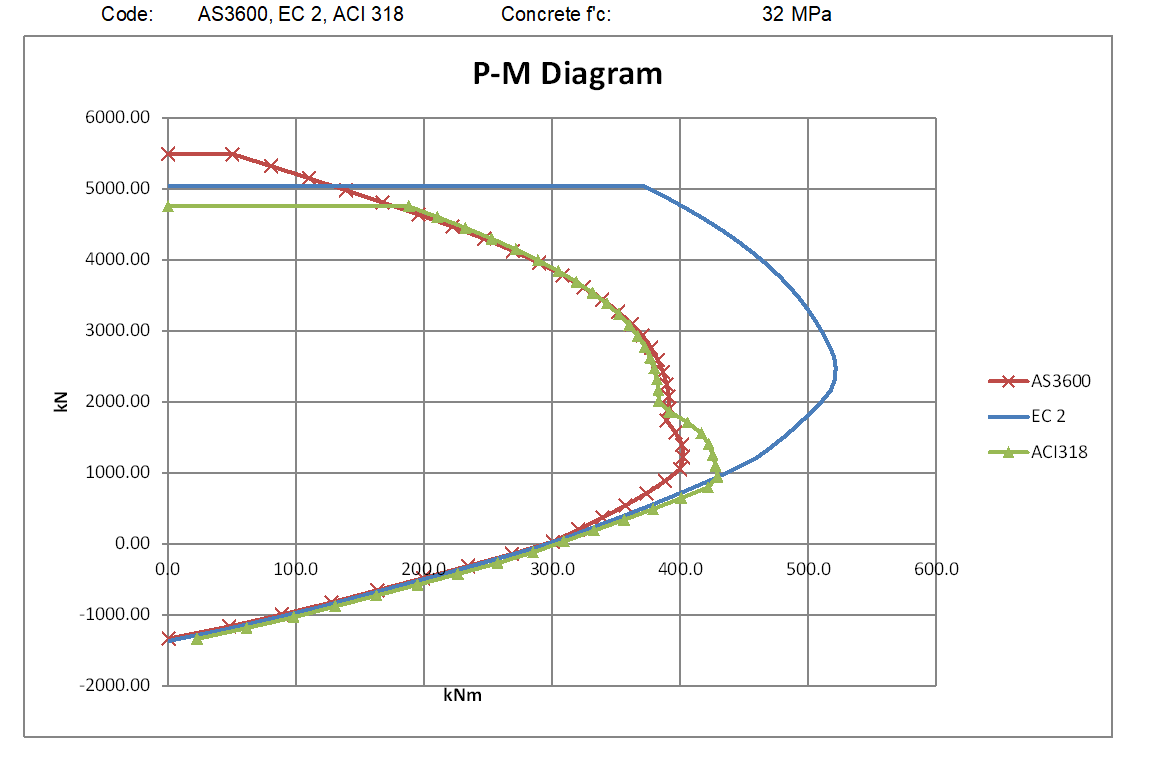

For the lower strength concrete the AS 3600 and ACI 318 are very close for high axial loads and zero axial load to maximum tension, but for intermediate axial loads the ACI results are significantly higher. This is because of the different procedures for calculating the transition of the capacity reduction factor from 0.85 to 0.65. For the high strength concrete the ACI results are significantly higher than AS 3600 over the full range of compressive axial loads up to the ACI maximum.
The Eurocode results are higher than both ACI 318 and AS 3600 for loads above the balance load for both the low and high strength concrete. The reasons for this difference, when the Eurocode and AS 3600 calculations use the same stress block, are examined below:
If the global reduction factors are set to 1.0, and the AS 3600 steel yield strength and concrete compressive strength are factored down by 1.15 and 1.5 repectiveley, the AS 3600 results exactly match the Eurocode results:

However if in AS 3600 the global reduction factor is set to 1/1.5, with the steel yield strength factored by 1.5/1.15, and the concrete strength factored by 1/0.9, so the nett material properties after factoring are the same as in the Eurocode analysis, the results are different:
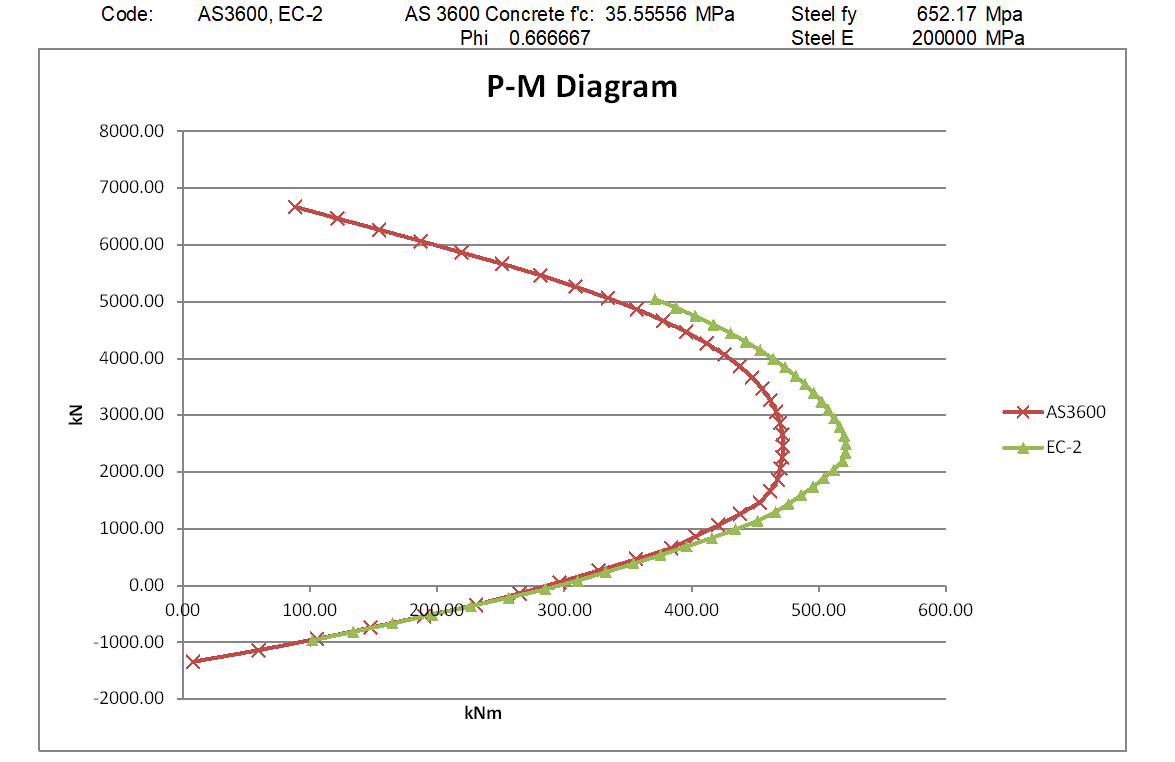
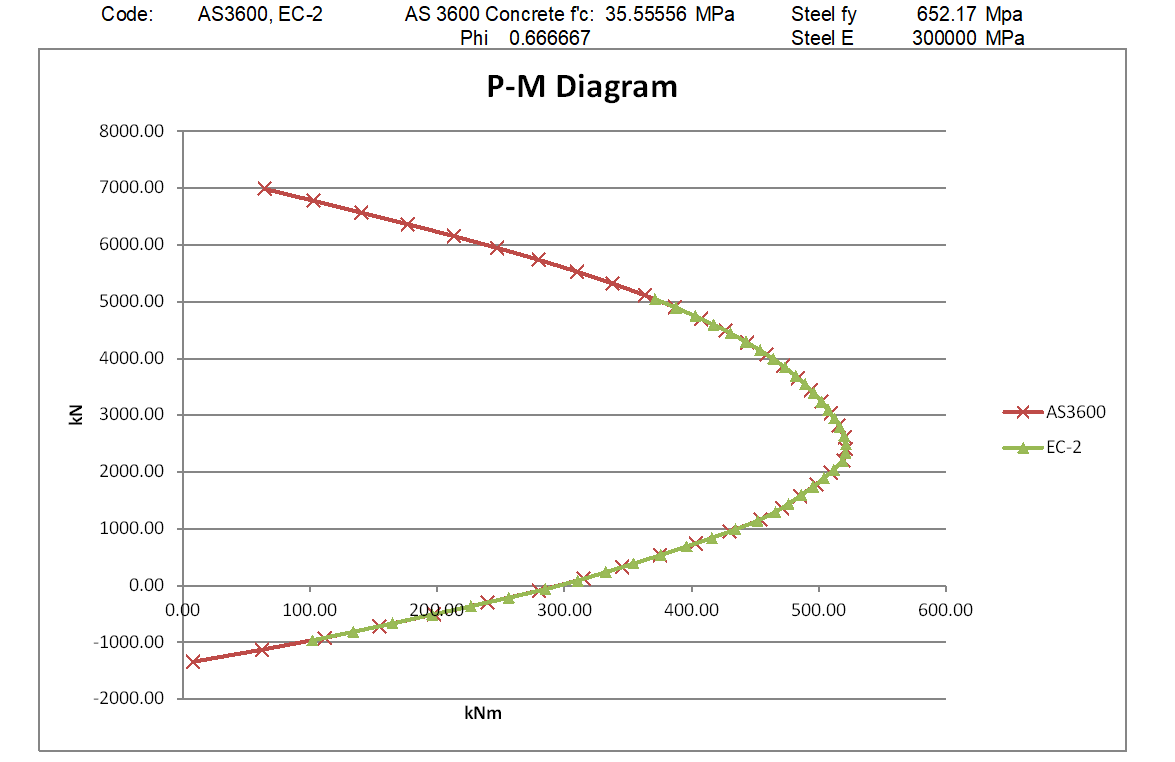
The reason is that in the Eurocode analysis forces in the reinforcing bars within the elastic range are not factored down, whereas in the AS 3600 analysis all the forces in the reinforcement are factored down by 1.5. In effect, the elastic modulus of the steel is reduced by a factor of 1.5 in the AS 3600 analysis, but remains unchanged in the Eurocode analysis. If the previous analysis is repeated with the steel elastic modulus factored up to 30,000 MPa in the AS 3600 run, the results from the two analyses are identical:
Update 27 Jan 2021:
Following the comment dated 25th Jan. below, I have modified the MomA function so that if any of the tabulated input axial loads exceed the section capacity, the function moves on to the next value, rather than exiting. The new file is now in the ULS Design Functions zip file near the top of the post.



 Newton Excel Bach, not (just) an Excel Blog