A Hard Rain

I happened to be looking at an old post here; Various routes to and from Nottamun Town, featuring Bob Dylan’s performance of A Hard Rain’s Gonna Fall, which led me to Patti Smith’s performance of the same song at last year’s Nobel Prize ceremony, and this is a unique performance in very many ways:

Posted in Bach | Tagged , , , | Leave a comment

Using Flash Fill

There have been several posts here on using functions or user defined functions (UDFs) to extract text or numbers from a longer string (most recently, here), but for many purposes it is quicker and easier to use the “flash-fill” feature, introduced in Excel 2013.

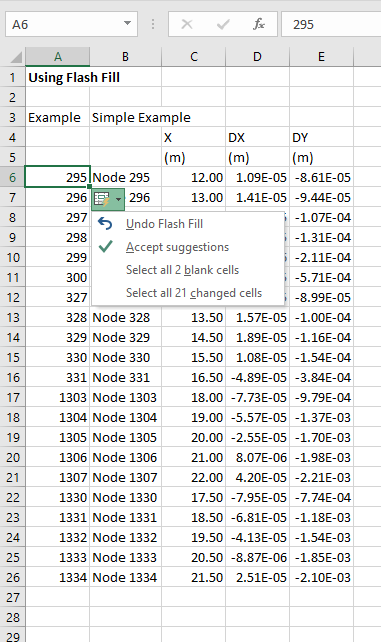
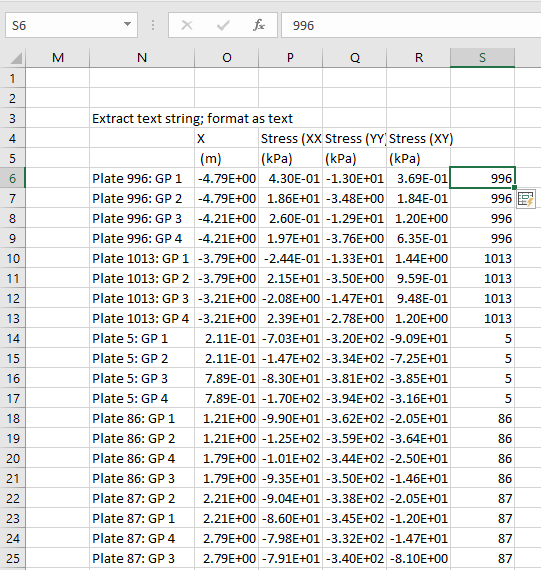
The examples below show examples of extracting a number from the end of a text string, using data copied and pasted from Strand7 as an example:

In the first example it is required to extract the numbers from the text in column B.  Simply enter the first number in the adjacent column, then press Ctrl-E (or click Data-Flash Fill):

The column is immediately filled with the required values.  A small icon appears next to the top cell, which gives the options displayed above if selected.

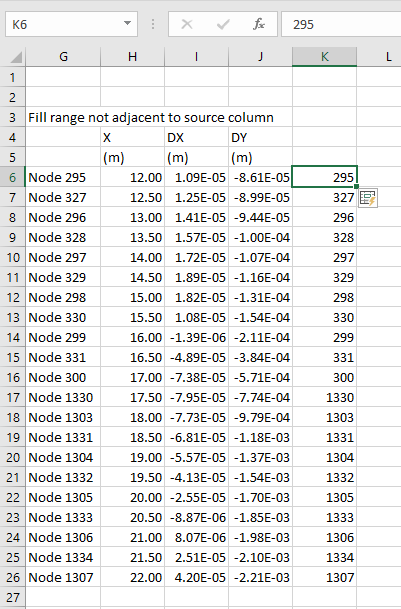
It is also possible to use a non-adjacent column:

Note that in this case the values extracted are not in ascending order.

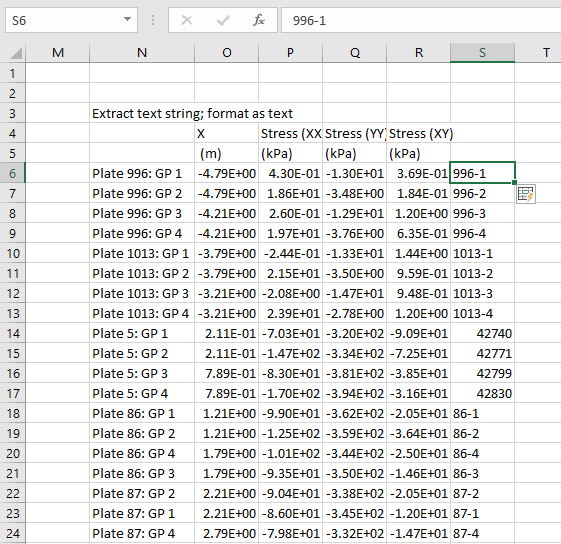
More complex examples also work:

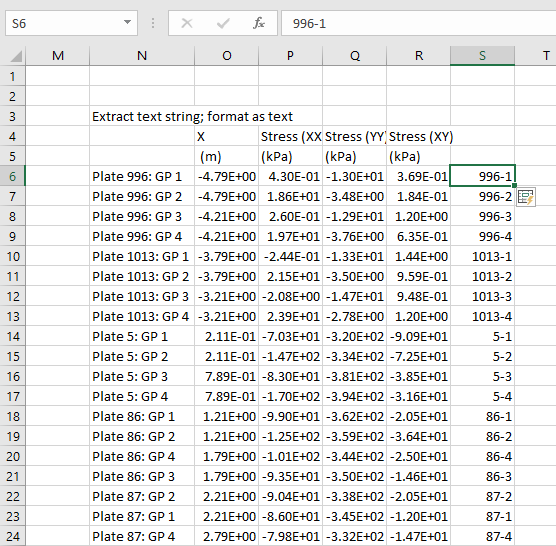
In this case the values in rows 14 to 17 (5-1 to 5-4) have been extracted as a date.  This can be fixed by simply formatting the example cell as text:

Also if the example cell is changed immediately, the flash-fill automatically updates:

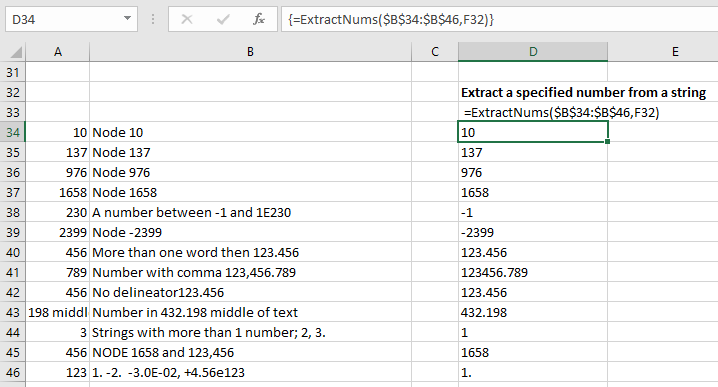
There are however times when more control is required.  The screen-shot below shows results from flash-fill (in column A), compared with the ExtractNums UDF in Column D (download here).

Posted in Excel, UDFs, VBA | Tagged , , , | 1 Comment

Hofstadter, Pahud, Bach

The latest ACO concert series features the Swiss flautist Emmanuel Pahud (interview here). The performance included J.S. Bach’s 6 Part Ricercar, from The Musical Offering, which was the inspiration for the final dialogue in Douglas Hofstadter’s Godel, Esher, Bach:

Achilles has brought his cello to the Crab’s residence, to engage in an evening of chamber music with the Crab and Tortoise. He has been shown into the music room by his host the Crab, who is momentarily absent, having gone to meet their mutual  friend the Tortoise at the door. The room is filled with all sorts of electronic equipment-phonographs in various states of array and disarray, television screens attached to typewriters, and other quite improbable-looking pieces of apparatus.  Nestled amongst all this high-powered gadgetry sits a humble radio. Since the radio is the only thing in the room which Achilles knows how to use, he walks over to it, and, a little furtively, flicks the dial and finds he has tuned into a panel discussion by six learned scholars on free will and determinism. He listens briefly and then, a little scornfully, flicks it off. …

On the text:

This Dialogue is an exuberant game played with many of the ideas which have permeated the book. It is a reenactment of the story of the Musical Offering, which began the book; it is simultaneously a “translation” into words of the most complex piece in the Musical Offering: the Six-Part Ricercar. This duality imbues the Dialogue with more levels of meaning than any other in the book. Frederick the Great is replaced by the Crab, pianos by computers, and so on. Many surprises arise. The Dialogue’s content concerns problems of mind, consciousness, free will, Artificial Intelligence, the Turing test, and so forth, which have been introduced earlier.  It concludes with an implicit reference to the beginning of the book, thus making the book into one big self-referential loop, symbolizing at once Bach’s music, Escher’s drawings, and Gödel’s Theorem.

From: Gödel, Escher, Bach Wiki 

And the music:


Posted in Bach, Maths, Newton | Tagged , , , , , | Leave a comment

Working with implied units – update

Following comments at Eng-Tips I have added two examples with different procedures for evaluating ACI equations for the flexural tensile strength of concrete here.

Posted in Excel, Maths, Newton, UDFs, VBA | Tagged , , , , , , , , , , , , | Leave a comment

Using Alglib least-squares solvers

Following the last post on using the Python version of Alglib from Excel, via xlwings, this post looks in more detail at alternatives for fitting a non-linear function to a set of data, using the Levenberg-Marquardt method.  The spreadsheet with examples and full open-source code may be downloaded from:

xlAlglib.zip

The spreadsheet requires xlwings, Python (including Numpy and Scipy) and Alglib to be installed.  All are available for free download, see Excel to Alglib via xlwings for more details.

In the examples below a non-linear function has been fitted to data generated using the same function plus some random scatter using two different Alglib modules:

  • The lsfit module (least-squares fitting)
  • The minlm module (Levenberg-Marquardt optimizer)

For each of these modules there is one user defined function (UDF) that uses a function entered as text on the spreadsheet, and another that calls a python function.

The lsfit versions (  xl_NLFitwFunc and  xl_NLFitwText) are described with examples on the Fit NonLin sheet:

The minlm versions (xl_minlm_vb and xl_minlm_vbtext) are found on the LM Solvers sheet:

The example shown below uses all four functions to fit a function of the form:
a * exp(b*x) + c * x + d
to the data shown in the screenshot below:

The function xl_minlm_vb (shown below) has the following arguments:

  • x (B42:B45), Initial guess of function parameters, single column range
  • xydat (B22:C34), Data to be fitted, two column range
  • Func (C37), Fitting function; a function in NLFuncs.py
  • bndl (B48:E48), Lower bound values, single row range
  • bndu (B49:E49), Upper bound values, single row range
  • epsx (B51), Maximum error
  • maxits (B52), Maximum iterations
  • out (0), Out = 0 returns results, anything else returns termination type code

Results of the four functions are shown below:

Code for the xl_minlm_vb function is described below.  Open source code for all the others is available in the download zip file.

The function xl_minlm_vb (automatically generated by xl wings) calls the Python function of the same name:

@xw.func
@xw.arg('x', ndim=1)
@xw.arg('bndl', ndim=1)
@xw.arg('bndu', ndim=1)
@xw.ret(transpose= True)
def xl_minlm_vb(x, xydat, funcname, bndl, bndu, epsx, maxits, out = 0):
    """
        Minimise a named function with Alglib minlmcreatev  Levenberg–Marquardt algorithm
        Initial guess of function parameters, single column range
        Data to be fitted, two column range
        Fitting function; a function in NLFuncs.py
        Lower bound values, single row range
        Upper bound values, single row range
        Maximum error, 0 = automatic
        Maximum iterations, 0 = unlimited
        out = 0 returns results, anything else returns termination type code
    """
    if type(x) == tuple: x = list(x)
    if type(bndl) == tuple: bndl = list(bndl)
    if type(bndu) == tuple: bndu = list(bndu)
    nx = len(x)
    nf = len(xydat)
    func = getattr(NLFuncs, funcname)
    state = xal.minlmcreatev(nx, nf, x, 0.00001)
    xal.minlmsetbc(state, bndl, bndu)
    xal.minlmsetcond(state, epsx, maxits)
    xal.minlmoptimize_v(state, func, None, xydat)
    x, rep = xal.minlmresults(state)
    if out == 0:
        return x
    else:
        return rep.terminationtype
  • if type(x) == tuple:  … Arrays are passed from Excel to Python as tuples, but Alglib requires a list.
  • func = getattr(NLFuncs, funcname): looks in NLFuncs.py for a Python function with the name given by funcname, and assigns this function to “func”.
  • state = xal.minlmcreatev( … x, rep = xal.minlmresults(state):  calls Alglib minlm functions to adjust the parameters passed to func in the “state”  object to minimize the square of the results.

“func” in this case is xl_expfunc:

def xl_expfunc(x, fi, func_dat):
    nf = len(func_dat)
    func_dat  = np.array(func_dat)
    for i in range(0,nf):
        X = func_dat[i,0]
        fi[i] = x[0]*np.exp(x[1]*X)+x[2]*X+x[3] - func_dat[i,1]
    return

Note that Alglib minimises the square of the array returned by xl_expfunc by adjusting the values in the x array.  To use this for curve fitting purposes we have to subtract the supplied Y value from the exponential function:
fi[i] = x[0]*np.exp(x[1]*X)+x[2]*X+x[3] – func_dat[i,1]

Alglib adjusts the function parameters until the error or maximum iterations criteria are satisfied, then extracts the required results from the “state” object with:
x, rep = xal.minlmresults(state)

The x array is then returned to the spreadsheet, via the VBA function.

Posted in AlgLib, Curve fitting, Excel, Link to Python, Maths, Newton, NumPy and SciPy, UDFs, VBA, xlwings | Tagged , , , , , , , , , , | 2 Comments