Following comments at Eng-Tips I have added two examples with different procedures for evaluating ACI equations for the flexural tensile strength of concrete here.
Recent Comments

Following comments at Eng-Tips I have added two examples with different procedures for evaluating ACI equations for the flexural tensile strength of concrete here.
Following the last post on using the Python version of Alglib from Excel, via xlwings, this post looks in more detail at alternatives for fitting a non-linear function to a set of data, using the Levenberg-Marquardt method. The spreadsheet with examples and full open-source code may be downloaded from:
The spreadsheet requires xlwings, Python (including Numpy and Scipy) and Alglib to be installed. All are available for free download, see Excel to Alglib via xlwings for more details.
In the examples below a non-linear function has been fitted to data generated using the same function plus some random scatter using two different Alglib modules:
For each of these modules there is one user defined function (UDF) that uses a function entered as text on the spreadsheet, and another that calls a python function.
The lsfit versions ( xl_NLFitwFunc and xl_NLFitwText) are described with examples on the Fit NonLin sheet:

The minlm versions (xl_minlm_vb and xl_minlm_vbtext) are found on the LM Solvers sheet:
The example shown below uses all four functions to fit a function of the form:
a * exp(b*x) + c * x + d
to the data shown in the screenshot below:
The function xl_minlm_vb (shown below) has the following arguments:

Results of the four functions are shown below:
Code for the xl_minlm_vb function is described below. Open source code for all the others is available in the download zip file.
The function xl_minlm_vb (automatically generated by xl wings) calls the Python function of the same name:
@xw.func
@xw.arg('x', ndim=1)
@xw.arg('bndl', ndim=1)
@xw.arg('bndu', ndim=1)
@xw.ret(transpose= True)
def xl_minlm_vb(x, xydat, funcname, bndl, bndu, epsx, maxits, out = 0):
    """
        Minimise a named function with Alglib minlmcreatev  Levenberg–Marquardt algorithm
        Initial guess of function parameters, single column range
        Data to be fitted, two column range
        Fitting function; a function in NLFuncs.py
        Lower bound values, single row range
        Upper bound values, single row range
        Maximum error, 0 = automatic
        Maximum iterations, 0 = unlimited
        out = 0 returns results, anything else returns termination type code
    """
    if type(x) == tuple: x = list(x)
    if type(bndl) == tuple: bndl = list(bndl)
    if type(bndu) == tuple: bndu = list(bndu)
    nx = len(x)
    nf = len(xydat)
    func = getattr(NLFuncs, funcname)
    state = xal.minlmcreatev(nx, nf, x, 0.00001)
    xal.minlmsetbc(state, bndl, bndu)
    xal.minlmsetcond(state, epsx, maxits)
    xal.minlmoptimize_v(state, func, None, xydat)
    x, rep = xal.minlmresults(state)
    if out == 0:
        return x
    else:
        return rep.terminationtype
“func” in this case is xl_expfunc:
def xl_expfunc(x, fi, func_dat): nf = len(func_dat) func_dat = np.array(func_dat) for i in range(0,nf): X = func_dat[i,0] fi[i] = x[0]*np.exp(x[1]*X)+x[2]*X+x[3] - func_dat[i,1] returnNote that Alglib minimises the square of the array returned by xl_expfunc by adjusting the values in the x array. To use this for curve fitting purposes we have to subtract the supplied Y value from the exponential function:
fi[i] = x[0]*np.exp(x[1]*X)+x[2]*X+x[3] – func_dat[i,1]Alglib adjusts the function parameters until the error or maximum iterations criteria are satisfied, then extracts the required results from the “state” object with:
x, rep = xal.minlmresults(state)The x array is then returned to the spreadsheet, via the VBA function.
The Units4Excel spreadsheet provides a number of functions to convert between different units and evaluate functions entered as text on the spreadsheet, taking account of the units of both the inputs and the results. The latest version can be downloaded from:
I have now added some examples comparing reinforced shear capacity to the ACI 318 design code, using the “customary US units” and SI units versions of the code:

The examples shown below use the user defined functions (UDFs) Eval and EvalU. Eval returns the value of any function entered as text on the spreadsheet, substituting given values for any parameters. EvalU is a “unit aware” version, returning the result in base SI units, or in any specified units. EvalU returns the calculated units if they are not specified, or an error message if the specified output units are not consistent with those calculated from the input units.
Evaluating formula 11-4 as given in the code produces strange results, even if consistent input units are used. If the input units are ignored (using the Eval function) the formula returns the correct results, provided that the input has consistent units, but using EvalU with no specified return unit finds a unit with non-integer exponents, and including m, rather than just N. If the return units are specified, as a force unit, this results in an error message, since the specified return units are different to those calculated from the input units:
The problem is that the code formula contains implied units, since Nu/(2000*Ag) has units of stress (rather than no units), and fc^0.5 has units of stress^0.5, rather than stress. The units can be made consistent by converting the 2000 (or 14 for the SI version) to an input parameter, Kc1, with stress units, and adding a new parameter, Kc2, also with stress units, as shown below:
EvalU now returns calculated units of N, as expected, and both versions of the formula return very similar results in N. Also note that when the output units are consistent with the input units (either lbf or N), EvalU and Eval return exactly the same value, as would be expected.
It is also possible to incorporate the initial constants (2 or 0.17) in the Kc1 and KC2 factors, and to use inconsistent input units. In the first example below Kc1 and Kc2 have been changed to ksi units, and Kc2 is factored by 2^2, so the initial 2 factor can be removed. In the SI example the units of Kc1 and Kc2 are unchanged, but Kc2 is factored by 0.17^2:
With the revised formulas the EvalA results are correct, but the Eval results, ignoring the input units, are now incorrect, because the input units are inconsistent (stresses are in ksi or MPa, but forces are in lbf or kN).
Formula 11-6 has no factors with implied units, so can be evaluated with no additional parameters, but as before, the input and output units must be consistent if Eval is used. EvalU will return correct results with any recognised moment output units:
The results of 11-6 can now be used to evaluate 11-5 for sections with combined axial load and shear:
Finally the upper limit to the shear force for combined axial load and shear is found with formula 11-7. Note that in this case the final expressions in the formula have a different form in the two versions of the code (1 + Nu/(500*Ag) for the US units version and 1 + 0.29*Nu/Ag for the SI version). Both have been converted to the form 1 + Nu/(Kc2*Ag), so Kc2 can have units of stress, so for the SI version the value of Kc2 becomes 1/0.29:
Two additional points to note when using EvalU:

Update 30 Sep 2017:
Following comments at Eng-Tips I have added two examples with different procedures for evaluating ACI equations for the flexural tensile strength of concrete:
The screenshot below shows equations from the US units and SI units versions of ACI 318, evaluated using the procedures described above, i.e. the concrete compressive strength has been factored by one, with units appropriate to the code. Note that the SI results are about 12% higher than the US units results, because the Kc1 factor is rounded up in the SI code:
An alternative approach is to divide the fc value by the units specified for the equation. The initial factor should than be given units of stress, or alternatively multiplied by the alternative stress units. Unlike Mathcad (which recognises units within a formula), EvalU requires the units to be specified as a parameter, with a value of 1, as shown below:
The third example shows the US units formula evaluated with fc in MPa, and return units specified as psi, showing exact agreement with the US units version.
Following a recent comment this post looks at the code for setting up the stiffness matrix for a 3D frame, and how to step through any selected part of the code.
The general procedure for setting up a 3D stiffness matrix, and rotating it to the global coordinate system is given at the link above. The 3DFrame spreadsheet (including full open-source code) can be downloaded from:
The main program for the 3D analysis is the sub-routine p44, found in the mFrameP44 module in the Visual Basic Editor (VBE), which can be accessed by:
* If the Developer tab is not visible, go to File-Options-Customize Ribbon, and select it as one of the main tabs.

The code for setting up the global stiffness matrix is:
    ' !---------------------global stiffness matrix assembly------------------------
elements_2:
' Range("kga").ClearContents
    For iel = 1 To Nels
        For i = 1 To nod
            Num(i) = g_num(i, iel)
            For j = 1 To NDim
                Coord(i, j) = g_coord(j, Num(i))
            Next j
        Next i

        ReDim km(ndof, ndof)
        i = BeamConER(iel, 6)
        If i = 0 Then
            ReDim R0(1 To 3, 1 To 3)
            Call rigid_jointed3(km, Prop, Gamma, Etype, iel, Coord, R0)
        Else
            For j = 1 To 12
                SpringA(1, j) = BeamHinge(i, j + 1)
            Next j
            Call spring_jointed3(km, Prop, Gamma, Etype, iel, Coord, R0, SpringA)
        End If

        For i = 1 To ndof
            g(i) = g_g(i, iel)
        Next i

        Call formkv(kv, km, g, neq, iel, g_coord, Num)
    If iel = Range("kmbeam").Value2 Then Range("km") = km
    Next iel    ' elements_2
This code loops through each beam element in the frame and calls either the rigid_jointed3 or spring-jointed3 routines for beams with fixed or spring end conditions respectively. The 12×12 matrix returned for each beam is then added to the global stiffness matrix with the formkv routine.
To step through the code in the p44 routine simply make sure that the cursor is somewhere within the body of the routine and press F8, or Debug-Step Into. To run the routine to a selected point either:
There is also a separate function, rigid_jointed3TT, that can be called from the spreadsheet for a specified beam, and returns the beam 12×12 stiffness matrix to the spreadsheet as an array function. The instructions below show how to step through this function line by line.
To step through a VBA function it must either be called from a sub-routine, or initiated from the spreadsheet. To do the latter:

You can now step through the code one line at a time by pressing the F8 key (or Debug-Step Into). Note that the Locals Window, under the main Editor window displays the status and value of all variables, and you can also see the value of a variable by simply placing the cursor over the variable name anywhere in the code:

Procedures for stepping through the code are then the same as for a sub-routine. To run to a selected line press Ctrl-F8 or right click and Run to cursor:

At the end of the function it will either return the end result (the km2 array), or one of the four intermediate arrays, depending on the value of the Out argument:
 The Debug menu provides further options, for example allowing control to jump directly to a specified point, or for called routines to be run in a single step.
For more details of VBA debugging options see Chip Pearson’s Debugging VBA.
Following a recent comment, this post looks at setting up a user defined function (UDF) on a blank worksheet, using the ConBeamU function as an example.
To use a UDF, the VBA code for the function must either be included in the active workbook, or another open file. In most cases the VBA code can be copied from the master file to a new workbook, but in the case of the ConbeamU function the units related code refers to a database of units data in the master file. The easiest way to set up a new file for this case is to save the master file with a new name, and delete all the unwanted sheets. I have added a ConbeamU-template file to the ConbeamU zip file, that has all the required code and units data, two sheets with notes and instructions, and a single blank sheet. The new zip file can be downloaded from:
The screen shots below illustrate how to set up a new application of the ConbeamU function, starting from a blank worksheet.
First copy details of the function arguments from the Functions sheet, and enter or copy and paste the input data. Each data range may be placed in any convenient position. For the ConbeamU function the required data ranges are:
Note that for the ConBeamU function (and other unit aware functions) all data ranges with values that have a unit must be headed by a valid unit symbol: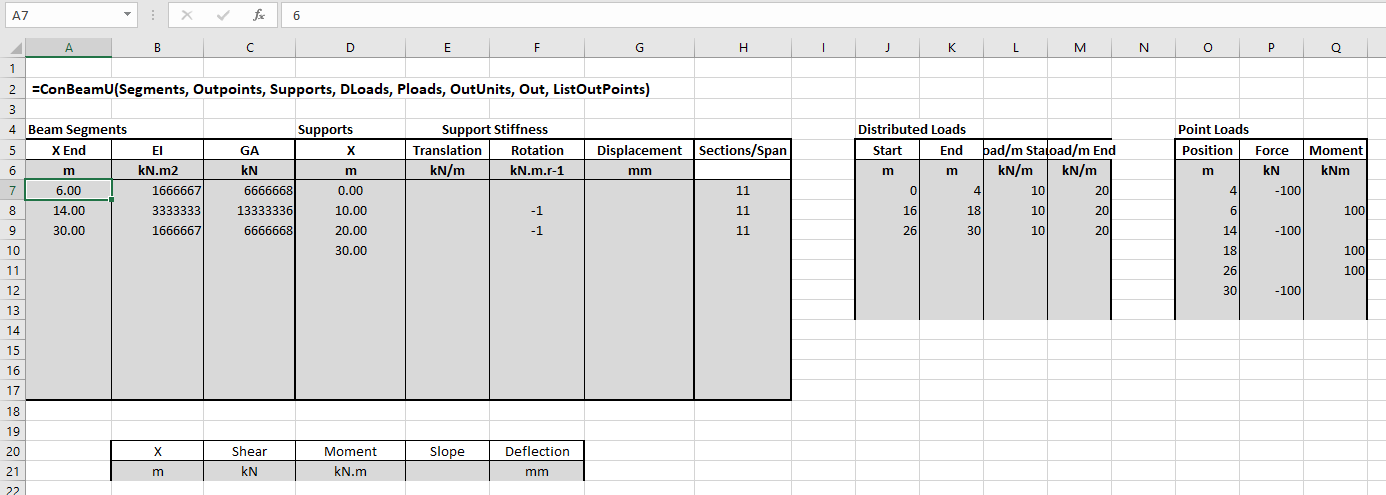
After entering all required input data, enter the function in the top-left cell of the output range. The easiest way to ensure that all arguments are provided, in the right order, is to enter the function name, including the opening bracket, then click the “insert function” button, just to the left of the edit bar, as shown below
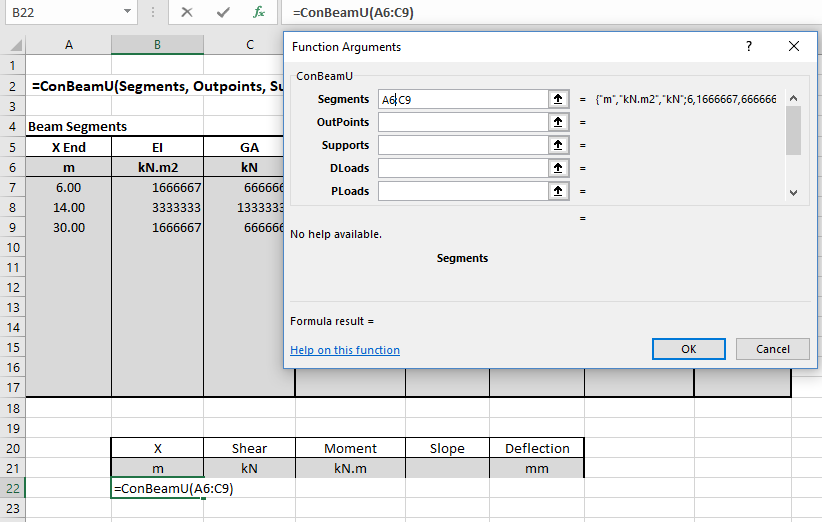
As each function argument is selected the contents of the cell or range are shown to the right of the data box. When all the required arguments are selected the function results appear under the data boxes. In this example the default values are what we want for the two optional arguments, so we can leave them blank. Click OK or press enter to enter the function:
At this stage only the first value of the results array is visible:
The standard Excel way to display all the contents of an array function is:
However the ConbeamU spreadsheet has a macro that will do this automatically, so with the cell containing the entered function still selected, just press Ctrl-Shift-S.

The default output option is to specify the number of output sections for each span. An alternative is to list the position of each section where output is required. In the example below two points are entered at each internal support, and each point with a point load or moment. To display the output set the final “ListOutPoints” argument to True, and select the list of locations range as the “OutPoints” argument. Having edited the function, press Ctrl-Shift-Enter to enter: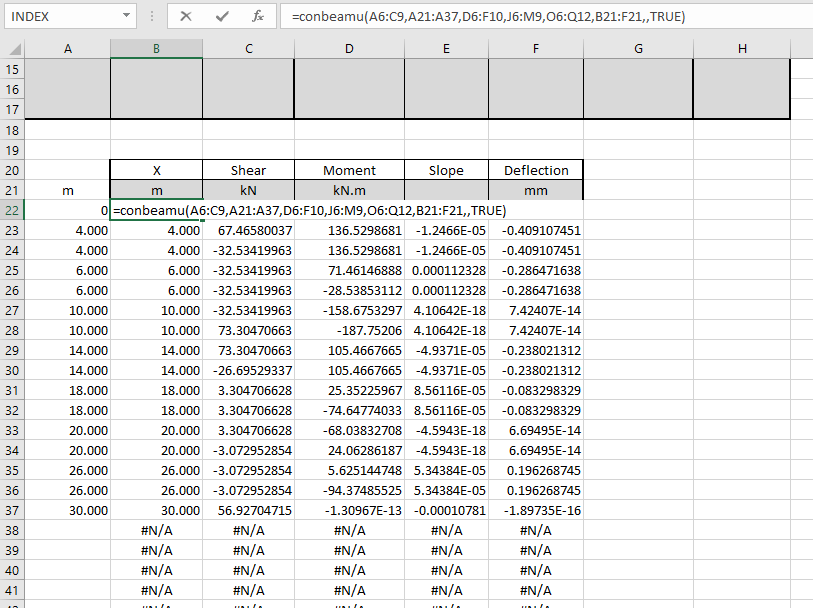
As before, to re-set the output range to display only the cells with valid output values, press Ctrl-Alt-S:
Note that the list of output point locations does not need to be adjacent to the output range, it can be anywhere in the workbook, or even in another workbook.
The procedures described above are applicable to any Excel function or UDF that returns an array function, except that resetting the output range to display the whole array by pressing Ctrl-Shift-S only works in those workbooks where the required macro has been added.


