Rabbits, Foxes, and Lorenz Attractors

Following comments here and here I have added two examples to the ODE Solver spreadsheet showing use of the ODE function to solve systems of differential equations with two or more coupled equations. The new version (including full open source code) may be downloaded from ODESolver.zip.

The first new example is the system of equations for the Lorenz-Attractor.  As for the examples given previously, it is necessary to create a short VBA function to evaluate each of the differential equations for given values of the variables and coefficients.  This function is called by the Alglib ODE solver (included with the download file) to solve the system of equations for any specified series of steps:

Lorenz Attractor Solver

Results for coefficients as used by Lorenz:

ODE8-1

The second example is the classic predator-prey system, where increasing prey numbers are limited by increasing numbers of predators, until the prey animals go into a rapid decline, followed by decline in predators, until prey numbers start to increase again. This example was taken from the document on solution of differential equations at the XNumbers site: ODE Tutorial

Predator-Prey Solver

ODE8-2

Posted in AlgLib, Differential Equations, Excel, Maths, Newton, UDFs, VBA | Tagged , , , , , , , , | 2 Comments

Skydrive becomes Onedrive

As noted in the previous post, the free on-line disc space provided by Microsoft is no longer called Skydrive, but is now known as Onedrive.  On this occasion the change is not due to a desperate bid by their marketing department to combat the dominance of Google and Apple  in the on-line world, but rather a law suit by another company who claim to own the word “Sky”, which claim a British court decided to be valid.

For now, links to Skydrive still work, and if you try to generate an embedded link for use on WordPress from the new Onedrive, it won’t work.  The links generated by Microsoft have to be modified to actually work with the WordPress software, so WordPress automatically edits them whenever you save.  Unfortunately this process looks for the word “skydrive”, which is no longer to be found, so the link is deleted.  The solution is simple: generate the link in Onedrive, copy and paste into the WordPress editor (in text view), then just change the “one” in onedrive to “sky”  (see update below).

How long the skydrive links will continue to work, I don’t know, but for now this seems to be the only simple way to get a Sky/Onedrive embedded link to work in WordPress.

WordPress Forum discussion on the topic:
Skydrive to Onedrive

Edit 23 Feb 2014:

The WordPress developers have now updated their link routines to recognise “onedrive”, so the automatic link generated by the Onedrive site should work without modification.

Posted in Computing - general | Tagged , , , | 1 Comment

6 Year Report

As in previous years, I have downloaded the statistics for this blog for the previous year, and pasted them into a worksheet. The link to each post is preserved in the spreadsheet, so it makes a convenient index to what has been posted over the year. The spreadsheet has been uploaded to Skydrive (which now seems to have morphed into OneDrive), so you should be able to access the links in the window below, or open the file in your browser or Excel, or download it.

Of the 2013 posts, the most popular overall was Clearing excess formats .

The most popular in the Newton category was 3DFrame – 3D Frame analysis for Excel,

and the most popular in the Bach category (by a mile) was George Gently, Matty Groves, and Ebony Buckle

From the “deserving but sadly neglected category” I have chosen (so go and have a look/listen):
Newton: Unit aware continuous beam spreadsheet update

Excel: Selecting Ranges from a UDF:

Bach: The Incredible String Band

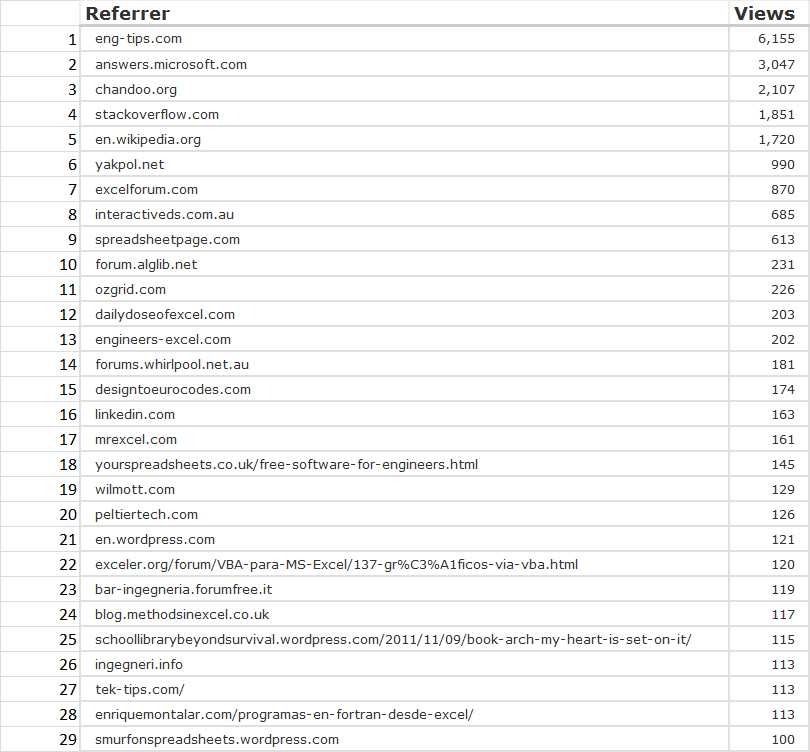
Most frequent referrers to this site came from:

Referrers to NewtonExcelBach

Referrers to NewtonExcelBach

Posted in Bach, Excel, Newton | Tagged | Leave a comment

Cubic splines with horizontal data

Following a request here I have modified my cubic spline functions to accept input arranged  in rows as well as columns.  By default the output arrays will have the same orientation as the range of interpolation X values, but I have also added an optional TransposeH input which if set to “False” will return the output arrays in columns, even if the interpolation X values are in a row.

The new spreadsheet (including full open source code) may be downloaded from: CSpline2.zip

For more details of the background to the functions, and how to use them see: Daily Download 22: Splines and Curves.

Typical output from CSplineA with X values in a row

Typical output from CSplineA with X values in a row

Posted in Excel, Maths, Newton, UDFs, VBA | Tagged , , , | 1 Comment

Beam actions and deflections, 3D or 2D

Two new functions have been added to the ConBeamU spreadsheet, last discussed here.

The new version can be downloaded from ConBeamU.zip, including full open-source code.

The new functions, BeamAct3D and BeamAct2D calculate forces, moments, deflections and rotations along a 3D or 2D beam under specified end conditions and loading.  The output is calculated based on the conditions specified at End1, and optionally the error in the calculated values at End 2, compared with the input values, may be returned.  If this option is not used the End2 data is ignored.

The examples below show input for a uniform beam, but the beam may be subdivided into any number of segments with differing section properties.  The current version of the functions performs linear analysis only, but the section properties can be easily adjusted on the spreadsheet, based on the output actions, to provide non-linear materials analysis.  Later versions will have this functionality built-in, and will also provide for geometric non-linear effects.

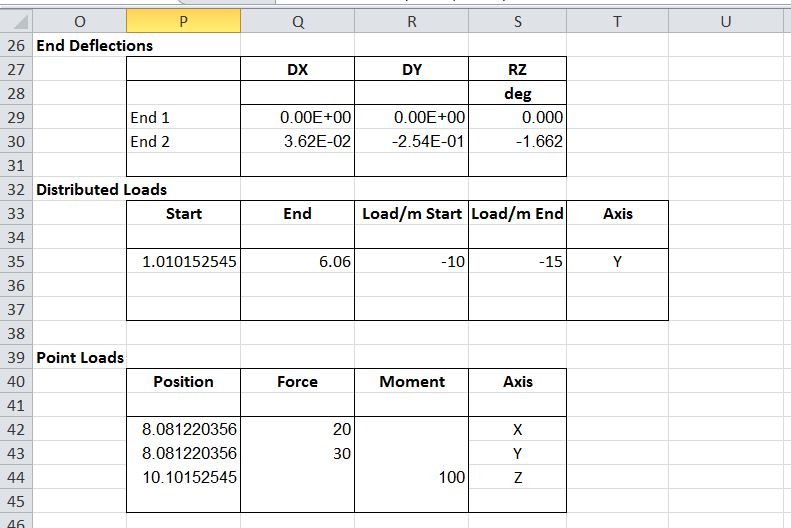
Details of the function input and output are shown in the screenshots below (taken from the Functions sheet of the spreadsheet).  For more details of how to use Excel User Defined Functions and Array Functions see: Using Array Functions and UDFs.

BeamAct1

BeamAct Functions Input 1

BeamAct2

BeamAct Functions Input 2

The output consists of 12 or 6 columns for the 3D or 2D version respectively:

BeamAct3

Examples of both functions are found on the BeamAct sheet:

BeamAct4

BeamAct3D Input

BeamAct5

BeamAct3D Input

BeamAct6

BeamAct3D Output; click for full size view

BeamAct7

BeamAct3D Deflection Results Compared with Strand7

BeamAct8

BeamAct2D Input 1

BeamAct9

BeamAct2D Input 2

BeamAct10

BeamAct2D results

BeamAct11

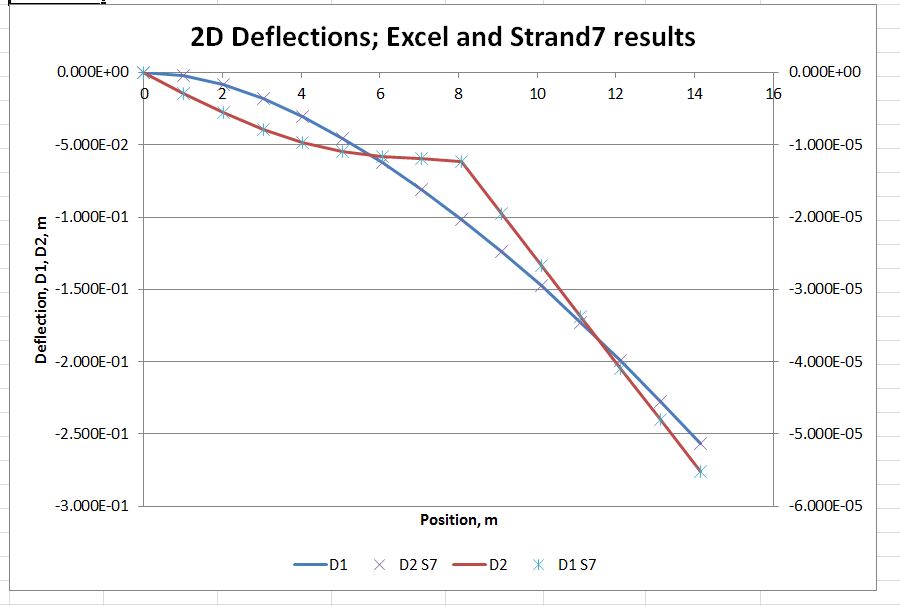
BeamAct2D Results compared with Strand7

Posted in Beam Bending, Excel, Finite Element Analysis, Frame Analysis, Newton, Strand7, UDFs, VBA | Tagged , , , , , , | 2 Comments