Section properties for groups of defined shapes

Following a discussion at Eng-Tips, I have modified the section properties spreadsheet (presented here) so that section properties can be found for groups of defined shapes, including provision for translation and rotation of each shape, and application of different E values.

The new spreadsheet may be downloaded from Section Properties07.zip, including full open source code.

The procedure is:

  • Select a shape from the drop-down list on the “DefShapes” sheet and enter the required dimensions.
  • In the Group Properties table (further down on the same sheet) enter details of X and Y offsets, rotations, and Elastic Modulus values for one or more copies of this shape.
  • Click the “Create new group” button.  The Group Properties table will update.
  • Different shapes may be added by following the same procedure as above, then click the “Add shapes to group” button.

Holes inside a shape may be defined using Elastic Modulus values of 1 and -1 for the shape and holes respectively.

The grouped shapes may be plotted on the “Coords_Group” sheet, which also recalculates section properties, based on end point coordinates.  Note that properties on the “Coords_Group” sheet will be slightly different from those shown in the Group Properties table for any shape including curves because the calculation on that sheet models curves as a series of short straight lines.  For any polygonal shape the results should be exactly the same (within machine precision).

Examples of input and results are shown in the screen-shots below.

Create 6 equilateral triangles, offset so that the tip is at the origin, and rotated through 60 degree increments

Create 6 equilateral triangles, offset so that the tip is at the origin, and rotated through 60 degree increments

Resulting hexagon

Resulting hexagon

Create new group with 0.5 dia. circle
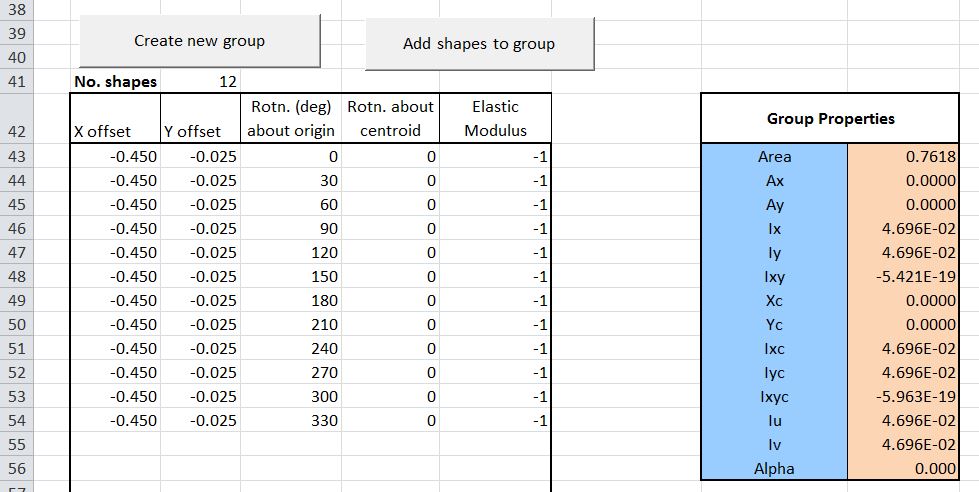
Create new group with 0.5 dia. circle

Add 25 mm diameter holes at 0.45 m from the centre with 30 degree increment
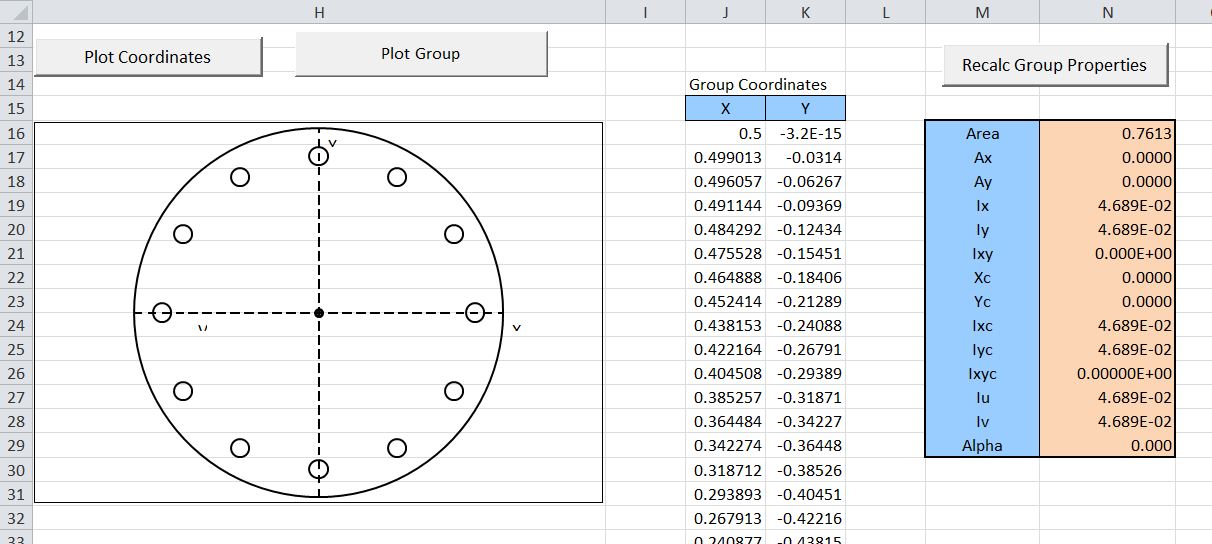
Add 25 mm diameter holes at 0.45 m from the centre with 30 degree increment

Resulting group and section properties

Resulting group and section properties

Add 4 equal angles to an I section; offset and rotated to I section internal corners

Add 4 equal angles to an I section; offset and rotated to I section internal corners

Resulting group and section properties
Resulting group and section properties
Posted in Coordinate Geometry, Excel, Maths, Newton, UDFs, VBA | Tagged , , , | 13 Comments

George Gently, Matty Groves, and Ebony Buckle

The George Gently episode “Gently With Class” (just shown in Australia) features an excellent rendition of the traditional song “Matty Groves” sung by Ebony Buckle:

The song dates from at least the 17th Century ,and is  included in the ballads collected by 19th Century American scholar Francis James Child.  It fits the story well, not just because the words of the song tell of an English “nobleman” who sees it as his right to dispense his own version of justice, and “ask for no man’s leave”, but also because the song was a staple part of the repertoire of Fairport Convention, at the height of their success in the era of the Gently story:

Matty Groves lyrics:

A holiday, a holiday, the first one of the year  Lord Arlen’s wife came into church the gospel for to hear.

And when the meeting it was done she cast her eyes about  And there she saw little Mattie Groves, walking in the park.

Come home with me little Mattie Groves, come home with me tonight  Come home with me little Mattie Groves and sleep with me tonight.

Oh I can’t come home, I won’t come home and sleep with you tonight  By the rings on your fingers I can tell you are Lord Arlen’s wife.

‘Tis true I am Lord Arlen’s wife, Lord Arlen’s not at home  He is out to the far corn fields, bringing the yearlings home.

And the servant who was standing by and hearing what was said,  He saw Lord Arlen, he would know, before the sun would set.

And in his hurry to carry the news, he filled his breast and ran  And when he came to the broad mill stream he took off his shoes and swam

Little Mattie Groves, he lay down and took a little sleep  When he awoke Lord Arlen, was standing at his feet

Saying how do you like my feather bed and how do you like my sheets  And how do you like my lady, who lies in your arms asleep.

Oh well I like your feather bed and well I like your sheets  But better I like your lady maid who lies in my arms asleep.

Well Get Up! Get Up! Lord Arlen cried, Get Up as quick as you can  It’ll never be said in fair England I slew a naked man!

Oh I won’t get up, I won’t get up, I can’t get up for my life  For you have two long beaten swords and I have but a pocket knife.

Well it’s true I have two beaten swords, they cost me deep in the purse  But you will have the better of them and I will have the worst.

And you will strike the very first blow and strike it like a man  I will strike the very next blow and I’ll kill you if I can.

So Mattie struck the very first blow and he hurt Lord Arlen sore  Lord Arlen struck the very next blow and Mattie struck no more.

And then Lord Arlen he took his wife, he sat her on his knee  Saying who do you like the best of us, Mattie Groves or me.

And then spoke up his own dear wife never heard to speak so free  I’d rather kiss one dead Mattie’s lips than you and your finery.

Lord Arlen he jumped up and loudly he did bawl  He stuck his wife right through the heart and pinned her against the wall.

A grave, a grave, Lord Arlen cried, to put these lovers in  But bury my lady at the top for she was of noble kin.

Posted in Bach | Tagged , , | 6 Comments

Installing dlls on 64 bit Windows

Several of the spreadsheets available here include routines linking to compiled code written in C#, C++ or Fortran, which require the installation and registration of dll files.  The procedures for doing this are significantly different on machines with 64 bit versions of Windows.  These procedures are not complicated, but they are not well documented, and the naming conventions used are confusing.  The instructions given below are based on my own inexpert investigations; if anyone has any corrections, clarifications, or a better way of doing things, I’d be glad to hear from you.

All the compiled applications available here (so far) are compiled as 32 bit dlls. These should be copied to the Windows\SysWOW64 folder, not Windows\System32, so:

  • 32 bit applications go in SysWOW64
  • 64 bit applications go in System32

OK?

The applications written C++ or Fortran are then registered using the version of Regsvr32.exe in the SysWOW64 folder.

Applications written in C# use the COM (Component Object Model) and the .Net framework, and are installed using the Regasm application, as described here. In this case use the version of regasm found in the latest folder found under c:\Windows\Microsoft.NET\Framework\, not c:\Windows\Microsoft.NET\Framework64\.

Following these instructions the applications should successfully install on machines with 64 bit Windows, and be available to either 32 bit or 64 bit versions of Office.

For a good clear description of the background to these things see: http://www.samlogic.net/articles/32-64-bit-windows-folder-x86-syswow64.htm (link provided by Dennis Wallentin).

Posted in Computing - general, Excel, Link to dll, VBA | Tagged , , , | 10 Comments

3DFrame Ver 1.03 and Frame4 Ver 3.07

Updated versions of my 2D and 3D frame analysis spreadsheets are now available for download from:
3DFrame.zip
Frame4.zip

The download files include full open-source VBA code, and dll files for compiled solvers for much better performance with large models. See https://newtonexcelbach.wordpress.com/2012/11/16/frame4-now-with-added-alglib/ for instructions on installing and linking to the dll files.  The VBA code does not require any special installation.

Changes common to both spreadsheets are:

  • The check for a reference to the compiled solver dll files previously caused the VBA solver to crash if the dll files were not found.  This has now been fixed so that the VBA solver will run if the compiled solver files are not installed.
  • A check has been added that the resultant reaction forces are equal to the total resultant applied loads.

In addition the following changes have been made to individual spreadsheets:

Frame4:

  • The three solvers available in 3DFrame (compiled Alglib sparse solver, compiled skyline solver, and VBA solver) are now also available in Frame4.

3DFrame:

  • Calculation of shear deflections is now supported.
  • Member end releases are now supported.
  • The plot functions have been updated for easier use and better performance
  • Specified support displacements may now be input.
  • Members may now be specified as truss elements, transferring axial load only.

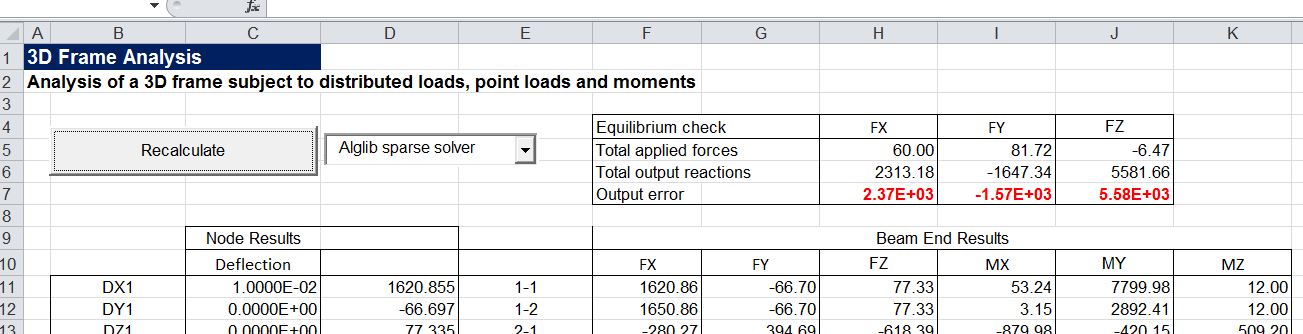
Note that specified support displacements are modelled by adding a virtual large stiffness in the direction of the displacement, and this solution method is not compatible with the iterative solution method used in the Alglib sparse solver.  For this reason models with specified support displacements should be solved with the compiled solver or the VBA solver.

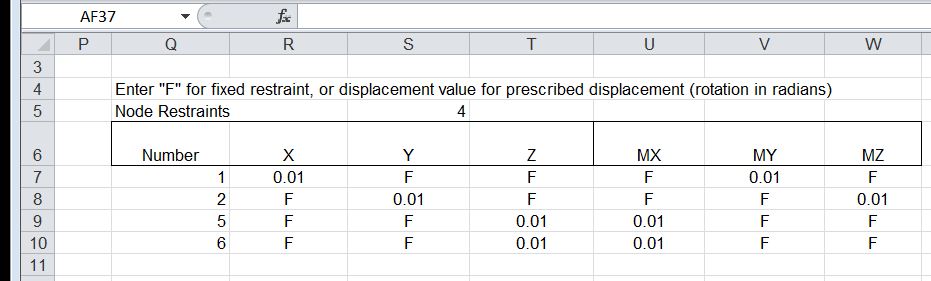
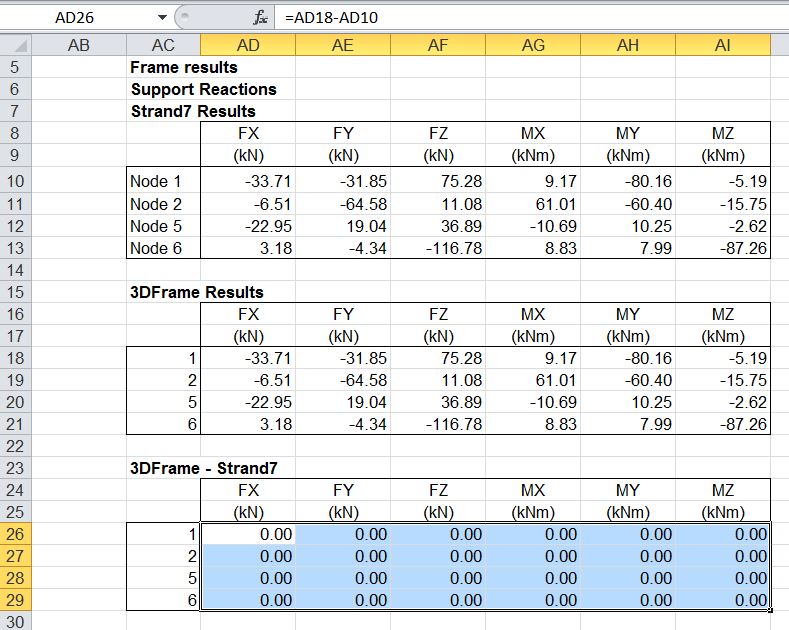
Examples of input and output using the new features in 3DFrame are shown in the screenshots below:

Support reactions without specified deflections or truss members:

3dFrame results compared with Strand7 results

3dFrame results compared with Strand7 results

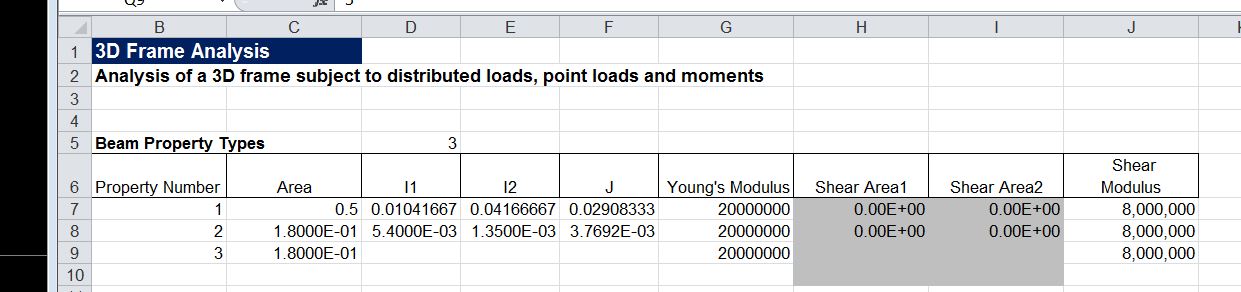
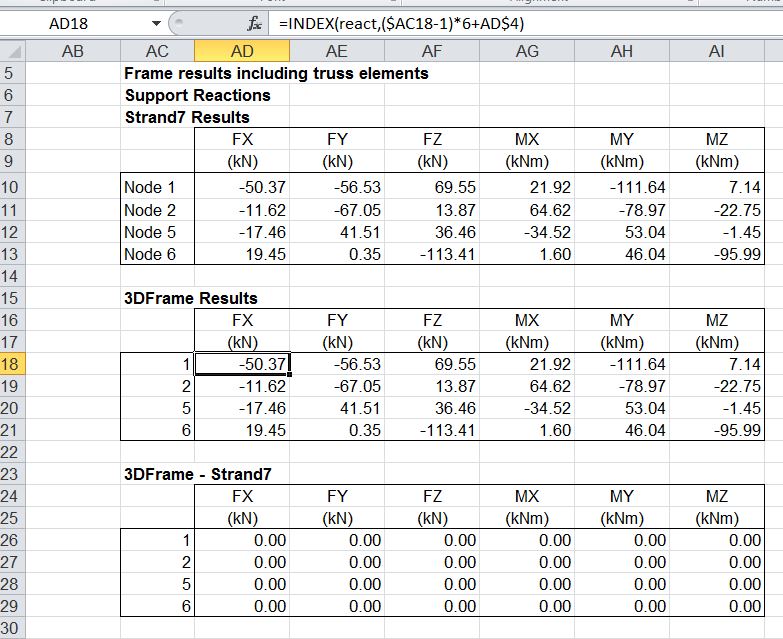
Change Property Number 3 to truss element (set I1, I2 and J to zero).

3DFrame2-2a

Reaction results

3DFrame2-2

Add support displacements

3DFrame2-3a
Reaction results
3DFrame2-3

Equilibrium check for Alglib sparse solver used with specified support displacements:

3DFrame2-4

Correct results with compiled solver option:

3DFrame2-5

Posted in Excel, Finite Element Analysis, Frame Analysis, Link to dll, Newton, VBA | Tagged , , , | 34 Comments

Tanh-Sinh Quadrature V4.1

The latest update to the Tanh-Sinh Quadrature spreadsheet from Graeme Dennes is now available for download from: Tanh-Sinh. As usual, the download includes full open-source code and extensive documentation.

Version 4.1 Release Notes

 1.   Small but useful accuracy improvements have been made to the Tanh-Sinh and DE programs through increasing the size of the node/weight arrays, thus allowing the array generators to terminate based on the magnitude of the calculated nodes and weights rather than on the size of the arrays.

2.   Small but useful accuracy improvements made by utilising the MinRealNumber constant in the array generators wherever possible.

 3.   Small speed improvements made to all programs.

 4.   Small improvements made to the parameters used by the function plotter on the Tanh-Sinh worksheet.

 5.   Taken together, these changes have provided improvements to the utility of the workbook.


Graeme Dennes

Posted in Excel, Maths, Newton, Numerical integration, UDFs, VBA | Tagged , , , , | 1 Comment