Frame4 Version 3.05; with support displacements

Hot on the heels of Version 3.04 comes Version 3.05.

A few days ago Julien asked if the Frame4 allowed for specified support deflections, to which I replied it would be added in the future.  Searching Google on the topic I found:
https://newtonexcelbach.wordpress.com/2009/05/11/frame-analysis-with-excel-%E2%80%93-7-shear-deflections-and-support-displacements/
from which I discovered that it had been done already!

Download from: http://www.interactiveds.com.au/software/Frame4.zip

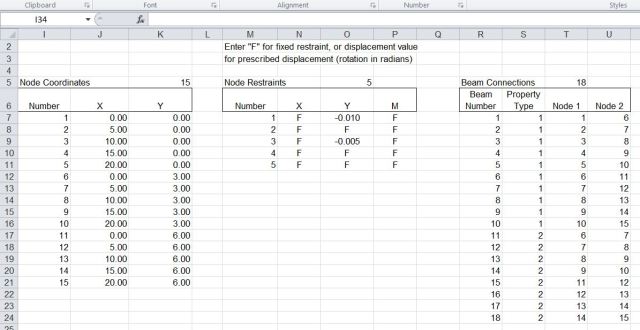
The new version has some small amendments to make it compatible with the Alglib solver, and adds some brief documentation.  The screen shots below show example input and output, and results from Strand7 for the same problem, which are in near exact agreement.

Support displacement input

Support displacement input

Frame4-6-2

Support displacement and reaction output

Frame4-6-3

Deflected shape x 200

Frame4-6-4

Horizontal beam moments

Frame4-6-5

Strand7 output, reactions for Node 1

Posted in Beam Bending, Excel, Finite Element Analysis, Frame Analysis, Newton, Strand7, VBA | Tagged , , , , | 7 Comments

Frame4 Version 3.04

In preparation for adding 3D functionality to the Frame4 spreadsheet I have rearranged the load input sheet, and in doing so I noticed that the fixed end reaction calculation was incorrect for cases where loads were applied to one member over two or more lines, and the fixed end moments were not equal.  That has now been fixed, along with some other minor amendments, and the new files (in xls and xlsb versions) may be downloaded from: Frame4.zip.

For details of installing the link to the compiled Alglib solvers see: https://newtonexcelbach.wordpress.com/2012/11/16/frame4-now-with-added-alglib ,
and in the event of problems registering the dll files see the comment from Tom dated December 5 2012.

New load input sheet

New load input sheet

Posted in Excel, Finite Element Analysis, Frame Analysis, Link to dll, Newton, VBA | Tagged , , , , | 1 Comment

Automating chart scale limits – update

I wrote about this function 2 1/2 years ago, and promptly forgot about it, but a few days ago brian provided an answer to a question that was raised shortly after it was first posted, concerning how to apply the function to secondary chart axes.

I have updated the spreadsheet to incorporate brian’s code (slightly modified), and the new version (including full open source code) can be downloaded from: SetScale2.zip

I have also added an example of the technique for plotting a function entered as text on the spreadsheet.  The procedure is:

  • Name cells containing the lower and upper limits for the X range: “xstart” and “xend” respectively.
  • Create a range “nsteps” with the value 1000 (or however many steps you would like in your graph)
  • Create a name “x” that will contain a rnge of x values, between the specified limits by entering: =xstart+xrange/(nsteps-1)*(ROW(OFFSET(Sheet1!$A$1,0,0,nsteps,1))-1) in the name “refers to” box (see picture below).
  • Create names “Y1vals” and “Y2vals” with the formulas: =EVALUATE(Sheet1!$B$17&”+x*0″) and =EVALUATE(Sheet1!$B$18&”+x*0″) (adjusting the cell references to the location of your function(s).
  • Create an XY (scatter) graph and set the data ranges to =SetScale.xls!x for the X range for both series and =SetScale.xls!Y1vals and =SetScale.xls!Y2vals for the two Y series

Posted in Charts, Excel, UDFs, VBA | Tagged , , , , | 13 Comments

Frame4; now with added Alglib

Edit 29 Nov 2012: I have now added an xls version to the download zip file.  This also has a much smaller example model, which will solve quickly using the VBA solver, so will be more useable for anyone having problems with the Alglib solver.

The compiled matrix functions featured in recent posts (Compiled Matrix Functions for Excel; Using Regasm.exe), have now been incorporated into the Frame4 spreadsheet (Download here), and also Frame4Buckle (Download here).  Both spreadsheets include full open-source code, and the Frame4 download also includes the necessary interface files (ALMatrixLib.tlb and ALMatrixLib.dll), and the AlgLib dll file (Alglibnet2.dll).  Step by step installation instructions are given below; see the previous posts for some shortcuts, and details of how to compile the program yourself (not necessary, unless you want to modify the code, or just follow the process).

Installation:

  • Copy the files: ALMatrixLib.dll, ALMatrixLib.tlb, and alglibnet2.dll to your C:\Windows\System32\ folder.
  • Copy the spreadsheet files to any convenient directory.
  • Click on “Start” (bottom left)-Computer and find the latest Microsoft.NET\Framework folder.  On my machine this is at C:\Windows\Microsoft.NET\Framework\v4.0.30319
  • Right click on the final folder name (at the top of the window) and select “copy address as text”
  • Click on “Start” and enter cmd in the search box
  • Right click on the cmd icon under Programs(1) and select Run as Administrator
  • It is necesary to move to the folder containing the Regasm.exe file. In the command line window enter:  CD space , right click and paste the folder path name.
  • Ensure that you are in the correct folder then enter:
    regasm /codebase C:\Windows\System32\ALMatrixLib.dll /tlb
    (with path amended as required) or copy this line and right click at the command prompt to paste it.
  • Check that there is no error message.  If there is, check the spelling of the command and that you opened the cmd window “as administrator”.
  • If there is no error, close the command prompt window.
  • Open any of the three downloaded spreadsheets and check if the Alglib functions are working.  If not:
  • Press Alt-F11 to open the Visual Basic editor window.
  • Select Tools-References-Browse, go to \Windows\System32 and select ALMatrixLib.tlb.
  • Return to the spreadsheet, which should now work correctly.
  • This process should only be necessary once.
  • Any problems, let me know.

The new code gives a respectable improvement in performance; how much? – see below:

Speed increase with compiled solver; 2500x

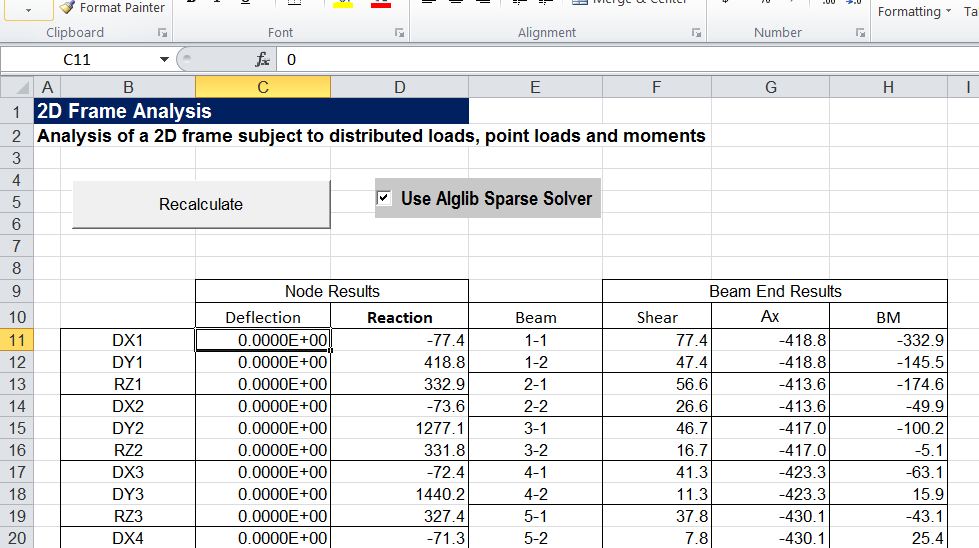
To use the compiled code ensure that the necessary files are installed then simply click the “Use Alglib Sparse Solver” check-box as shown below.  Note that if the Alglib routines are not properly installed the solver will automatically revert to the VBA routine, and the check box will automatically de-select.

Frame4 Output sheet with Alglib Sparse Solver checkbox

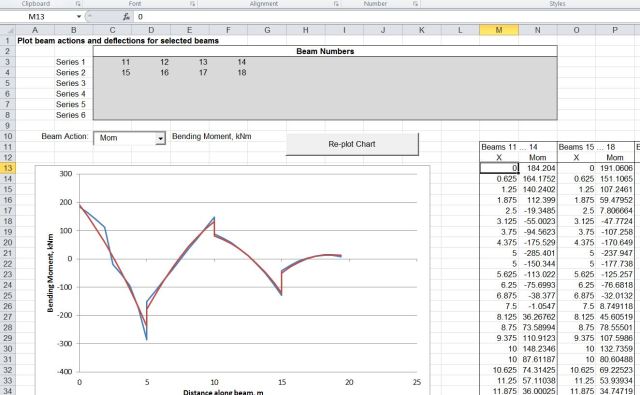
The screenshots below show the frame included with the download spreadsheet, and an example of bending moment diagrams plotted for selected beams.
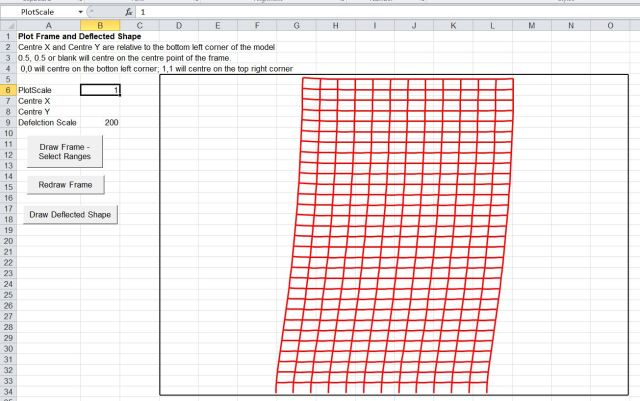
Example analysis deflected shape plot

Bending moment diagrams for selected beams

Posted in AlgLib, Beam Bending, Excel, Finite Element Analysis, Frame Analysis, Link to dll, Newton, UDFs, VBA | Tagged , , , , , | 24 Comments

Circle Limit III animation

Enjoy:

And papers by the artist on how to do it available at: http://bulatov.org/math/1107/

Update 16th Nov 12:

Comments and more links from PM2Ring:

That image is an example of a tessellation of the hyperbolic plane, in the
Poincaré disc projection. Escher learned about this stuff from H. S. M. Coxeter, probably the greatest geometer of the 20th
century.

Hyperbolic geometry is fun. And it’s much easier to create
regular & semi-regular tessellations in the hyperbolic plane than in the
Euclidean plane. John Baez discussed this topic a little while ago: Archimedean Tilings and Egyptian Fractions

Modern Dutch
graphic artist Jos Leys has done some nice work with hyperbolic tessellations:

In 2D: http://www.josleys.com/show_gallery.php?galid=262
In 3D: http://www.josleys.com/show_gallery.php?galid=342

Also see images by PM2Ring from and early post in this blog:

https://newtonexcelbach.wordpress.com/2008/06/30/pythagoras-penrose-and-pov-ray/


Posted in Animation, Bach, Newton | Tagged , , | Leave a comment