Tanh-Sinh Quadrature V2.0

I recently received an update of the Tanh-Sinh Quadrature spreadsheet from Graeme Dennes, which can be downloaded from:  Tanh-Sinh Quadrature (including, as usual, full open source code). – Link fixed 5th April 2011

Here is Graeme’s description of the updates:

The Tanh-Sinh program and the two Double Exponential programs have been revised to improve their robustness when dealing with functions and limits for which overflow can occur. Previously, overflow events were managed by the automatic tolerance feature I introduced, which worked very well – for most situations. This revision takes a different path, in that the abscissas and weights for the interval (-1,1) are generated first, and stored in an array. The abscissas and weights are independent of the integrand and the limits, and are based only on the given tolerance figure (10^-14), Excel’s smallest positive floating point number (10^-305, with just a tad in reserve), and the method itself. The abscissas and weights are different for each program. The programs then access their array data as required. (Previously the abscissas and weights were calculated on the fly by the integration programs themselves.) Thus, overflow should not be possible with this new method.

The core technique (pre-generation of the abscissas and weights and overflow prevention) is by Takuya Ooura.

Consequently, the automatic tolerance feature has been removed from the three programs as being redundant, and all related text has been removed.

As a further change, the optional inputs of tolerance and level/panels/loops have been removed from all five programs, as these are no longer considered necessary or useful. All related text has also been removed.

In summary, overflow should not occur, the results should be at the maximum accuracy possible, and the programs’ use has been simplified.

Previous post on Tahn-Sinh Quadrature.

Posted in Excel, Maths, Newton, Numerical integration, UDFs, VBA | Tagged , , , , | 2 Comments

The Weaver and the Factory Maid

This is an old Steeleye Span song, a favourite of mine, cleverly combining two 19th century weavers songs. The You Tube presentation is noteworthy for two rareities, a video that adds something to the song, and a collection of mostly intelligent comments.  Open in You Tube and have a read while you listen.

Read more about the background to the songs here:

 The (Hand)weaver and the Factory Maid

Posted in Bach | Tagged , | 2 Comments

PView Function

As promised in the previous post, here are further details of the PView User Defined Function (UDF), included in the IP2 spreadsheet, which can be downloaded (including full open source code) from IP2.ZIP.

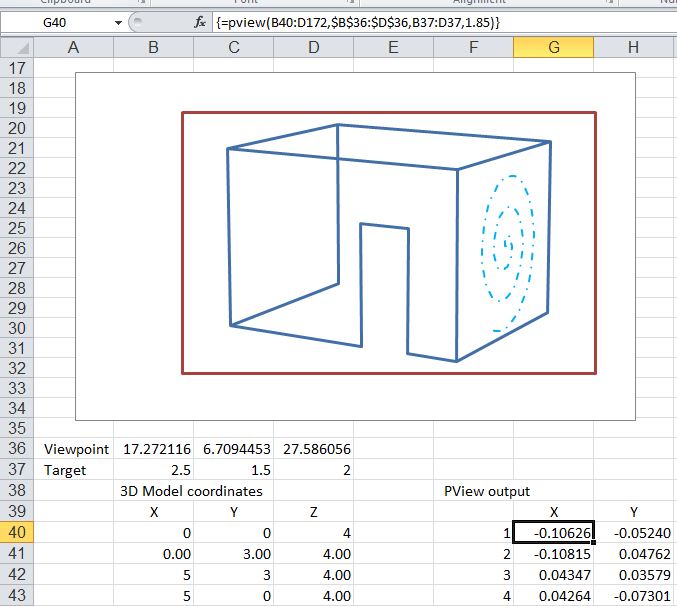
The PView UDF works by multiplying the 3D coordinates of any set of points by a rotation matrix.  The resulting array of 2D coordinates can be plotted in an XY (scatter) chart in the usual way.  The function input and output is described in the screen shot below, together with a plot of an example; a simple box structure with a doorway, and a spiral line plotted on one wall.

PView input and plot of sample output (click for full size view)

Part of the output array is shown in the next screen shot.  The function output is a single array, which must be entered as an array function.

Pview Output array

Posted in Arrays, Charts, Charts, Coordinate Geometry, Drawing, Excel, Maths, UDFs, VBA | Tagged , , , , , , | 3 Comments

More 3D Intersections and 3D plotting function

Following the previous post, I have added several new functions connected with intersections of lines and planes, and a function to generate a perspective plot from 3D coordinates.  The new functions have been added to the IP2.xls worksheet, which can be downloaded (including full open source code) from IP2.ZIP.

Note that all the functions return results as an array, and must be entered as an array function:

  • Enter the function as shown in the examples
  • Select the complete output range, with the function in the top-left corner
  • Press F2 (edit)
  • Press ctrl-shift-enter

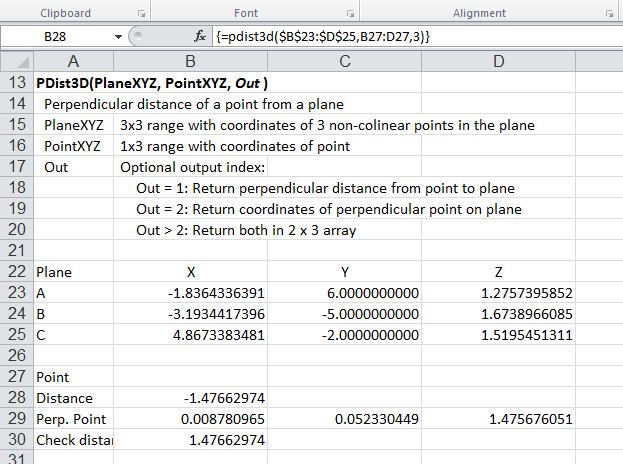
The new functions are shown in the screen shots below (click any image for full size view):

PDist3D - Perpendicular distance from a point to a plane

PlaneCoeff; Coefficients of a plane specified by 3 points

IPPlaneLine: Intersection point of a plane and a line segment

IPPlanePlane: Intersection line of two planes

PView: Perspective projection of 3D Lines, showing IPPlanePlane output

Further details of the PView function will be given in the next post.

Posted in Coordinate Geometry, Excel, Maths, Newton, UDFs, VBA | Tagged , , , , , , , | 7 Comments

3D Intersections

Following a discussion at the Eng-Tips Forum, I have written an Excel User Defined Function (UDF) to find the intersection point of two 3D line segments.  The UDF has been added to the IP2 spreadsheet, which is available for free download (including full open source code) from IP2.ZIP.

The method of calculation of the intersection point is:

  1. Check if either End of Line2 is coincident with either end of Line1.
  2. Check if either end of Line2 lies on Line1.
  3. Check for quick 2D solution, if both lines lie on a plane parallel to the XY, XZ or YZ planes.
  4. Check that lines lie in the same plane, i.e distance of End2 of Line2 from the plane formed by Line1 and End1 of Line2 is zero.
  5. Find 2D IP of lines projected on to XY, XZ, and YZ planes.
  6. Check that the IP is within the length of each line segment.
  7. Extract the IP X,Y, and Z coordinates and assign to the function return value.

The screen shots below show for two 3D line segments:

The intersection point found using the new UDF (IP3D):

IP3D example

On spreadsheet calculation for the same two lines, using the UDF IP() (Example 2), and using only built in Excel Functions (Example 3)

On spreadsheet calculation of IP

and graphs of the two lines projected on to the three axis planes:

Projected intersecting lines

Posted in Coordinate Geometry, Excel, Maths, Newton, UDFs, VBA | Tagged , , , , | 7 Comments