Laterally Loaded Piles and a Safety Device for Walking on Icy Pavements

What do laterally loaded piles:

Pile loading test

and a safety device for walking on icy pavements:

have in common?

Apart from their obvious utility, both are the subject of learned papers, freely available at the Virginia Tech Digital Library and Archives, along with 18,762 Electronic Theses and Dissertations.

For the full papers see:

Investigation of the Resistance of Pile Caps to Lateral Loading and

Introducing Engineering Design Through an Intelligent Rube Goldberg Implementation

or search the entire archive at: Virginia Tech Digital Library and Archives

Posted in Geotechnical Engineering, Newton | Tagged , | Leave a comment

More links

One of the nice things about running a blog is that visitors leave the address of the site that lead them here, and if you follow these links back it sometimes takes you to fascinating sites that you would  never have otherwise seen (sometimes it also leads to the most tedious spam imaginable, but we won’t go into that).

So this evening I have discovered:

Pfadintegral dotCom – a quantitative finance site, but if they are happy to link to an engineer, I’m happy to return the favour.

And from their resources page:

Robert de Levie – Excellaneous a fellow “engineers and scientists” site.  Very un-flashy presentation, all on a single page, but lots of good content.

Visual Basic Tutorials – what it say, tutorials on VB (not VBA), and again excellent content

Visual Basic Secrets  – what they say about themselves: “”Here’s the thing though… even VB programmers that have been in the industry for years don’t realize the real power of VB because they don’t grasp (or realize) a few key concepts and functionalities that VB offers. These concepts aren’t taught, or at least are not emphasized the way they should, so I call them “VB SECRETS”.”

Posted in Excel, VBA | Tagged , , | 1 Comment

XNumbers and Tropical Events

My on-line friend Al Vachris recently sent me a link to the Tropical Events site, which features a detailed analysis of the orbital motion of the Earth and the other bodies of the solar system, all done in Excel, and all available for free download:

This is a great site, and well worth a visit for anyone interested in astronomy or the scientific application of Excel, but what really grabbed my interest was that the author had used the XNumbers add-in in preparing his charts, and he had got his brother to update the program for Excel 2007/2010.

Xnumbers is a free open-source maths add-in, offering a huge number of additional maths functions and extended precision arithmetic.  It was developed by Leonardo Volpi and the “Foxes Team” in Italy, but it had not been updated for Excel 2007.  Steve Beyers, the author of the Tropical Events site, got his brother, John Beyers, to do the necessary update, and also to compile the functions with a resulting performance improvement.  The new version, XNumbers6.0, can be downloaded from:

XNumbers6.0

The download includes an excellent detailed help file.  Further information is available at:

THE VOLPI XNUMBER ADD-INS: (This is summary material extracted from the site http://digilander.libero.rt/foxes. It is presented as an explanation on how xnumbers works in an Excel environment.)

The Foxes Team site Detailed documentation of XNumbers and related maths topics from the original authors.

It is excellent news that this software is now available for Excel 2007/2010, and I recommend the sites linked above to anyone wanting to do advanced numerical analysis inside Excel.

Posted in Excel, Maths, Newton, Numerical integration | Tagged , , , | 16 Comments

Double Exponential Quadrature

Graeme Dennes has updated his Tanh-Sinh Quadrature spreadsheet to include Double Exponential Quadrature.  His brief notes are given below, and more details and links to background information are included in the download file.

=================================================================

Double Exponential Quadrature UDFs added to Tanh-Sinh Quadrature workbook.

Two Double Exponential (DE) quadrature UDFs to calculate the numerical integral of a function over the semi-infinite interval (a,inf) have been added to the Tanh-Sinh Quadrature workbook. The UDF named DE_QUAD will integrate non-oscillatory integrals, ie, those without periodic trigonometric functions like sine, cosine, etc, while the UDF named DE_OSC_QUAD will integrate oscillatory integrals.

Like the Tanh-Sinh program, the two DE programs provide excellent performance, primarily because the three programs are based on the Double Exponential quadrature technique (developed by Takahasi and Mori in 1974).

The revised zip file may be downloaded here: Tanh-Sinh and DE Quadrature.zip.

Note:  New version (1.51) with minor corrections uploaded 9 Mar 2011.

=================================================================

DE-Quad Function Examples; click for full size view

Posted in Excel, Maths, Newton, Numerical integration, UDFs, VBA | Tagged , , , , , | 1 Comment

Non linear regression – 2; ALGLIB functions

The previous post looked at using the Excel Solver to fit a non-linear equation to a given set of data, using the least squares method.  This approach is reasonably convenient and straightforward, but it has a number of disadvantages:

  • The Solver tends to be very slow, compared with alternative methods
  • The solution does not update automatically if the data changes
  • It is necessary to set up the calculation of function results and squares of the error values for each new application, or for alternative functions.
  • Control of the precision of the results is limited

The ALGLIB non-linear least squares functions provide better performance in all these respects, and with the VBA functions described below, are quick and simple to use.  Two new User Defined Functions (UDFs) have been added to the AL-Spline-Matrix spreadsheets.  The new spreadsheets (including full open-source code) can be downloaded from AL-Spline-Matrix07.zip and AL-Spline-Matrix03.zip.  The two new UDFs are:

  • AL-NLFit – non-linear least squares fit for a function evaluated by a VBA routine.
  • AL-NLFitText – non-linear least squares fit with automatic evaluation of a function entered as text on the spreadsheet.

The ALGLIB routines follow an iterative process, requiring the evaluation of the functions, and also their partial derivatives with respect to each parameter.  Optionally, the Hessian of the function (a matrix of all second partial derivatives with respect to each parameter) may also be evaluated.  The spreadsheet UDFs allow for the derivatives and Hessian to be evaluated analytically, or they may be found automatically by a finite difference method.

Input and output for the two new functions are shown in the screen shots below:

AL_NLFit function input and output (click for full size view)

Al_NLFitText Function input and output

These functions have been applied to the fitting problem described in the previous post.  To use AL_NLFit it is necessary to write a VBA routine to evaluate the function and its partial derivatives:

Function CreepFD1(XA() As Double, CoeffA() As Double, RtnType As Long) As Variant
  Dim A As Double, B As Double, C As Double, D As Double, E As Double, F As Double, Slopea As Variant, X1 As Double, X2 As Double
    Dim Th As Double, T As Double

  A = CoeffA(0)
  B = CoeffA(1)
  C = CoeffA(2)
  D = CoeffA(3)

    Th = XA(0)
    T = XA(1)

  Select Case RtnType
    Case 1
  CreepFD1 = A * Log(B * T) - C * T - D * Th
    Case 2
  Slopea = GradientA("CreepFD1", CoeffA, XA, 4, 2)

  CreepFD1 = Slopea
    End Select
End Function

Note that to find the function value for the given values in XA and CoeffA (for RtnType = 1) the routine must include the function to be evaluated, but to calculate the array of partial derivatives (for RtnType = 2) these may either be calculated within the routine, or alternatively (as in the case shown) the GradientA function may be used, which recursively calls the evaluation function with small offsets to evaluate the derivatives by the finite difference method.

To use AL_NLFitText it is simply necessary to enter  the function as text on the spreadsheet, and optionally the functions for the partial derivatives immediately underneath.  When these are omitted the derivatives are automatically calculated by the finite difference method.

The input and results for the concrete shrinkage problem are shown in the screen shot below:
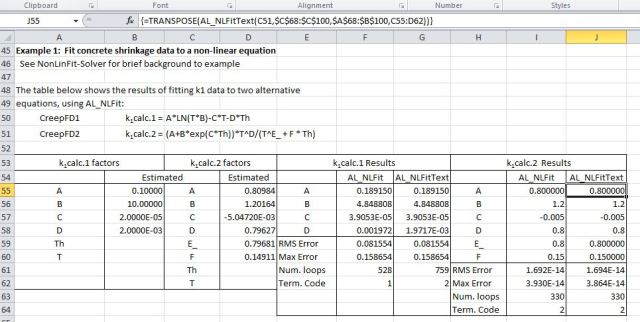
Input and results fitting concrete shrinkage data to two alternative formulas

It can be seen that:

  • AL_NLFit and AL_NLFitText have given almost identical solutions in both cases.
  • The ALGLIB solution for k1calc.1 is different to that found by the Solver method, with a lower average error, but the gradient of the curve becomes negative for high values of T, whereas the data always has a positive slope.
  • The solution for k.calc.2 has close to zero error, and (unlike the Solver solution) the calculated coefficients are identical to those used to generate the base data.

Log scaled plots of the two solutions are shown below:

k1calc.1 = A*LN(T*B)-C*T-D*Th (Log scale)

k1calc.2 = (A+B*exp(C*Th))*T^D/(T^E_ + F * Th) (Log scale)

In summary, the non-linear least squares UDFs provide a quick and flexible method of performing non-linear least squares regression, and with an appropriate base function provide accurate results.

Posted in AlgLib, Concrete, Excel, Maths, Newton, UDFs, VBA | Tagged , , , , , | 8 Comments