This post is a follow up to Using LINEST for non-linear curve fitting and the following comments from Scott Rogers and Lori Miller. Scott found that he was getting different results from Linest and the xy chart trend line for polynomials of order 5 and 6 (6th order being the highest that can be displayed with the trend line).
In order to investigate this I have looked at fitting polynomials of different degree to the function y = 1/(x – 4.99) over the range x = 5 to x = 6. It should be emphasised that high order polynomials are completely inappropriate for interpolating a function such as this; it was chosen purely because it shows up the differences in the results from the four different methods examined. These were:
- Using the LINEST function: =LINEST(YRange, XRange^{1,2, … ,n}
- Using the xy chart trend line for polynomials up to 6th order
- Using the function provided by Lori Miller in the comments: =MMULT(MMULT(TRANSPOSE(Y),X^N),MINVERSE(MMULT(TRANSPOSE(X^N),X^N)))
- Using the ALGLIB “PolynomialFit” fit routine. This is specifically intended to fit a polynomial to scattered data, using a least squares method. I have written an Excel VBA User Defined Function (UDF) to call the ALGLIB function directly from the spreadsheet. I will post more details of this, including a download file with open source code, in a future post.
The screenshots below show the following results for polynomials fitted to the test function:
- Plots of the base data for 101 points between x = 5 and x = 6, and the four generated polynomial curves.
- The polynomial coefficients for the Linest curve, the chart trend line (displayed on the charts), and the matrix function.
- Unfortunately the current VBA version of the ALGLIB routine does not return the polynomial coefficients (this feature should be available in a few months), so I have evaluated the Linest and the Alglib functions at each of the base data x values, and found the maximum absolute difference between the two.
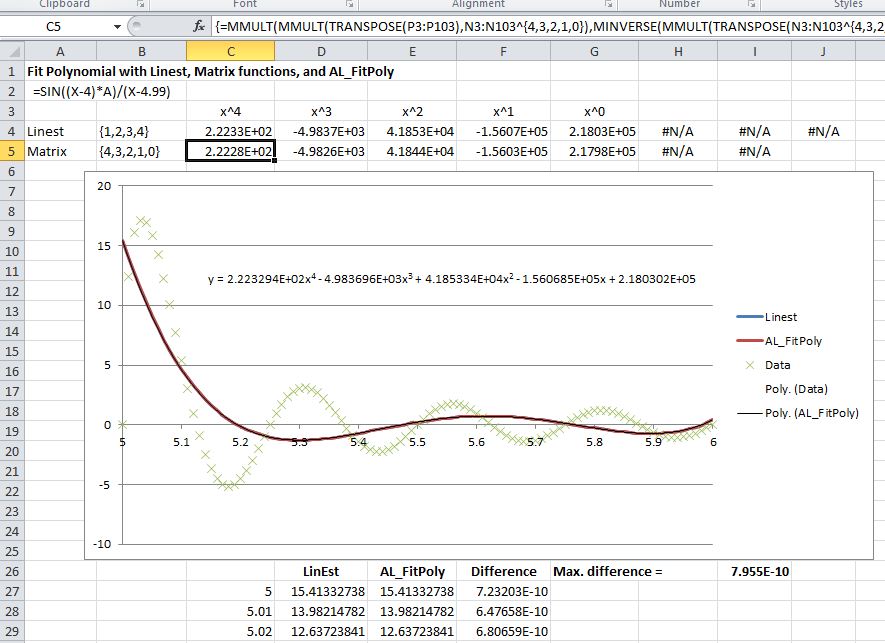
For 4th order polynomials:
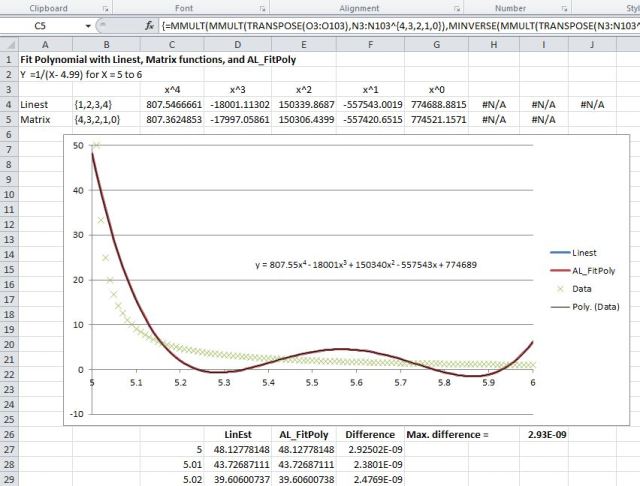
4th order polynomial, click for full size view
the Linest, chart trend line and ALGLIB results are essentially identical, but the matrix function is already showing significant differences.
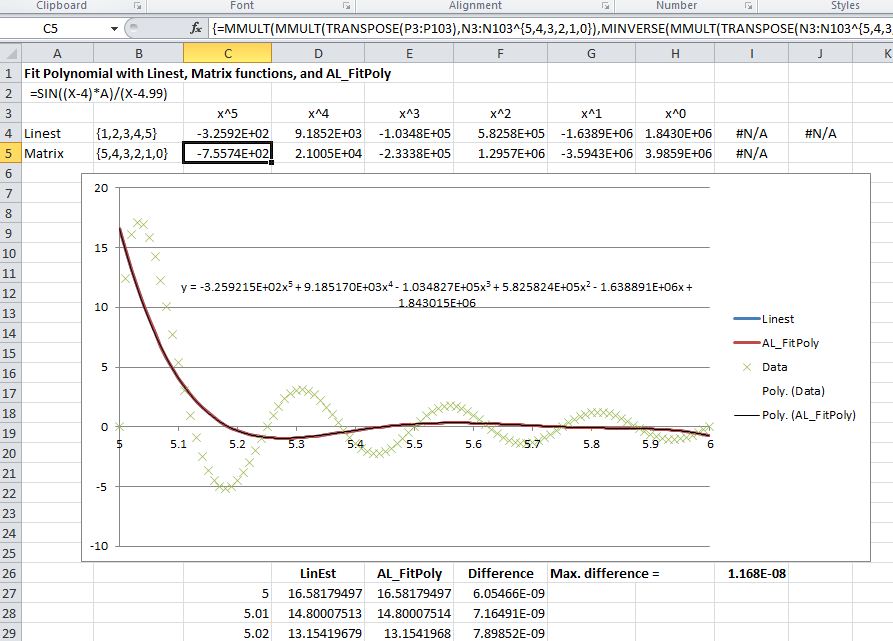
For 5th order polynomials:

5th order polynomials
the Linest, chart trend line, and ALGLIB results are still in good agreement, but the matrix function results are now completely different.
For 6th order:
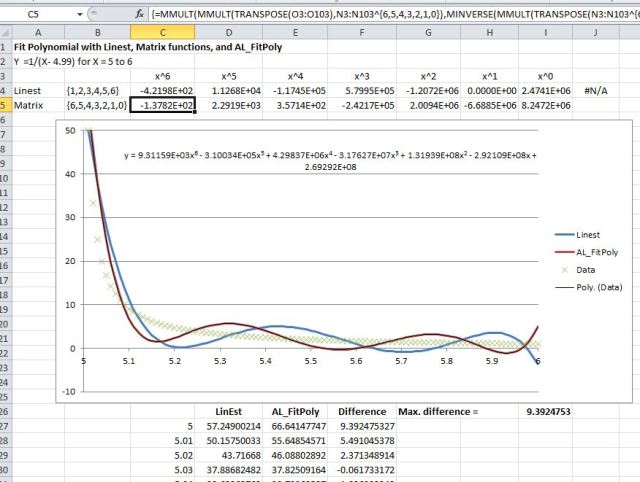
6th order polynomials
The Linest and chart trend line results are now completely different, with Linest having returned a coefficient of 0 for the x term. The ALGLIB results appear visually identical to the chart trend line.
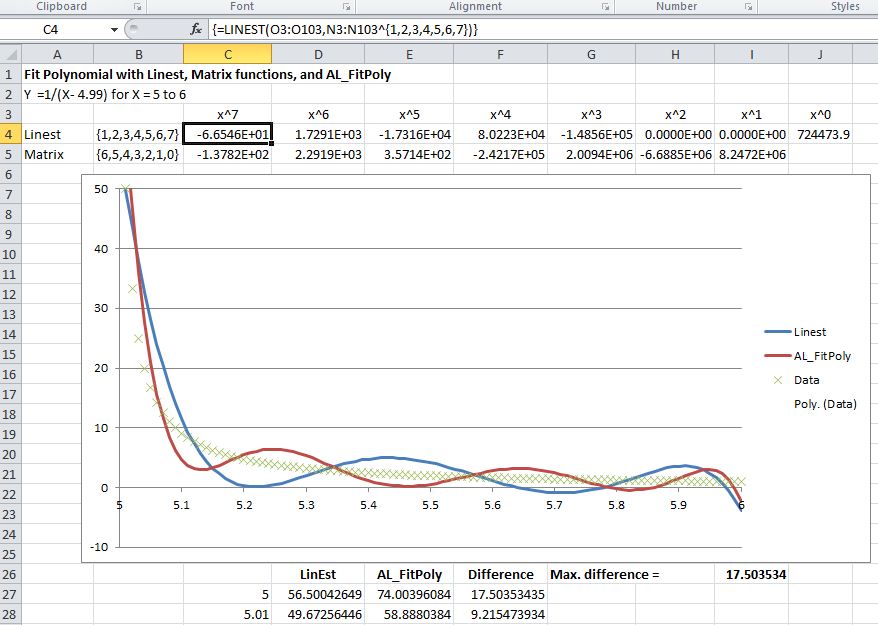
For the 7th order only the Linest and ALGLIB results are plotted:
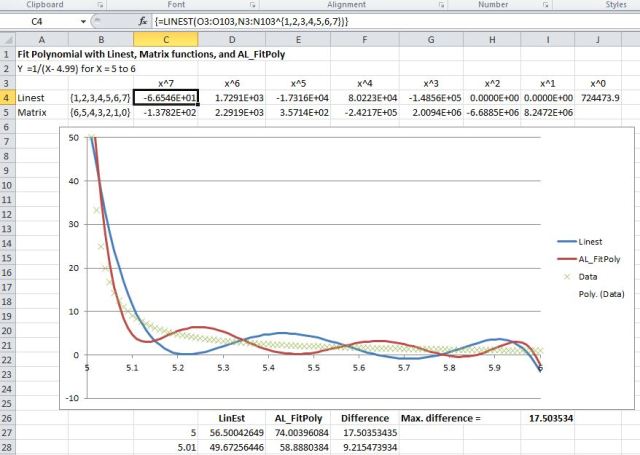
7th order polynomials
The Linest line has retained a form similar to the 5th order results (with zero coefficients for the x squared and x terms), but the ALGLIB line is consistent with a 7th order polynomial.
It can be seen that in all cases the polynomial lines oscillate above and below the data, which is a feature of fitting high order polynomials to a monotonic function. To check if the behaviour of the Linest output was a result of fitting a polynomial function to inappropriate data the same exercise was carried out on a cyclic function:
y = =SIN((X-4)*A)/(X-4.99), with A set to 8pi, so that the resulting function had 4 complete cycles over the range from x = 5 to x = 6.
The results for fourth order to seventh order polynomials are shown in the four screen shots below:

Cyclic function, fourth order polynomials

Cyclic function; fith order polynomials

Cyclic function; 6th order polynomials
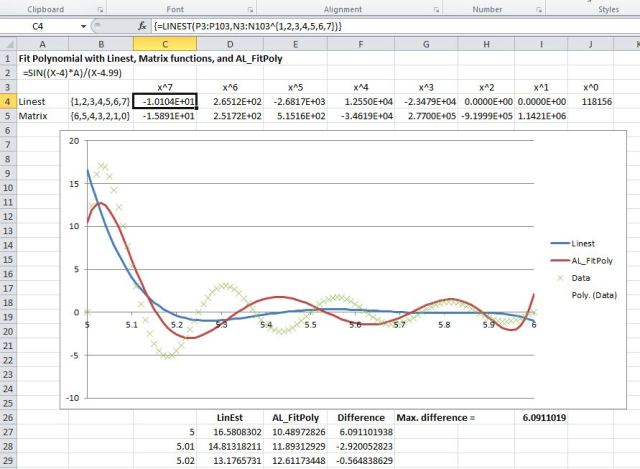
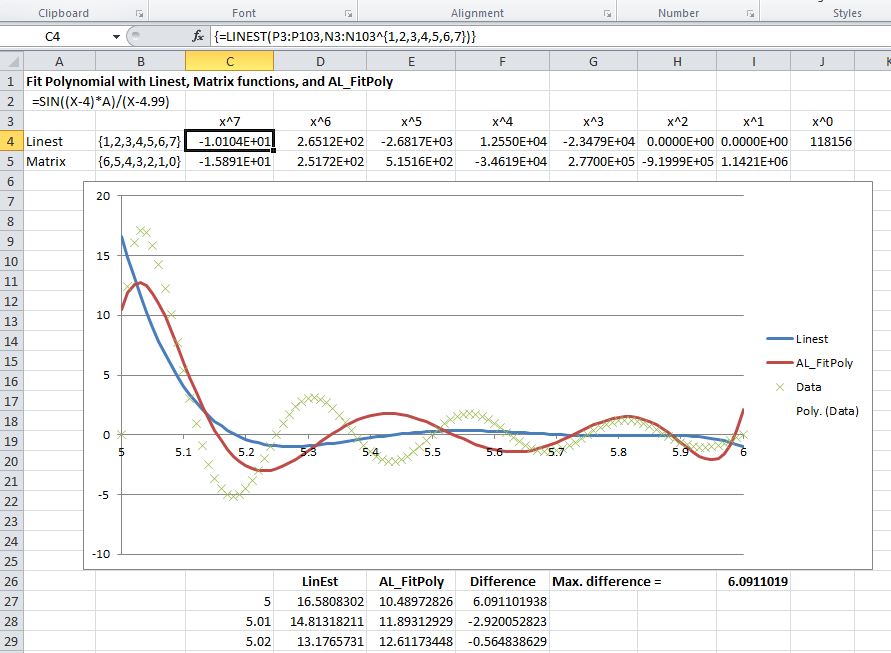
Cyclic function; 7th order polynomials
The results were very similar to those for the monotonic function, with the Linest results being different from the chart trend line at the 6th order, and with the x squared and x coefficients from Linest being zero for the 7th order line.
Two further lines were plotted with 10th order polynomials (Linest and ALGLIB) and 15th order (ALGLIB only), to check if a reasonably close fit to the data could be found:

Cyclic function, 10th order polynomials

Cyclic function, 15th order polynomial
It can be seen that the 10th order Linest line has maintained the form of the 5th order polynomial, with 5 of the 11 coefficients being set to zero. The ALGLIB results appear to be appropriate to the order of the polynomial curve, and a good fit has been achieved to the data with a 15th order polynomial.
In conclusion:
- The Excel Linest function and polynomial chart trendline produce different results for 6th order polynomials in the cases examined. As noted by Lori Miller in the comments to the previous Linest post, this is probably because of changes made to the algorithm for dealing with co-linear data.
- The matrix function (at least in this case) did not give good results beyond fourth order.
- For most interpolation purposes use of a cubic spline will normally give better results than a high order polynomial.
- For cases where a high order polynomial is appropriate the ALGLIB PolynomialFit routine appeared to give much better results than Linest. In separate tests PolynomialFit was found to be stable up to at least 50th order, with the data presented here.





 Newton Excel Bach, not (just) an Excel Blog