The files presented in the recent post on Scipy Linear Algebra Solvers include a wide range of different solver types, with in some cases numerous sub-options, allowing the functions to be called from Excel, and greatly extending and speeding up Excel’s limited solver functions.
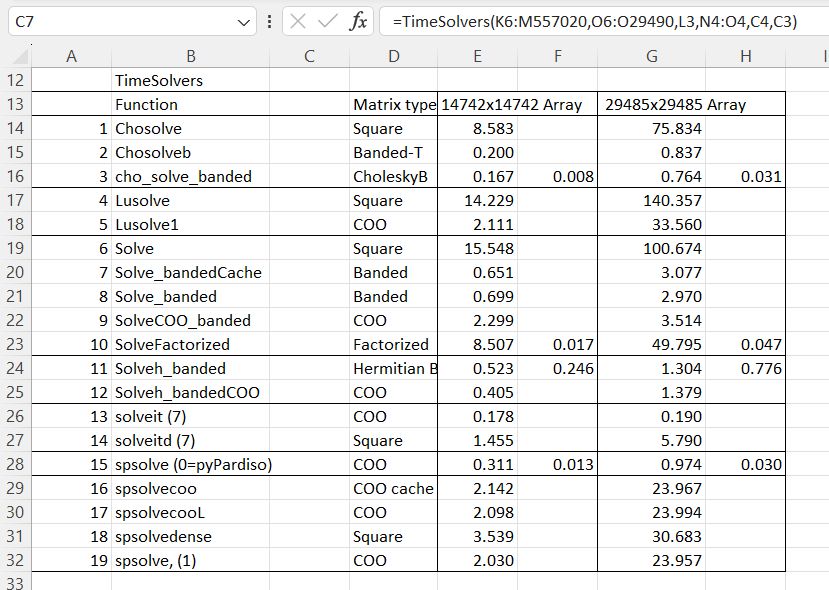
In this post the speed of all the available functions is compared for solving sparse matrices for structural frame analysis with matrix sizes of 14742×14742 and 29485×29485.
The python code and spreadsheet for the solvers can be downloaded from:
Note that the spreadsheets require pyxll to link the Python code to Excel.
The file Time Lin-Alg2.xlsx has the larger matrix and time results for both:
The solver times show the time for complete solution in the first column, or where applicable the time for factorisation in the first column, and extraction of the results from a factorised matrix in the second:
The functions solveit (iterative solver) and spsolve (sparse solver) have alternative solver types, with widely varying performance:
Times shown are for the larger matrix.
Two of the iterative solvers (4 and 10) failed to converge.
For the py_Spsolve functions Option 0 calls the pyPardiso library, which must be installed separately to Scipy. This is very much faster than the built-in Scipy options, and is the default solver called by py_Spsolve.
EngineeringPaper.xyz is a web app for engineering applications with free open-source code:
EngineeringPaper.xyz is a web app for engineering calculations that handles unit conversion/checking automatically and also supports plotting, solving systems of equations, and documenting your calculations (see the official blog for many examples). It’s easy to share your calculations by creating a shareable link that anyone can open and build off of. Additionaly, you can save and open your files locally if you prefer not to save to the cloud. EngineeringPaper.xzy runs on Mac, Windows, Linux, and ChromeOS and works on all of the major browsers. Additionally, EngineeringPaper.xyz is designed to run well on Android and iOS devices. Launch EngineeringPaper.xyz in your browser to try it out.
EngineeringPaper.xyz is a free and open source Mathcad® alternative for engineering calculations that automatically handles unit checking and unit conversions, can solve systems of equations, and supports plotting. You can also easily save and share your work by creating a shareable link. EngineeringPaper.xyz is a web app that doesn’t require you to create an account. The tutorial video below will get you started using this powerful tool that runs on any operating system including macOS, Windows, Chrome OS, and Linux. The table at the bottom of this page lists several example sheets that walk you through some of the more advanced capabilities of EngineeringPaper.xyz. If your interested getting involved with the development of EngineeringPaper.xyz, visit the EngineeringPaper.xyz GitHub project site.
Peter Ronald Brown (25 December 1940 – 19 May 2023) was an English performance poet, lyricist, and singer best known for his collaborations with Cream and Jack Bruce.
I spent my last year of high school in England as a boarder, and the “upper sixth” boarders were privileged to have their own common room (located in a cardboard box in the middle of the road) where we could huddle around the record player and listen to the latest progressive rock releases, including the works of Cream, featuring the music of Eric Clapton, Ginger Baker, and Jack Bruce, and the words of Pete Brown; such as:
has open source Python code allowing the Scipy linear algebra functions to be called from Excel using the pyxll add-in. It also includes all the Python code to perform LU decomposition, as discussed in the previous post., and a spreadsheet with examples of all the available functions.
The spreadsheet has 64 functions, listed on the first sheet:
The solver functions are demonstrated solving a stiffness matrix representing a small structural frame:
The first 10 rows of the solution to the matrix for the example loading are presented for a wide range of different functions:
The problem presented in the previous post is also included, with the associated python code:
Future post will look at the use of the different solver functions in more detail.
which asked why Mathcad was generating LU matrices different to those calculated from the basic theory. The short answer was that there is more than one way to do LU decomposition. This post looks at the question in more detail, including examples of the basic procedures, and how and why the variations are used.
LU decomposition is an efficient method for solving systems of linear equations of the form Ax = b, where A is a square matrix and b is a vector. A is decomposed into a lower triangular matrix, L, and an Upper triangular matrix, U, such that LU = A. It is then a simple process to find the vector x such that LUx = b, for any values of b, without having to repeat the decomposition process.
Many of the on-line articles on the procedures for decomposition (including Wikipedia) are very hard to follow, but I found a clear and comprehensive tutorial at:
The code listed at the end of this post is a modified version of code at the link above.
The basic process to find x such that Ax = b is:
Decompose the matrix A into a lower triangle, L, with a leading diagonal of 1s, and an upper triangle, U.
Use forward substitution to find y such that Ly = b
Use backward substitution to find x such that Ux = y
Python code for this procedure is shown below. Applying this procedure to a 3×3 matrix gives the results shown in the screenshot below, under Python unpivoted results:
Triangular matrices L and U are generated from Matrix A.
Multiplying L by U gives LU which is equal to A.
The lu_solve function follows the full process to generate the solution with A and b as input.
The lu_solve2 function has L, U, and b as input, and returns the same result.
The Scipy function LUSolve returns the same results, but the Scipy decomposition functions generate additional P (pivot) and PL matrices. (Octave returns the same results).
The reason for the introduction of the additional matrices can be seen in the screenshot below:
The top left value of the Matrix A has been changed to zero. The calculation of the unpivoted L matrix now requires a division by zero, giving invalid results. The pivoting process moves the matrix rows and/or columns to avoid the zero at the top left, and remove the division by zero.
There are alternative methods of pivoting, as can be seen in the Scipy and Python pivoted results above, but both result in a PLU matrix identical to the original Matrix A, and the same results. Python code for the whole decomposition and solving process is shown below, without and with pivoting.
Without pivoting Decompose Matrix A to Lower and Upper triangular matrices:
def lu_decomp(A):
    """(L, U) = lu_decomp(A) is the LU decomposition A = L U
       A is any matrix
       L will be a lower-triangular matrix with 1 on the diagonal, the same shape as A
       U will be an upper-triangular matrix, the same shape as A
    """
    n = A.shape[0]
    if n == 1:
        L = np.array([[1]])
        U = A.copy()
        return (L, U)

    A11 = A[0,0]
    A12 = A[0,1:]
    A21 = A[1:,0]
    A22 = A[1:,1:]

    L11 = 1
    U11 = A11

    L12 = np.zeros(n-1)
    U12 = A12.copy()

    L21 = A21.copy() / U11
    U21 = np.zeros(n-1)

    S22 = A22 - np.outer(L21, U12)
    (L22, U22) = lu_decomp(S22)


    L = np.zeros((n,n))
    U = np.zeros((n,n))
    L[0,0] = L11
    L[0,1:] = L12
    L[1:,0] = L21
    L[1:,1:] = L22

    U[0,0] = U11
    U[0,1:] = U12
    U[1:,0] = U21
    U[1:,1:] = U22

    return (L, U)
Find y such that Ly = b
def forward_sub(L, b):
    """y = forward_sub(L, b) is the solution to L y = b
       L must be a lower-triangular matrix
       b must be a vector of the same leading dimension as L
    """
    n = L.shape[0]
    y = np.zeros(n)
    for i in range(n):
        tmp = b[i]
        for j in range(i):
            tmp -= L[i,j] * y[j]
        y[i] = tmp / L[i,i]
    return y
Find x such that Ux = y
def back_sub(U, y):
    """x = back_sub(U, y) is the solution to U x = y
       U must be an upper-triangular matrix
       y must be a vector of the same leading dimension as U
    """
    n = U.shape[0]
    x = np.zeros(n)
    for i in range(n-1, -1, -1):
        tmp = y[i]
        for j in range(i+1, n):
            tmp -= U[i,j] * x[j]
        x[i] = tmp / U[i,i]
    return x
Combine the process to solve Ax = b
def lu_solve(A, b):
    """x = lu_solve(A, b) is the solution to A x = b
       A must be a square matrix
       b must be a vector of the same leading dimension as L
    """
    L, U = lu_decomp(A)
    y = forward_sub(L, b)
    x = back_sub(U, y)
    return x
With pivoting Form pivot matrix, and pivoted L and U matrices
def lup_decomp(A, out = 0):
    """(L, U, P) = lup_decomp(A) is the LUP decomposition P A = L U
       A is any matrix
       L will be a lower-triangular matrix with 1 on the diagonal, the same shape as A
       U will be an upper-triangular matrix, the same shape as A
       P will be a permutation matrix, the same shape as A
    """
    n = A.shape[0]
    if n == 1:
        L = np.array([[1]])
        U = A.copy()
        P = np.array([[1]])
        return (L, U, P)
# Form pivot matrix, P
    P = np.identity(n, dtype = np.int)
    A_bar = np.copy(A)
    for row in range(0, n):
        i = np.abs(A_bar[row:,row]).argmax()
        if i > 0:
            temp = A_bar[row+i,:].copy()
            A_bar[row+1:row+i+1,:] = A_bar[row:row+i,:].copy()
            A_bar[row,:] = temp
            temp = P[row+i,:].copy()
            P[row+1:row+i+1,:] = P[row:row+i,:].copy()
            P[row,:] = temp
    if out == 3: return P
    if out == 4: return A_bar

    (L, U) = lu_decomp(A_bar)
    if out == 5: return L
    if out == 6: return U

    return (L, U, P)
Solve by forward and back substitution:
def lup_solve(A, b):
    """x = lup_solve(A, b) is the solution to A x = P b
       A square matrix to be solved
       b must be a vector of the same leading dimension as A
    """
    L, U, P = lup_decomp(A)
    z = np.dot(P, b)
    y = forward_sub(L, z)
    x = back_sub(U, y)
    return x
Full code to link the Scipy linear algebra functions, and the code above, to Excel via pyxll will be posted in the near future.




 Newton Excel Bach, not (just) an Excel Blog