Area from Vectors

The previous post looked at User Defined Functions (UDFs) for working with vectors, including examples of functions to find the area of polygons defined by coordinates.  In this post the functions will be extended to find other section properties (such as first and second moment of area), and compared with the functions presented previously in Section Properties07.xlsb.  The new functions (including full open source code) can be downloaded from: SecPropV.xlsb.  The new function returns up to 14 values as an array function; refer to Using Array Formulas if you are not familiar with their use.

The code used in the new functions is shown below:

Area:

For i = 1 To Num1 - 1
j = i + 1
Vect1(i, 1) = Coords(i, 1)
Vect1(i, 2) = Coords(i, 2)
Vect2(i, 1) = Coords(j, 1)
Vect2(i, 2) = Coords(j, 2)
CrosspA(i) = Vect1(i, 1) * Vect2(i, 2) - Vect1(i, 2) * Vect2(i, 1)
Next i

    k = 1
For i = 1 To Num1 - 1
Area = Area + CrosspA(i)
Next i
Area = -Area / 2

First Moment of Area (about X axis):

For i = 1 To Num1 - 1
AX = AX + CrosspA(i) * (Vect1(i, 2) + Vect2(i, 2))
Next i
AX = -AX / 6

Second Moment of Area (about X axis):

For i = 1 To Num1 - 1
IX = IX + (Vect1(i, 2) ^ 2 + Vect2(i, 2) ^ 2 + Vect1(i, 2) * Vect2(i, 2)) * CrosspA(i)
Next i
IX = -IX / 12

The full list of properties returned by the function is:
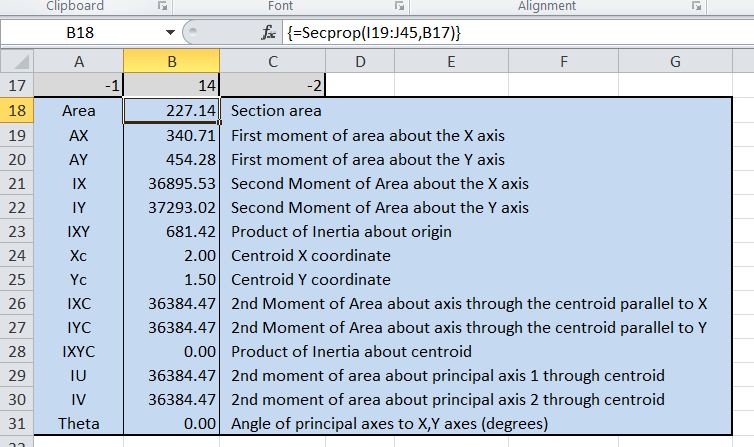
Secprop Function Output

The performance of the new function is compared below with the previous version in computing the section properties of a circle defined with 1 million points on the circumference:

Times for section properties for 1 million segment polygon

It can be seen that the new function (red line) has very little advantage for the area function, but the calculation of first and second moment of area is substantially faster. For both functions the calculation of section properties relative to different axes is almost instantaneous.

Details of input are shown below:
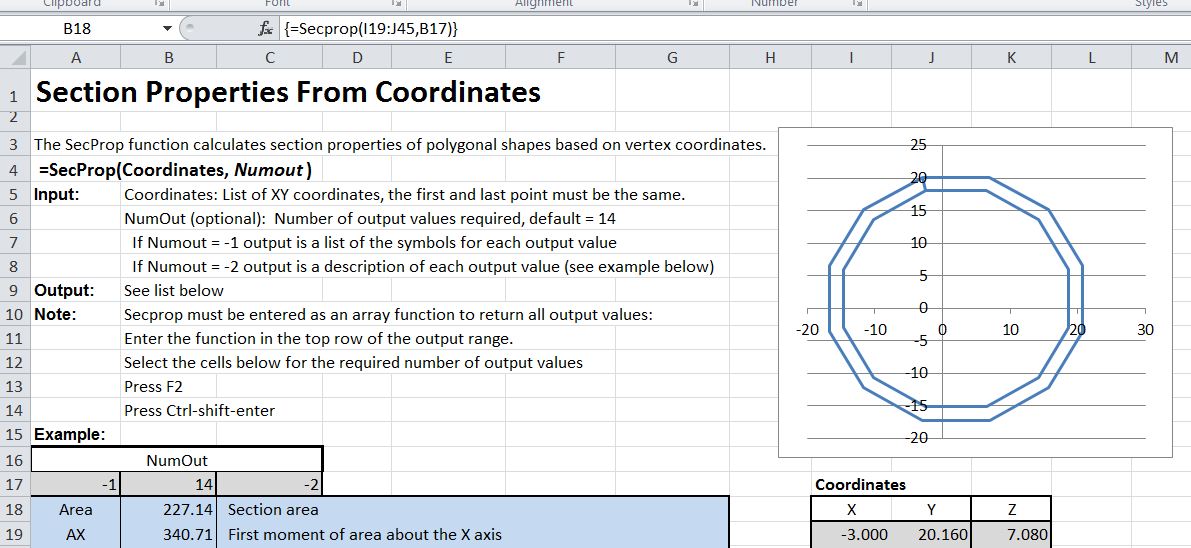
Input for SecProp Function

Input XY coordinates must be listed in a 2 column range, with the last point being the same as the first.  Points should be listed in a clockwise direction to return a positive area.  As shown in the example, a hollow shape my be analysed by entering the outer boundary in the clockwise direction, then the inner boundary in the anti-clockwise direction, finally returning to the starting point on the outer boundary along the same line.

If not all the output values are required the number to be calculated may be specified in the optional NumOut argument.  Alternatively, enter -1 list the symbols for each output value in sequence, or -2 for a description of each value.

Finally, if only the area is required, the algorithm taken from the Softsurfer site is considerably faster, at about 0.25 seconds for the 1 million segment circle. An example of the Area2D and Area3D functions is shown below:

Area2D and Area3D Functions

Area = 0
For i = 2 To n - 1
j = i + 1
k = i - 1

Area = Area + PointVals(i, 1) * (PointVals(j, 2) - PointVals(k, 2))
Next i
Area = Area + PointVals(i, 1) * (PointVals(1, 2) - PointVals(i - 1, 2))

Area = -Area / 2
Posted in Arrays, Coordinate Geometry, Excel, Maths, UDFs, VBA | Tagged , , , , , , | 5 Comments

Dots and Crosses

The comments from Bill Harvey in the previous post prompted me to have a closer look at the functions available in Excel for working with vectors.  Here is a complete list of them:

=SUMPRODUCT() (Equivalent to the vector dot product)

This is a strange omission, even by Microsoft standards, considering that they have gone to the trouble of programming several esoteric mathematical functions such as the Bessel Function, but they haven’t provided the most basic support for operations on vectors.  It’s easily fixed with some User Defined Functions (UDFs) of course, so that is what this post examines.  The VectorFunc.xlsb spreadsheet includes full open source code for all the functions.  Many of the UDFs in this spreadsheet return results as an array function.  Refer to Using Array Formulas if you are not familiar with their use.  In the following post I will have a closer look at the application of vector methods to calculating areas and other geometric section properties.

In the course of researching this post I came across the Softsurfer site, which contains detailed descriptions of coordinate geometry related algorithms, including c++ code.  Several of their vector related functions have been converted to VBA and are included in the download spreadsheet.

The first step was to write a routine to convert different input types (i.e. horizontal or vertical spreadsheet ranges, or 1D or 2D arrays of doubles or variants) into a uniform format for processing by the vector functions with minimum overhead.  That is what the code below does:

Function GetVect(Vect1 As Variant, ByRef Vect2() As Double) As Variant
Dim Num1 As Long, NumDims1 As Long
Dim i As Long, j As Long, Orient As Long

If TypeName(Vect1) = "Range" Then Vect1 = Vect1.Value2

Num1 = UBound(Vect1) - LBound(Vect1) + 1
NumDims1 = NumDims(Vect1)

If NumDims1 = 2 Then
 Orient = 1
If Num1 = 1 Then
Num1 = UBound(Vect1, 2) - LBound(Vect1, 2) + 1
 Orient = 2
 End If
 End If
ReDim Vect2(1 To Num1)
 j = 1
If NumDims1 = 1 Then

For i = LBound(Vect1) To UBound(Vect1)
Vect2(j) = Vect1(i)
j = j + 1
Next i
ElseIf NumDims1 = 2 Then
 If Orient = 1 Then
For i = LBound(Vect1) To UBound(Vect1)
Vect2(j) = Vect1(i, 1)
j = j + 1
Next i
 Else
For i = LBound(Vect1, 2) To UBound(Vect1, 2)
Vect2(j) = Vect1(1, i)
j = j + 1
Next i
 End If
 Else
GetVect = CVErr(xlErrNA)
 End If

GetVect = Num1

End Function
 

The steps in GetVect are:

  • If the input vector (Vect1) is a range, convert it into a Variant array
  • Find the size of the first dimension in Vect1
  • Find the number of dimensions of Vect1 (calling the NumDims function)
  • If Vect1 has 2 dimensions, check the orientation, assuming “vertical” if it has two or more rows, or “horizontal” if it has 1 row.
  • If Vect1 is horizontal, find the number of columns
  • Redimension the output array, Vect2, as a base 1, 1D array.
  • Assign the values of Vect1 to Vect2
  • Assign the number of values in Vect2 to the function return value

Note that the function returns the size of the array Vect2, but because Vect2 was passed as an empty double array “by reference”, its contents are available to the calling procedure.

The GetVect function is used in the Dot and Cross functions, which in turn call Dot2, Dot3, Cross2 or Cross3 as appropriate.  Note that if these functions are to be used direct from the spreadsheet they must be called through the Dot or Cross functions, which will peform the necessary conversion of the spreadsheet range into a 1D array of doubles.

In addition to Dot and Cross the spreadsheet contains the following vector related functions (optional function arguments are shown in italics):

  • Length(Vect1, Vect2) returns the length of a vector from the origin if only Vect1 is specified, or the length between Vect1 and Vect2 if both are specified.
  • isLeft(P1, P2, P3) tests if P3 is left or Right of the line through P1 and P2.  The magnitude of the return value is also twice the area of the triangle specified by P1, P2, P3.  Note that isLeft cannot be called as a UDF.
  • Orientation2D_Triangle(P1, P2, P3) calls isLeft, and returns the same value.  It may be called as a UDF.
  • Area2D_Triangle(P1, P2, P3) calls Orientation2D_Triangle, and divides the result by -2, returning the area of the triangle P1P2P3, with a positive area when the points are specified in a clockwise direction.
  • Area2D(Pointrange) returns the area of a 2D polygon with any number of points.  The points are assumed to be arranged in a range of n rows x 2 columns (X and Y values), with the last point being the same as the first.
  • Area3D(Pointrange) returns the area of a 3D polygon in a plane with any number of points.  The points are assumed to be arranged in a range of n rows x 3 columns (X, Y and Z values), with the last point being the same as the first.  If the points are not on a common plane it will return the area of the polygon projected onto the plane defined by the first three points.
  • UnitNorm(Pointrange) returns the unit normal to a plane specified by the 3D points in Pointrange.  The points are assumed to be arranged in a range of n rows x 3 columns (X, Y and Z values)

Examples of the use of these functions are shown in the screenshots below.  Download VectorFunc.xlsb for more details and open source code.

Vector dot and cross products

3D cross product and length

Vector orientation, Area and Length

Posted in Arrays, Coordinate Geometry, Excel, Maths, Newton, UDFs, VBA | Tagged , , , , , , | 11 Comments

Section Properties from Coordinates Without VBA

At the Eng-Tips forum there was a question asking for a calculation of area and centroid values from coordinates without the use of VBA.  In my opinion using VBA is much the easiest and most robust way to do it, but doing the calculation entirely on the spreadsheet does make the process clearer, especially for those not familiar with VBA, so I have set up a sample calculation, which can be downloaded here: On-sheet SecProp.xls

The spreadsheet includes the “on-sheet” calculation for Area, first moment of area about the centroid, and X and Y coordinates of the centroid.  For comparison I have also included the SecProp user defined function (UDF), which should be entered as an array function.

A screen shot showing both methods applied to a channel section is shown below.

Click for full size view

Note that if a shape with more than 20 segments is required it is possible to insert extra rows in the table, but the formulas in the top row (shaded darker) mut be copied over the shaded region below. For the Secprop UDF it is just necessary to adjust the range (=SecProp(coordinate_range)), then re-enter as an array function by pressing Ctrl-Shift Enter.

The SecProp UDF will also return any desired single value, by entering the row number after the range.  For instance, entering:

=SecProp(A4:B24,3), returns the third result, which is the first moment of area about the Y axis (21.667).

Posted in Coordinate Geometry, Excel, Newton, UDFs, VBA | Tagged , , , , , | 13 Comments

Wonders of the Universe – Kate Rusby

At the end of the Brian Cox “Wonders of the Universe” session on gravity the closing sequence is accompanied by a haunting folk song that I was not familiar with.

A quick search found that it was the appropriate “Falling” sung by Kate Rusby, who (according to Wikipedia) is “regarded as one of the most famous English folk singers of contemporary times.”

Here is a small collection from Youtube, starting with the song from Wonders of the Universe, followed by a very nice version of Sandy Denny’s “Who Knows Where the Time Goes”, then a short chat with a BBC interviewer, and a rendition of the traditional song “Blooming Heather”

Posted in Bach | Tagged , , | 5 Comments

Starting Javascript

Since this is not (just) an Excel blog, I’ll be looking at applications of the Google Docs spreadsheet.  One of the attractions of the Google spreadsheet alternative is that it is linked to a scripting language, so I should be able to translate my VBA based applications to run on-line, since Microsoft don’t seem to be interested in providing this capability in their on-line offerings.

The only problem is that the Google spreadsheet uses Javascript, which I don’t know, so this post links to some Javascript resources for beginners.  If anyone has any other recommended sources, please leave a comment.

Eloquent JavaScript – A Modern Introduction to ProgrammingI have only just started reading this e-book, but so far I’m very impressed.  Very readable and easy to follow.  What’s even better is it’s free!  From the site:

Eloquent JavaScript is a book providing an introduction to the JavaScript programming language and programming in general.

A concise and balanced mix of principles and pragmatics. I loved the tutorial-style game-like program development. This book rekindled my earliest joys of programming. Plus, JavaScript!     —Brendan Eich, the man who gave us JavaScript

7 Free JavaScript E-Books and Tutorials:  Where I found the Eloquent Javascript book.  It has another 6 links to varied books, tutorials, code samples, and video lectures.

Posted in Javascript | Tagged , , | 2 Comments