Units for Excel 4: Scripting dictionaries

As mentioned in the previous post I have now updated the Units4Excel spreadsheet with the use of scripting dictionaries to speed up the process of finding units in the lists, and also to simplify the process of adding or deleting units.  The revised spreadsheet may be downloaded from Units4Excel including full open source code.

The use of scripting dictionaries has been described previously at Working with FEM data and using the dictionary object:

  • Each entry in the dictionary has a string “key” and an associated “item” which may be any data type. In this application the item is used to store the index number of each unit in the unit lists.
  • The “Exists” method is used to determine if a unit is included in the dictionary object, and if so its position in the table.

Generation of the dictionary for the Non-SI units list is shown below:

...
NumNonSI = UBound(NonSIUnits)
  Set NonSIDict = New Scripting.Dictionary
  For i = 1 To NumNonSI
  NonSIAbbr = NonSIUnits(i, 2)
  If NonSIDict.Exists(Key:=NonSIAbbr) = False Then NonSIDict.Add NonSIAbbr, i
  Next i
...

And the dictionary is used to return the index number for the specified unit, then read the required details from the NonSIUnits array, as shown below:

...
 ' If the NonSIUnits array is empty, run the ReadUnits function
  On Error GoTo UnitErr
  NumRows = UBound(NonSIUnits)
  If NumRows = 0 Then GoTo UnitErr
  On Error GoTo RtnError

  If NonSIDict.Exists(UnitName) Then
  i = NonSIDict.Item(UnitName)
        For j = 1 To 5
  UnitA(1, j) = NonSIUnits(i, j)
        Next j
    Else

  UnitA(1, 1) = "Unit Not listed"
    End If
  NonSI = UnitA

Having implemented the dictionaries, the row numbers previously generated on the spreadsheet to locate each unit category in the Non-SI Units list have become redundant and have been deleted, removing a possible source of error.

In the next post I will describe how the units UDFs can be incorporated in other functions to give them the ability to work with any of the units listed; using the concrete beam design spreadsheet as an example (see Reinforced Concrete Section Analysis – 6; Ultimate Limit State).

Posted in Excel, Newton, UDFs, VBA | Tagged , , , , , , | 6 Comments

Units for Excel 3 – Editing the units table

I have made several changes to the Units4Excel spreadsheet:

  • Litres added as the base SI unit of fluid volume.
  • Units added for specific heat
  • Units added for fuel consumption in both km/litre and litres/100 km form

As before, the revisions are currently only in the standalone version; the add-in version will be updated at a later date. The revised spreadsheet may be downloaded from: Units4Excel

Since there are a huge number of other units in use in various contexts it is difficult, if not impossible, to cater for all eventualities, so I will describe how the unit tables may be edited to change unit names or abbreviations and to introduce new units.

The editable tables are all on the “Ext Unit List” and “SIDims” sheets, the tables on the “XLUnit_List” sheet are the units used by the built-in Convert function, and are for reference only.  Editing the Non-SI units table for existing units or unit types is straightforward; for instance:

To change default gallon units from Imperial to US fluid units change the table as shown below:

Existing Gallon units

Gallon Units modified for US fluid gallon default

     To insert a new unit, with an existing unit type, insert a blank row in the appropriate range, and enter details following the pattern of the other entries.
    Entering a new unit type is a little more complicated.  The screen shots below show the addition of the new “fuel consumption” and “inverse fuel consumption” units:

Insert the new unit details in the Non-SI Units Table.

Insert rows for the new unit types in the SI Units table

Add unit details. Note that the row numbers in Col F and G are generated by functions copied from the row below

Add new rows in the “Dimensions of SI Units” Table

In order  to recognise the new units the spreadsheet must be saved and re-opened.

In future versions this process will be simplified, using the VBA “scripting dictionary” object, which will also improve performance, but the current system allows the addition of any new unit types required.

Posted in Excel, Newton, UDFs, VBA | Tagged , , , , , | 1 Comment

Units for Excel 2 – Unit aware evaluation of functions

The Units4Excel spreadsheet described in the first post of this series provides functions to convert values from one set of units to another, but does not allow for automatic evaluation of functions, taking account of the specified units, as performed by programs such as MathCad and SMath.  I have now rectified this omission with the addition of the User Defined Function (UDF) EvalU().  The revised spreadsheet may be downloaded from  Units4Excel.zip, including full open source code.  At the moment the new function has only been added to the stand-alone spreadsheet (Units4Excel.xlsb).  It will be added to the add-in version at a later date.

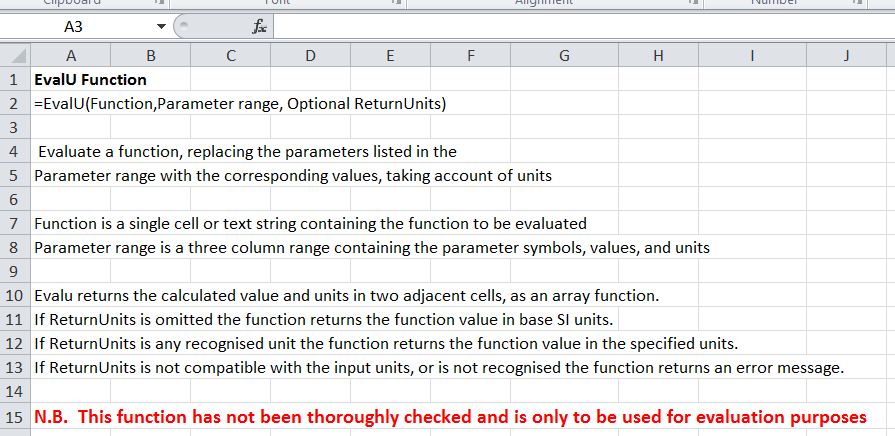
The UDF input and output options are described in the screenshot below:

EvalU Function input and output

Typical usage is shown below, with the evaluation of the deflection of a cantilever with a single point load at the end.  Note that the input values are in a mixture of kips and psi for forces, and inches and feet for length.  The first EvalU (Cells I20:J20) function calculates that the function value has units of length, and returns the value in metre units, together with the unit type.  If the optional ReturnUnits value is given (as in I21:J21) the function converts the output to the specified units, or if the units are inconsistent returns an error message.  Cell I22 shows the result of the Eval UDF (also included in the spreadsheet), which evaluates the function ignoring units. 

Evaluation of cantilever deflection with mixed units.

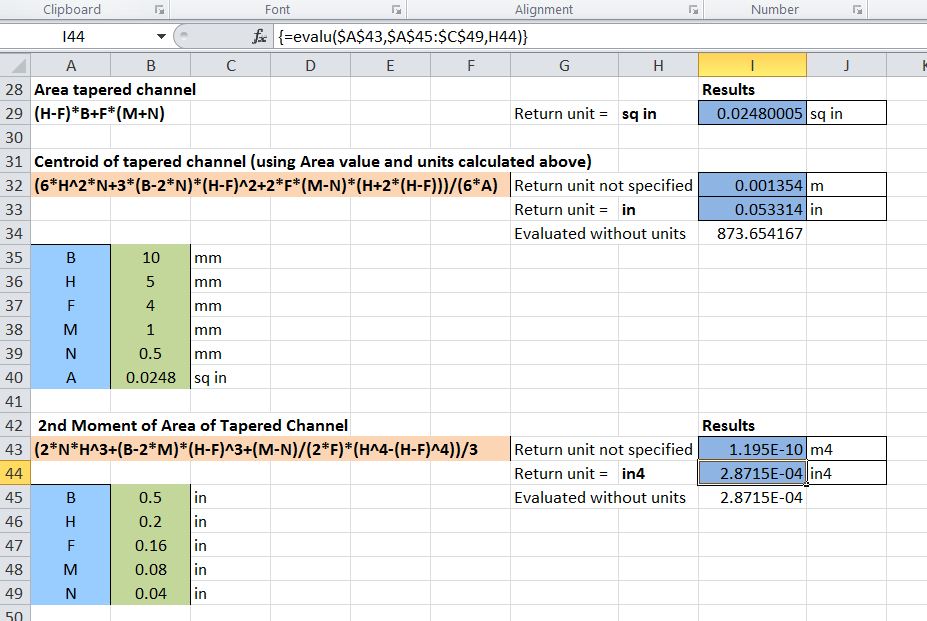
The second example shows the output of one function (cells I29:J29) used in the input to another function, including the unit type. The final example shows that where the input values have consistent units, and the specified return units are also consistent (in^4 in the example shown), then the EvalU and Eval functions give the same result.

Section Properties of a Tapered Channel

Please take note of the warning in large red type. Any comments or suggestions will be gratefully received.

Posted in Excel, Newton, UDFs, VBA | Tagged , , , , , | Leave a comment

Random Connections

A song by Anne Briggs:

A song about Anne Briggs:

Another song by Anne Briggs

The Pond and the Stream; Reynardine

Posted in Bach | Tagged | Leave a comment

Alglib Spline Functions 1.32

Following a comment to AlgLib Spline Functions, the AL-Spline-Matrix spreadsheets have been updated, and may be downloaded from AL-Spline-Matrix03 for Excel 2003 and earlier and AL-Spline-Matrix07 for Excel 2007 and 2010.

Posted in AlgLib, Excel, Maths, Newton, UDFs, VBA | Tagged , , , , , , , , , , | Leave a comment